
1. Pengenalan
This manual provides essential instructions for the safe and effective use of your DOAO A3 Pro Electric Razor. Please read this manual thoroughly before first use and retain it for future reference.
The DOAO A3 Pro is designed for men's shaving, offering both wet and dry shaving capabilities. It features 3D floating heads, powerful dual-track blades, a pop-up trimmer, and a waterproof design for easy cleaning.
2. Kandungan Pakej
Sahkan bahawa semua item yang disenaraikan di bawah terdapat dalam pakej anda:
- DOAO A3 Pro Electric Shaver
- Tudung Pelindung
- Berus Pembersih
- Beg Perjalanan
- Kabel Kuasa USB-C
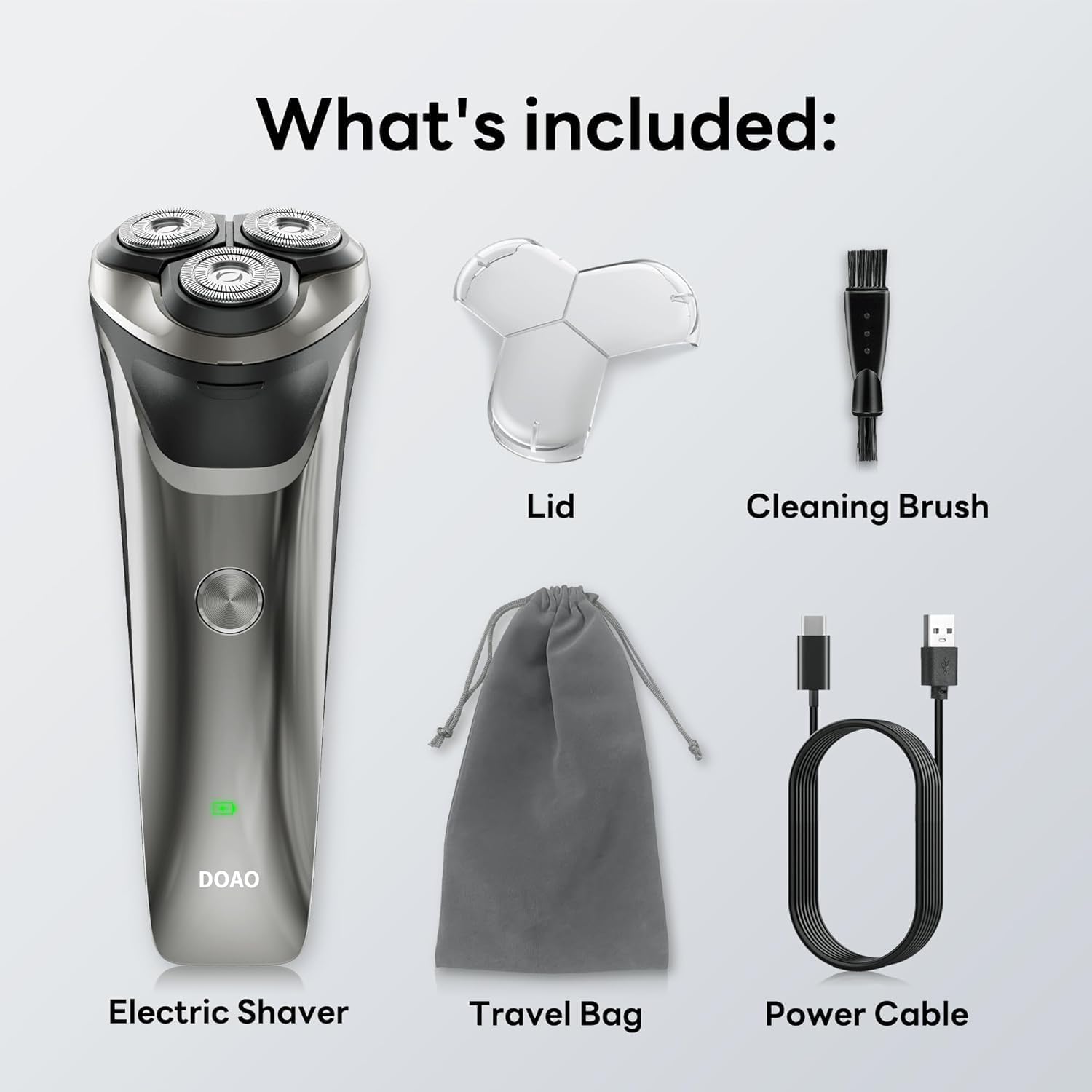
Image: All components included in the DOAO A3 Pro Electric Razor package.
3. Ciri-ciri Produk
- Kepala Terapung 3D: Ergonomically designed to adapt to facial contours for a close shave.
- Powerful Dual-Track Blades: High-speed motor with blades cutting up to 56,000 times per minute for efficient shaving.
- 100% Reka Bentuk Kalis Air: Suitable for wet or dry shaving and easy cleaning under running water.
- Pemangkas Pop Timbul: Integrated trimmer for precise grooming of sideburns, mustaches, and beard edges.
- Bateri Tahan Lama: Provides up to 120 minutes of continuous use on a 1.5-hour charge.
- Pengecasan USB-C: Pengecasan yang mudah dan pantas.

Image: Illustration of the shaver's 3D floating heads and powerful dual-track blades.
4. Persediaan
4.1 Caj Permulaan
- Sebelum penggunaan pertama, cas sepenuhnya pencukur.
- Connect the USB-C power cable to the charging port on the shaver.
- Palamkan hujung kabel USB-C yang satu lagi ke dalam penyesuai kuasa USB yang serasi (tidak disertakan) atau port USB komputer.
- Penunjuk LED akan menunjukkan status pengecasan. Cas penuh biasanya mengambil masa 1.5 jam.
- Setelah dicas sepenuhnya, putuskan sambungan pencukur daripada sumber kuasa.

Image: The shaver connected to its USB-C charging cable, illustrating battery life and charging time.
5. Arahan Operasi
5.1 Mencukur
The DOAO A3 Pro supports both wet and dry shaving.
Pencukuran Kering:
- Pastikan muka anda bersih dan kering.
- Tekan butang kuasa untuk menghidupkan pencukur.
- Move the shaver in small, circular motions over your skin, applying gentle pressure.
- Stretch your skin with your free hand to ensure hairs stand upright for a closer shave.
Mencukur Basah:
- Sapukan buih atau gel pencukur ke muka anda.
- Tekan butang kuasa untuk menghidupkan pencukur.
- Gerakkan pencukur dalam gerakan kecil membulat ke atas kulit anda.
- Rinse the shaver head under running water during shaving to prevent clogging.

Image: A user demonstrating wet shaving with the DOAO A3 Pro electric razor.
5.2 Menggunakan Pemangkas Pop-Up
- Cari suis pemangkas timbul di bahagian belakang pencukur.
- Luncurkan suis ke atas untuk mengaktifkan perapi.
- Use the trimmer to shape sideburns, mustaches, or to define beard lines.
- Selepas digunakan, luncurkan suis ke bawah untuk menarik balik perapi.

Image: The integrated pop-up trimmer in use for precise grooming.
6. Penyelenggaraan
6.1 Membersihkan Pencukur
Pembersihan tetap memastikan prestasi dan kebersihan yang optimum.
Pembersihan Harian (Selepas Setiap Penggunaan):
- Matikan pencukur.
- Open the shaver head by pressing the release button (if applicable) or gently pulling it open.
- Rinse the shaver head and the hair chamber thoroughly under warm running water.
- Shake off excess water and allow the shaver head to air dry before closing or attaching the protective lid.
Thorough Cleaning (Weekly or as Needed):
- Turn off the shaver and detach the shaver head.
- Use the provided cleaning brush to remove any trapped hairs from the blades and inner chamber.
- Rinse all parts under warm running water.
- Pastikan semua bahagian kering sepenuhnya sebelum dipasang semula.

Image: The shaver head being rinsed under running water, highlighting its waterproof feature.
6.2 Penggantian Bilah
For optimal shaving performance, it is recommended to replace the shaver heads every 12 months, or sooner if you notice reduced performance or discomfort.
- Matikan pencukur.
- Gently twist and pull the old shaver head upwards to remove it.
- Align the new shaver head with the shaver body and press down until it clicks into place.
7. Penyelesaian masalah
| Masalah | Kemungkinan Punca | Penyelesaian |
|---|---|---|
| Pencukur tidak dihidupkan. | Bateri habis. | Cas pencukur sepenuhnya. |
| Prestasi bercukur yang lemah / mencabut bulu. | Bilah kusam atau tersumbat dengan rambut. | Clean the shaver head thoroughly. Consider replacing the shaver head if performance does not improve. |
| Pencukur berhenti semasa digunakan. | Bateri lemah. | Isi semula pencukur. |
| Penunjuk pengecasan tidak berfungsi. | Kabel atau penyesuai kuasa rosak. | Cuba kabel USB-C atau penyesuai kuasa yang lain. Pastikan sambungannya selamat. |
Jika masalah berterusan selepas mencuba penyelesaian ini, sila hubungi sokongan pelanggan.
8. Spesifikasi
- model: A3 Pro
- Sumber Kuasa: Dikuasakan Bateri (termasuk bateri 1 A)
- Jenis Bateri: Litium-ion
- Masa Pengecasan: Lebih kurang 1.5 jam
- Masa Operasi: Up to 120 minutes (approx. 60 days of daily use)
- Penilaian Kalis Air: 100% Kalis Air
- Ciri Khas: Cordless, Pop-up Trimmer
- Penggunaan yang Disyorkan: Muka
- Pengeluar: DOAO
- Dimensi Pakej: 8.03 x 6.1 x 2.52 inci
- Berat Barang: 9.88 auns
9. Waranti dan Sokongan
Your DOAO A3 Pro Electric Razor comes with comprehensive support and warranty:
- Waranti seumur hidup: Enjoy peace of mind with a lifetime warranty on your product.
- Waranti 365 Hari: Specific warranty details may apply, refer to product registration for full terms.
- Bantuan Teknikal Seumur Hidup: Access to technical assistance for the lifespan of your product.
- Pemulangan Percuma & Bayaran Balik 100%: Hassle-free returns and full refunds if you are not satisfied.
- Sokongan Pantas 24/7: Responsive customer support available within 12 hours.
For any inquiries, technical assistance, or warranty claims, please contact DOAO customer support through the platform where you purchased the product.

Image: DOAO customer support information.