
1. Pengenalan
This manual provides essential information for the proper setup, operation, and maintenance of your Veout 15.6-inch Portable Monitor. Please read these instructions thoroughly before using the product to ensure optimal performance and longevity.
2. Kandungan Pakej
Sahkan bahawa semua item yang disenaraikan di bawah terdapat dalam pembungkusan produk anda:
- 1 x Monitor Mudah Alih
- 1 x Kabel USB-A ke USB-C
- 1 x Kabel USB-C ke USB-C
- 1 x Kabel HDMI Mini ke HDMI
- 1 x Manual Pengguna

Figure 2.1: Included accessories with the portable monitor.
3. Produk Lebihview
The Veout portable monitor features a 15.6-inch IPS display with a slim profile and integrated kickstand for versatile use.
3.1. Ciri Fizikal

Rajah 3.1: Depan view of the Veout 15.6-inch Portable Monitor.

Rajah 3.2: Belakang view highlighting connectivity ports.

Rajah 3.3: Pro sampinganfile demonstrating the monitor's thin design.
3.2. Port dan Kawalan
- Full-Function USB-C Ports: For video, audio, data, and power delivery with a single cable.
- Port Mini-HDMI: For video and audio input. Requires external power via USB-C when used.
- Bicu Audio 3.5mm: Untuk menyambungkan fon kepala atau pembesar suara luaran.
- Control Wheel/Buttons: Used for adjusting volume, brightness, and navigating the On-Screen Display (OSD) menu.
3.3. Integrated Kickstand
The monitor features a foldable kickstand for stable positioning at various viewsudut-sudut.
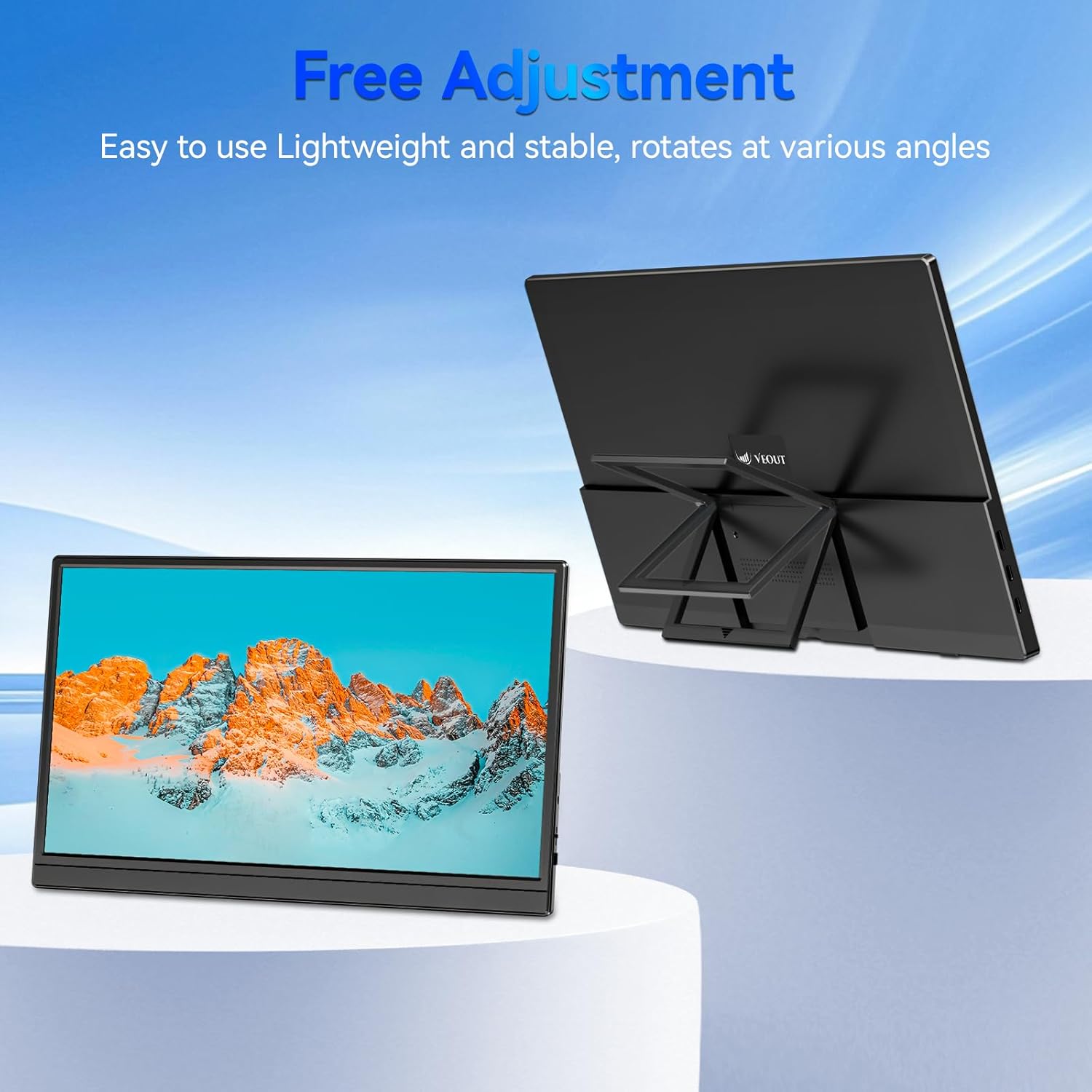
Figure 3.4: Monitor with kickstand for adjustable viewing.
4. Persediaan
The Veout portable monitor supports plug-and-play functionality, requiring no driver installation for most devices.
4.1. Menyambung ke Peranti
- USB-C Connection (Single Cable):
- Connect one end of the USB-C to USB-C cable to a full-function USB-C port on your laptop, smartphone, or other compatible device.
- Connect the other end of the USB-C to USB-C cable to one of the full-function USB-C ports on the portable monitor.
- This connection provides video, audio, and power to the monitor.
- HDMI Connection (Requires Additional Power):
- Connect one end of the Mini-HDMI to HDMI cable to the Mini-HDMI port on the monitor.
- Connect the other end of the Mini-HDMI to HDMI cable to the HDMI port on your device.
- For power, connect the USB-A to USB-C cable or a USB-C to USB-C cable from your device's USB port or a power adapter (not included) to one of the monitor's USB-C ports.
4.2. Positioning the Monitor
Deploy the integrated kickstand to position the monitor on a flat surface. Adjust the angle for optimal viewing. The monitor can be used in both landscape and portrait orientations.

Figure 4.1: Monitor used in portrait mode for document viewing.
5. Arahan Operasi
5.1. Mod Paparan
When connected to a computer, you can configure the display mode through your operating system's display settings:
- Copy Mode (Mirror Display): Duplicates your primary screen's content onto the portable monitor. Useful for presentations or sharing content.
- Mod Lanjutan: Extends your desktop across both screens, providing additional workspace for multitasking.
- Mod Skrin Kedua Sahaja: Displays content only on the portable monitor, with the primary device's screen turned off.
5.2. Melaraskan Tetapan
The monitor features an intuitive control mechanism for quick adjustments:
- Pelarasan Kecerahan: Scroll the control wheel up or down to instantly adjust screen brightness.
- Pelarasan Kelantangan: Scroll the control wheel up or down to instantly adjust speaker volume.
- Menu OSD: Press the control wheel or designated button to access the On-Screen Display menu for advanced settings like color, contrast, and input source selection.
5.3. Eye Care Technology
The monitor incorporates advanced eye-care technology designed to reduce blue light emission and screen flicker, promoting comfortable viewsemasa penggunaan yang berpanjangan.
6. Penyelenggaraan
Untuk mengekalkan prestasi dan penampilan monitor anda, ikuti garis panduan ini:
- Membersihkan Skrin: Lap skrin perlahan-lahan dengan kain lembut yang tidak berbulu. Untuk tanda degil, ringankan dampen kain dengan air atau larutan pembersih skrin. Elakkan bahan kimia yang keras atau bahan yang melelas.
- Membersihkan Casing: Gunakan kain lembut dan kering untuk membersihkan monitor casing.
- Storan: When not in use, store the monitor in a cool, dry place, preferably in its original packaging or a protective sleeve.
- Elakkan Cecair: Do not expose the monitor to excessive moisture or spill liquids directly onto it.
7. Penyelesaian masalah
Jika anda menghadapi masalah dengan monitor anda, rujuk kepada masalah dan penyelesaian biasa berikut:
| Masalah | Kemungkinan Punca | Penyelesaian |
|---|---|---|
| No display/"No Signal" message | Sambungan kabel salah, kuasa tidak mencukupi, sumber input salah. | Ensure cables are securely connected. If using HDMI, ensure a separate power source is connected to the monitor's USB-C port. Check your device's display settings to ensure the monitor is detected and enabled. Select the correct input source via the OSD menu. |
| Skrin berkelip-kelip | Loose cable connection, incompatible resolution/refresh rate, power fluctuations. | Reconnect cables. Adjust display resolution or refresh rate on your connected device. Ensure stable power supply. |
| Tiada bunyi daripada pembesar suara monitor | Monitor volume too low, incorrect audio output selected on device. | Increase monitor volume using the control wheel. On your connected device, ensure the portable monitor is selected as the audio output device. |
| Monitor tidak dihidupkan | No power supply, faulty cable. | Ensure the monitor is receiving power via a USB-C connection from a compatible device or power adapter. Try a different USB-C cable. |
8. Spesifikasi
| Ciri | Perincian |
|---|---|
| Nombor Model Produk | Veout-15.6 |
| Saiz Skrin | 15.6 inci |
| Resolusi | 1920 x 1080 Piksel (FHD 1080p) |
| Nisbah Aspek | 16:9 |
| Jenis Panel | IPS |
| Permukaan Skrin | Matte |
| Dimensi Produk | 1.97 x 13.78 x 11.02 inci |
| Berat Barang | 3.08 paun |
| Input Voltage | 5V |
| Nilai Semasa | 3A |
| Kuasa Keluaran | 5.5W |
| Pengeluar | Guangdong Zhanwei electronic Technology Co., LTD |

Figure 8.1: Product information and certification details.
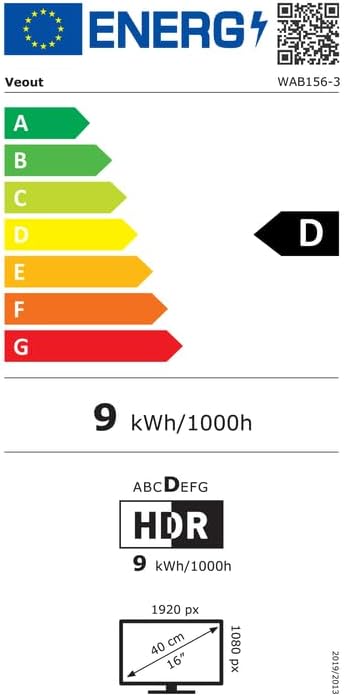
Figure 8.2: EU Energy Label for model WAB156-3. For more details, visit eprel.ec.europa.eu/qr/2209122.
9. Waranti dan Sokongan
Your Veout Portable Monitor is backed by a 12-month warranty from the date of purchase. We are committed to providing customer service and support.
- Tempoh Waranti: 12 Bulan
- Polisi Pemulangan: Jaminan wang dikembalikan 30 hari
- Perkhidmatan Pelanggan: Tersedia 24 jam

Rajah 9.1: Maklumat jaminan dan sokongan.
For technical assistance or warranty claims, please contact Veout customer support at support@veout.com.