
1. Pengenalan
The Elitech DIT-220 is a high-precision, non-contact infrared thermometer designed for safe and accurate temperature measurement across various applications. This device utilizes laser targeting for precise aim and features adjustable emissivity to ensure accurate readings on different surface types. It is suitable for use by professionals, DIY enthusiasts, and in household settings for monitoring temperatures in industrial, commercial, and domestic environments.
2. Maklumat Keselamatan
Sila baca semua amaran dan arahan keselamatan dengan teliti sebelum menggunakan produk ini. Kegagalan mematuhi arahan ini boleh mengakibatkan kecederaan atau kerosakan pada peranti.
- Keselamatan Laser: Do not look directly into the laser beam or point it at people or animals. The laser is used for targeting only and should be used with caution.
- Pengukuran Bukan Kenalan: This thermometer measures surface temperature. It is not intended for measuring body temperature.
- Keselamatan Elektrik: Do not use the device near strong electromagnetic fields. Keep the device dry and avoid exposure to moisture or extreme temperatures.
- Keselamatan Bateri: Use only the specified battery type (2x AAA). Ensure correct polarity when installing batteries. Remove batteries if the device will not be used for an extended period. Do not mix old and new batteries or different types of batteries.
- Penyelenggaraan: Jangan cuba membuka atau mengubah suai peranti. Rujuk semua servis kepada kakitangan yang berkelayakan.
3. Kandungan Pakej
Sahkan bahawa semua item terdapat dalam pakej:
- Elitech DIT-220 Infrared Thermometer
- 2 x Bateri AAA
- Manual Pengguna (dokumen ini)
4. Ciri-ciri Produk
- Julat Suhu Luas: Berukuran dari -50°C hingga 530°C (-58°F hingga 986°F).
- Masa Respons Pantas: Memberikan bacaan dalam masa kira-kira 0.5 saat.
- Ketepatan Tinggi: ±1.5°C (±2.7°F) or ±1.5% for temperatures between -50°C and 50°C.
- Penyasaran Laser: Integrated laser pointer for precise aiming at the target surface.
- Emisiviti boleh laras: User-adjustable emissivity from 0.10 to 1.00 for accurate readings on various materials.
- Distance-to-Spot Ratio (D:S): 12:1, ensuring accurate measurement from a safe distance.
- MAX/MIN/AVG Mode: Automatically tracks maximum, minimum, and average temperatures during a measurement session.
- Paparan LCD dengan lampu latar: Memberikan keterlihatan bacaan yang jelas dalam pelbagai keadaan pencahayaan.
- Matikan Auto: Menjimatkan hayat bateri dengan mematikan secara automatik selepas tempoh tidak aktif.
- Peringatan Bateri Rendah: Menunjukkan bila bateri perlu diganti.
- Suis °C/°F: Bertukar antara unit Celsius dan Fahrenheit dengan mudah.

Rajah 1: Elitech DIT-220 Infrared Thermometer highlighting its main features.
5. Persediaan
5.1 Pemasangan Bateri
- Cari penutup petak bateri pada pemegang termometer.
- Buka penutup petak bateri.
- Masukkan dua bateri AAA, pastikan kekutuban (+ dan -) betul seperti yang ditunjukkan di dalam petak.
- Tutup penutup petak bateri dengan selamat.

Rajah 2: Elitech DIT-220 components and battery compartment location.
5.2 Menghidupkan/Mematikan
To power on the device, simply press the measurement trigger. The device will automatically power off after a period of inactivity to conserve battery life.
6. Arahan Operasi
6.1 Mengambil Pengukuran
- Point the thermometer at the target surface. Ensure the laser pointer (if activated) is aimed at the center of the area you wish to measure.
- Press and hold the measurement trigger. The laser will activate, and the current temperature will be displayed on the LCD screen.
- Release the trigger to hold the measurement on the display. The 'HOLD' icon will appear.
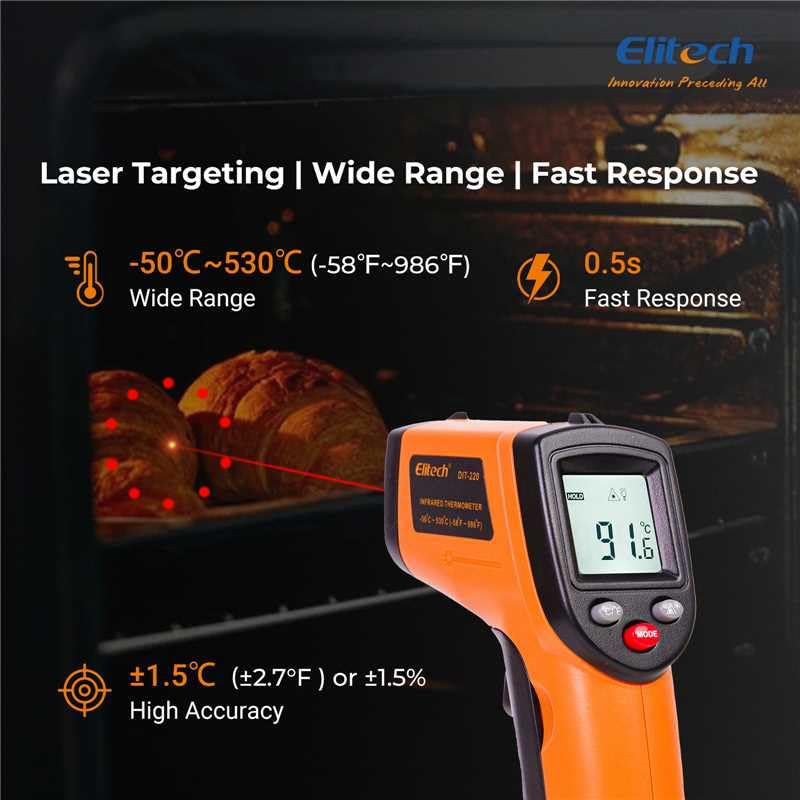
Rajah 3: Using the DIT-220 for non-contact temperature measurement with laser targeting.
6.2 Understanding Distance-to-Spot Ratio (D:S)
The DIT-220 has a Distance-to-Spot ratio of 12:1. This means that as you move further from the target, the area being measured (spot size) increases. For accurate readings, ensure the target area is larger than the spot size. For example, at a distance of 12 inches, the measurement spot will be 1 inch in diameter.

Rajah 4: Illustration of the 12:1 Distance-to-Spot ratio.

Rajah 5: Visual guide for maintaining correct measurement distance.
6.3 Melaraskan Emisiviti
Different materials emit infrared energy differently. The DIT-220 allows you to adjust the emissivity (ε) from 0.10 to 1.00 to compensate for this and achieve more accurate readings. Refer to a standard emissivity table for common materials or adjust empirically.
- Tekan ke MODE button to cycle through settings until 'EMS' (Emissivity) is displayed.
- Use the Up/Down arrow buttons to adjust the emissivity value.
- Tekan ke MODE butang sekali lagi untuk mengesahkan dan keluar.
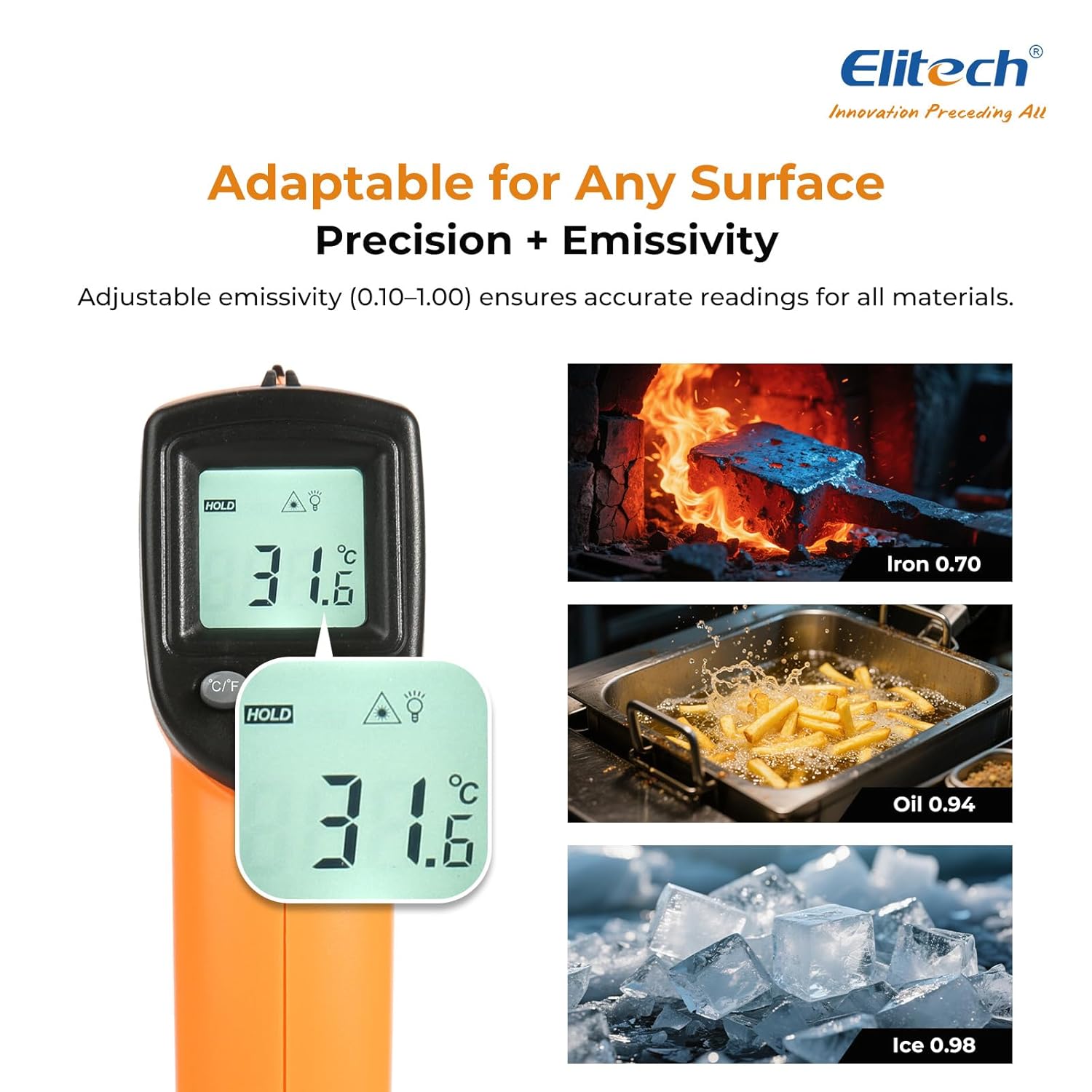
Rajah 6: Adjustable emissivity feature and examples for different materials.
6.4 Using MAX/MIN/AVG Modes
These modes are useful for monitoring temperature fluctuations over time.
- While holding the measurement trigger, press the MODE button repeatedly to cycle through MAX (Maximum), MIN (Minimum), and AVG (Average) display modes.
- The corresponding icon will appear on the screen, showing the respective temperature value recorded during the current measurement session.
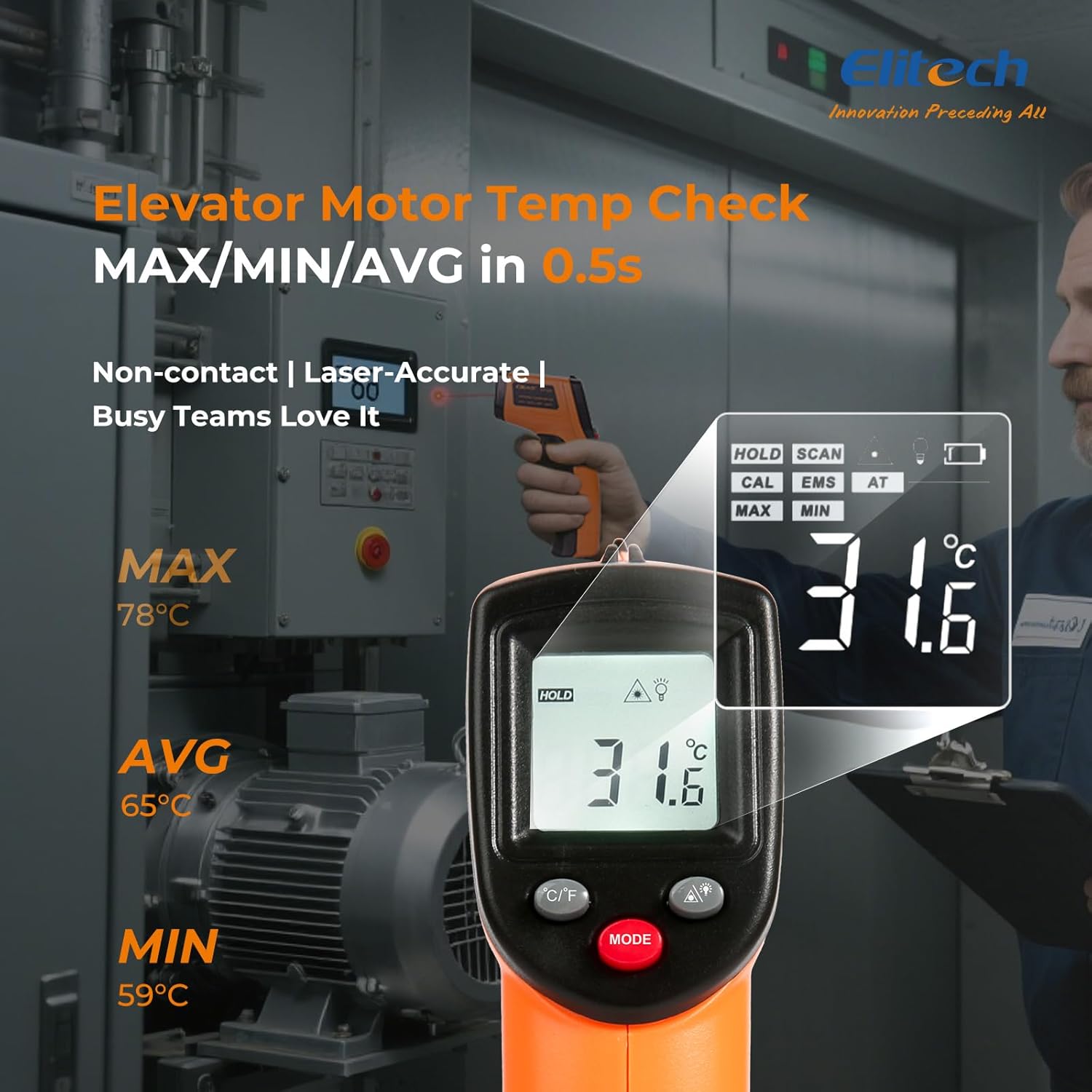
Rajah 7: Displaying MAX, MIN, and AVG temperature readings.
6.5 Menukar Unit Suhu (°C/°F)
To switch between Celsius and Fahrenheit, press the °C/°F button located on the device.
7. Penyelenggaraan
7.1 Pembersihan
- Bersihkan kanta dengan lembut, damp cloth or cotton swab. Do not use abrasive cleaners or solvents.
- Lap peranti casing dengan kain lembut dan kering.
7.2 Penggantian Bateri
When the low battery indicator appears on the display, replace the two AAA batteries as described in the Setup section (5.1 Battery Installation).
7.3 Penyimpanan
Store the thermometer in a cool, dry place, away from direct sunlight and extreme temperatures. Remove batteries if storing for extended periods.
8. Penyelesaian masalah
| Masalah | Kemungkinan Punca | Penyelesaian |
|---|---|---|
| Display shows 'Lo' or 'Hi' | Suhu berada di luar julat ukuran. | Ensure the target temperature is within -50°C to 530°C (-58°F to 986°F). |
| Bacaan tidak tepat | Incorrect emissivity setting; measurement distance too far/close; lens dirty. | Adjust emissivity for the target material. Maintain appropriate D:S ratio. Clean the lens. |
| Peranti tidak dihidupkan | Bateri mati atau tidak dipasang dengan betul. | Replace batteries with new AAA batteries. Check battery polarity. |
| Laser tidak berfungsi | Laser may be disabled or faulty. | Check if the laser function is enabled via the MODE button. If not, contact support. |
9. Spesifikasi
| Ciri | Spesifikasi |
|---|---|
| Model | DIT-220 (EU-DIT-220) |
| Julat Suhu | -50°C hingga 530°C (-58°F hingga 986°F) |
| Ketepatan | ±1.5°C (±2.7°F) or ±1.5% (for -50°C to 50°C) |
| Masa Tindak Balas | 500 milisaat (0.5 saat) |
| Nisbah Jarak ke Tempat (D:S) | 12:1 |
| Emisiviti | Boleh laras 0.10 - 1.00 |
| Sumber Kuasa | 2 x bateri AAA (termasuk) |
| Jenis Paparan | Digital, LCD Bercahaya Belakang |
| Ciri Khas | Non-contact, Laser Target, MAX/MIN Mode, Auto Calibration |
| bahan | plastik |
| Berat Barang | 30 Gram |
| Dimensi Pakej | 18.7 x 9.7 x 3.6 cm |
10. Waranti dan Sokongan
Elitech products are designed for reliability and performance. For warranty information, technical support, or service inquiries, please contact Elitech customer support through their official website or the retailer where the product was purchased. Please have your model number (DIT-220) and purchase date available when contacting support.