
pengenalan
Thank you for choosing the pTron Studio Evo Wireless Over-Ear Headphones. This manual provides essential information for setting up, operating, and maintaining your headphones to ensure optimal performance and longevity. Please read these instructions carefully before use.

Imej: Selesaiview of pTron Studio Evo features including sound quality, battery life, driver size, controls, charging, and connectivity modes.
Persediaan
1. Unboxing dan Komponen
Keluarkan semua barang dari pembungkusan dengan berhati-hati. Kotak tersebut hendaklah mengandungi:
- pTron Studio Evo Wireless Over-Ear Headphones
- Kabel Pengecasan USB Jenis-C
- 3.5mm Audio Cable (Aux-in)
- Manual Pengguna (dokumen ini)
2. Mengecas Fon Kepala
Before first use, fully charge your headphones. Connect the provided USB Type-C cable to the charging port on the headphones and the other end to a compatible USB power source (e.g., wall adapter, computer USB port).
- Masa Pengecasan: Kira-kira 2 jam untuk cas penuh.
- Hayat Bateri: Up to 70 hours of playtime on a single full charge.

Image: pTron Studio Evo headphones highlighting 70 hours of playtime and Type-C fast charging.
3. Menghidupkan/Mematikan
- Untuk Menghidupkan: Tekan dan tahan butang Kuasa selama lebih kurang 3 saat sehingga penunjuk LED menyala.
- Untuk Mematikan: Tekan dan tahan butang Kuasa selama lebih kurang 3 saat sehingga penunjuk LED dimatikan.
4. Berpasangan Bluetooth
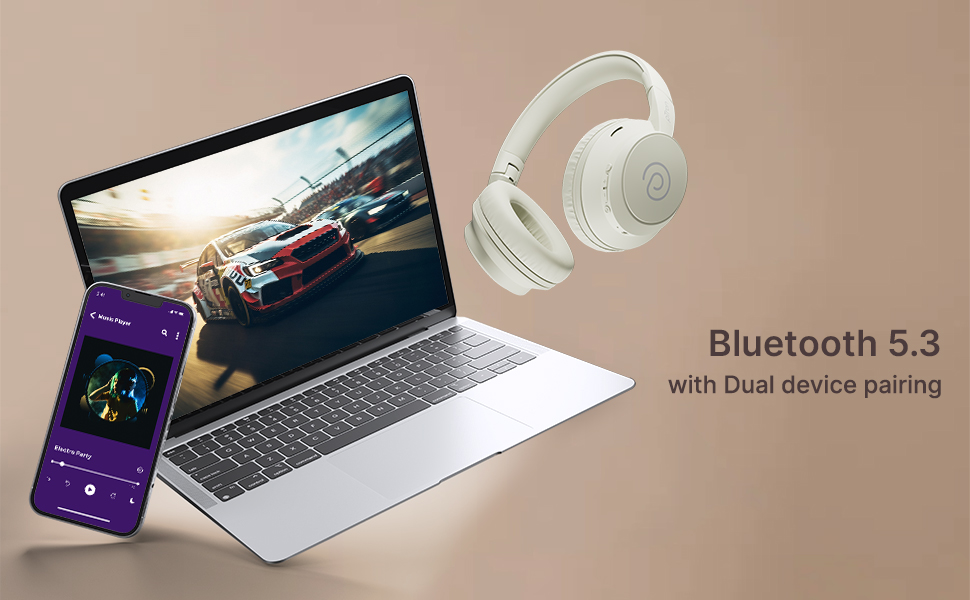
The pTron Studio Evo headphones utilize Bluetooth 5.3 for stable wireless connectivity.
- Pastikan fon kepala dimatikan.
- Tekan dan tahan butang Kuasa selama 5-7 saat sehingga penunjuk LED berkelip merah dan biru secara berselang-seli, menunjukkan mod berpasangan.
- Pada peranti anda (telefon pintar, komputer riba, dll.), dayakan Bluetooth dan cari peranti yang tersedia.
- Select "pTron Studio Evo" from the list of found devices.
- Setelah disambungkan, penunjuk LED akan bertukar menjadi biru pepejal atau biru berkelip perlahan-lahan.
Gandingan Peranti Dwi: These headphones support connecting to two devices simultaneously. After pairing with the first device, disable Bluetooth on that device, then pair with the second device. Re-enable Bluetooth on the first device, and the headphones should connect to both. You can then switch audio playback between the two devices.

Image: Headphones connected to both a phone and a laptop, demonstrating Bluetooth 5.3 dual device pairing.
5. Wired Connection (Aux-in)
For a wired connection, use the provided 3.5mm audio cable. Plug one end into the headphone's 3.5mm jack and the other end into your audio source's auxiliary output. The headphones will automatically switch to wired mode when the cable is connected.
Arahan Operasi
1. Kawalan Ke Atasview
The headphones feature integrated buttons for easy control of music, calls, and modes.
Imej: Terperinci view of the integrated control buttons on the pTron Studio Evo headphones.
- Butang Kuasa: Tekan dan tahan untuk hidup/mati. Tekan sebentar untuk memainkan/menjeda muzik atau menjawab/menamatkan panggilan.
- Kelantangan Naik (+): Tekan pendek untuk meningkatkan kelantangan. Tekan lama untuk trek seterusnya.
- Perlahankan suara (-): Tekan pendek untuk mengurangkan kelantangan. Tekan lama untuk trek sebelumnya.
- Butang EQ: Short press to cycle through EQ modes (Bass, Movie, Pop, Vocal).
2. Mod EQ
The pTron Studio Evo headphones offer multiple low-latency EQ modes optimized for different audio experiences:
- Mod Permainan: Reduces audio latency for a more synchronized gaming experience.
- Mod Filem: Enhances dialogue clarity and cinematic sound effects.
- Mod Muzik: Menyediakan pro audio yang seimbangfile untuk mendengar muzik umum.
- Mod Bes: Boosts low frequencies for a deeper bass response.
- Mod Pop: Optimized for pop music genres.
- Mod Vokal: Enhances vocal clarity, ideal for podcasts or audiobooks.
Press the EQ button to switch between these modes.
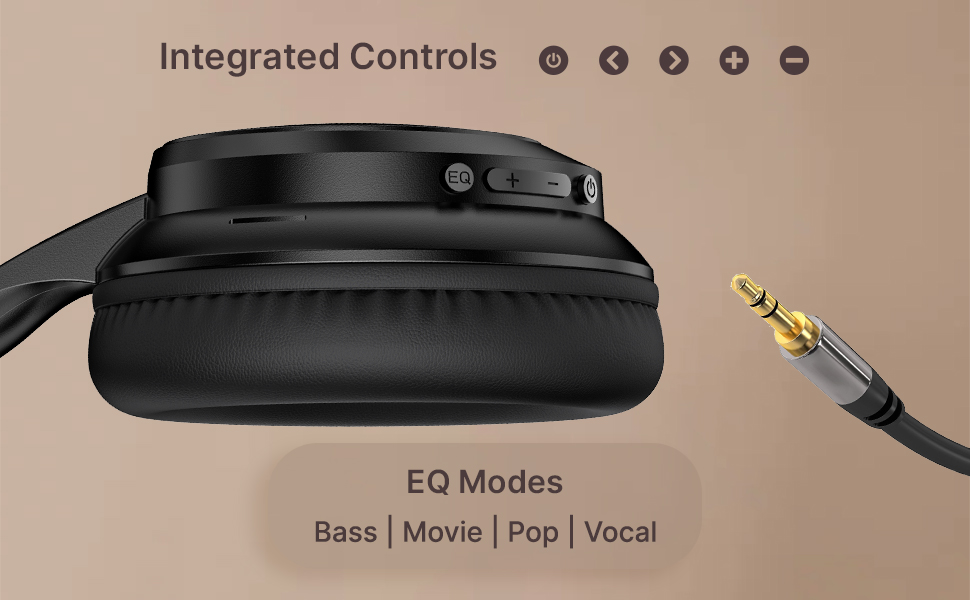
Image: User engaging in gaming with headphones, demonstrating low-latency sync for game mode.
3. Membuat dan Menerima Panggilan
The headphones include a built-in HD microphone for hands-free calls.
- Jawab/Tamatkan Panggilan: Tekan pendek butang Kuasa.
- Tolak Panggilan: Tekan dan tahan butang Kuasa selama 2 saat.
4. Pembantu Suara
Access your device's voice assistant (e.g., Siri, Google Assistant) by double-pressing the Power button.
5. Memakai Fon Kepala
The pTron Studio Evo headphones feature an ergonomic design with soft earcups and an adjustable head beam for comfortable all-day listening. Adjust the head beam to position the earcups exactly over your ears for the best fit and sound isolation.
Penyelenggaraan
1. Pembersihan
Regularly clean your headphones to maintain hygiene and performance.
- Use a soft, dry cloth to wipe the earcups and headband.
- Jangan gunakan pembersih atau pelarut yang melelas.
- Avoid getting moisture into the charging port or audio jack.
2. Tahan Air
The headphones are IPX5 water-resistant, meaning they can withstand splashes and sweat. Do not submerge them in water or expose them to heavy rain.
3. Penyimpanan
The foldable design allows for easy storage. Fold the headphones when not in use to protect them from damage and save space. Store them in a cool, dry place away from direct sunlight and extreme temperatures.
Menyelesaikan masalah
- Tiada Kuasa: Pastikan fon kepala dicas sepenuhnya. Sambungkan ke sumber kuasa dan cuba lagi.
- Tidak boleh berpasangan: Make sure Bluetooth is enabled on your device and the headphones are in pairing mode (flashing red and blue LED). Try restarting both devices.
- Tiada Bunyi: Periksa tahap kelantangan pada kedua-dua fon kepala dan peranti anda yang disambungkan. Pastikan output audio yang betul dipilih pada peranti anda. Jika menggunakan sambungan berwayar, pastikan kabel 3.5mm dimasukkan sepenuhnya.
- Kualiti Bunyi Lemah: Ensure the headphones are within the Bluetooth range (up to 10 meters) of your device. Avoid obstacles that may interfere with the signal. Try switching EQ modes.
- Mikrofon Tidak Berfungsi: Ensure the headphones are properly connected and selected as the input device on your call application.
Spesifikasi
| Ciri | Spesifikasi |
|---|---|
| Nama Model | Studio |
| Teknologi Ketersambungan | Wayarles (Bluetooth) |
| Teknologi Komunikasi Tanpa Wayar | Bluetooth 5.3 |
| Julat Bluetooth | 10 Meter |
| Saiz Pemacu Audio | 40 Milimeter |
| Hayat Bateri | 70 Jam |
| Masa Mengecas | 2 Jam |
| Jack Fon Kepala | Jack 3.5 mm |
| Tahap Ketahanan Air | Tahan Air IPX5 |
| Kaedah Kawalan | Butang Tekan, Suara |
| Kawalan Bunyi | Pengasingan Bunyi |
| bahan | Akrilonitril Butadiena Stirena (ABS) |
| Berat Barang | 157 Gram |
| Dimensi Produk | 19.2 x 15.8 x 7.9 cm |
Waranti dan Sokongan
1. Waranti Pengeluar
The pTron Studio Evo headphones come with a Waranti Pengeluar 1 Tahun from the date of purchase. This warranty covers manufacturing defects only. Please retain your proof of purchase for warranty claims.
2. Sokongan Pelanggan
Untuk sebarang pertanyaan, bantuan teknikal atau tuntutan jaminan, sila hubungi khidmat pelanggan pTron:
- e-mel: support@ptron.in
- telefon: 040-67138888