
1. Pengenalan
The LILYGO T-Display K230 is a versatile and high-performance AIoT (Artificial Intelligence of Things) development board. It integrates the powerful K230 AIoT chip, offering extensive computing capabilities and various expansion interfaces. Key features include LoRa 915Mhz communication, Wi-Fi connectivity, an integrated microphone, and a vibrant 4.1-inch AMOLED capacitive touchscreen. This board is designed for advanced applications in remote data transmission, AI recognition, and IoT monitoring and interaction.
2. Produk Lebihview
The T-Display K230 combines several advanced technologies into a compact, handheld-sized device. Its core is the K230 chip, which provides robust processing power for AI and IoT tasks. The 4.1-inch AMOLED touchscreen offers a clear visual interface and supports intuitive capacitive touch input. With integrated LoRa and Wi-Fi, the board facilitates both long-range, low-power communication and standard network connectivity. It also supports an ISP camera for imaging applications.

Figure 2.1: LILYGO T-Display K230 with attached antenna, displaying its user interface.

Rajah 2.2: Meletup view of the T-Display K230, highlighting the main board and display assembly.
3. Apa yang ada di dalam Kotak
Upon unboxing your LILYGO T-Display K230, please verify that all components listed below are present:
- 1 x T-Display K230 Development Board
- 1 x LoRa Antenna (915Mhz)
- 1 x Pin Header Set
- 1 x Manual Pengguna (dokumen ini)
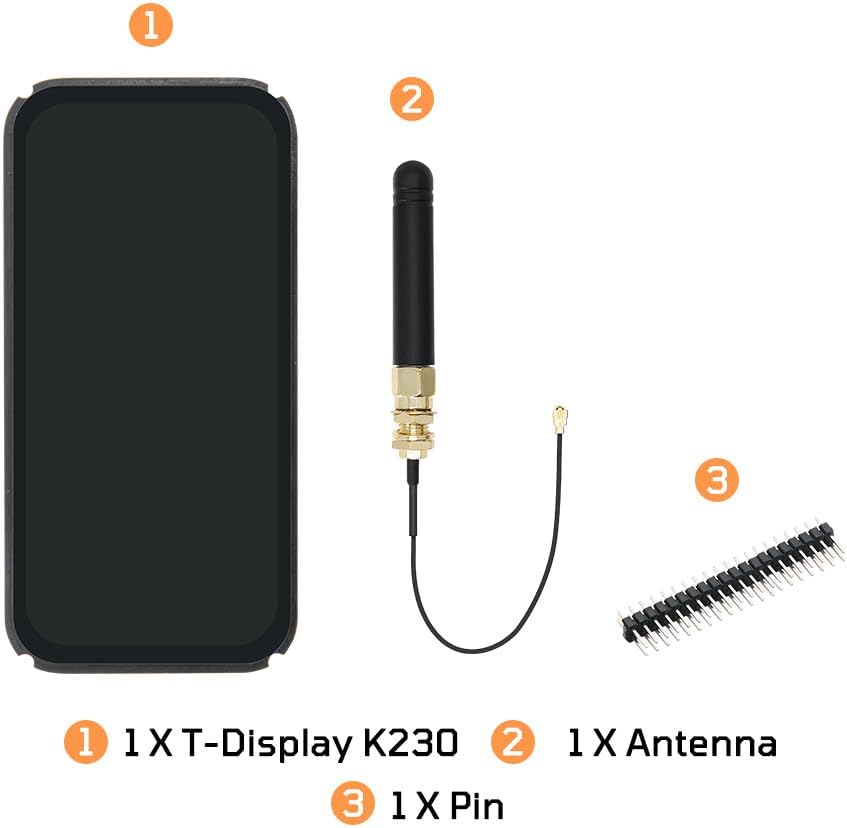
Figure 3.1: Package contents of the LILYGO T-Display K230.

Figure 3.2: The T-Display K230 and its accessories within the protective packaging.
4. Spesifikasi
Detailed technical specifications for the LILYGO T-Display K230:
| Ciri | Penerangan |
|---|---|
| Jenama | LILYGO |
| Nama Model | T-Display K230 |
| Pemproses | K230 AIoT Chip (Dual 64-bit RISC-V CPU, KPU, DPU, GPU, VPU) |
| Kekerapan CPU | CPU1: 1.6 GHz, CPU0: 800 MHz |
| Paparan | 4.1-inch AMOLED Touchscreen (RM69A10 driver, 568 x 1232 resolution) |
| Pemancar LoRa | SX1262 Module, 915Mhz Band |
| Modul Wi-Fi | RTL8189 (IEEE 802.11 b/g/n 2.4GHz) |
| RAM | x32 LPDDR4 8GB |
| Kamera | 2MP 1080P (GC2093 Module) |
| Modul Ethernet | RC01812 (RJ45 Connector) |
| Sistem Operasi | Linux |
| Port USB | 2 x Type-C (Power, USB-OTG) |
| Pengecasan USB | 5V, 500mA |
| Dimensi (L x W x H) | 104 x 51 x 15.5 mm |
| UPC | 717382831299 |

Figure 4.1: Key technical specifications of the T-Display K230.

Figure 4.2: Pinmap and component layout of the LILYGO T-Display K230.

Figure 4.3: Physical dimensions of the T-Display K230.
5. Panduan Persediaan
Follow these steps to set up your LILYGO T-Display K230:
- Pasangkan Antena LoRa: Carefully screw the provided LoRa antenna onto the designated SMA connector on the board. Ensure it is securely fastened but do not overtighten.
- Sambungkan Peranti Periferal (Pilihan): If you plan to use an ISP camera or other external modules, connect them to the appropriate FPC or GPIO interfaces as indicated in the pinmap (Figure 4.2).
- Hidupkan kuasa: Connect the T-Display K230 to a 5V power source using a USB Type-C cable. The device should power on and the display will activate.
- Konfigurasi Perisian Awal: For development and initial setup, refer to the official GitHub repository for firmware flashing instructions, development environment setup, and example code. The repository can be found at: github.com/Xinyuan-LilyGO/T-Display-K230_canmv_rt.
6. Arahan Operasi
This section provides general guidance on operating your T-Display K230. Specific operations will depend on the firmware loaded onto the device.
- Interaksi skrin sentuh: The 4.1-inch AMOLED display supports capacitive touch. Interact with the user interface by tapping, swiping, and using multi-touch gestures as supported by the loaded application.
- Komunikasi LoRa: Utilize the integrated LoRa 915Mhz module for long-range, low-power wireless data transmission. Configuration for LoRa communication protocols and data exchange will be handled through software. Refer to the GitHub repository for LoRa examples and libraries.
- Kesambungan Wi-Fi: Connect the device to a 2.4GHz Wi-Fi network for internet access or local network communication. Wi-Fi settings are typically managed via the device's software interface or through a configuration utility.
- Penggunaan Mikrofon: The onboard microphone enables audio input for various applications, such as voice commands, audio recording, or sound analysis. Software applications will process the microphone data.
- Pengecaman AI: Leverage the K230 chip's AI capabilities for tasks like image recognition (with an attached ISP camera), object detection, or other machine learning inferences. Development kits and examples are available on the GitHub page.
Video 6.1: Tamatview of the LILYGO T-Display K230's features and capabilities.
7. Penyelenggaraan
Proper maintenance ensures the longevity and optimal performance of your T-Display K230:
- Pembersihan: Use a soft, dry, anti-static cloth to clean the display and exterior. Avoid abrasive cleaners or solvents.
- Keadaan Persekitaran: Operate and store the device within recommended temperature and humidity ranges. Avoid exposure to extreme temperatures, direct sunlight, moisture, or corrosive environments.
- Kemas Kini Perisian: Regularly check the official LILYGO GitHub repository for firmware updates and software improvements. Keeping your device's software up-to-date can enhance performance and add new features.
- Pengendalian: Handle the development board with care to prevent physical damage. Avoid dropping the device or applying excessive force to its components.
8. Penyelesaian masalah
This section addresses common issues you might encounter with your T-Display K230.
| Masalah | Kemungkinan Punca | Penyelesaian |
|---|---|---|
| Peranti tidak dihidupkan. | Incorrect power supply, loose cable, or faulty USB port. | Ensure a stable 5V, 500mA power source. Check USB Type-C cable connection. Try a different USB port or cable. |
| Display is blank or unresponsive. | Software issue, display cable not properly connected, or hardware fault. | Perform a hard reset (if available). Re-flash the firmware. Check display FPC cable connection (if accessible and safe to do so). |
| LoRa communication not working. | Antenna not connected, incorrect frequency/settings, or software configuration error. | Verify the LoRa antenna is securely attached. Check LoRa frequency and other parameters in your software. Consult the GitHub repository for LoRa examples. |
| Isu sambungan Wi-Fi. | Incorrect Wi-Fi credentials, out of range, or software configuration. | Double-check Wi-Fi SSID and password. Ensure the device is within range of the Wi-Fi access point. Review Wi-Fi configuration in your code. |
| General software errors. | Bugs in custom code, incorrect library usage, or outdated firmware. | Refer to the LILYGO GitHub repository for the latest code, examples, and community support. Ensure your development environment is correctly set up. |
9. Waranti dan Sokongan
LILYGO is committed to providing quality products and support for its development boards.
- Sumber Teknikal: For detailed technical documentation, example code, and community discussions, please visit the official LILYGO GitHub repository: github.com/Xinyuan-LilyGO/T-Display-K230_canmv_rt.
- Sokongan Pelanggan: If you have any questions, suggestions, or require assistance with your product, please contact the seller directly through the platform where you purchased the device.
- Maklumat Waranti: Specific warranty terms may vary by region and retailer. Please refer to your purchase documentation or contact the seller for details regarding warranty coverage.