
pengenalan
The TABWEE P10 is a versatile 10.1-inch digital calendar and photo frame designed to simplify family and professional scheduling. This device connects via Wi-Fi and synchronizes with various calendar applications, offering real-time updates for all family members. It also functions as a digital photo frame, displaying cherished memories. This manual provides detailed instructions for setup, operation, and maintenance of your TABWEE P10.

Image: The TABWEE P10 Digital Calendar displaying a weekly schedule, with text indicating its features for managing family life and syncing with various calendar apps.
Panduan Persediaan
1. Menyahkotak dan Menghidupkan Permulaan
Carefully remove the TABWEE P10 from its packaging. Connect the power adapter to the device and plug it into a power outlet. The device will automatically power on.
2. Sambungan Wi-Fi
- On the device screen, navigate to tetapan.
- Pilih Wi-Fi and choose your preferred network.
- Enter your Wi-Fi password and tap Sambung.
3. Mobile App Installation and Synchronization
The TABWEE P10 supports synchronization with mobile applications (iOS and Android) for seamless management.
- Download the official TABWEE mobile application from your device's app store.
- Buat akaun atau log masuk.
- Follow the on-screen instructions in the app to pair your TABWEE P10 device. This typically involves scanning a QR code displayed on the P10 screen.
- Once paired, you can link your existing calendar accounts (Google, Apple, iCloud, Outlook, Yahoo, Cozi, etc.) through the mobile app for two-way synchronization.
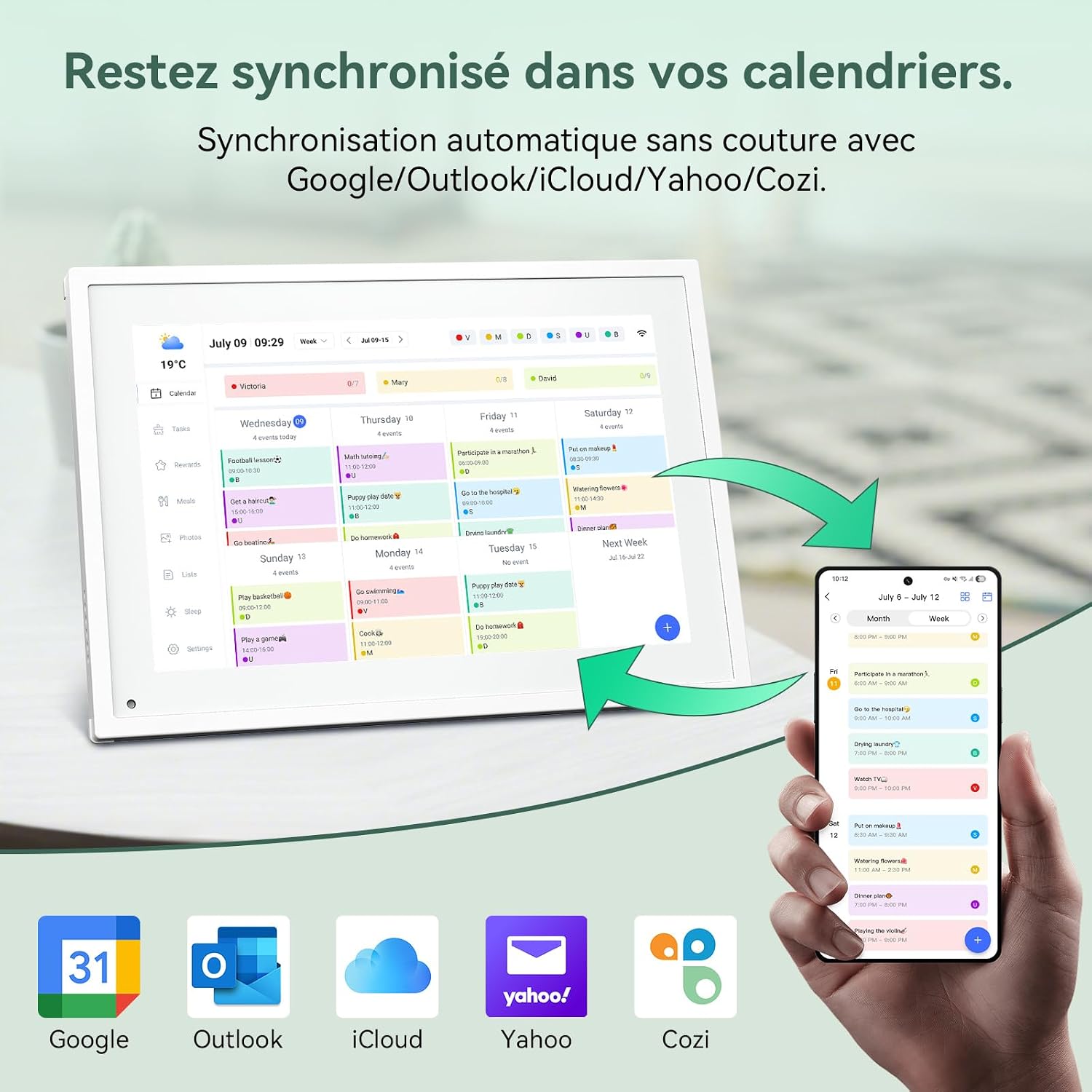
Image: The TABWEE P10 Digital Calendar displaying a weekly schedule, with a smartphone next to it showing the synchronized mobile app interface. Icons for Google, Outlook, iCloud, Yahoo, and Cozi are visible below, indicating compatibility.
Arahan Operasi
1. Calendar Management
- Viewing Schedules: The P10 displays schedules in various formats (daily, weekly, monthly). Tap on the screen to switch between views.
- Adding/Editing Events: Use the touchscreen directly or the mobile app to add new events, appointments, or reminders. Events can be color-coded for easy identification.
- Real-time Synchronization: All changes made on the device or through linked calendar apps will update in real-time across all platforms.
2. Digital Photo Frame Functionality
The P10 can display personal photos, transforming into a digital photo frame when not actively used for scheduling.
- Memuat naik Foto: Send photos from your mobile app to the P10.
- Mod Paparan: The device supports both landscape and portrait orientations. You can configure slideshow settings, including transition effects and display duration.
- Mod tidur: The P10 features a sleep mode that allows the screen to turn off and wake up at set times, conserving energy.

Image: Two TABWEE P10 devices, one in landscape mode displaying a calendar, and another in portrait mode displaying a family photo, illustrating its dual functionality as a calendar and digital photo frame.
3. Task Management and Rewards System
Organize household chores and encourage good habits with the integrated task manager and rewards system.
- Creating Tasks: Parents can create tasks via the device or mobile app and assign them to family members.
- Earning Rewards: Children can earn stars upon completing tasks, which can then be redeemed for custom rewards set by parents.

Image: A young girl pointing at the TABWEE P10 screen, which displays a task manager interface with a rewards system showing stars earned for completed tasks.
4. Meal Planning
Plan daily meals and healthy recipes directly on the device.
- Customizable Recipes: Input and store healthy recipes.
- Meal Schedule: Plan breakfast, lunch, dinner, and snacks for the week, ensuring balanced nutrition and timely meals.
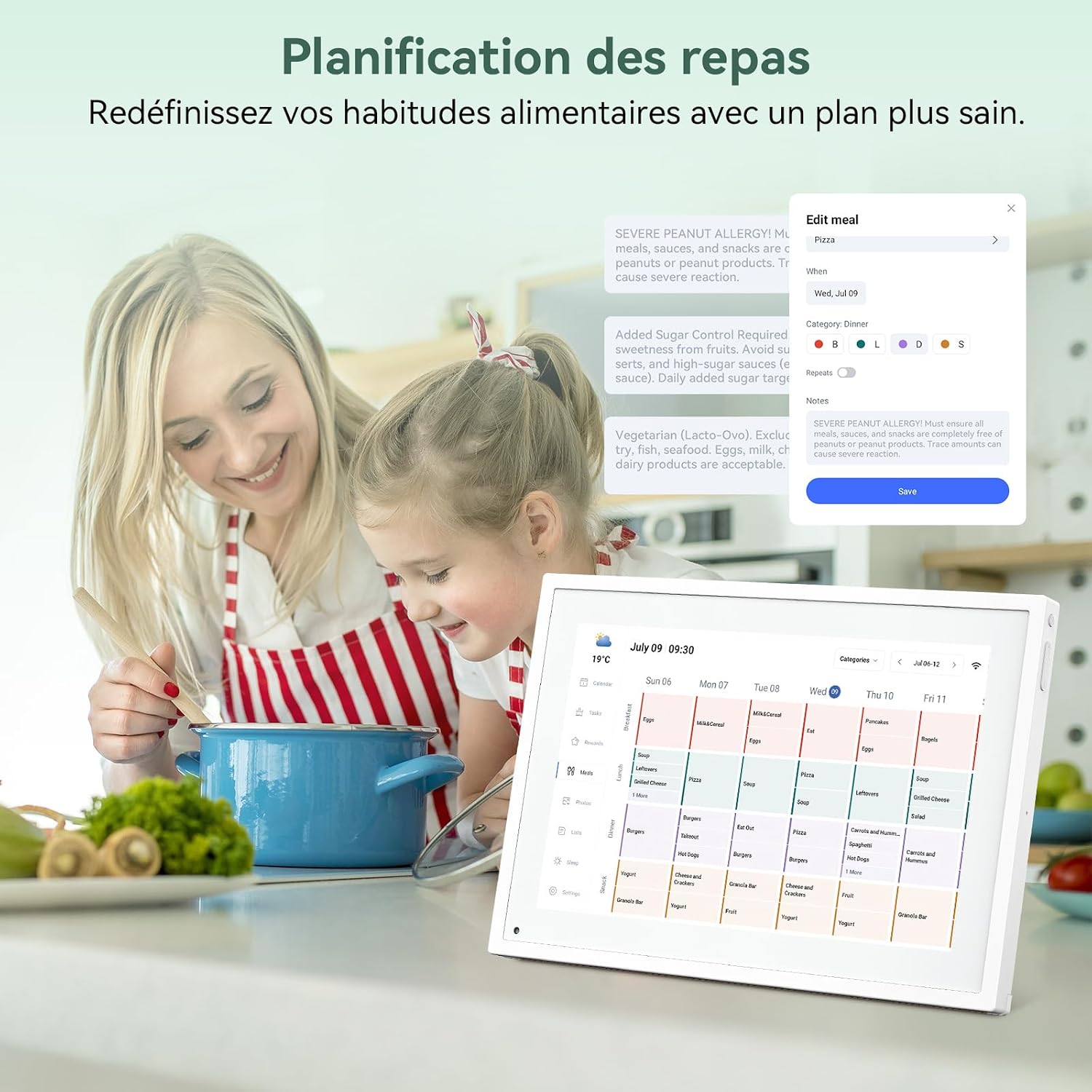
Image: A mother and child looking at the TABWEE P10 screen, which displays a meal planning interface, with food items and a cooking pot in the foreground.
Senario Penggunaan
The TABWEE P10 is designed for various environments to enhance organization and connectivity.
- For Families: Centralize family schedules, manage household tasks, and share moments.
- Untuk Kanak-kanak: Utilize the rewards system to foster good habits and independence.
- For Seniors: Provides clear reminders for medication, appointments, and healthy meal plans.
- For Office Workers: Display meeting agendas, task deadlines, and project schedules with color-coded priorities.

Image: A collage showing the TABWEE P10 in different settings: a bedroom displaying a photo, a living room with a family, and an office desk displaying a calendar, highlighting its versatility.
Penyelenggaraan
- Pembersihan: Use a soft, dry cloth to clean the screen and exterior. Avoid abrasive cleaners or sprays directly on the screen.
- Kemas Kini Perisian: Ensure your device's software is up to date for optimal performance and new features. Check for updates via the Settings menu or the mobile app.
- Keadaan Persekitaran: Operate the device in a dry environment, away from direct sunlight and extreme temperatures.
Menyelesaikan masalah
Isu dan Penyelesaian Biasa:
- Peranti Tidak Dihidupkan: Pastikan penyesuai kuasa disambungkan dengan selamat pada kedua-dua peranti dan salur keluar kuasa yang berfungsi.
- Isu Sambungan Wi-Fi: Verify your Wi-Fi password. Try restarting your router and the TABWEE P10. Ensure the device is within range of your Wi-Fi network.
- Synchronization Problems: Check your internet connection. Ensure the mobile app is updated and correctly paired with the device. Re-link your calendar accounts if necessary.
- Skrin Tidak Responsif: Cuba mulakan semula peranti. Jika masalah berterusan, hubungi sokongan pelanggan.
Untuk bantuan lanjut, sila rujuk bahagian Waranti dan Sokongan.
Spesifikasi
| Ciri | Spesifikasi |
|---|---|
| Nombor Model | P10 |
| Saiz Skrin | 10.1 inci |
| Jenama | TABWEE |
| bahan | Bahan mesra alam |
| Jenis Pemasangan | Lekapan Desktop |
| Berat Barang | 1.17 Kilogram |
| Ketersambungan | Wi-Fi |
| UPC | 652805713458 |
| GTIN | 652805713458 |

Image: A technical diagram illustrating the dimensions (26.5cm x 18.5cm x 1.5cm) and key physical features of the TABWEE P10, including power on/off, volume buttons, light sensor, and support stand.
Waranti dan Sokongan
TABWEE ensures product quality through a comprehensive inspection system for every unit before it leaves the factory.
- Waranti: The TABWEE P10 calendar machine comes with a two-year warranty.
- Sokongan Teknikal: Lifetime technical support is provided for the TABWEE P10.
- Hubungi: For any questions regarding usage or constructive suggestions for the product, please do not hesitate to contact us. Our engineers are continuously working to improve and optimize our products.

Image: The TABWEE brand logo with icons representing key company values and services, including a 2-year warranty and lifetime support, set against a clean background with office decor.