
pengenalan
Thank you for choosing the FINOTI LU30 Drone. This professional 8K GPS brushless HD camera drone is designed for aerial photography enthusiasts, offering advanced features such as 6K HD video recording, GPS positioning, visual obstacle avoidance, and a 1000m remote control range. This manual provides essential information for the safe and effective operation, maintenance, and troubleshooting of your drone. Please read it thoroughly before your first flight.

Image: The FINOTI LU30 drone and its remote control, highlighting GPS positioning, 1000m range, dual cameras, and support for a Microdrive 64GB card.
Persediaan
1. Menyahkotak dan Semakan Komponen
Keluarkan semua komponen dari pembungkusan dengan berhati-hati. Pastikan item berikut ada:
- FINOTI LU30 Drone
- Remote Control with 4.5-inch screen
- Flight Battery (Single Battery variant)
- Kabel Pengecas USB
- Baling-baling ganti
- Manual Pengguna
2. Pemasangan dan Pengecasan Bateri
- Insert the flight battery into the designated compartment on the drone. Ensure it clicks securely into place.
- Connect the USB charging cable to the flight battery and a suitable USB power adapter (not included). The charging indicator will show the charging status.
- Charge the remote control using its dedicated charging port and cable.
- Ensure both drone and remote control batteries are fully charged before first use.
3. Lampiran Kipas
Attach the propellers according to the markings on the drone arms and propellers (e.g., A to A, B to B). Ensure they are securely fastened but not overtightened.
4. Penentukuran Awal
Before the first flight, perform a gyroscope and geomagnetic calibration. Refer to the 'Operating' section for detailed steps on how to perform these calibrations using the remote control or companion app.
Arahan Operasi
1. Kawalan Jauh Lebihview

Image: Detailed layout of the remote control, showing the functions of each button and stick, including throttle, steering, camera controls, and GPS switch.
The remote control features a 4.5-inch LCD screen for real-time flight data and FPV operation. Key controls include:
- Tongkat Pendikit: Mengawal ketinggian (naik/turun).
- Steering Sticks: Controls drone direction (forward/backward, left/right).
- Butang Ambil Foto/Video: Initiates photo capture or video recording.
- One-Click Return Button: Activates the Smart Return to Home function.
- Speed/Obstacle Avoidance Switch: Toggles flight speed modes and obstacle avoidance.
- Suis GPS: Activates or deactivates GPS positioning.
- Gyro/Geomagnetic Calibration: Button to initiate calibration procedures.
- Take-off/Landing/Emergency Stop: One-button for automated take-off, landing, or emergency shutdown.
- Lens Adjustments: Controls for camera angle.
- Suis Skrin: Toggles display modes on the remote screen.
- Menu/Confirm/Select Up/Down: Navigation buttons for the remote control's menu system.
2. Senarai Semak Pra-Penerbangan
- Pastikan bateri dron dan alat kawalan jauh dicas sepenuhnya.
- Periksa bahawa kipas dipasang dengan selamat dan tidak rosak.
- Verify that the camera lens is clean.
- Choose an open area free from obstacles, people, and electromagnetic interference.
- Power on the remote control, then the drone. Wait for GPS signal acquisition (if GPS mode is enabled).
3. Mod dan Ciri Penerbangan

Image: The LU30 drone and remote, emphasizing ESC dual camera, obstacle avoidance, brushless motor, optical flow hovering, and 4.5-inch remote screen.
- Kedudukan GPS: Provides stable hovering and precise navigation. Essential for features like Return to Home.
- Operasi FPV: View foo masa nyatatage from the drone's camera directly on the remote control screen or connected smartphone via the app.
- Visual Obstacle Avoidance: The drone is equipped with visual sensors for four-way intelligent perception, helping to detect and avoid obstacles during flight.
- Optical Flow Hovering: Assists with stable hovering in environments where GPS signal may be weak or unavailable.
- Smart Return to Home (RTH): The drone can automatically return to its take-off point under various conditions:
- Pulangan kuasa rendah: Returns when battery is critically low.
- Over-the-top Return: Returns if it flies beyond a set distance.
- Out of Control Return: Returns if connection with remote is lost.
- One-click Return: Initiated manually by the user.
- Waypoint Definition (Intelligent Flight): Plan a flight path on the app map using GPS satellite positioning. The drone will then follow the drawn waypoint path automatically, providing an intelligent flight experience without constant manual control.
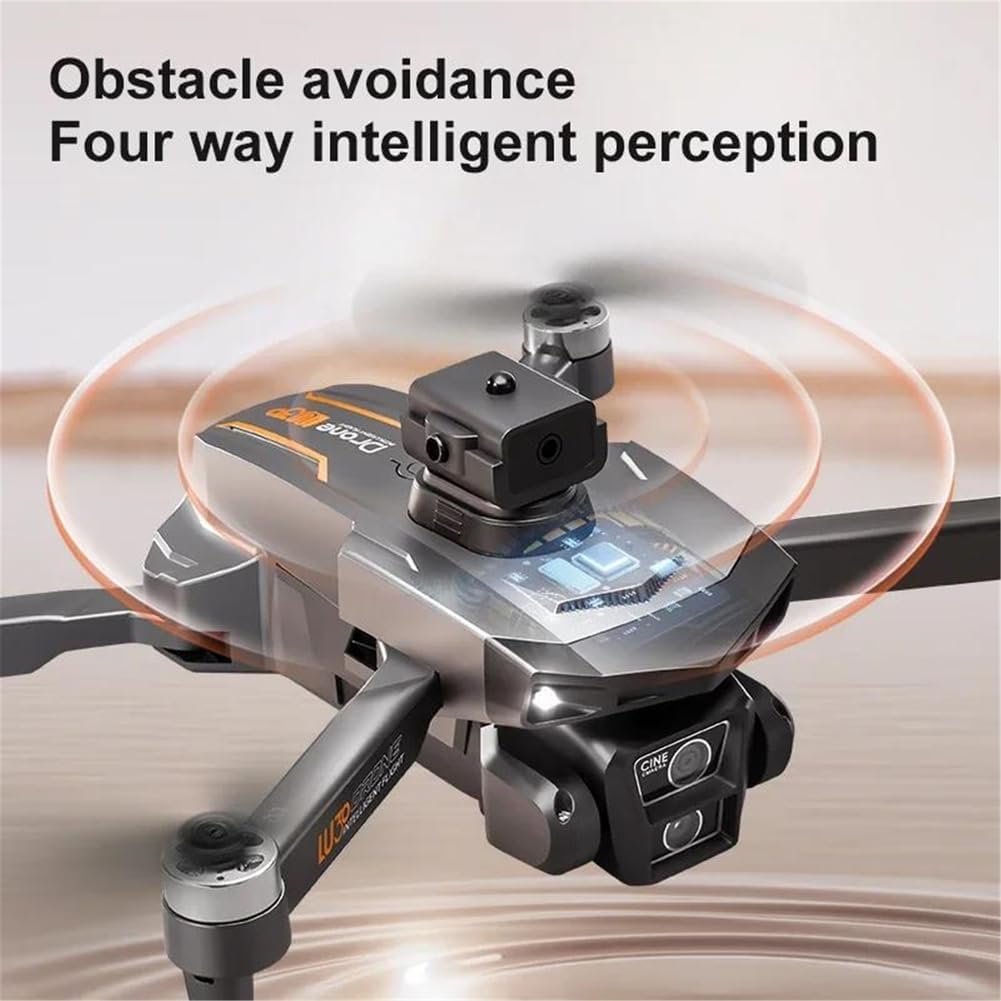
Image: Close-up of the drone's obstacle avoidance sensor, illustrating its four-way intelligent perception capability.

Image: The drone in flight, with icons illustrating the various GPS Smart Return to Home functions: low-power, over-the-top, out of control, and one-click return.

Image: The drone flying along a pre-defined waypoint path, demonstrating the intelligent flight feature where the drone follows a route set on the app map.
4. Operasi Kamera
The LU30 drone is equipped with a 6K HD camera featuring a 1/1.9-inch sensor, capable of capturing stunning videos (5780x2890 pixels) and high-resolution photos. The camera mount is fixed for stability, but the lens angle can be adjusted remotely up to 90 degrees.

Image: Close-up of the drone's camera, illustrating its ability to be remotely controlled for a 90-degree angle adjustment.
- Tangkapan Foto/Video: Use the dedicated buttons on the remote control or the app interface to start/stop recording or take photos.
- Storan: The drone supports expandable storage, typically via a Micro SD card (up to 64GB recommended, as shown in product images). Ensure a high-speed card is used for 6K recording.
- Remote Camera Angle Adjustment: Use the lens adjustment controls on the remote to change the camera's vertical angle during flight.
Penyelenggaraan
1. Penjagaan Bateri
- Always use the provided charging cable and a compatible adapter.
- Jangan cas berlebihan atau terlalu nyahcas bateri.
- Simpan bateri di tempat yang sejuk dan kering jauh dari cahaya matahari langsung dan sumber haba.
- If the drone will not be used for an extended period, charge the batteries to approximately 50-60% before storage.
2. Pembersihan
- Use a soft, dry cloth to clean the drone body and remote control.
- For the camera lens, use a specialized lens cleaning cloth and solution to avoid scratches.
- Ensure no dust or debris accumulates in the motor areas or propeller mounts.
3. Pemeriksaan Kipas
- Periksa kipas secara berkala untuk retakan, selekoh atau kerosakan lain.
- Replace damaged propellers immediately to ensure safe and stable flight.
- Ensure propeller screws are tight before each flight.
Menyelesaikan masalah
| Masalah | Kemungkinan Punca | Penyelesaian |
|---|---|---|
| Drone tidak dihidupkan | Bateri lemah; Pemasangan bateri yang salah | Charge battery fully; Reinstall battery correctly. |
| Alat kawalan jauh tidak bersambung | Low remote battery; Pairing issue | Charge remote control; Refer to pairing instructions in manual. |
| Penerbangan/Hanyut Tidak Stabil | Improper calibration; Damaged propellers; Strong wind | Perform gyroscope and geomagnetic calibration; Replace damaged propellers; Fly in calm conditions (<10km/h wind). |
| kehilangan isyarat GPS | Flying indoors; Obstructions; Electromagnetic interference | Fly in open outdoor areas; Avoid areas with tall buildings or strong signals. |
| Penghindaran halangan tidak berkesan | Sensors blocked; Feature disabled | Clean sensors; Ensure obstacle avoidance is enabled via remote/app. |
| Poor camera image quality | Dirty lens; Insufficient lighting; SD card issue | Clean lens; Fly in well-lit conditions; Use a high-speed Micro SD card. |
Spesifikasi
- model: LU30
- Berat Drone: 192g
- Masa Penerbangan: Lebih kurang 18 minit
- Jarak Jauh: Sehingga 1000m
- kamera: 6K HD Video Recording (5780x2890), 1/1.9-inch sensor, Fixed Camera Mount, Remote 90° control
- Jenis Motor: Motor tanpa berus
- Mengelakkan halangan: Visual avoidance (four-way intelligent perception)
- Rintangan Kelajuan Angin Maks: <10km/j
- Berat Berlepas Maks: <1kg
- Aircraft Operating Frequency: 2.4GHz
- Ketersambungan: APP Controller, Remote Control, Wi-Fi Connection
- GPS: ya
- Kawalan Paparan: Yes (on remote control)
- Operasi FPV: ya
- Storan Boleh Dikembangkan: Yes (supports Micro SD card, e.g., 64GB)
- Bateri: Removable/Replaceable
Maklumat Waranti
FINOTI provides a warranty for this product during the specified warranty period. For detailed information regarding warranty terms, conditions, and duration, please refer to the product description on the purchase platform or contact the seller directly. Keep your proof of purchase for warranty claims.
Sokongan Pelanggan
For technical assistance, troubleshooting, or any inquiries regarding your FINOTI LU30 Drone, please contact our customer support team:
- e-mel: 92991@qq.com
- Sumber Dalam Talian: Visit the FINOTI brand store or product page on the platform where you made your purchase for additional resources and FAQs.
Please provide your product model (LU30) and purchase details when contacting support to ensure a prompt and efficient response.