
1. Pengenalan
This manual provides detailed instructions for the setup, operation, and maintenance of your HELLORADIOSKY V16 MAX ELRS Multi Protocol Transmitter Remote Control. This high-frequency head touch screen transmitter supports both EdgeTX and OpenTX firmware, offering versatile control for various RC models. Please read this manual thoroughly before using the device to ensure proper function and safety.
2. Produk Lebihview
The V16 MAX ELRS transmitter is designed for precision control and user-friendly interaction. It features a robust build with advanced components for reliable performance.
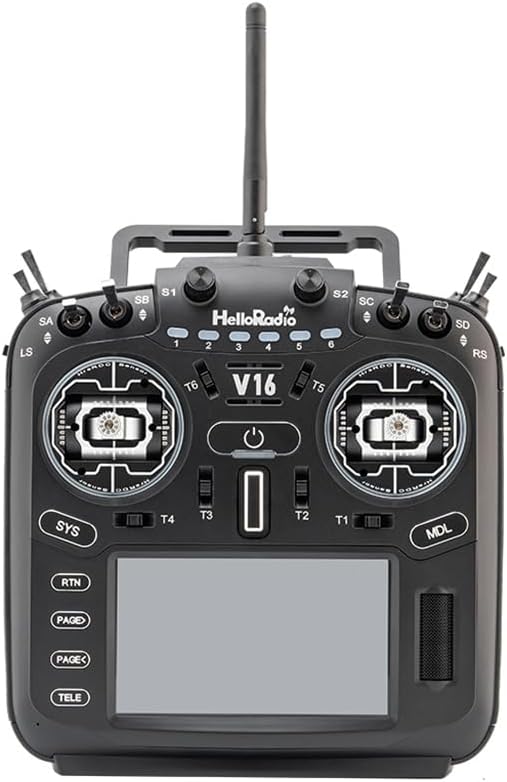
Rajah 2.1: Depan view of the V16 MAX ELRS Multi Protocol Transmitter. This image displays the overall layout of the transmitter, including the central power button, gimbals, switches, and the touch screen display at the bottom.

Rajah 2.2: jarak dekat view of the right gimbal and surrounding switches (T1, T2, T5, T6) on the V16 MAX ELRS Transmitter. This highlights the precision RDC90 joystick sensor and the arrangement of control toggles.

Rajah 2.3: Terperinci view of the left gimbal on the V16 MAX ELRS Transmitter, showcasing the RDC90 sensor and the robust CNC metal joystick material. The labels 'HrsRDC Sensor' are visible around the gimbal housing.

Rajah 2.4: sebelah view of the V16 MAX ELRS Multi Protocol Transmitter, showing its ergonomic design and the placement of the antenna. This perspective illustrates the depth and contours of the device.
Komponen Utama:
- Gimbal: Equipped with RDC90 joystick sensors for precise control. The MAXR9 model features CNC metal joysticks.
- Suis: Multiple programmable switches (SA, SB, SC, SD, LS, RS, T1-T6) for various functions.
- Paparan Skrin Sentuh: Intuitive interface for navigation and settings adjustments.
- Butang Kuasa: Central button for turning the transmitter on/off.
- Butang Navigasi: SYS, RTN, PAGE+, PAGE-, TELE buttons for menu navigation.
- Antena: High-frequency antenna for reliable signal transmission.
- ELRS Module: Built-in ExpressLRS module with up to 1000mW power output.
3. Persediaan
3.1 Pengecasan Awal
Before first use, ensure the transmitter's internal battery is fully charged. Connect the transmitter to a compatible USB-C power source using the provided cable. The charging indicator on the device will show charging status.
3.2 Firmware (EdgeTX/OpenTX)
Your V16 MAX transmitter comes pre-installed with either EdgeTX or OpenTX firmware. It is recommended to check for and update to the latest stable firmware version for optimal performance and access to new features. Refer to the official EdgeTX or OpenTX documentation for detailed firmware update procedures.
3.3 Binding to Receiver
- Hidupkan pemancar.
- Navigate to the 'Model Setup' menu on the touch screen.
- Select the appropriate ELRS protocol and binding option.
- Put your ELRS receiver into binding mode (refer to your receiver's manual for specific instructions).
- Initiate the binding process on the transmitter. The transmitter and receiver should establish a connection, indicated by a solid LED on the receiver.
3.4 Penentukuran Gimbal
For accurate control, it is crucial to calibrate the gimbals. Access the 'Calibration' menu within the system settings. Follow the on-screen prompts to move the gimbals through their full range of motion. This ensures the transmitter accurately registers stick inputs.
4. Arahan Operasi
4.1 Menghidupkan/Mematikan
- Untuk Menghidupkan: Press and hold the central power button until the screen illuminates and the system boots up.
- Untuk Mematikan: Press and hold the central power button. A power-off confirmation prompt will appear on the screen. Confirm to shut down the transmitter.
4.2 Menu Navigasi
The V16 MAX features a touch screen for intuitive menu navigation. You can also use the dedicated navigation buttons:
- Skrin Sentuh: Tap icons and swipe to navigate through menus and adjust settings.
- SYS Button: Access the main system settings menu.
- RTN Button: Kembali ke skrin atau menu sebelumnya.
- PAGE+ / PAGE- Buttons: Scroll through pages within a menu.
- TELE Button: Access telemetry data screens.
4.3 Model Setup and Configuration
The transmitter allows for multiple model memories, each with customizable settings. To set up a new model:
- From the main screen, press the MDL button or navigate to 'Model Select'.
- Select an empty model slot or create a new model.
- Configure model type (e.g., airplane, helicopter, drone), channel assignments, mixes, curves, and flight modes according to your specific aircraft's requirements.
- Save your model settings before exiting.
4.4 Voice Assistant and Sensory Control
The V16 MAX includes a voice assistant and sensory control features. These can be configured within the system settings to provide audible feedback or respond to specific gestures, enhancing the user experience. Refer to the firmware's specific documentation for detailed setup of these advanced features.
5. Penyelenggaraan
5.1 Pembersihan
Regularly clean the transmitter's exterior with a soft, dry, lint-free cloth. For stubborn dirt, a slightly damp cloth can be used, but ensure no moisture enters the device. Avoid using harsh chemicals or abrasive cleaners.
5.2 Penyimpanan
When not in use, store the transmitter in a cool, dry place, away from direct sunlight and extreme temperatures. It is recommended to store it in a protective case to prevent physical damage.
5.3 Penjagaan Bateri
To prolong battery life, avoid fully discharging the battery frequently. If storing for extended periods, charge the battery to approximately 50-60% capacity.
6. Penyelesaian masalah
6.1 Transmitter Not Powering On
- Periksa Bateri: Ensure the battery is sufficiently charged. Connect to a power source and attempt to power on again.
- Butang Kuasa: Pastikan anda menekan dan menahan butang kuasa untuk tempoh yang diperlukan (biasanya 2-3 saat).
6.2 No Signal to Receiver
- Mengikat: Verify that the transmitter and receiver are correctly bound. Re-perform the binding process if necessary.
- Pemilihan Model: Pastikan model yang betul dipilih pada pemancar.
- Antena: Check that the transmitter antenna is securely attached and properly oriented.
- ELRS Module: Confirm the internal ELRS module is active and configured correctly in the firmware settings.
6.3 Gimbal Input Issues
- Penentukuran: Re-calibrate the gimbals as described in Section 3.4.
- Halangan Fizikal: Check for any physical debris or obstruction around the gimbals.
6.4 Skrin Sentuh Tidak Responsif
- Mulakan semula: Kitaran kuasa pemancar.
- Perisian tegar: Ensure the firmware is up to date. A corrupted firmware can sometimes cause display issues.
7. Spesifikasi
| Ciri | Penerangan |
|---|---|
| Model | V16 MAX (MAXR9 black) |
| Built-in ELRS Power | Maximum 1000mW |
| Joystick Sensor | RDC90 |
| Button and Handle Material | plastik |
| Joystick Material | CNC Metal |
| Pembantu Suara | ya |
| Sensory Control | ya |
| Colorful Aperture Security Guard | ya |
| Berat Barang | 28 Gram (0.988 auns) |
| Dimensi Produk | 4"P x 4"L x 2"T (lebih kurang 10.16 x 10.16 x 5.08 sm) |
| Teknologi Ketersambungan | Other (ELRS) |
8. Waranti dan Sokongan
For warranty information and technical support, please contact HELLORADIOSKY directly through their official website or the retailer from whom you purchased the product. Keep your proof of purchase for any warranty claims.
Additional support and community resources for EdgeTX and OpenTX firmware can be found on their respective official websites and forums. These communities often provide valuable insights and troubleshooting tips.