
1. Produk Lebihview
The AOOEPU WiFi Extender Signal Booster is designed to expand your existing wireless network coverage, eliminate Wi-Fi dead zones, and provide stable, high-speed internet access throughout your home or outdoor areas. This dual-band device supports both 2.4GHz and 5GHz frequencies, ensuring broad compatibility with various devices.
Ciri-ciri Utama:
- Kesambungan Dwi-Jalur: Operates on both 2.4GHz and 5GHz frequencies for versatile network extension.
- Liputan Lanjutan: Features four external antennas to penetrate walls and floors, extending Wi-Fi coverage up to 12880 sq. ft.
- Keserasian Tinggi: Supports up to 105 devices, including phones, tablets, laptops, smart TVs, security cameras, and printers.
- Prestasi Kelajuan Tinggi: Boosts internet speeds up to 1200 Mbps, ideal for streaming, gaming, and video conferencing.
- Sambungan Stabil: Provides a super stable signal, even through thick walls and appliances, ensuring uninterrupted online activities.
- Pelabuhan Ethernet: Includes RJ45 Ethernet ports for reliable wired connections to devices like game consoles and smart TVs.
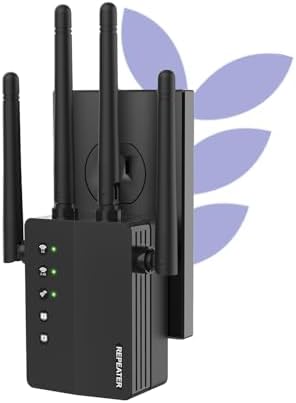
Figure 1: The AOOEPU WiFi Extender Signal Booster, a compact device with four external antennas, designed to plug directly into a standard wall outlet. Green indicator lights are visible, signifying active connections.
2. Persediaan dan Pemasangan
The AOOEPU WiFi Extender offers multiple modes for flexible network setup. Follow these steps for quick and easy installation.
2.1. Quick Setup using WPS Button
- Hidupkan kuasa: Plug the WiFi Extender into a power outlet within the range of your existing main Wi-Fi router.
- Tekan WPS pada Extender: Locate and press the WPS button on the AOOEPU WiFi Extender. The WPS indicator light should start blinking.
- Tekan WPS pada Penghala: Dalam masa dua minit, tekan butang WPS pada penghala Wi-Fi utama anda.
- Pengesahan Sambungan: Wait for the indicator lights on the extender to become solid, indicating a successful connection. The extender will automatically pair with your router.

Figure 2: Visual guide for the WPS (Wi-Fi Protected Setup) method, demonstrating how to quickly connect the extender to your existing router by pressing the WPS buttons on both devices.
2.2. Manual Setup (Web pelayar)
- Hidupkan kuasa: Plug the WiFi Extender into a power outlet.
- Sambung ke Rangkaian Extender: On your computer or mobile device, connect to the extender's default Wi-Fi network (e.g., "AOOEPU_Extender" or similar, check the device label for the exact name). No password is required initially.
- Akses Halaman Persediaan: Buka a web browser and enter the default IP address or web address (e.g., 192.168.10.1 or repea.ter, refer to the manual for exact details).
- log masuk: Enter the default username and password (usually "admin" for both, check the device label).
- Pilih Mod: Pilih mod pengendalian yang anda inginkan (Repeater, AP atau Router).
- Konfigurasikan Rangkaian: Follow the on-screen instructions to select your existing Wi-Fi network and enter its password. You can also set a new name and password for the extended network.
- Gunakan Tetapan: Simpan tetapan dan tunggu sehingga extender dimulakan semula.
- Sambung semula: Reconnect your devices to the newly configured extended Wi-Fi network.
3. Mod Operasi
The AOOEPU WiFi Extender supports three primary operating modes to suit various networking needs:
- Mod Pengulang: Meluaskan liputan rangkaian wayarles sedia ada. Ini adalah mod paling biasa untuk menghapuskan zon mati Wi-Fi.
- Mod AP (Titik Akses): Transforms a wired network connection into a wireless one. Ideal for adding Wi-Fi capability to a wired-only router.
- Mod Penghala: Functions as a standalone router, creating a new private wireless network.

Figure 3: An illustration of the three distinct operating modes: AP Mode, Repeater Mode, and Router Mode, detailing their respective network configurations and applications.
4. Ketersambungan dan Keserasian
This WiFi Extender is designed for broad compatibility and robust connectivity, supporting a wide array of devices and providing stable connections for various activities.
4.1. Keserasian Peranti
The extender can connect up to 105 devices simultaneously, ensuring all your smart devices, from entertainment systems to smart home gadgets, stay connected.

Figure 4: The extender's wide compatibility, illustrated with icons of common devices such as game consoles, cameras, computers, smartphones, and smart TVs, all capable of connecting to the extended network.
4.2. Ethernet Port Usage
The integrated RJ45 Ethernet ports allow for stable wired connections, which are ideal for devices requiring maximum speed and reliability, such as gaming consoles, desktop computers, and smart televisions.

Rajah 5: Satu terperinci view of the Ethernet ports on the extender, demonstrating how wired devices can be connected for enhanced stability and speed.
5. Penyelesaian masalah
If you encounter issues with your AOOEPU WiFi Extender, please refer to the following common troubleshooting steps:
- Tiada Akses Internet Selepas Persediaan:
- Ensure the extender is within the effective range of your main router.
- Sahkan bahawa kata laluan Wi-Fi yang dimasukkan semasa persediaan adalah betul.
- Cuba mulakan semula penghala utama dan pemanjang anda.
- Slow Speed on Extended Network:
- Relocate the extender closer to your main router to ensure a strong signal for the extender itself.
- Avoid placing the extender near large metal objects, concrete walls, or other electronic devices that may cause interference.
- Ensure your main router is providing adequate speed.
- Cannot Access Setup Page:
- Ensure your device is connected to the extender's default Wi-Fi network (not your main router's network).
- Kosongkan cache dan kuki pelayar anda atau cuba yang lain web pelayar.
- Verify the IP address or web address is entered correctly.
- Sambungan Terputus-putus:
- Check for firmware updates for the extender on the AOOEPU official webtapak.
- Ensure there are no physical obstructions or sources of interference between the extender and your devices.
- Consider resetting the extender to factory defaults and reconfiguring it.
6. Spesifikasi
| Atribut | Perincian |
|---|---|
| Jenama | AOOEPU |
| Nombor Model | AOOEPU-0630-1 |
| Dimensi Produk | 7.48 x 3.74 x 2.4 inci |
| Berat Barang | 5.6 auns |
| Standard Komunikasi Tanpa Wayar | 2.4 GHz Radio Frequency, 5 GHz Radio Frequency (Dual Band) |
| Kadar Pemindahan Data | Sehingga 1200 Megabait Sesaat |
| Jenis Penyambung | Pelabuhan Ethernet RJ45 |
| Ciri Khas | 1-Tap Setup, 360 Degree Coverage, Directional Antenna, Firewall, WiFi Mesh (compatible) |
| Kawasan Liputan | Sehingga 12880 Sq. kaki |
| Peranti Maksimum Disokong | 105 Peranti |
7. Penyelenggaraan
To ensure optimal performance and longevity of your AOOEPU WiFi Extender, consider the following maintenance tips:
- Mula Semula Biasa: Periodically restart the extender (unplug and plug back in after 10 seconds) to clear its memory and refresh its connection.
- Kemas kini Firmware: Check the official AOOEPU weblaman web untuk sebarang kemas kini perisian tegar yang tersedia. Mengemas kini perisian tegar dapat meningkatkan prestasi, kestabilan dan keselamatan.
- Peletakan Optimum: Ensure the extender is placed in an open area, away from obstructions and sources of electromagnetic interference (e.g., microwaves, cordless phones, large metal objects).
- Pembersihan: Lap bahagian luar peranti dengan kain lembut dan kering untuk menghilangkan habuk. Jangan gunakan pembersih cecair atau aerosol.
- Keadaan Persekitaran: Operate the extender within recommended temperature and humidity ranges to prevent damage.
8. Waranti dan Sokongan
AOOEPU is committed to providing high-quality products and customer satisfaction. For detailed warranty information and technical support, please refer to the following resources:
- Maklumat Waranti: Please refer to the warranty card included in your product packaging for specific terms and conditions. Standard warranty typically covers manufacturing defects for a period specified at purchase.
- Sokongan Teknikal: For technical assistance, setup guidance, or troubleshooting beyond this manual, please visit the official AOOEPU support webtapak atau hubungi perkhidmatan pelanggan mereka.
- Sumber Dalam Talian: Additional FAQs, video tutorials, and updated manuals may be available on the AOOEPU brand store or product page.
Note: Protection plans are available for purchase separately through Amazon, offering extended coverage beyond the manufacturer's warranty.