
1. Produk Lebihview
The KESHIDE Digital Alarm Clock Model 210 is a battery-operated alarm clock featuring a large LCD display, indoor temperature reading, night light, and snooze function. It is designed for ease of use in various settings such as bedrooms, offices, and during travel.

Rajah 1: Depan view of the KESHIDE Digital Alarm Clock Model 210.
Ciri-ciri Utama:
- Large LCD display with time, date, and indoor temperature.
- 12/24 hour format selection.
- Daily alarm with 5-minute snooze function.
- Night light with a 5-second illumination or glow-in-the-dark function.
- Temperature display in Celsius (℃) or Fahrenheit (℉).
- Battery operated (3 AAA batteries, not included).
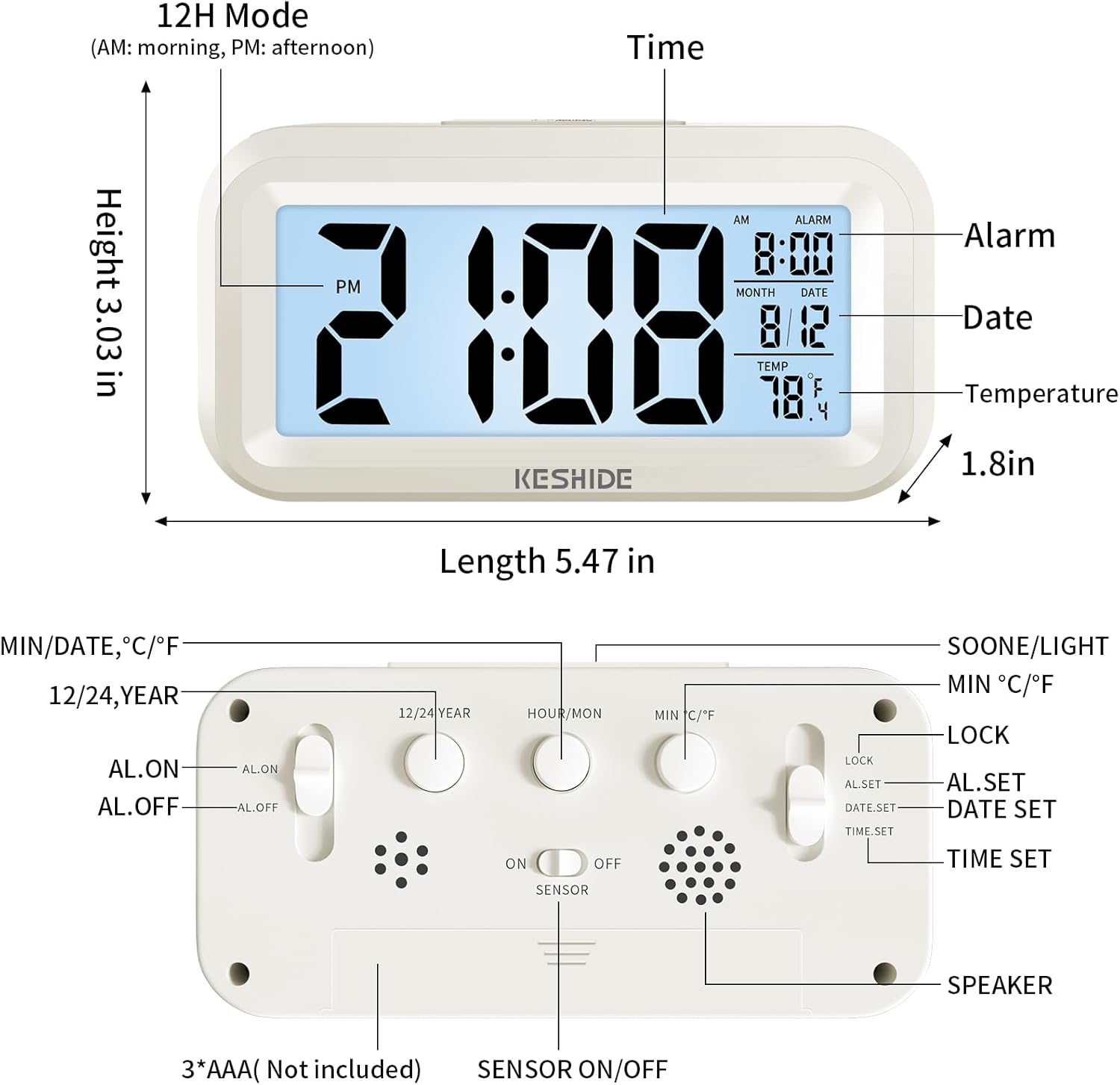
Figure 2: Labeled diagram of the alarm clock, showing display elements and dimensions.
2. Persediaan
2.1 Pemasangan Bateri
- Cari petak bateri di belakang jam.
- Buka penutup petak bateri.
- Insert 3 new AAA batteries (not provided), ensuring correct polarity (+/-).
- Tutup penutup petak bateri dengan selamat.

Figure 3: Back panel controls and battery compartment.
3. Arahan Operasi
3.1 Menetapkan Masa dan Tarikh
- Luncurkan LOCK/AL.SET/DATE.SET/TIME.SET switch on the back to MASA DITETAPKAN.
- Tekan ke HOUR/MON butang untuk menyesuaikan jam.
- Tekan ke MIN/TARIKH butang untuk menyesuaikan minit.
- To set the year, press the 12/24 YEAR butang.
- To set the month, slide the switch to DATE.SET dan tekan HOUR/MON.
- To set the day, slide the switch to DATE.SET dan tekan MIN/TARIKH.
- Once time and date are set, slide the switch back to KUNCI untuk menyimpan tetapan.
3.2 Pemilihan Format 12/24 Jam
While in normal time display mode (switch set to KUNCItekan butang 12/24 YEAR button to toggle between 12-hour (AM/PM) and 24-hour formats.

Figure 4: Switching between 12-hour and 24-hour time display.
3.3 Menetapkan Penggera
- Luncurkan LOCK/AL.SET/DATE.SET/TIME.SET switch on the back to AL.SET.
- Tekan ke HOUR/MON butang untuk menyesuaikan jam penggera.
- Tekan ke MIN/TARIKH butang untuk menyesuaikan minit penggera.
- Once the alarm time is set, slide the switch back to KUNCI.
- To activate or deactivate the alarm, use the AL.ON/AL.OFF switch on the back. When set to AL.ON, an alarm icon will appear on the display.
3.4 Fungsi Tunda
Apabila penggera berbunyi, tekan besar SNOOZE / CAHAYA button on the top of the clock. The alarm will temporarily stop and sound again after approximately five minutes. To turn off the alarm completely, press any button on the back of the clock, or the alarm will automatically stop after 60 seconds if no action is taken.
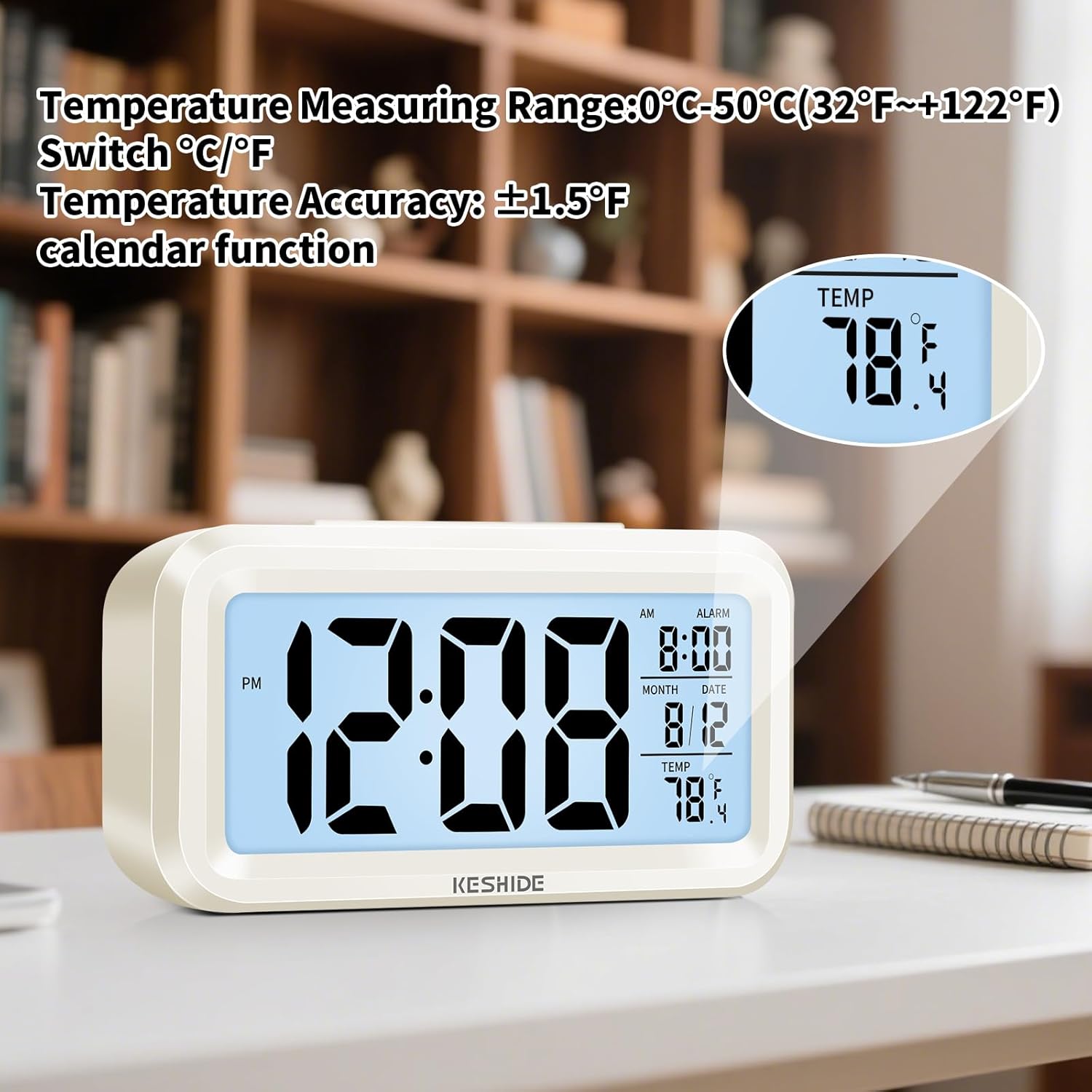
Figure 5: Activating the snooze function.
3.5 Night Light and Backlight
- Lampu Latar Sementara: Tekan ke SNOOZE / CAHAYA button on the top to illuminate the screen for five seconds.
- Automatic Glow-in-the-Dark: The clock features a photosensitive sensor. Slide the SENSOR HIDUP/MATI switch on the back to ON. In dark environments, the screen will emit a soft glow, allowing you to see the time without pressing any buttons. Slide the switch to DIMATIKAN untuk melumpuhkan ciri ini.

Figure 6: Automatic screen standby during the day and soft glow at night.
3.6 Paparan Suhu
The clock displays the indoor temperature. To switch between Celsius (℃) and Fahrenheit (℉), press the MIN ℃/℉ button on the back of the clock. The temperature range is 0℃~50℃ (32℉~122℉).

Figure 7: Indoor temperature display.
4. Penyelenggaraan
4.1 Penggantian Bateri
When the display dims or functions become erratic, it is time to replace the batteries. Follow the steps in Section 2.1 for battery installation.
4.2 Pembersihan
Wipe the clock with a soft, dry cloth. Do not use abrasive cleaners or immerse the clock in water.
5. Penyelesaian masalah
- Paparan kosong atau malap:
Ensure batteries are correctly installed and not depleted. Replace with fresh AAA batteries. - Penggera tidak berbunyi:
Semak sama ada AL.ON/AL.OFF suis ditetapkan ke AL.ON. Verify that the alarm time is correctly set. - Night light/backlight not working:
For temporary backlight, ensure the SNOOZE / CAHAYA button is pressed firmly. For automatic glow, ensure the SENSOR HIDUP/MATI suis ditetapkan ke ON and the environment is sufficiently dark. - Bacaan suhu tidak betul:
The clock measures ambient indoor temperature. Ensure it is not placed near heat sources or air conditioning vents that could affect readings.
6. Spesifikasi
| Ciri | Perincian |
|---|---|
| Jenama | KESHIDE |
| Nombor Model | 210 |
| Jenis Paparan | LCD |
| Sumber Kuasa | 3 x Bateri AAA (tidak termasuk) |
| Dimensi Produk | 6.7"W x 3"H |
| Berat Barang | 5.6 auns |
| Julat Suhu | 0℃~50℃ (32℉~122℉) |
| bahan | plastik |
| Jenis Pemasangan | Atas meja |
7. Waranti dan Sokongan
KESHIDE is committed to providing quality products and customer satisfaction. If you encounter any issues or have concerns regarding your product, please contact KESHIDE customer service via the Amazon Platform. We are dedicated to addressing your problems even if the standard return window has closed, ensuring you receive appropriate support.