
1. Pengenalan
This manual provides essential instructions for the safe operation, setup, and maintenance of your FINOTI D27 Pro MAX GPS Drone. The D27 Pro MAX is an advanced quadcopter featuring an 8K EIS HD camera, 5G WiFi FPV transmission, 360° obstacle avoidance, and GPS-assisted flight modes. Please read this manual thoroughly before operating the drone to ensure proper function and to prevent damage or injury.

Image: The FINOTI D27 Pro MAX GPS Drone with its remote control, showcasing its design and integrated screen.
2. Garis Panduan Keselamatan
Adherence to these safety guidelines is crucial for preventing accidents, injuries, and damage to the drone or property.
- Persekitaran: Operate the drone in open areas, away from people, animals, buildings, and power lines. Avoid flying in strong winds, rain, or other adverse weather conditions.
- Jarak: Maintain a safe distance from the drone during operation. Do not attempt to catch the drone while it is flying.
- Keselamatan Bateri: Keep batteries away from naked flames or direct heat sources. Use only the provided charger and batteries. Do not overcharge or puncture batteries.
- Semakan Pra-Penerbangan: Always perform a pre-flight check to ensure all components are securely attached and functioning correctly.
- Pematuhan Undang-undang: Be aware of and comply with all local regulations regarding drone operation, including airspace restrictions and privacy laws.
- Sekatan Umur: This product is not suitable for children without adult supervision.
3. Kandungan Pakej
Sahkan bahawa semua item terdapat dalam pakej:
- D27 Pro MAX GPS Drone
- Remote Control with 4.5-inch Screen
- Flight Battery (3.7V 3000mAh) - Quantity may vary based on purchase (Single, Dual, or Triple Battery variant)
- Kabel Pengecas USB
- Spare Propellers (4 pieces)
- Manual Pengguna
- Storage Box/Bag
4. Persediaan
4.1. Mengecas Bateri
Before first use, fully charge the drone's flight battery and the remote control's internal battery.
- Connect the USB charging cable to the drone battery and a suitable USB power adapter (not included).
- Connect the USB charging cable to the remote control's charging port.
- Charging indicators will show the charging status. Disconnect once fully charged.
4.2. Pemasangan Baling-baling
Ensure propellers are correctly installed on the corresponding motor shafts. Match 'A' propellers with 'A' motors and 'B' propellers with 'B' motors. Incorrect installation will prevent flight.
4.3. Remote Control Preparation
Power on the remote control. The integrated 4.5-inch screen will activate. Ensure the remote control's battery is sufficiently charged.
4.4. Muat Turun Apl dan Sambungan
For advanced features and real-time FPV, download the dedicated drone application to your smartphone. Refer to the QR code in the quick start guide or search for the app name in your device's app store.
- Hidupkan dron dan alat kawalan jauh.
- On your smartphone, connect to the drone's Wi-Fi network (usually named 'D27-XXXXXX').
- Open the drone application. The live video feed should appear.
5. Arahan Operasi
5.1. Senarai Semak Pra-Penerbangan
- Pastikan bateri dron dan alat kawalan jauh dicas sepenuhnya.
- Periksa bahawa kipas dipasang dengan selamat dan tidak rosak.
- Verify that the camera lens is clean.
- Confirm GPS signal acquisition (if flying outdoors).
- Check for any obstructions in the flight path.
5.2. Berlepas dan Mendarat
After powering on the drone and remote, and completing calibration (refer to the quick start guide for calibration steps), you can initiate take-off.
- Berlepas Satu Kunci: Press the dedicated take-off button on the remote control. The drone will automatically ascend to a safe altitude and hover.
- Berlepas Manual: Push both joysticks simultaneously to the bottom-outer corners to unlock motors, then slowly push the left joystick up to ascend.
- Pendaratan Satu Kunci: Press the dedicated landing button. The drone will descend and land automatically.
- Pendaratan Manual: Slowly pull the left joystick down to descend.
5.3. Mod dan Ciri Penerbangan
The D27 Pro MAX offers several intelligent flight modes:
- GPS Intelligent Tracking: The drone will automatically follow the remote control or a designated target.
- Image Tracking: Identify a target on the screen, and the drone will automatically track its movement.
- Pengecaman Gerak Isyarat: Within 1-3 meters of the drone, perform specific hand gestures towards the camera to trigger photo or video recording.
- Route Multi-Point Planning Flight: Use the app to set multiple waypoints on a map. The drone will fly autonomously along the pre-set route.
- Fixed Point Surround: Select a central point on the map, then set a desired radius. The drone will orbit the central point at the specified distance.

Image: Illustration of the GPS homing feature, showing the drone returning to a designated home point.

Image: The drone maintaining a stable hover using optical flow positioning, depicted over a scenic waterfall.
5.4. Obstacle Avoidance
The D27 Pro MAX is equipped with 360° omnidirectional obstacle avoidance sensors. These sensors detect obstacles in the drone's path and automatically adjust its flight to prevent collisions. While highly effective, it is not a substitute for careful piloting and visual observation.

Image: Visual representation of the drone's 360° obstacle avoidance system detecting and reacting to its surroundings.
5.5. Return to Home (RTH) Function
The drone features multiple Return to Home functions for enhanced safety:
- GPS One-Click Return: Press the RTH button on the remote control, and the drone will return to its recorded take-off point.
- Low Power Return: If the drone's battery level becomes critically low, it will automatically initiate RTH.
- No Signal Return: If the connection between the drone and remote control is lost, the drone will automatically initiate RTH.
5.6. Camera Operation (8K EIS HD)
The D27 Pro MAX is equipped with an 8K EIS (Electronic Image Stabilization) HD camera for high-quality aerial photography and videography.
- Tangkapan Foto/Video: Gunakan butang khusus pada alat kawalan jauh atau antara muka aplikasi untuk mengambil foto atau memulakan/menghentikan rakaman video.
- Image Transmission: The 5G image transmission system provides a real-time view on the remote control's screen or connected smartphone.
- Perkongsian: Photos can be shared individually or in batches. Videos can be shared separately after recording.
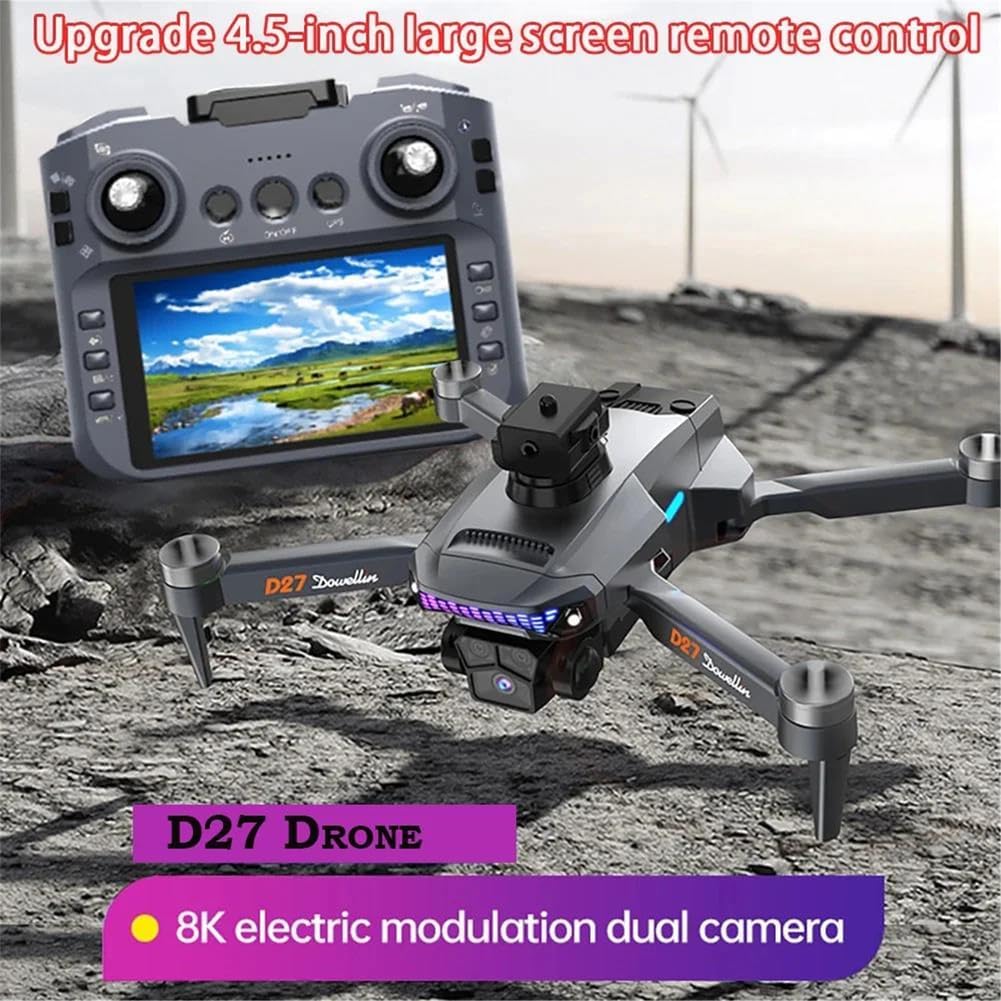
Image: The FINOTI D27 Pro MAX drone and its remote control, highlighting the 8K electric modulation dual camera system.
6. Penyelenggaraan
6.1. Pembersihan
Regular cleaning helps maintain performance and longevity.
- Wipe the drone body and remote control with a soft, dry cloth.
- Use a soft brush or compressed air to remove dust from motors and sensors.
- Clean the camera lens with a lens cleaning cloth.
6.2. Penggantian Baling-Baling
Inspect propellers for cracks or damage before each flight. Replace damaged propellers immediately using the provided spare parts. Ensure correct 'A' and 'B' propeller placement.
6.3. Penjagaan dan Penyimpanan Bateri
- Simpan bateri di tempat yang sejuk dan kering, jauh daripada cahaya matahari langsung dan haba.
- Do not store fully charged or completely depleted batteries for extended periods. Charge to approximately 50-60% for long-term storage.
- If the drone will not be used for an extended period, remove the flight battery.
7. Penyelesaian masalah
| Masalah | Kemungkinan Punca | Penyelesaian |
|---|---|---|
| Drone tidak dihidupkan | Low battery; Battery not connected | Charge battery; Reconnect battery securely |
| Drone cannot take off | Motors not unlocked; Incorrect propeller installation; Calibration error | Unlock motors (joysticks to bottom-outer); Check propeller orientation; Perform calibration |
| Poor image transmission/FPV feed | Weak Wi-Fi signal; Interference; Distance too far | Ensure strong Wi-Fi connection; Fly in open areas; Reduce distance to drone |
| Drone hanyut semasa penerbangan | Improper calibration; Strong wind | Recalibrate gyroscope/compass; Avoid flying in strong winds |
| Penghindaran halangan tidak berkesan | Sensors obstructed/dirty; Feature disabled | Clean sensors; Ensure feature is enabled in app/remote settings |
8. Spesifikasi
- model: D27 Pro MAX
- Jenama: FINOTI
- kamera: 8K EIS HD Lens
- Image Transmission: 5G WiFi FPV
- Kawalan Jauh: 4.5-inch Large Screen Remote Control
- Mengelakkan halangan: 360° Omnidirectional
- Jenis Motor: Tanpa berus
- Bateri Penerbangan: 3.7V 3000mAh
- Positioning System: GPS + Optical Flow
- Fungsi Pintar: GPS One-Click Return, Low Power Return, No Signal Return, GPS Intelligent Tracking, Image Tracking, Gesture Recognition, Route Multi-Point Planning, Fixed Point Surround, Aircraft Search Function.

Imej: Jarak dekat view of the low-noise brushless motor, emphasizing stability and wind resistance.