
1. Pengenalan
Thank you for choosing the VOPLLS G3 Smart Google TV Projector. This device combines advanced projection technology with the versatility of Google TV, offering a comprehensive entertainment experience. Featuring 4K input support, 2000 ANSI lumens brightness, Dolby Audio, and intelligent auto-correction features, the G3 projector is designed for both home and portable use. This manual provides essential information for setup, operation, maintenance, and troubleshooting to ensure optimal performance and enjoyment of your projector.

The VOPLLS G3 Smart Google TV Projector, showcasing its compact design and the vibrant Google TV interface projected onto a screen.
2. Persediaan
2.1 Membuka Kotak dan Kandungan Pakej
Keluarkan semua barang dari kotak dengan berhati-hati. Pastikan komponen berikut ada:
- VOPLLS G3 Google TV Projector
- Pendirian Pusing 360°
- HDMI Cable (1.5M/4.92ft)
- Kord Kuasa
- Manual Pengguna (dokumen ini)
- Alat Kawalan Jauh (bateri tidak disertakan)
2.2 Sambungan Kuasa
- Sambungkan kord kuasa ke port input kuasa projektor.
- Pasangkan hujung kord kuasa yang satu lagi ke dalam soket elektrik yang sesuai.
- Tekan butang kuasa pada projektor atau alat kawalan jauh untuk menghidupkan peranti.
2.3 Persediaan Awal (Google TV)
Upon first power-on, the projector will guide you through the Google TV setup process. This typically includes:
- Pemilihan Bahasa: Pilih bahasa pilihan anda.
- Sambungan Rangkaian: Connect to your Wi-Fi network (supports WiFi 6 for fast streaming).
- Log Masuk Akaun Google: Log masuk dengan akaun Google anda untuk mengakses ciri Google TV, apl dan pengesyoran diperibadikan.
- Pemasangan Apl: Install desired streaming applications like Netflix, Disney+, Prime Video, and Hulu.

The VOPLLS G3 projector displaying the Google TV home screen, featuring a wide array of streaming applications.
2.4 Peletakan dan Pelarasan Imej
The VOPLLS G3 features intelligent auto-correction for easy setup:
- Fokus Auto: The projector automatically adjusts for a crisp image in seconds, even after minor movements.
- Pembetulan Auto Keystone: Automatically corrects tilted frames to ensure a rectangular image.
- Pengelakan Halangan Pintar: The projector can detect and avoid wall outlets or picture frames, adjusting the image size and position accordingly.
- Automatic Screen Fit: If projecting onto a screen, the projector can automatically adjust the image to fit the screen boundaries.
- Zum Digital: Laraskan saiz imej dari 50% hingga 100% tanpa menggerakkan projektor.
- 360° Rotating Stand: The integrated stand allows for flexible projection angles, including ceiling projection.
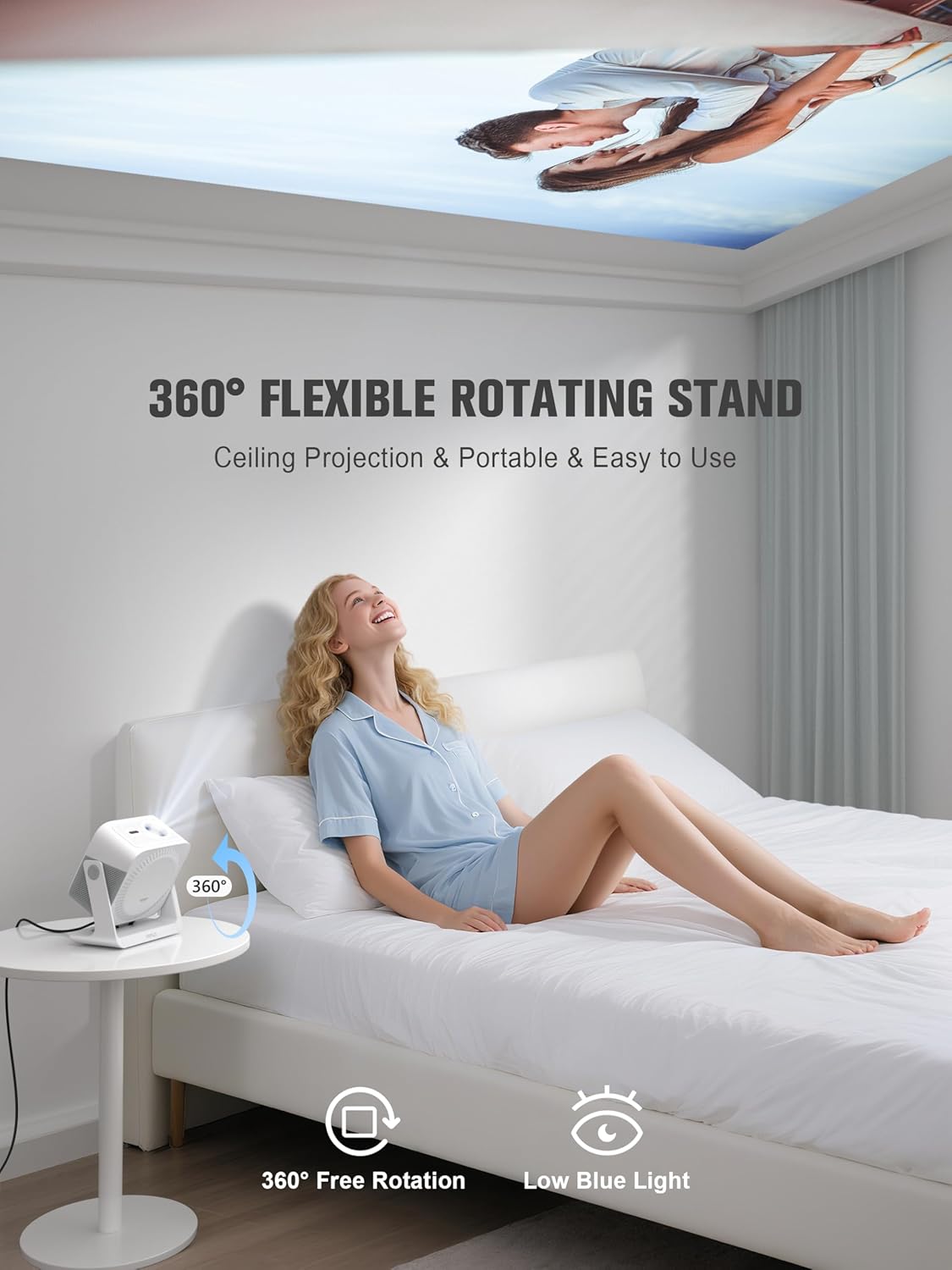
A user enjoying content projected onto the ceiling by the VOPLLS G3 projector, demonstrating its 360° rotating stand flexibility.

Visual representation of the VOPLLS G3 projector's automatic image correction features, including auto-focus, auto-keystone, obstacle avoidance, and screen fit.
3. Arahan Operasi
3.1 Navigasi Antara Muka Google TV
Navigate the Google TV interface using the provided remote control. The home screen provides access to your installed apps, personalized content recommendations, and live channels.
3.2 Kawalan Suara (Pembantu Google)
The projector integrates Google Assistant for hands-free control. Press the microphone button on your remote and speak commands such as:
- "Play [Movie/Show Name] on Netflix."
- "Lower volume."
- "Bagaimana cuaca?"
- "Open YouTube."

A user interacting with the VOPLLS G3 projector using the Google Voice Assistant via the remote control.
3.3 App Usage and Content
Access a wide range of applications from the Google Play Store. The projector comes pre-certified for popular platforms including Netflix, Disney+, Prime Video, and Hulu. Google TV's AI provides tailored recommendations based on your viewtabiat.
3.4 Ketersambungan
The VOPLLS G3 offers versatile connectivity options:
- Wi-Fi 6 (5G+2.4G): For high-speed wireless internet and streaming.
- Bluetooth 5.2 (Dua hala): Connect to external Bluetooth speakers or headphones for enhanced audio, or use the projector as a Bluetooth speaker.
- Port HDMI: Connect gaming consoles (e.g., PS5, Switch), laptops, or other HDMI-enabled devices.
- Port USB: Play media from USB drives.
- Bicu Audio 3.5mm: Sambungkan fon kepala berwayar atau pembesar suara luaran.
- Pencerminan Skrin: Supports AirPlay, Miracast, and Chromecast protocols for casting content from iPhone, Android, PC, or Mac devices.
3.5 Tetapan Audio (Dolby Atmos)
The projector features dual speakers with Dolby Atmos support for immersive audio. You can switch between movie mode for cinematic sound or party mode to use the projector as a standalone Bluetooth speaker. For private listening, pair zero-lag wireless headphones.

The VOPLLS G3 projector demonstrating its dual-channel Dolby Audio capabilities, creating an immersive sound experience.
3.6 Kid-Safe Mode
For family use, enable Kid-Safe Mode to filter content ratings, set viewing time limits, and activate bedtime lock screens, ensuring a safe viewpersekitaran untuk kanak-kanak.
4. Penyelenggaraan
4.1 Membersihkan Lensa
Gently clean the projector lens with a soft, lint-free cloth or a lens cleaning brush. Avoid using abrasive materials or harsh chemicals that could damage the lens coating.
4.2 Sistem Penyejukan
The projector features a smart dual-fan cooling system designed for quiet operation (approximately 30dB). Ensure the ventilation ports are not obstructed to maintain proper airflow and prevent overheating. Regularly check for dust accumulation around the vents.
4.3 LED Lamp kehidupan
The advanced LED light source is designed to last up to 100,000 hours, providing long-term, reliable performance without frequent lamp penggantian.
5. Penyelesaian masalah
If you encounter issues with your VOPLLS G3 projector, refer to the following common solutions:
- Tiada gambar:
- Pastikan kord kuasa disambungkan dengan selamat dan projektor dihidupkan.
- Check the input source (HDMI, USB, etc.) is correctly selected.
- Verify that the connected device (laptop, console) is powered on and outputting a signal.
- Tiada Bunyi:
- Increase the volume on both the projector and the connected source device.
- Check if external speakers or headphones are properly connected via Bluetooth or the 3.5mm jack.
- Ensure the audio output settings on the source device are configured correctly.
- Isu Kesambungan Wi-Fi/Bluetooth:
- Mulakan semula projektor dan penghala Wi-Fi/peranti Bluetooth anda.
- Pastikan projektor berada dalam julat rangkaian Wi-Fi atau peranti Bluetooth anda.
- Verify Wi-Fi password or Bluetooth pairing is correct.
- Image Not Clear/Distorted:
- Allow the auto-focus and auto-keystone correction features to complete their adjustments.
- Pastikan kanta projektor bersih.
- Adjust the projector's position to be perpendicular to the projection surface if auto-correction is insufficient.
Untuk isu yang berterusan, sila hubungi sokongan pelanggan.
6. Spesifikasi
| Ciri | Spesifikasi |
|---|---|
| Jenama | VOPLLS |
| Nombor Model | G3 |
| Resolusi Paparan | 1920 x 1080 (Native 1080p, supports 4K input) |
| Kecerahan | 2000 ANSI Lumen |
| Teknologi Ketersambungan | 3.5mm Jack, Bluetooth 5.2, HDMI, USB, Wi-Fi 6 |
| Ciri Khas | Google TV (Officially Licensed), Dolby Audio, Kid-Safe Mode, AI Smart Recommendations, HDR10+, 98% NTSC, 360° Portable Rotating Stand, Auto Focus/Keystone, Smart Obstacle Avoidance, Two-way Bluetooth, Airplay/Miracast/Chromecast, Voice Control (Google Assistant), Google Home app Control |
| Berat Barang | 5.29 paun |
| Dimensi Produk | 10 x 8 x 11 inci |
| LED Lamp kehidupan | Sehingga 100,000 jam |
7. Waranti dan Sokongan
The VOPLLS G3 Smart Google TV Projector comes with a Pelan perlindungan 3 tahun. VOPLLS is committed to providing excellent customer service, offering sokongan pelanggan seumur hidup dan 24/7 assistance for any inquiries or issues you may encounter. Please refer to your purchase documentation for specific warranty claim procedures.