
1. Pengenalan
The nuphy Air75 V3 is an 84-key, 75% layout low-profile mechanical keyboard designed for versatility and performance. It features hot-swappable switches, RGB backlighting, gasket-mounted construction, and multiple connectivity options including Bluetooth, 2.4GHz wireless, and USB-C wired. This manual provides detailed instructions for setting up, operating, and maintaining your keyboard.

Image: The nuphy Air75 V3 mechanical keyboard in black, showcasing its compact 75% layout and vibrant keycap accents.
2. Kandungan Pakej
Please verify that all items are present in your nuphy Air75 V3 package:
- 1 x nuphy Air75 V3 Keyboard
- 1 x Kabel USB-C ke USB-C
- 1 x High-Profile Modul Tombol
- 1 x Rendah-Profile Modul Tombol
- 1 x 2.4G Dongle
- Keycap/Switch Puller (not explicitly listed but common accessory)
- Quick Guide & FAQ (documentation)
Video: An unboxing demonstration of the nuphy Air75 V3, showing the keyboard and its included accessories.
3. Ciri-ciri Produk
- Reka Bentuk Pemasangan Gasket: Ensures a smooth and quiet typing experience by absorbing keystrokes and reducing vibration.
- Rendah-Profile & Compact: With a thickness of 13.2mm and a 75% layout, it saves desktop space and is highly portable.
- Kesambungan Berbilang Peranti: Supports Bluetooth, 2.4GHz wireless, and USB-C wired connections, allowing simultaneous connection to up to four devices.
- NuPhyIO Customization Software: Enables personalized keyboard configurations, including key remapping and macro creation.
- Removable Knobs: Customizable knobs can be set for volume control, zoom, or other functions via NuPhyIO.
- Latensi Rendah: Achieves a 1000Hz polling rate in wired and 2.4GHz modes for responsive performance.
- RGB Backlight & PBT Keycaps: Features extensive theme effects and durable, colorfast Doubleshot PBT keycaps.
- Hayat Bateri yang Panjang: Equipped with a 4000 mAh battery for extended wireless use.

Image: The nuphy Air75 V3 keyboard with a graphic emphasizing its 4000mAh high-capacity battery.
4. Persediaan
4.1 Pengecasan Awal
Before first use, connect the keyboard to a USB-C power source using the provided cable to ensure it is fully charged. The battery indicator lights will show charging status.
4.2 Mod Kesambungan
Air75 V3 menyokong tiga jenis sambungan:
- Berwayar USB-C: Connect the keyboard directly to your device using the USB-C cable.
- Wayarles 2.4GHz: Insert the 2.4G dongle into your device's USB port. The keyboard will automatically connect.
- Bluetooth: The keyboard can pair with up to three Bluetooth devices.
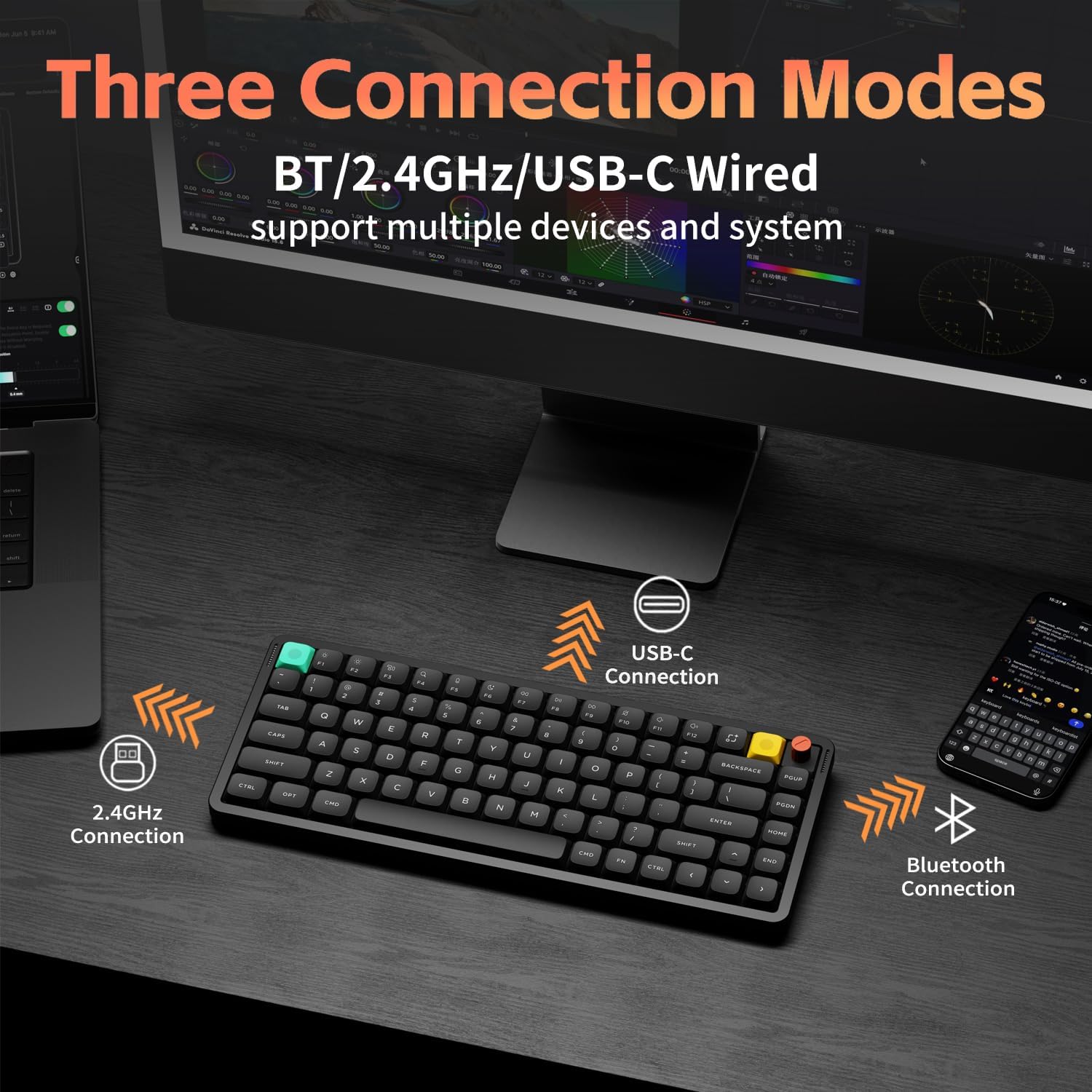
Image: Visual representation of the nuphy Air75 V3's three connection modes: Bluetooth, 2.4GHz wireless, and USB-C wired, connecting to a phone, laptop, and monitor.
4.3 Switching Between Devices (Wireless)
To switch between paired Bluetooth devices or the 2.4GHz dongle:
- Ensure the keyboard is in wireless mode (switch on the back).
- Tekan dan tahan butang Fn kunci.
- Tekan 1, 2, atau 3 for Bluetooth channels, or 4 for the 2.4GHz dongle.
Video: A demonstration of switching between wireless devices on the nuphy Air75 V3 keyboard using function keys.
4.4 Suis Sistem Pengendalian
Use the switch on the back of the keyboard to select between Windows (WIN) and Mac (MAC) layouts for optimal key functionality.
4.5 Kaki Boleh Laras
The keyboard features a 3-stage adjustable kickstand, allowing you to set the typing angle to 4°, 8°, or 10° for ergonomic comfort.

Image: The nuphy Air75 V3 keyboard demonstrating its three adjustable typing angles (4°, 8°, 10°) for ergonomic customization.
5. Arahan Operasi
5.1 Hidupkan/Mati Kuasa
Locate the power switch on the back of the keyboard to turn it on or off.
5.2 Kawalan Lampu Latar
The Air75 V3 features customizable RGB backlighting:
- Tukar Warna: Tekan Fn + Anak Panah Kanan.
- Kesan Perubahan: Tekan Fn + Anak Panah Kiri.
- Laraskan Kecerahan: Tekan Fn + Anak Panah Atas (peningkatan) atau Fn + Anak Panah Bawah (menurun).

Image: The nuphy Air75 V3 keyboard illuminated with colorful RGB backlighting, showcasing its dynamic lighting effects.
5.3 Knob Functionality
The included knobs are removable and customizable. By default, they may control volume or other media functions. Use the NuPhyIO software to reassign their actions.
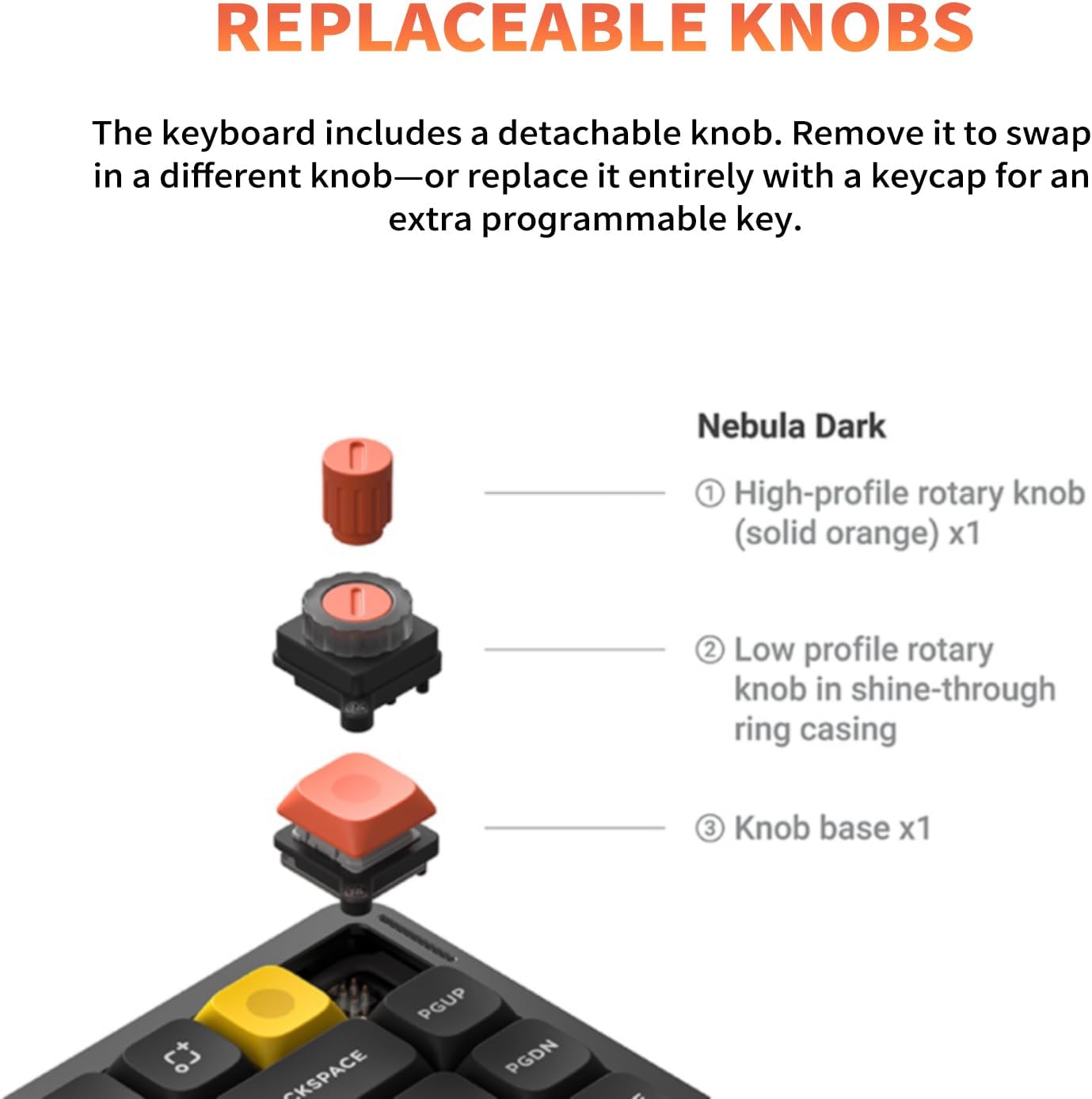
Image: A diagram illustrating the replaceable knob components of the nuphy Air75 V3 keyboard, including high-profile dan pro rendahfile pilihan.
5.4 NuPhyIO Software
The NuPhyIO software allows for advanced customization of your Air75 V3 keyboard. You can remap keys, create macros, and fine-tune lighting effects. Access the software via the official nuphy webtapak.

Image: A screenshot of the NuPhyIO software interface displayed on a monitor, showing options for key remapping, lighting effects, and macro recording for the nuphy Air75 V3 keyboard.
6. Penyelenggaraan
- Pembersihan: Use a soft, dry cloth to clean the keyboard surface. For keycaps, a damp kain dengan sabun lembut boleh digunakan, memastikan tiada cecair memasuki suis.
- Keycap/Switch Replacement: Use the provided keycap and switch puller for safe removal and replacement of components.
- Storan: Simpan papan kekunci di tempat yang sejuk dan kering jauh dari cahaya matahari langsung dan suhu yang melampau.
7. Penyelesaian masalah
- Isu Ketersambungan: Ensure the keyboard is charged and the correct mode (Bluetooth, 2.4GHz, or wired) is selected. Re-pair Bluetooth devices if necessary.
- Kunci Tidak Menjawab: Check if the keyboard is powered on and connected. If hot-swappable, ensure switches are properly seated.
- Lampu latar tidak berfungsi: Laraskan kecerahan menggunakan Fn + Anak Panah Atas/Bawah. Check settings in NuPhyIO software.
- Lag in Wireless Mode: Ensure the 2.4GHz dongle is used for optimal low-latency performance, especially during gaming.
8. Spesifikasi
| Dimensi Produk | 12.56 x 5.07 x 1.76 inci |
| Berat Barang | 1.6 paun |
| Pengeluar | nuphy |
| Nombor Model Item | Air75 V3 |
| Bateri | 1 x 12V battery required (4000 mAh capacity) |
| Teknologi Ketersambungan | USB-C/2.4GHz/Bluetooth |
| Peranti Serasi | Laptop, PC, Tablet (Windows/macOS/Linux support) |
| Backlighting papan kekunci | RGB |
| bahan | Acrylonitrile Butadiene Styrene, Aluminum, Polybutylene Terephthalate |
9. Waranti dan Sokongan
Untuk maklumat jaminan dan sokongan teknikal, sila rujuk nuphy rasmi webtapak atau hubungi perkhidmatan pelanggan mereka. Simpan resit pembelian anda untuk tuntutan waranti.