1. Pengenalan
Thank you for choosing the Fame SPD Hybrid Wave Sample Pad. This versatile digital drum and sample pad is designed for musicians seeking a powerful and flexible percussion instrument. This manual will guide you through the setup, operation, and maintenance of your device, ensuring optimal performance and longevity.
2. Maklumat Keselamatan
Please read and adhere to the following safety precautions to prevent damage to the device or personal injury:
- Bekalan Kuasa: Only use the approved AC adapter provided with this unit. Using an unauthorized adapter may cause malfunction or damage.
- Pendedahan Kelembapan: Do not expose the product to rain, moisture, or any liquids. Avoid using it in damp persekitaran.
- Pengudaraan: Pastikan pengudaraan yang betul di sekitar unit. Jangan halang bukaan pengudaraan.
- penempatan: Letakkan unit pada permukaan yang stabil dan rata. Elakkan meletakkannya berhampiran sumber haba atau di bawah cahaya matahari langsung.
- Pembersihan: Disconnect the power adapter before cleaning. Use a soft, dry cloth. Do not use liquid cleaners or aerosols.

Rajah 2.1: Bawah view of the unit, highlighting safety warnings and power input details (DC 9V 2A).
3. Produk Lebihview
The Fame SPD Hybrid Wave Sample Pad features a robust design with responsive pads and intuitive controls for dynamic performance.
3.1 Panel Hadapan dan Kawalan

Rajah 3.1: Atas view of the SPD Hybrid Wave Sample Pad, illustrating the layout of pads and controls.
- Tuala wanita: Six velocity-sensitive pads for triggering sounds and samples.
- paparan: LCD screen for navigating menus and viewdalam parameter.
- Tombol Master: Melaraskan volum keluaran keseluruhan.
- Phone Knob: Melaraskan kelantangan output fon kepala.
- FX Knobs (FX1, FX2): Control parameters for built-in effects.
- Butang Navigasi: (HOME, SAMPLE, TEMPO, PAD EDIT, KIT SET, UTIL, SYSTEM, BT) For accessing various functions and settings.
- Directional Buttons & OK: Untuk navigasi dan pemilihan menu.
- Butang Kuasa: Menghidupkan atau mematikan unit.
3.2 Sambungan Panel Belakang

Figure 3.2: Rear panel connections, including power, audio, MIDI, USB, and trigger inputs.
- DC DALAM: Power adapter input (9V 2A).
- MASTER OUT (L/MONO, R): Stereo audio outputs for connecting to an amppenguat, pengadun atau antara muka audio.
- LINE IN (L/MONO, R): Stereo audio inputs for connecting external audio sources.
- DAPATKAN: Adjusts the input level for the LINE IN.
- USB-A: For connecting USB storage devices (e.g., USB flash drives).
- USB-B: Untuk menyambung ke komputer bagi pemindahan data MIDI dan audio.
- MIDI MASUK/KELUAR: Standard MIDI connections for external MIDI devices.
- TRIGGER IN (1/2, 3/4, 5/6, 7/8): Inputs for connecting external drum triggers or pads.
- PEDAL IN (1, 2): Inputs for connecting footswitches or expression pedals.
4. Persediaan
Follow these steps to set up your Fame SPD Hybrid Wave Sample Pad:
- Sambungan Kuasa: Connect the approved AC adapter to the DC IN port on the rear panel, then plug the adapter into a power outlet.
- Output Audio:
- For stereo output, connect cables from the MASTER OUT (L/MONO, R) jacks to your amppenguat, pengadun atau antara muka audio.
- For mono output, connect a cable from the MASTER OUT (L/MONO) jack.
- For personal monitoring, connect headphones to the PHONE jack on the front panel.
- External Triggers/Pedals (Optional): Connect external drum triggers or pads to the TRIGGER IN jacks (1/2, 3/4, 5/6, 7/8) and footswitches or expression pedals to the PEDAL IN jacks (1, 2) as needed.
- Sambungan USB (Pilihan):
- To connect to a computer for MIDI/audio, use a USB-B cable to connect the USB-B port to your computer.
- To use a USB flash drive for importing/exporting samples, connect it to the USB-A port.
- Hidupkan kuasa: Press the POWER button on the front panel to turn on the unit.
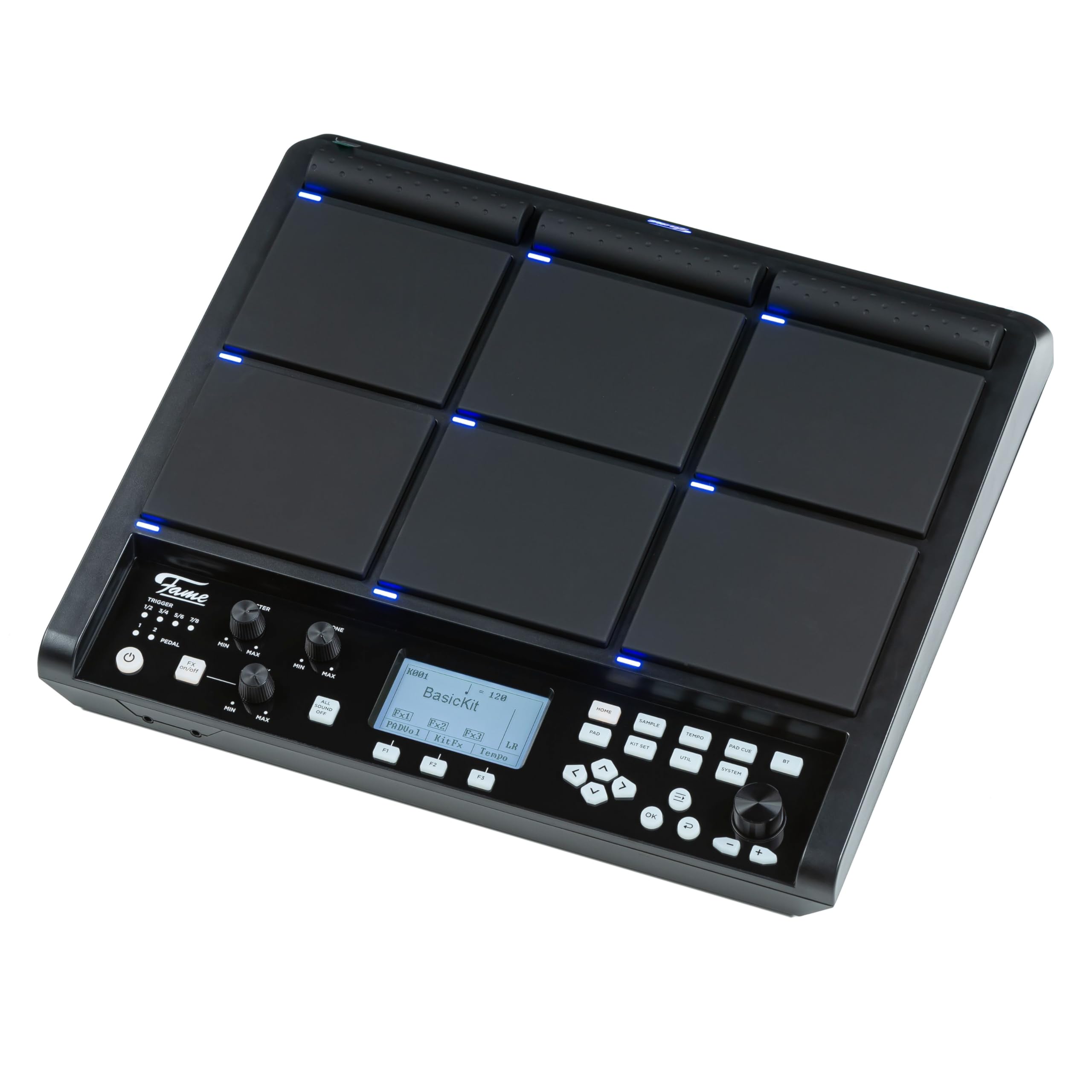
Figure 4.1: The SPD Hybrid Wave Sample Pad connected to its power adapter.
5. Arahan Operasi
5.1 Operasi Asas
- Melaraskan Kelantangan: Use the MASTER knob to control the main output volume and the PHONE knob for headphone volume.
- Playing Pads: Strike the pads to trigger assigned sounds. The pads are velocity-sensitive, meaning the sound will vary based on how hard you strike them.
- Menavigasi Menu: Use the directional buttons (left, right, up, down) to navigate through menu options on the LCD display. Press the OK button to confirm selections.
- Mengakses Fungsi: Use the dedicated function buttons (HOME, SAMPLE, TEMPO, PAD EDIT, KIT SET, UTIL, SYSTEM, BT) to quickly access different modes and settings.
5.2 Kit Selection and Editing
- Selecting Kits: Press the KIT SET button to enter the Kit Selection mode. Use the directional buttons to browse through available drum kits. Press OK to load a kit.
- Editing Pads: Press the PAD EDIT button to assign sounds, adjust volume, pitch, and other parameters for individual pads.
- Saving Kits: After making changes to a kit, navigate to the UTIL (Utility) menu and select the 'Save Kit' option to store your custom settings.
5.3 Sampling and Effects
- Sampling: Tekan SAMPLE button to enter the sampling mode. Follow the on-screen instructions to record new samples via the LINE IN or internal microphone (if available).
- Memohon Kesan: Use the FX1 and FX2 knobs to adjust the parameters of the built-in effects. The specific effect and its parameters can be configured in the SYSTEM or UTIL menus.
5.4 Tempo and Metronome
- Melaraskan Tempo: Press the TEMPO button to adjust the playback tempo. Use the directional buttons or a dedicated data entry knob (if present) to change the BPM (beats per minute).
- Metronom: The TEMPO menu also allows you to activate and configure the metronome for practice.
6. Penyelenggaraan
Proper maintenance ensures the longevity and optimal performance of your SPD Hybrid Wave Sample Pad.
- Pembersihan: Regularly wipe the unit with a soft, dry cloth. For stubborn dirt, slightly dampen the cloth with water. Avoid abrasive cleaners, solvents, or waxes.
- Storan: When not in use for extended periods, store the unit in a clean, dry place away from extreme temperatures and direct sunlight.
- Penjagaan Pad: Avoid striking the pads with excessive force or sharp objects, as this can damage the sensors.
7. Penyelesaian masalah
If you encounter issues with your SPD Hybrid Wave Sample Pad, refer to the following common problems and solutions:
| Masalah | Kemungkinan Punca | Penyelesaian |
|---|---|---|
| No sound from main outputs |
|
|
| Pads not responding |
|
|
| Unit tidak dihidupkan |
|
|
| External trigger not working |
|
|
8. Spesifikasi
- model: Fame SPD Hybrid Wave Sample Pad
- Tuala wanita: 6 pad sensitif halaju
- paparan: LCD
- Kuasa: DC 9V, 2A (via included AC adapter)
- Input:
- LINE IN (L/MONO, R)
- TRIGGER IN (x4, supporting 8 triggers)
- PEDAL IN (x2)
- MIDI DALAM
- USB-B (for computer connection)
- USB-A (for USB storage)
- Keluaran:
- MASTER OUT (L/MONO, R)
- PHONE OUT (Stereo)
- MIDI KELUAR
- Ketersambungan: Bluetooth (BT button indicates functionality)
9. Waranti dan Sokongan
Fame products are designed for quality and reliability. This product comes with a standard manufacturer's warranty against defects in materials and workmanship. Please refer to the warranty card included with your purchase for specific terms and conditions.
For technical support, service, or warranty claims, please contact your authorized Fame dealer or visit the official Fame webtapak untuk maklumat hubungan.