
1. Pengenalan
Thank you for choosing the Philips SFL2124 LED Rechargeable Flashlight. This manual provides essential information for the safe and efficient use of your new flashlight. Please read these instructions carefully before use and retain them for future reference.
2. Maklumat Keselamatan
- Do not look directly into the LED light. The intense light can cause temporary vision impairment.
- Jauhkan daripada kanak-kanak.
- Do not disassemble or modify the flashlight. This may cause damage and void the warranty.
- Use only the provided Type-C charging cable or a compatible certified cable.
- Elakkan daripada mendedahkan lampu suluh kepada suhu yang melampau atau cahaya matahari langsung untuk tempoh yang lama.
- Although water-resistant, do not submerge the flashlight in water.
3. Kandungan Pakej
Sahkan bahawa semua item terdapat dalam pakej anda:
- Philips SFL2124 LED Flashlight
- Kabel Pengecas USB Jenis-C
- pergelangan tangan lanyard
- Manual Pengguna (dokumen ini)
- Kad Waranti Produk

Image: Philips SFL2124 Flashlight, its retail box, Type-C charging cable, and documentation including the warranty card.
4. Produk Lebihview
The Philips SFL2124 features a durable metal body, a rubber power switch, and a telescopic head for zoom functionality.

Image: The Philips SFL2124 flashlight highlighting its telescopic zoom, four light modes, stepless dimming, and Type-C charging port.
5. Persediaan
Pengecasan Awal
Before first use, fully charge the flashlight. Connect the Type-C charging cable to the flashlight's charging port and plug the other end into a USB power source (e.g., wall adapter, computer USB port). The battery indicator will show red when below 30% charge and green when above 30% or fully charged. Charging typically takes approximately 3 hours.
6. Arahan Operasi
Kuasa Hidup/Mati dan Pemilihan Mod
The flashlight features a rubber switch for easy control.
- First tap: Activates Strong Light mode.
- Second tap: Switches to Soft Light mode.
- Double tap quickly: Activates or deactivates Flash-SOS mode.
- Tekan dan tahan: Turns the flashlight off from any mode.

Image: Diagram illustrating the four mode selections (Strong Light, Low Light, Flash, SOS) and the rubber switch for single-hand control.
Zum Teleskopik
Adjust the beam focus by extending or retracting the flashlight head. Extend the head for a focused, long-range beam, and retract it for a wider floodlight illumination.
Peredupan Tanpa Langkah
While the flashlight is on in Strong or Soft Light mode, press and hold the power button to continuously adjust the brightness level from 15% to 100%. Release the button when the desired brightness is reached.
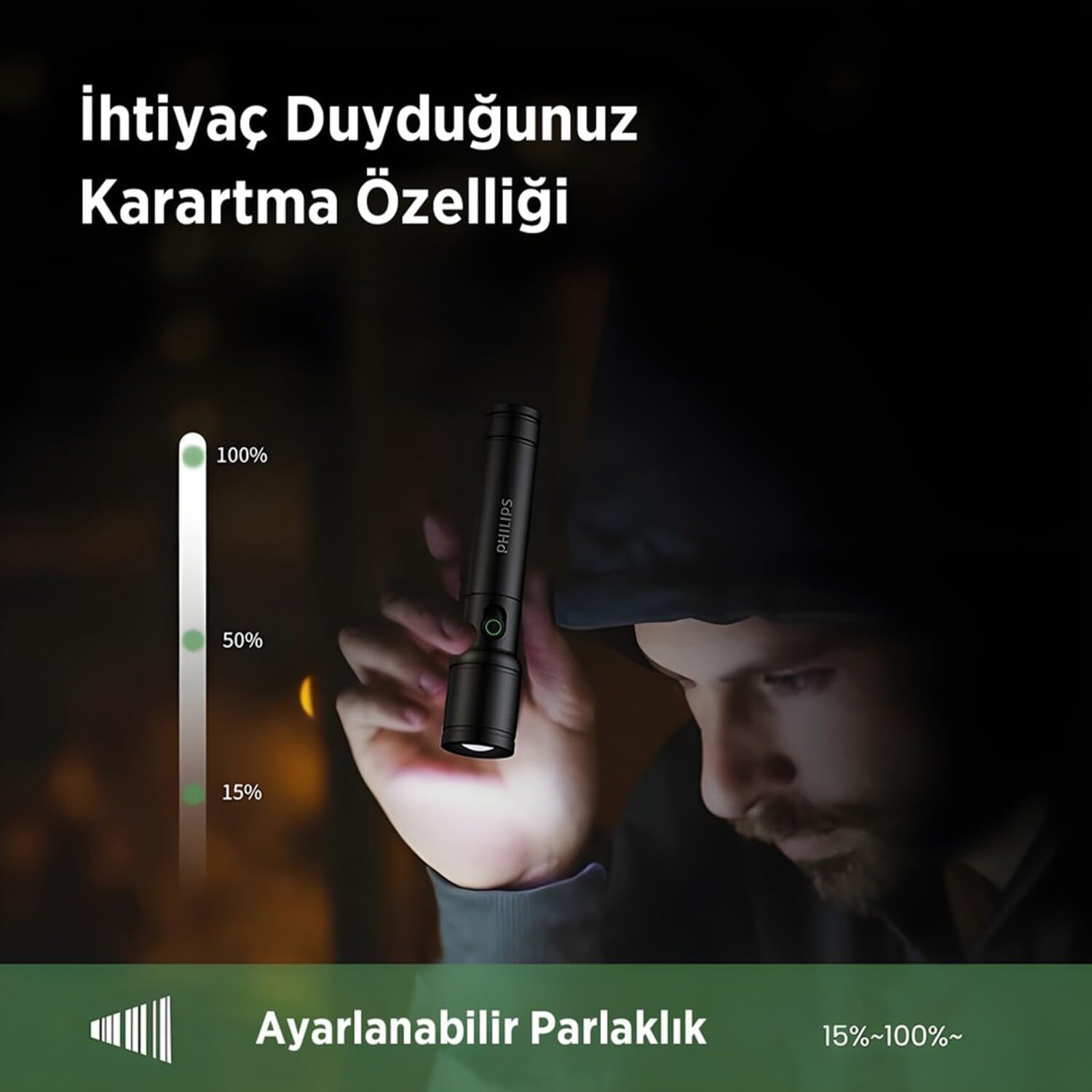
Image: Illustration of the adjustable brightness feature, showing a flashlight beam dimming from 100% to 15% output.
7. Mengecas
The Philips SFL2124 uses a 18650 Lithium Ion battery (1200 mAh) and charges via a Type-C port. The battery status indicator light provides a visual cue for the charge level:
- Lampu merah: Caj bateri di bawah 30%.
- Lampu hijau: Battery charge is 30% or above, or fully charged.
Ensure the flashlight is turned off during charging for optimal performance.
8. Penyelenggaraan
Pembersihan
Lap lampu suluh dengan lembut, damp kain. Jangan gunakan pembersih atau pelarut yang kasar. Pastikan kanta bersih untuk output cahaya yang optimum.
Penyimpanan
Store the flashlight in a cool, dry place away from direct sunlight and extreme temperatures. If storing for an extended period, charge the battery every 3-6 months to maintain battery health.
9. Penyelesaian masalah
| Masalah | Kemungkinan Punca | Penyelesaian |
|---|---|---|
| Lampu suluh tidak menyala. | Low battery or depleted battery. | Cas lampu suluh sepenuhnya. |
| Cahaya malap atau berkelip. | Low battery. Dirty lens. | Charge the flashlight. Clean the lens with a soft cloth. |
| Lampu suluh tidak dicas. | Faulty charging cable or power source. Charging port obstruction. | Try a different Type-C cable and USB power source. Check the charging port for debris. |
| Fungsi zum adalah kaku. | Kotoran atau serpihan dalam mekanisme. | Gently clean the telescopic mechanism. Do not force it. |
10. Spesifikasi
The Philips SFL2124 is designed for reliable performance with the following specifications:

Image: Visual representation of key product features including stepless dimming, telescopic zoom, and aluminum alloy material.
| Ciri | Perincian |
|---|---|
| Nombor Model | SFL2124 |
| Output Cahaya | ≤ 250 Lumens (max.) |
| Kuasa LED | 5W |
| Mod Pencahayaan | Strong light, Soft light, Flashing/SOS |
| Ciri Zum | Telescopic zoom (focused and wide illumination) |
| Peredupan | Stepless Dimming (15%-100%) |
| Jenis Bateri | 18650 Lithium Ion Battery (1200 mAh) |
| Masa Mengecas | ~3 jam |
| Input Pengecasan | Jenis-C |
| Penunjuk Status Bateri | Present (red below 30%, green above 30%) |
| Rintangan Jatuh | 1 meter |
| Tahap Ketahanan Air | Tahan Air |
| bahan | Logam (Aluminium Aloi) |
| warna | Hitam |
| Dimensi Produk (L x W x H) | 140 x 30 x 30 mm |
| Berat Produk | 0.16 Kilogram |
| Negara Asal | China |
11. Waranti dan Sokongan
Maklumat Waranti
This Philips SFL2124 flashlight comes with a Waranti Pengeluar 2 Tahun from the date of purchase. Please retain your proof of purchase for warranty claims. The warranty covers defects in materials and workmanship under normal use. It does not cover damage caused by misuse, accidents, unauthorized repairs, or normal wear and tear.
Sokongan Pelanggan
For technical support, warranty claims, or any questions regarding your Philips SFL2124 flashlight, please contact Philips customer service. Refer to the contact information provided on your product warranty card or visit the official Philips webtapak untuk wilayah anda.