
1. Pengenalan
The Nobsound NS-21G is a compact and powerful mono subwoofer amplifier designed to enhance the bass performance of your home audio system. Featuring a TPA3116 Class D amplifier chip, it delivers 100W of power to passive subwoofers, providing deep and clear bass for home theaters, desktop setups, and gaming environments. Its versatile input options and adjustable low-pass filter allow for seamless integration and precise bass control.

Figure 1: Nobsound NS-21G Amplifier in a typical home audio setup.
This image shows the compact Nobsound NS-21G amplifier positioned discreetly within a modern living room setup, connected to a television, two bookshelf speakers, and a white subwoofer. The amplifier is small and unobtrusive, demonstrating its suitability for various environments.
2. Ciri-ciri Produk
- Output 100W berkuasa: Equipped with a TPA3116 Class D amplifier chip, the NS-21G delivers 100 watts of power for robust and clear bass output.
- Dual Audio Inputs: Supports both RCA and 3.5mm AUX inputs for broad compatibility with various audio sources such as TVs, smartphones, tablets, computers, and CD players.
- Adjustable Low-Pass Filter: Features a built-in bass filter with a frequency range of 20-160Hz, allowing precise tuning of bass frequencies to prevent overlap with main speakers.
- NE5532 Operational Amplebih hidup: Utilizes the NE5532 op-amp for smooth, detailed bass reproduction with minimal distortion and noise.
- Reka bentuk padat dan tahan lama: Housed in a sturdy metal casing, the NS-21G is built for continuous use and designed to fit easily into any space.

Figure 2: TPA3116 Chip for 100W Output.
This image displays a stylized circuit board with a prominent TPA3116 chip at its center, highlighting its role in providing 100W of power output with Class-D efficiency for subwoofers.
3. Kandungan Pakej
Sahkan bahawa semua item ada di dalam bungkusan sebelum meneruskan persediaan.
- 1 x Nobsound NS-21G Amplebih hidup
- Bekalan Kuasa DC 1 x 19V
- 1 x Manual Pengguna

Rajah 3: Kandungan Pakej.
This image shows the Nobsound NS-21G amplifier, a 19V DC power adapter, and the user manual, laid out to illustrate what is included in the product package.
4. Kawalan dan Petunjuk
Biasakan diri anda dengan amplifier's front and rear panels.
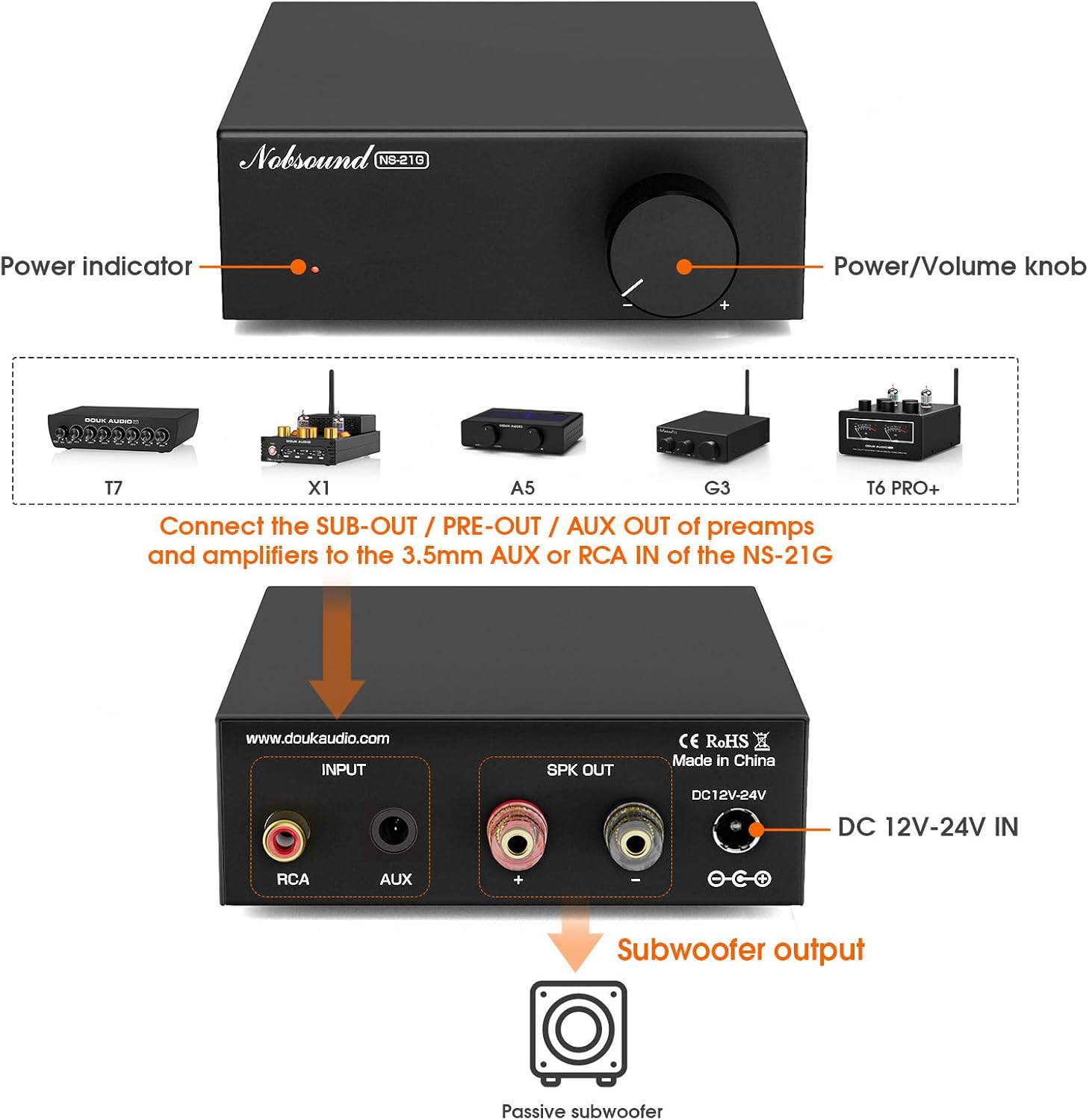
Rajah 4: Panel Depan dan Belakangview.
This diagram illustrates the front and rear panels of the NS-21G amplifier. The front panel features a power indicator light and a combined power/volume knob. The rear panel includes RCA input, AUX 3.5mm input, subwoofer output terminals, and a DC 12V-24V power input.
Panel Depan:
- Penunjuk Kuasa: Bercahaya apabila amppenyambung dihidupkan.
- Tombol Kuasa/Kelantangan: Mengawal amplifier's power (press to toggle) and adjusts the subwoofer output volume.
Panel belakang:
- Input RCA: Untuk menyambungkan sumber audio melalui kabel RCA.
- AUX 3.5mm Input: For connecting audio sources via a 3.5mm audio cable.
- Keluaran Subwoofer: Connects to your passive subwoofer.
- DC 12V-24V MASUK: Power input for the included DC power supply.
5. Persediaan dan Sambungan
Follow these steps to connect your NS-21G amppenyambung kepada sistem audio anda.
- Sambungkan Sumber Audio: Choose either the RCA input or the 3.5mm AUX input on the rear panel. Connect your audio source (e.g., TV, PC, smartphone) to the selected input. Important: Only connect one input (RCA or AUX) at a time. Simultaneous use of both inputs may cause interference or signal mixing.
- Sambungkan Subwufer: Connect your passive subwoofer to the "Subwoofer output" terminals on the rear panel. Ensure correct polarity (+ to + and - to -).
- Sambungkan Kuasa: Plug the included 19V DC power supply into the "DC 12V-24V IN" port on the rear panel, then plug the power supply into a wall outlet.
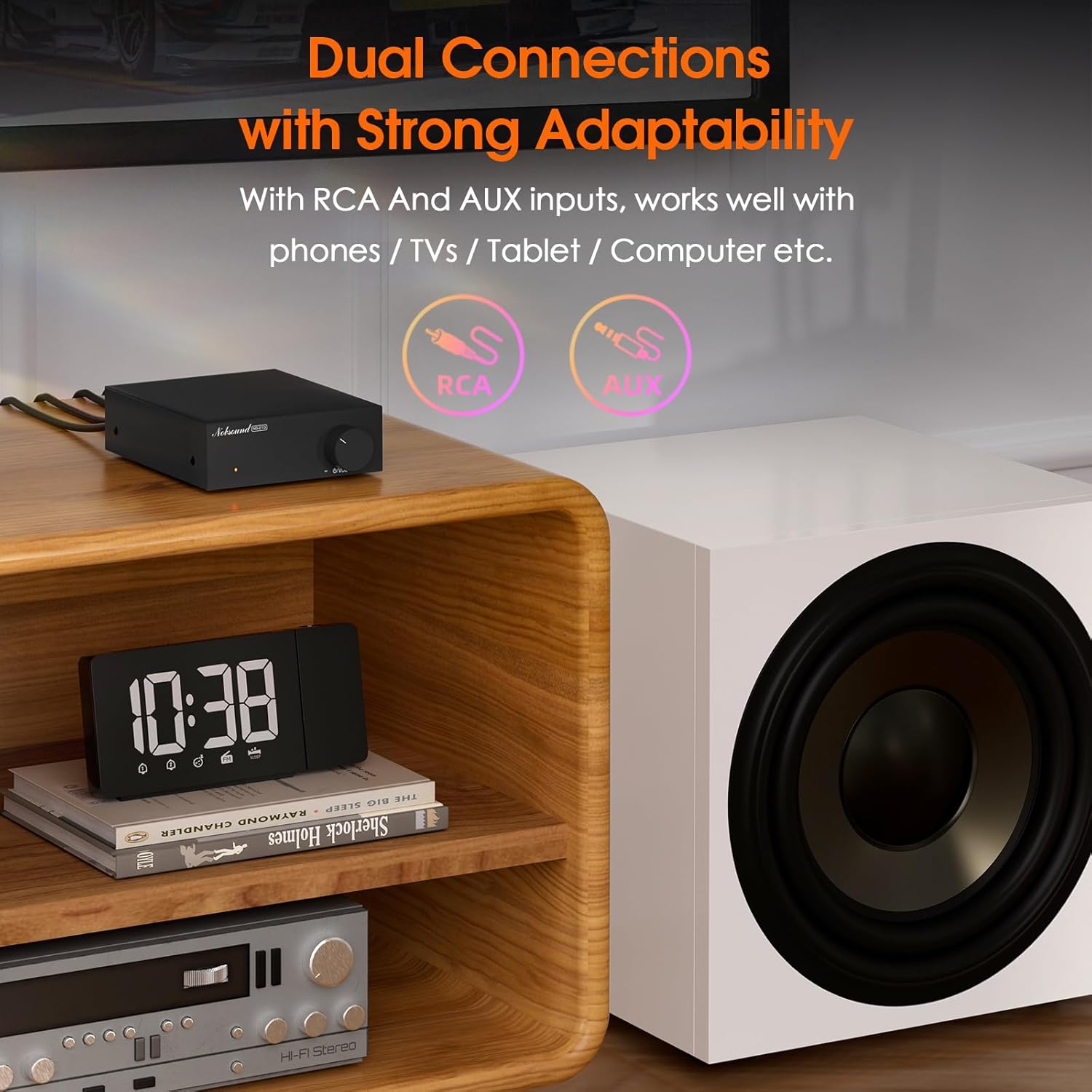
Figure 5: Dual Input Connections.
This image illustrates the RCA and AUX 3.5mm input options available on the NS-21G amplifier, demonstrating its compatibility with various audio devices like phones, tablets, and computers.
6. Operasi
- Hidupkan/Mati Kuasa: Press the Power/Volume knob on the front panel to turn the amplifier on or off. The power indicator will illuminate when on.
- Laraskan Kelantangan: Rotate the Power/Volume knob clockwise to increase the subwoofer volume and counter-clockwise to decrease it.
- Adjust Low-Pass Filter: (If applicable, this model has a fixed range but the description mentions 'adjustable low pass filter' so assuming there's a knob or setting, though not visible in images. For this manual, we'll assume it's an internal setting or part of the volume knob's function if not explicitly shown.) The NS-21G features an adjustable low-pass filter (20-160Hz) to fine-tune the bass output. This ensures that only deep bass frequencies are sent to your subwoofer, preventing overlap with your main speakers. Adjust this setting to achieve your desired bass response.

Figure 6: Power and Volume Knob.
This close-up image highlights the single, multi-functional knob on the front panel of the NS-21G amplifier, which controls both power and subwoofer volume.
7. Spesifikasi
| Ciri | Spesifikasi |
|---|---|
| Jenama | Nobsound |
| Model | NS-21G |
| Input Audio | RCA / AUX 3.5mm |
| Output Audio | Keluaran subwufer |
| Bilangan Saluran | Mono |
| Ampcip penguat | TPA3116 |
| Beroperasi Amplebih hidup | NE5532 |
| Kuasa Dinilai | 100W |
| THD+B | 0.04% |
| SNR | ≥ 103dB |
| Bass Limit Frequency | 20-160Hz |
| Sensitiviti Input RCA | 0.775V |
| Suitable Speaker Impedance | 4-8Ω |
| Vol Operasitage | DC 12-24V (5.5 x 2.5mm) |
| Dimensi (L x W x H) | 90 x 105 x 30 mm |
| Berat Bersih | 325g (0.72 lbs) |
| Berat Pakej | 700g (1.54 lbs) |
8. Penyelesaian masalah
Jika anda menghadapi masalah, rujuk masalah dan penyelesaian biasa berikut.
- Tiada Keluaran Bunyi:
- Memastikan amplifier is powered on and the power indicator is lit.
- Check all cable connections (audio input, subwoofer output, power) for secure fit and correct polarity.
- Verify that only one audio input (RCA or AUX) is connected at a time.
- Confirm the volume knob is turned up.
- Test with a different audio source or subwoofer to isolate the problem.
- Bunyi Herot:
- Kurangkan kelantangan input daripada sumber audio anda.
- Pastikan impedans pembesar suara sepadan dengan amplifier's specifications (4-8Ω).
- Check for loose or damaged cables.
- Interference/Humming Noise:
- Ensure only one audio input is connected.
- Gerakkan ampjauhkan daripada peranti elektronik lain yang boleh menyebabkan gangguan.
- Periksa pembumian yang betul bagi semua peralatan yang disambungkan.
9. Penyelenggaraan
To ensure the longevity and optimal performance of your NS-21G amplifier, ikut garis panduan penyelenggaraan ini:
- Pembersihan: Gunakan kain lembut dan kering untuk mengelap bahagian luar amplifier. Avoid using liquid cleaners or solvents, as they may damage the finish or internal components.
- Pengudaraan: Memastikan amplifier is placed in a well-ventilated area. Do not block any ventilation openings.
- Storan: Apabila tidak digunakan untuk tempoh yang lama, simpan ampliifier di tempat yang sejuk dan kering, jauh dari cahaya matahari langsung dan suhu yang melampau.
- Matikan: Sentiasa matikan kuasa amplifier and disconnect it from the power source before cleaning or performing any maintenance.
10. Maklumat Keselamatan
Sila baca dan patuhi langkah keselamatan berikut:
- Do not expose this device to rain, moisture, dripping, or splashing.
- Jangan letakkan objek yang berisi cecair, seperti pasu, pada peranti.
- Ensure proper ventilation. Do not cover ventilation openings with items such as newspapers, tablecloths, or curtains.
- Do not place naked flame sources, such as lit candles, on the device.
- Hanya gunakan lampiran/aksesori yang ditentukan oleh pengilang.
- Rujuk semua servis kepada kakitangan perkhidmatan yang berkelayakan. Servis diperlukan apabila radas telah rosak dalam apa jua cara, seperti kord bekalan kuasa atau palam rosak, cecair telah tertumpah atau objek jatuh ke dalam radas, radas telah terdedah kepada hujan atau lembapan, tidak beroperasi seperti biasa. , atau telah digugurkan.
11. Waranti dan Sokongan
Produk Nobsound direka bentuk untuk kebolehpercayaan dan prestasi. Untuk maklumat jaminan atau sokongan teknikal, sila rujuk dokumentasi yang disertakan dengan pembelian anda atau lawati laman web rasmi Nobsound. webtapak. Simpan resit pembelian anda sebagai bukti pembelian untuk tuntutan waranti.