
RunStar FG2422
Manual Pengguna Penimbang Pintar RunStar FG2422
Model: FG2422
pengenalan
Thank you for choosing the RunStar Smart Scale FG2422. This manual provides essential information for the safe and effective use of your new body composition monitor. Please read it thoroughly before first use and keep it for future reference.

Image: The RunStar Smart Scale FG2422, featuring its sleek black and gold design, integrated handle for full-body analysis, and a digital display showing body metrics. A smartphone displaying the companion app interface is also visible, highlighting the device's connectivity and comprehensive data tracking capabilities.
Apa yang ada dalam Kotak
- RunStar Smart Scale FG2422
- 4 Bateri AAA (dipasang atau disertakan secara berasingan)
- Manual Pengguna
Persediaan
- Pasang Bateri: If not already installed, open the battery compartment on the underside of the scale and insert the 4 AAA batteries, ensuring correct polarity. If a plastic pull-tab is present, remove it to activate the batteries.
- penempatan: Place the scale on a hard, flat, and stable surface. Avoid carpets or uneven flooring for accurate measurements.
- Download the Starfit App: Scan the QR code on the scale's surface or search for "Starfit" in your device's app store (Apple App Store or Google Play Store) to download the free companion application.
- Daftar: Complete the registration process within the Starfit app using your email, Apple ID, or Google account.
- Sambungkan Peranti: Turn on Bluetooth on your smartphone. In the Starfit app, navigate to "Account" > "My Devices" and tap the "+" icon. Select "Bluetooth" and search for "Runstar-RX" to complete the connection. A connected logo will appear on the scale's screen once paired.

Image: The underside of the RunStar Smart Scale, showing the battery compartment for 4 AAA batteries and a button to switch measurement units (lbs/kg/st).
Arahan Operasi
- Pengaktifan Awal: Step lightly on the scale and then step off. Wait for the screen to display "0.0" to activate the device.
- Standard Weight Measurement: Step onto the scale barefoot. Stand still until the display flashes, showing your final weight measurement.
- Full Body Composition Measurement: For a full body scan, step onto the scale barefoot and grasp the retractable handle. Ensure your thumbs and palms make full contact with the electrodes on the handle. Maintain a steady posture for approximately 20 seconds until the measurement is complete.
- Penukaran Unit: To switch between measurement units (pounds, kilograms, stones), press the 'UNIT' button located on the underside of the scale.
- Penyegerakan Apl: Measurements will automatically sync to the Starfit app when your phone is connected via Bluetooth. The app will display 28 body composition metrics and generate health reports.
- Mod Luar Talian: You can weigh yourself without your phone nearby. The scale will store measurements and sync them to the app later when a connection is established.
Image: The underside of the RunStar Smart Scale, showing the battery compartment for 4 AAA batteries and a button to switch measurement units (lbs/kg/st).
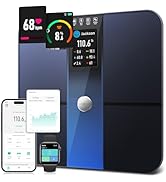
Image: A three-step diagram illustrating how to measure with the RunStar Smart Scale. Step 1 shows feet on the scale for weight. Step 2 shows hands on the handle for full body analysis. Step 3 shows a person standing on the scale holding the handle for a complete measurement.
Video: A demonstration of the RunStar Smart Scale's features, including its 8 electrodes for full-body analysis, clear LED display for weight, BMI, and body fat, and synchronization with popular fitness apps like Starfit, Apple Health, and Google Fit. The video highlights the scale's ability to track 28 body composition metrics and output detailed analysis reports.
Ciri-ciri Utama
- Full-Body Scan: Utilizes 8 metal electrodes and a dual-frequency BIA system for precise upper and lower body impedance measurements, providing comprehensive insights into 28 body composition metrics.
- 28 Body Composition Metrics: Tracks Body Fat, BMI, Visceral Fat, Muscle Mass, Bone Mass, Protein Mass, Body Water, and more.
- Ketepatan Tinggi: Measures with 0.1 lb increments and supports up to 400 lb capacity.
- Pembinaan Tahan Lama: Crafted with high-strength ABS material, featuring a 6mm tempered glass surface and non-slip feet for stability and safety.
- Ultra-Clear LED Display: Auto-rotating screen cycles through Weight, Body Fat, and BMI for quick and easy viewing.
- User-Friendly Starfit App: Connects seamlessly via Bluetooth to monitor trends, set goals, and generate detailed health reports.
- Penyepaduan Apl: Syncs data with Apple Health, Fitbit, and Health Connect for convenient data sharing.
- Pro pintarfiles: Menyokong berbilang pengguna profiles with auto-recognition, including family-friendly modes for Pregnancy, Child, and Baby.
- Kabel boleh tarik balik: The handle features a retractable cable for tidy storage.
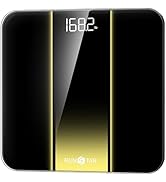
Image: The RunStar Smart Scale displaying an Ultra-Clear LED screen with three core data points: Weight (136.9 lb), Body Fat (25.7%), and BMI (18.3). This highlights the scale's easy-to-read interface for essential body metrics.
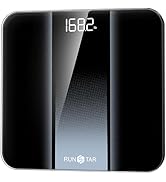
Image: A graphic detailing the precision features of the RunStar Smart Scale, including a wide 300mm/12-inch platform, ultra-high accuracy sensors (up to 400 lbs), 8 electrodes (front and back), and a 10mm wide ABS crash edge for durability.
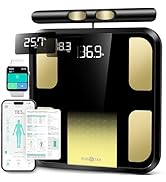
Image: A woman performing lunges, surrounded by icons and text representing the 28 body composition metrics tracked by the RunStar Smart Scale, such as Muscle Rate, Fat Mass, Weight, BMI, Visceral Fat, and Skeletal Muscle.
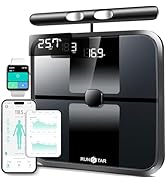
Image: A woman standing barefoot on the RunStar Smart Scale, holding its retractable handle for segmental fat and muscle analysis. The image also shows a smartphone displaying detailed body composition data and BMI trends, emphasizing the dual-frequency BIA measurement.
Image: A smartphone displaying the Starfit app interface, showcasing a detailed body composition analysis report with trends, goals, and printable reports. The image highlights the app's easy interconnection with Apple Health, Health Connect, iwatch, and Fitbit.
Image: A group of friends looking at a smartphone displaying the Starfit app, illustrating the Smart Profiles for the Whole Family feature. The app supports multi-user profiles with auto-recognition and includes modes for Pregnancy, Child, and Baby.
Penyelenggaraan
- Pembersihan: Lap permukaan skala dengan lembut, damp kain. Elakkan pembersih yang melelas atau bahan kimia yang keras.
- Storan: Simpan penimbang di tempat yang sejuk dan kering. Elakkan meletakkan objek berat di atasnya apabila tidak digunakan.
- Penggantian Bateri: Gantikan bateri apabila penunjuk bateri lemah muncul pada paparan.
- Awas: Do not step on the scale with wet feet to prevent slipping.
Menyelesaikan masalah
- No Display/Incorrect Reading: Ensure batteries are correctly installed and have sufficient charge. Replace if necessary. Make sure the scale is placed on a hard, flat surface.
- Isu Ketersambungan Apl: Verify Bluetooth is enabled on your smartphone and the Starfit app is open. Ensure the scale is within range of your device. Restarting both the app and the scale may resolve connection problems.
- Inaccurate Body Composition Data: Ensure you are standing barefoot on the scale and making full contact with all 8 electrodes (feet on the main platform, hands on the handle). Maintain a steady posture during measurement.
Spesifikasi
- Nombor Model: FG2422
- Had Berat: 400 paun
- Jenis Paparan: LED
- Ciri Khas: Body Fat, BMI, Muscle Mass, 28 Metrics
- Bahan Platform: Kaca Terbaja
- Sumber Kuasa: 4 bateri AAA (termasuk)
- Dimensi Platform: 300 x 300 mm (approximately 12 x 12 inches)
Waranti dan Sokongan
RunStar products are covered by a lifetime warranty. To activate your warranty, please visit runstar.com dan daftarkan produk anda dalam masa 15 hari selepas pembelian.
For questions or concerns, please contact customer support at service@runstar.com.
Ask a question about this manual
Ask about setup, troubleshooting, compatibility, parts, safety, or missing instructions. Manuals+ will review the question and use this page’s manual context to help answer it.