
1. Pengenalan
The Flashpoint Zoom Li-Ion V480C is a high-performance on-camera flash designed for Canon cameras, offering advanced features for professional and enthusiast photographers. This flash integrates with the Flashpoint R2 wireless system, providing versatile lighting control. Key features include a Guide Number of GN50, rapid 1.7-second recycle time, TTL auto flash, manual flash modes, and 2.4GHz wireless control.

Image 1.1: Flashpoint Zoom Li-Ion V480C with an overview of its main features.
2. Komponen yang Disertakan
Sahkan bahawa semua item berikut disertakan dalam pakej anda:
- Flashpoint Zoom Li-on Compact V480 Flash
- VB22 7.2 V / 2200 mAh Rechargeable Li-ion Battery Pack
- Pengecas Bateri
- Pendirian Mini
- Kes Pelindung
3. Produk Lebihview
Familiarize yourself with the various parts of your Flashpoint V480C flash unit.

Imej 3.1: Depan dan sisi view of the Flashpoint V480C with numbered components.
- Catchlight Panel (White)
- Built-in Wide Angle Diffuser
- Kepala kilat
- Pemodelan LED Lamp
- Sensor Fotocell
- Cincin Kunci
- Kasut Panas
- Penyegerakan Jack Kord
- Skrin Sentuh
- Port Peningkatan Perisian Tegar USB-C
- Butang Suis Kuasa
- Tetapkan Butang
- Pilih Dail
- Butang Uji / Penunjuk Kitar Semula
- Gancu Pembetulan Kasut Panas
4. Persediaan
4.1. Pemasangan dan Pengecasan Bateri
The Flashpoint V480C uses a VB22 7.2V / 2200mAh rechargeable Li-ion battery pack. Ensure the battery is fully charged before first use.
- To install the battery, slide open the battery compartment cover located on the side of the flash unit.
- Insert the VB22 Li-ion battery pack, ensuring the contacts align correctly.
- Tutup penutup petak bateri sehingga ia berbunyi klik dengan selamat pada tempatnya.
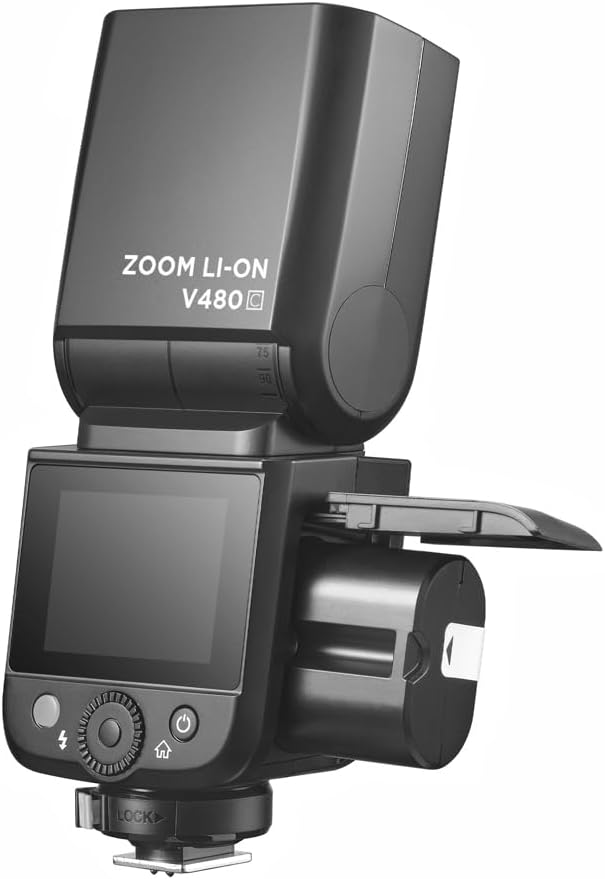
Image 4.1: Battery compartment open for installation.
To charge the battery, use the provided battery charger. Connect the battery to the charger and plug the charger into a power outlet. The indicator light on the charger will show the charging status.
4.2. Memasang Lampu Kilat pada Kamera Anda
The V480C is designed to mount onto a camera's hot shoe.
- Pastikan kamera anda dimatikan.
- Slide the flash's hot shoe (7) into your camera's hot shoe mount.
- Rotate the Hot Shoe Fixing Buckle (15) clockwise to secure the flash firmly in place. Do not overtighten.
5. Operating the Flash
5.1. Powering On/Off and Basic Controls
To power on the flash, press and hold the Power Switch Button (11) until the screen illuminates. To power off, press and hold the same button.
The V480C features a crisp color touchscreen (9) and tactile buttons for intuitive control.

Image 5.1: Touchscreen and button interface for adjusting flash settings.
- Set Button (12): Digunakan untuk mengesahkan pilihan atau memasukkan pilihan menu.
- Select Dial (13): Rotate to navigate menus and adjust values.
- Test Button / Recycle Indicator (14): Press to fire a test flash. The indicator light shows when the flash is ready to fire.
5.2. Mod Denyar
The V480C supports various flash modes:
- TTL Auto Flash: Melaraskan output denyar secara automatik untuk pendedahan yang betul.
- Flash Manual: Allows manual control over flash power output (1/1 to 1/256 in 1/3 stop increments).
- Multi Flash (Stroboscopic): Fires a series of rapid flashes during a single exposure to capture multiple movements.
5.3. Wireless Operation (R2 System)
The V480C features built-in 2.4GHz R2 wireless functionality, allowing it to act as a master or slave unit within the Flashpoint R2 system. It supports 4 groups and 32 channels with a transmission range of up to 100m.

Imej 5.2: Cthample of 2.4GHz R2 wireless integration in a studio environment.
Refer to the on-screen menu for setting master/slave modes, group assignments, and channel selection.
5.4. Penyegerakan Berkelajuan Tinggi (HSS)
High-Speed Sync allows the flash to synchronize with shutter speeds up to 1/8000s, enabling you to use flash with wide apertures in bright conditions or to freeze fast motion.

Image 5.3: Demonstration of High-Speed Sync (HSS) capability.
Activate HSS through the flash's menu or your camera's flash control settings.
5.5. Pemodelan LED Lamp
The built-in LED Modeling Lamp (4) provides continuous light for focusing in low-light conditions or for previewing lighting effects. Adjust its brightness through the flash's menu.
5.6. Kemas Kini Perisian Tegar
The Flashpoint V480C supports firmware updates via its USB-C Firmware Upgrade Port (10). Visit the Flashpoint weblaman web untuk perisian tegar dan arahan terkini.
6. Penyelenggaraan
6.1. Pembersihan
Untuk membersihkan unit denyar, gunakan kain lembut dan kering. Untuk kotoran degil, gunakan sedikit kainamp cloth can be used, followed by a dry cloth. Do not use strong detergents or solvents.
6.2. Penyimpanan
When not in use for extended periods, remove the battery from the flash unit. Store the flash in a cool, dry place, away from direct sunlight and extreme temperatures. Use the provided protective case for storage and transport.
7. Penyelesaian masalah
If you encounter issues with your Flashpoint V480C, refer to the following common problems and solutions:
- Denyar tidak menyala:
- Ensure the flash is powered on and securely mounted to the camera's hot shoe.
- Periksa tahap bateri; cas semula jika perlu.
- Verify camera and flash settings are compatible (e.g., flash enabled in camera menu).
- If using wireless, ensure master and slave units are on the same channel and group.
- Incorrect exposure (too dark/too bright):
- In TTL mode, check for Flash Exposure Compensation (FEC) settings on both flash and camera.
- In Manual mode, adjust flash power output.
- Ensure flash head zoom matches lens focal length or is set to auto.
- Flash recycle time is slow:
- Bateri mungkin lemah; cas semula atau ganti.
- High power settings naturally result in longer recycle times.
- Isu sambungan wayarles:
- Ensure all units are within range (100m).
- Periksa gangguan daripada peranti 2.4GHz yang lain.
- Verify channel and group settings are identical on all units.
If problems persist, consult the Flashpoint support webtapak atau hubungi perkhidmatan pelanggan.
8. Spesifikasi
| Model | V480C |
| Nombor Panduan | GN50 (ISO 100, dalam meter) |
| Masa Kitar Semula | lebih kurang 1.7 saat |
| Mod Flash | TTL, Manual, Berbilang |
| Fungsi Tanpa Wayar | Tuan, Hamba, Mati |
| Julat Tanpa Wayar | Anggaran. 100m |
| Saluran | 32 (1-32) |
| Kumpulan | 4 (A, B, C, D) |
| Penyegerakan Kelajuan Tinggi | Sehingga 1/8000s |
| Sumber Kuasa | VB22 Li-ion Battery (7.2V / 2200mAh) |
| Dimensi | 6.54" x 2.8" x 1.93" (16.6 x 7.1 x 4.9 cm) |
| Berat (dengan bateri) | 12.7 oz (360g) |
| Pemasangan yang Serasi | Canon |
9. Waranti dan Sokongan
For warranty information, technical support, or service inquiries, please refer to the documentation provided with your purchase or visit the official Flashpoint webtapak. Simpan bukti pembelian anda untuk tuntutan waranti.