
XINDADA HW S11
XINDADA HW S11 Smartwatch User Manual
Model: HW S11
1. Pengenalan
The XINDADA HW S11 Smartwatch is a versatile device designed for communication, navigation, and activity tracking. Featuring a 2.02-inch HD display, Android 8.1 operating system, and a powerful quad-core processor, it supports independent calls, video calls, GPS positioning, and a wide range of applications.

Imej 1.1: Selesaiview of the HW S11 Smartwatch highlighting key features such as 4G video calls, GPS, music control, and access to popular apps.
2. Apa yang ada di dalam Kotak
Sila semak kandungan pakej semasa membuka kotak:
- XINDADA HW S11 Smartwatch
- Charging Cable (Magnetic Wireless)
- Manual Pengguna
3. Persediaan Awal
3.1 Mengecas Jam Pintar
Before first use, fully charge your smartwatch. Connect the magnetic wireless charging cable to the charging points on the back of the watch and to a compatible USB power source. The watch has a 700 mAh battery.
3.2 Pemasangan Kad SIM
The HW S11 Smartwatch supports an independent SIM card for cellular connectivity. Locate the separate SIM card slot on the side of the watch. Carefully insert a Nano-SIM card into the slot, ensuring correct orientation.

Image 3.1: Detail of the smartwatch showing the 180° swivel camera and the dedicated SIM card slot for independent cellular connectivity.
3.3 Hidupkan/Mati Kuasa
- Untuk Menghidupkan: Tekan dan tahan butang kuasa (biasanya di sisi) sehingga skrin menyala.
- Untuk Mematikan: Tekan dan tahan butang kuasa, kemudian pilih 'Matikan' pada skrin.
3.4 Tatarajah Awal
Upon first power-on, follow the on-screen prompts to select your language, set the time and date, and connect to a Wi-Fi network if desired.
4. Arahan Operasi
4.1 Menavigasi Antara Muka
The smartwatch features a 2.02-inch HD touchscreen. Swipe left, right, up, or down to access different menus, notifications, and quick settings. Tap to select items and press the side button to return to the home screen or go back.
4.2 Membuat dan Menerima Panggilan
With a SIM card installed, you can make and receive calls directly from your smartwatch. Access the 'Phone' application, dial a number, or select a contact to initiate a call. Incoming calls will display on the screen, allowing you to answer or reject.
4.3 Panggilan Video
The HW S11 supports HD video calls. Utilize the built-in 180° swivel telescopic camera for video communication. Ensure you have a stable internet connection (Wi-Fi or cellular data) and a compatible video calling application installed.
4.4 GPS Positioning
The smartwatch integrates GPS, Beidou, and LBS Wi-Fi for precise real-time positioning. This feature allows for tracking your location, recording historical trajectories, and indoor positioning in large public spaces like malls or airports.
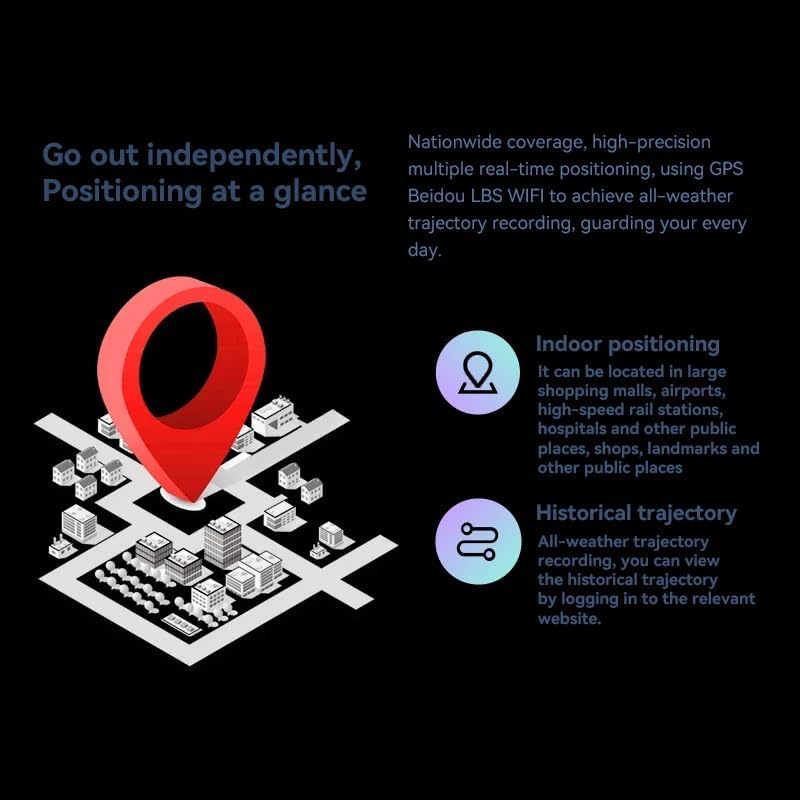
Image 4.1: Visual representation of the smartwatch's GPS and multi-location tracking features, including indoor and historical trajectory capabilities.
4.5 Penggunaan Aplikasi
Running on Android 8.1 with 2GB RAM and 16GB internal storage, the smartwatch allows you to download and use various applications from its integrated app store. Popular apps like WeChat, TikTok, YouTube, and games are supported.

Image 4.2: The smartwatch interface showcasing a selection of popular applications available for download and use.
4.6 Kawalan Muzik
Control music playback on your connected smartphone or directly from the smartwatch if music files are stored on its internal memory. Access the music player app to play, pause, skip tracks, and adjust volume.
5. Penyelenggaraan
- Pembersihan: Wipe the watch screen and body with a soft, dry, lint-free cloth. Avoid using harsh chemicals or abrasive materials.
- Tahan Air: While the device may have some resistance, avoid submerging it in water or exposing it to high-pressure water streams.
- Storan: Simpan jam tangan pintar di tempat yang sejuk dan kering apabila tidak digunakan.
- Penjagaan Bateri: To prolong battery life, avoid extreme temperatures and do not allow the battery to fully discharge for extended periods.
6. Penyelesaian masalah
6.1 Watch Does Not Power On
- Pastikan jam tangan dicas sepenuhnya. Sambungkannya ke pengecas selama sekurang-kurangnya 30 minit.
- Try pressing and holding the power button for 10-15 seconds to force a restart.
6.2 Poor GPS Signal
- Pastikan anda berada di kawasan lapang yang jelas view dari langit.
- Avoid areas with tall buildings or dense foliage that can obstruct the signal.
6.3 Aplikasi Tidak Memuat Turun/Berfungsi
- Periksa sambungan Wi-Fi atau data selular anda.
- Ensure there is sufficient storage space on the device (16GB internal memory).
- Mulakan semula jam tangan pintar.
6.4 Skrin Sentuh Tidak Responsif
- Bersihkan skrin untuk menghilangkan sebarang kotoran atau kelembapan.
- Mulakan semula peranti. Jika masalah berterusan, hubungi khidmat pelanggan.
7. Spesifikasi

Imej 7.1: Dalaman view highlighting the Android 8.1 operating system and the quad-core ASR8601 processor, ensuring smooth operation.
| Ciri | Perincian |
|---|---|
| Model | HW S11 |
| Jenama | XINDADA |
| Sistem Operasi | Android 8.1 |
| Pemproses | Quad-core (ASR8601) |
| RAM | 2 GB |
| Storan Dalaman | 16 GB |
| Saiz Paparan | 2.02 Inci |
| Jenis Paparan | LCD |
| Resolusi | 320 x 390 piksel |
| Kapasiti Bateri | 700 mAh |
| Ketersambungan | Bluetooth, Wi-Fi, 4G (SIM card support) |
| GPS | Integrated GPS, Beidou, LBS |
| Kamera | 180° Swivel Telescopic Camera |
| Dimensi | 5 x 5 x 5 cm |
| Berat badan | 100 g |
8. Waranti dan Sokongan
Untuk maklumat jaminan dan sokongan teknikal, sila rujuk dokumentasi yang disediakan bersama pembelian anda atau hubungi peruncit anda. Simpan bukti pembelian anda untuk sebarang tuntutan jaminan.
Ask a question about this manual
Ask about setup, troubleshooting, compatibility, parts, safety, or missing instructions. Manuals+ will review the question and use this page’s manual context to help answer it.