
SINGER 6180 Plus
SINGER® Brilliance™ 6180 Plus Sewing Machine User Manual
Model: 6180 Plus (230401112)
pengenalan
Welcome to the SINGER® Brilliance™ 6180 Plus Sewing Machine. This manual provides essential information for setting up, operating, maintaining, and troubleshooting your new sewing machine. Designed for ease of use, this machine offers 181 stitch applications, a heavy-duty metal frame for durability, an LCD screen for easy stitch selection, a built-in needle threader, and six one-step buttonhole styles.
Please read this manual thoroughly before operating the machine to ensure safe and efficient use.
Arahan Keselamatan Penting
Apabila menggunakan perkakas elektrik, langkah berjaga-jaga keselamatan asas hendaklah sentiasa dipatuhi, termasuk yang berikut:
- Sentiasa cabut plag mesin dari soket elektrik sebaik sahaja selepas menggunakan dan sebelum membersihkan, menanggalkan penutup atau membuat sebarang pelarasan servis pengguna.
- Jangan biarkan digunakan sebagai mainan. Perhatian rapi diperlukan apabila perkakas ini digunakan oleh atau berhampiran kanak-kanak.
- Gunakan perkakas ini hanya untuk kegunaan yang dimaksudkan seperti yang diterangkan dalam manual ini. Gunakan hanya lampiran yang disyorkan oleh pengilang seperti yang terkandung dalam manual ini.
- Jangan sekali-kali mengoperasikan alat ini jika ia mempunyai kabel atau palam yang rusak, jika tidak berfungsi dengan baik, jika telah jatuh atau rosak, atau jatuh ke air.
- Jangan sekali-kali menjatuhkan atau memasukkan sebarang objek ke dalam mana-mana bukaan.
- Jangan gunakan di luar rumah.
- Jangan beroperasi di tempat produk aerosol (semburan) digunakan atau di mana oksigen diberikan.
- Untuk memutuskan sambungan, matikan semua kawalan ke kedudukan mati, kemudian tanggalkan palam dari alur keluar.
Komponen Lebihview
Your SINGER® Brilliance™ 6180 Plus Sewing Machine comes with a variety of essential accessories to enhance your sewing experience. Familiarize yourself with these components before beginning your projects.

Image: The SINGER Brilliance 6180 Plus Sewing Machine shown with its various included accessories, such as different presser feet, bobbins, needles, and the foot pedal.
Komponen yang Disertakan:
- 6180 BRILLIANCE Plus Sewing Machine with Extension Table
- Kaki Semua Tujuan
- Kaki Zip
- Kaki Lubang Butang
- Kaki Jahit Butang
- Kaki Kelim Buta
- Kaki Zip Halimunan
- Overcasting Foot
- Kaki Roller
- Bobbins (Class-15 Metal)
- Pack of Needles
- Other Essential Accessories
- Dokumentasi (manual ini)
Persediaan
Membongkar dan Meletakkan:
Keluarkan mesin dari pembungkusannya dengan berhati-hati. Letakkan mesin di atas permukaan yang stabil dan rata. Pastikan terdapat ruang yang mencukupi di sekeliling mesin untuk pengendalian dan pengendalian fabrik yang selesa.
Sambungan Kuasa:
Connect the foot controller plug into the machine's receptacle and the power cord plug into a suitable electrical outlet. Ensure the machine's power switch is in the 'OFF' position before connecting.
Attaching the Extension Table:
The included extension table provides a larger work surface, ideal for bigger projects. To attach, align the table's pegs with the corresponding holes on the machine's free arm and gently push until it clicks into place.
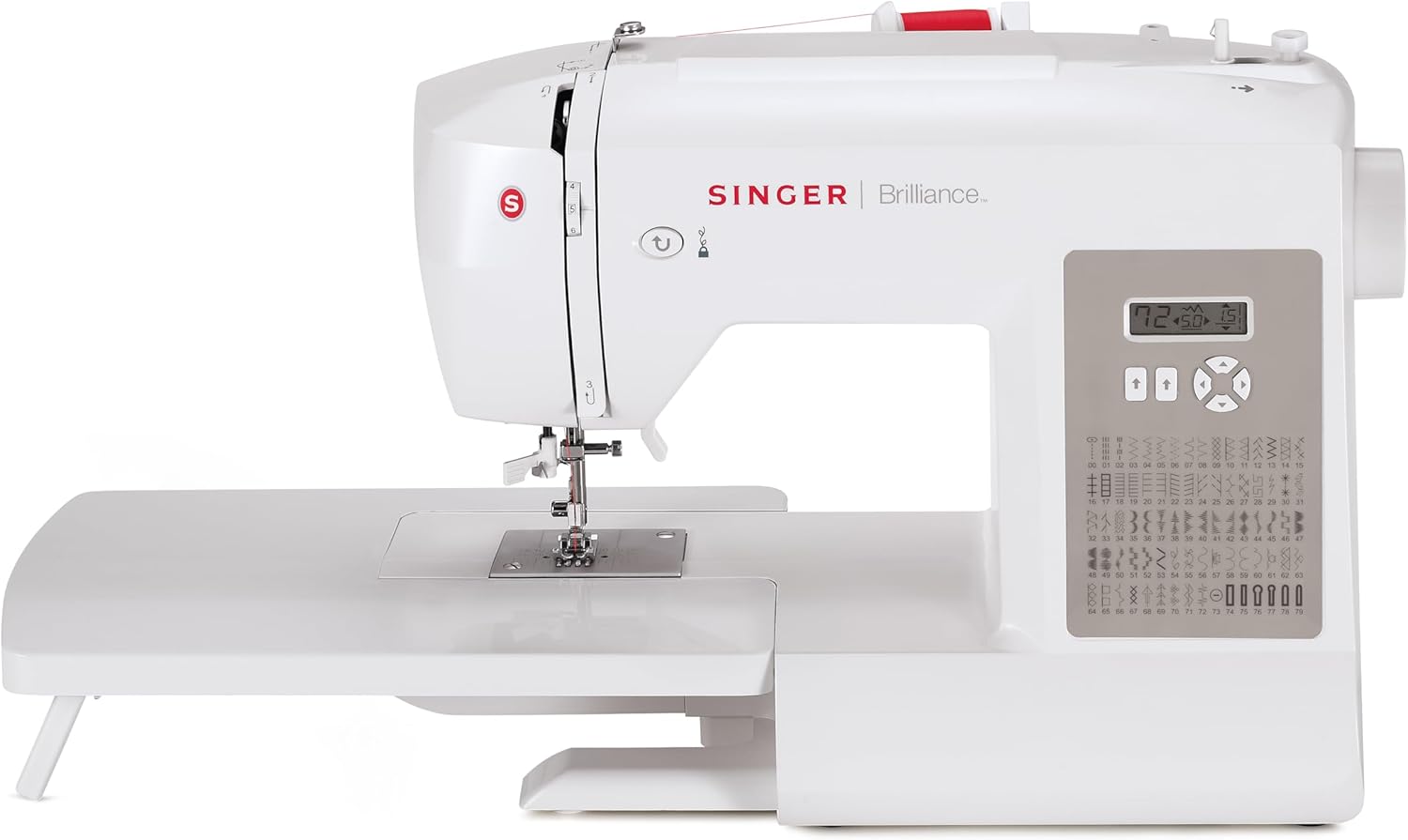
Image: The SINGER Brilliance 6180 Plus Sewing Machine shown with its extension table securely attached, providing an expanded work area.
Menggulung Bobbin:
Proper bobbin winding is crucial for consistent stitch quality. Place an empty bobbin onto the bobbin winder spindle. Follow the threading guides to route the thread from the spool pin to the bobbin. Engage the bobbin winder and press the foot controller to begin winding. Stop when the bobbin is full.

Imej: Dari dekat view of the SINGER Brilliance 6180 Plus Sewing Machine demonstrating the process of winding thread onto a bobbin.
Menggulung Mesin:
Ensure the presser foot is raised and the needle is in its highest position. Follow the numbered threading path indicated on the machine, guiding the thread through all tension discs and guides. Utilize the built-in needle threader for effortless threading of the needle eye.

Image: A close-up showing hands using the built-in needle threader on the SINGER Brilliance 6180 Plus, simplifying the threading process.
Beroperasi
Pemilihan Jahitan:
The Brilliance 6180 Plus features an LCD screen and intuitive buttons for stitch selection. Simply press the desired stitch number, and the machine will automatically set the optimum stitch length and width. You can further customize these settings using the adjustable length and width buttons.
Using Presser Feet:
Your machine comes with 8 different presser feet, each designed for specific sewing tasks. To change a presser foot, raise the presser foot lever, press the release button on the back of the foot holder, and snap the new foot into place. Refer to the included documentation for specific uses of each foot.
Sewing Buttonholes:
The machine offers 6 styles of one-step buttonholes. Attach the buttonhole foot and place the button in the designated slot on the foot. Select the desired buttonhole stitch on the LCD screen. The machine will automatically sew the buttonhole to the correct size based on the button inserted.

Image: A close-up shot demonstrating the automatic one-step buttonhole feature of the SINGER Brilliance 6180 Plus, showing a buttonhole being sewn on fabric.
Menggunakan Lengan Bebas:
To sew cylindrical items like cuffs, sleeves, or trouser hems, remove the accessory storage compartment to expose the free arm. This narrow arm allows fabric to be easily maneuvered around the needle area.

Image: The SINGER Brilliance 6180 Plus Sewing Machine with its removable free arm detached, illustrating how it provides access for sewing smaller, cylindrical projects.
Penyelenggaraan
Penyelenggaraan yang kerap memastikan jangka hayat dan prestasi optimum mesin jahit anda.
Pembersihan:
Periodically clean lint and dust from the bobbin case area and feed dogs using a small brush. Unplug the machine before cleaning. Do not use compressed air, as it can push lint further into the machine.
Penggantian jarum:
Replace the needle frequently, especially after every 8-10 hours of sewing or when starting a new project. A dull or bent needle can cause skipped stitches, thread breakage, or damage to fabric. Use only SINGER® brand needles suitable for your machine and fabric type.
Storan:
When not in use, cover your sewing machine to protect it from dust. Store it in a dry, stable environment.
Menyelesaikan masalah
Berikut ialah beberapa isu biasa dan potensi penyelesaiannya:
| Masalah | Kemungkinan Punca | Penyelesaian |
|---|---|---|
| Jahitan Terlangkau | Jarum salah, jarum bengkok, pemasangan benang tidak betul, saiz jarum untuk fabrik yang salah. | Gantikan jarum, masukkan semula benang ke dalam mesin, pastikan jenis/saiz jarum betul. |
| Pecah Benang | Improper threading, tension too tight, poor quality thread, bent needle, burr on needle plate. | Re-thread machine, adjust tension, use quality thread, replace needle, check for burrs. |
| Penyekatan Benang Bobbin | Improperly wound bobbin, incorrect bobbin insertion, lint in bobbin case. | Re-wind bobbin correctly, re-insert bobbin, clean bobbin case area. |
| Mesin Tidak Bermula | Kord kuasa tidak dipasang, pengawal kaki tidak disambungkan, suis kuasa dimatikan. | Check all connections, ensure power switch is on. |
If you encounter issues not listed here or if the suggested solutions do not resolve the problem, please refer to the support section.
Spesifikasi
| Ciri | Perincian |
|---|---|
| Dimensi Produk | 16"D x 8.5"W x 12.5"H (16 x 8.5 x 12.5 inci) |
| Berat Barang | 13.8 paun |
| Pengeluar | PENYANYI |
| Nombor Model | 230401112 |
| ASIN | B0FDXCSJ9T |
| UPC | 840163304702 |
| warna | putih |
| Aplikasi Jahitan | 181 (Basic, decorative, stretch stitches) |
| Bingkai | Bingkai Logam Tugas Berat |
| Jenis Bobbin | Front Load Bobbin (Class-15 Metal) |
| Paparan | Skrin Sentuh LCD |
| Benang Jarum | terbina dalam |
| Gaya Lubang Butang | 6 One-Step Styles |
| Kaki Penekan | 8 Termasuk |
| Jadual Sambungan | Termasuk |
Waranti dan Sokongan
Maklumat Waranti:
Your SINGER® Brilliance™ 6180 Plus Sewing Machine is covered by a manufacturer's warranty. Please refer to the separate warranty card included with your purchase for specific terms, conditions, and duration of coverage. Keep your proof of purchase for warranty claims.
Sokongan Pelanggan:
For technical assistance, troubleshooting beyond this manual, or warranty inquiries, please contact SINGER customer support. Visit the official SINGER website for the most current contact information, including phone numbers, email support, and online resources.
You can also visit the SINGER Store on Amazon for additional product information and support resources: Kedai SINGER
Ask a question about this manual
Ask about setup, troubleshooting, compatibility, parts, safety, or missing instructions. Manuals+ will review the question and use this page’s manual context to help answer it.