pengenalan
This manual provides essential instructions for the proper setup, operation, and maintenance of your Losfom Z11 4K Body Camera. Please read this manual thoroughly before using the device to ensure optimal performance and longevity. The Losfom Z11 is a compact, wearable camera designed for high-quality audio and video recording, featuring 4K resolution, night vision, and dual battery support.
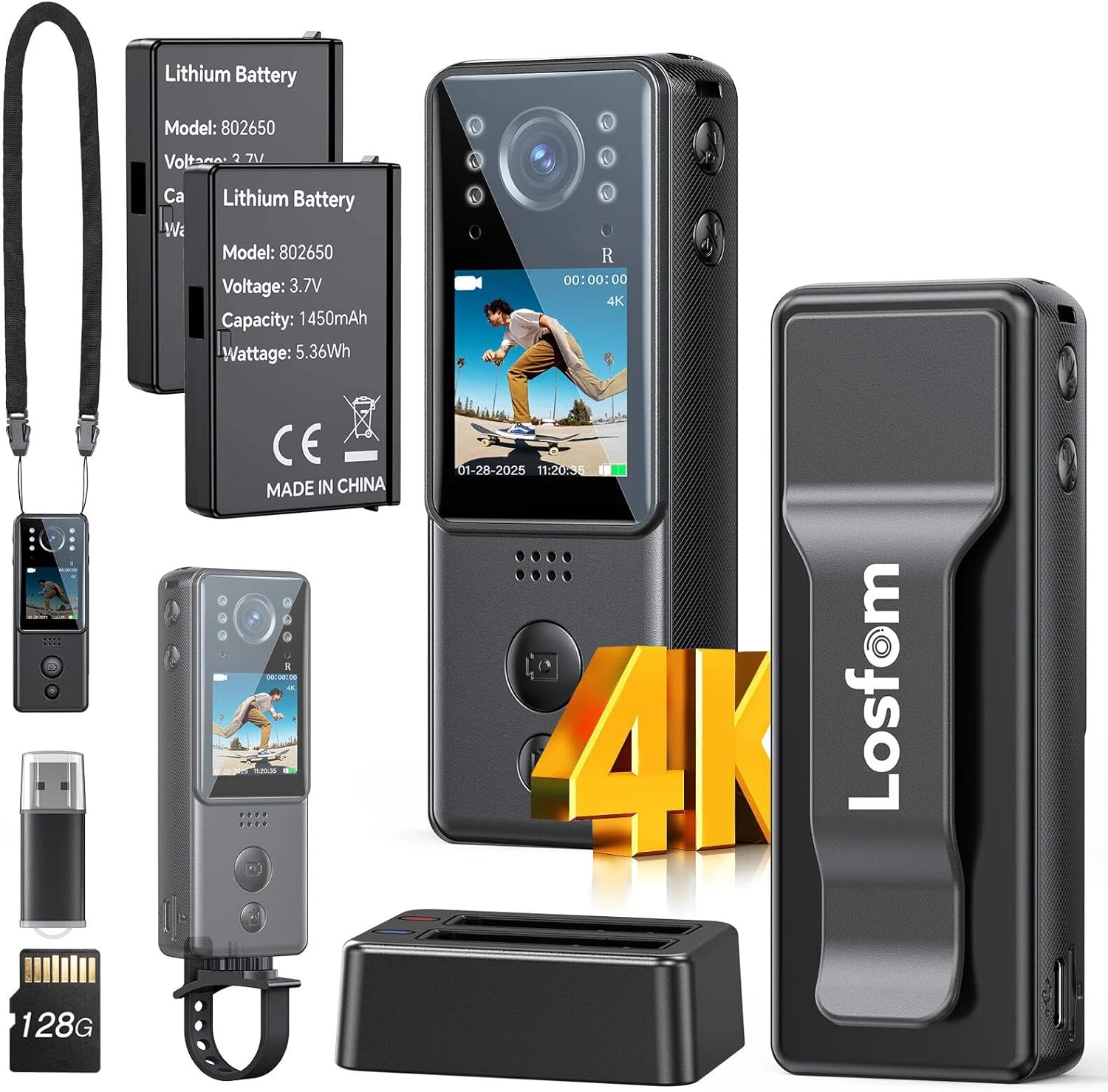
Apa yang ada dalam Kotak
- Losfom Z11 4K Body Camera
- Two 1400mAh Rechargeable Batteries (one pre-installed)
- Dok Pengecasan
- Gunung Basikal
- Lanyard
- Kabel Pengecas USB
- Micro SD Card (capacity may vary by package)
Persediaan
1. Mengecas Bateri
The Losfom Z11 comes with two 1400mAh rechargeable batteries. One battery is typically pre-installed in the camera, and a spare is provided. Use the included charging dock to charge both batteries simultaneously.
- Insert the batteries into the designated slots on the charging dock.
- Connect the USB charging cable to the charging dock and a power source (e.g., USB wall adapter, computer USB port).
- The indicator lights on the dock will show the charging status. Once fully charged, remove the batteries.


2. Memasukkan Kad Mikro SD
The camera requires a Micro SD card for storing recordings. A card is typically included with your purchase.
- Cari slot kad Micro SD di sisi kamera.
- Gently insert the Micro SD card into the slot until it clicks into place. Ensure the card is inserted in the correct orientation.
- To remove, gently press the card inward until it springs out.
3. Memasang Aksesori
The Losfom Z11 offers various wearing and mounting options for different scenarios.
- Klip Belakang: Attach the camera to your uniform, shirt pocket, or belt for hands-free recording.
- Tali Leher: Wear the camera around your neck for easy access and portability.
- Bike Mount: Use the included mount to secure the camera to bicycle handlebars for outdoor activities.


Arahan Operasi
1. Hidupkan/Mati Kuasa
- Untuk menghidupkan, tekan dan tahan butang Kuasa sehingga skrin menyala.
- Untuk mematikan kuasa, tekan dan tahan butang Kuasa sehingga peranti dimatikan.
2. Merakam Video dan Mengambil Foto
The camera features dedicated buttons for video and photo capture.
- Rakaman Video: Press the Video button once to start recording. Press it again to stop. The screen will indicate recording status.
- Tangkapan Foto: Press the Photo button once to take a still image.


3. Penglihatan Malam
The camera is equipped with 6 IR lights for enhanced night vision capabilities, allowing for clear recordings in low-light or total darkness.
- Refer to the on-screen menu or dedicated button (if available) to activate or deactivate night vision mode.
- Ensure no obstructions block the IR lights for optimal performance.

4. Melaraskan Sudut Kamera
The camera features a 180° rotating lens, allowing you to adjust the recording angle as needed. Gently pivot the top section of the camera to achieve the desired view.
5. Reviewing dan Pemindahan Files
Anda boleh semulaview recordings directly on the camera's 1.3-inch LCD screen or transfer them to a computer for larger viewdalam dan penyimpanan.
- On-Device Review: Use the navigation buttons below the screen to browse and play back recorded videos and photos.
- File Pemindahan: Connect the camera to your computer using the provided USB cable. The camera will appear as a removable disk drive. You can then copy files directly from the Micro SD card to your computer. Alternatively, remove the Micro SD card and insert it into a card reader connected to your computer.

Penyelenggaraan
- Penjagaan Bateri: To prolong battery life, avoid fully discharging the batteries frequently. Store them in a cool, dry place when not in use.
- Pembersihan: Gunakan kain lembut dan kering untuk membersihkan badan dan kanta kamera. Elakkan penggunaan bahan kimia yang keras atau bahan yang melelas.
- Storan: Store the camera in a protective case or pouch to prevent scratches and damage. Keep it away from extreme temperatures and humidity.
Menyelesaikan masalah
| Isu | Penyelesaian yang Mungkin |
|---|---|
| Kamera tidak dihidupkan. | Ensure batteries are fully charged and correctly inserted. Try using the spare battery. |
| Tidak boleh merakam video/mengambil gambar. | Check if a Micro SD card is inserted and has sufficient free space. Ensure the camera is not in playback mode. |
| Kualiti video yang teruk. | Ensure the lens is clean. Check recording resolution settings (set to 4K for best quality). Ensure adequate lighting or activate night vision if in low light. |
| Files not transferring to computer. | Verify the USB cable connection. Try a different USB port or computer. Ensure the camera is powered on when connected. |
Spesifikasi
| Ciri | Perincian |
|---|---|
| Jenama | Losfom |
| Nombor Model | Z11 |
| Resolusi Tangkapan Video | 4K |
| Teknologi Penderia Foto | CMOS |
| Jenis Memori Denyar | SD mikro |
| Saiz Skrin | 1.3 Inci |
| Ciri Khas | HD Resolution, Portable, 6 IR Night Vision Lights, Dual Batteries |
| Berat Barang | 1.2 paun |
| Dimensi Pakej | 5.91 x 3.86 x 2.72 inci |
| Bateri | 2 A batteries required (1400mAh Lithium) |
| Format Tangkapan Video | MOV |
| Format Audio yang Disokong | AAC |
| Teknologi Ketersambungan | berwayar |
Waranti dan Sokongan
For warranty information, technical support, or service inquiries, please refer to the official Losfom webtapak atau hubungi perkhidmatan pelanggan mereka secara langsung. Simpan resit pembelian anda sebagai bukti pembelian untuk sebarang tuntutan waranti.