
1. Pengenalan
This manual provides detailed instructions for the installation, operation, and maintenance of your BESTTEN 24W USB Wall Outlet, Model BAA-015. This device integrates a standard 15 Amp electrical outlet with both Type C and Type A USB charging ports, offering a total output of 4.8A (5VDC, 24W). It is designed for convenient charging of various electronic devices while maintaining a clean aesthetic with its screwless wallplate.

Imej 1.1: Selesaiview of the BESTTEN 24W USB Wall Outlet.
2. Maklumat Keselamatan
Sila baca semua arahan keselamatan dengan teliti sebelum pemasangan dan penggunaan. Kegagalan mematuhi arahan ini boleh mengakibatkan renjatan elektrik, kebakaran atau kerosakan harta benda.
- UL/cUL Disenaraikan: This product is UL/cUL Listed, ensuring it meets recognized safety standards.
- Tamper-Resistant (TR) Shutters: Outlet mempunyai tamper-resistant shutters to prevent foreign objects from being inserted, enhancing electrical safety, especially in homes with children.
- Bahan: Constructed from fire and impact-resistant polycarbonate thermoplastic material for enhanced durability and safety.
- Awas semasa Pemasangan:
- Sentiasa matikan kuasa pada pemutus litar sebelum pemasangan.
- Do not unscrew the terminal screws too far or with excessive force.
- Do not use power tools to loosen or tighten terminal screws.
- The USB receptacle can only be wired to one circuit.
- This USB outlet cannot charge laptops.

Image 2.1: Tamper-Resistant feature for enhanced safety.

Image 2.2: Multiple safety protections integrated into the outlet.
3. Kandungan Pakej
Sahkan bahawa semua komponen hadir sebelum memulakan pemasangan:
- USB Outlets (quantity as per pack)
- Screwless Wallplates
- Skru Pemasangan
4. Spesifikasi
| Ciri | Spesifikasi |
|---|---|
| Nombor Model | BAA-015 |
| Penilaian USB | Two USB Ports with 4.8 Amp, 5VDC (24W total) |
| AC Outlet Rating | 15 Amp, 125VAC |
| Terminal Kawat | #14 - #12 AWG for Side, #14 AWG for Back |
| Suhu Operasi | -4 hingga 140°F (-20 hingga 60°C) |
| Keserasian USB | USB 1.1/2.0/3.0 Devices, including Apple Products (excluding laptops) |
| Pensijilan | UL/cUL Disenaraikan |
| bahan | Polikarbonat (PC) |
| Dimensi Produk | 4.69"L x 2.91"W x 1.75"D (11.91cm x 7.39cm x 4.45cm) |
| Berat Barang | 6.3 auns |
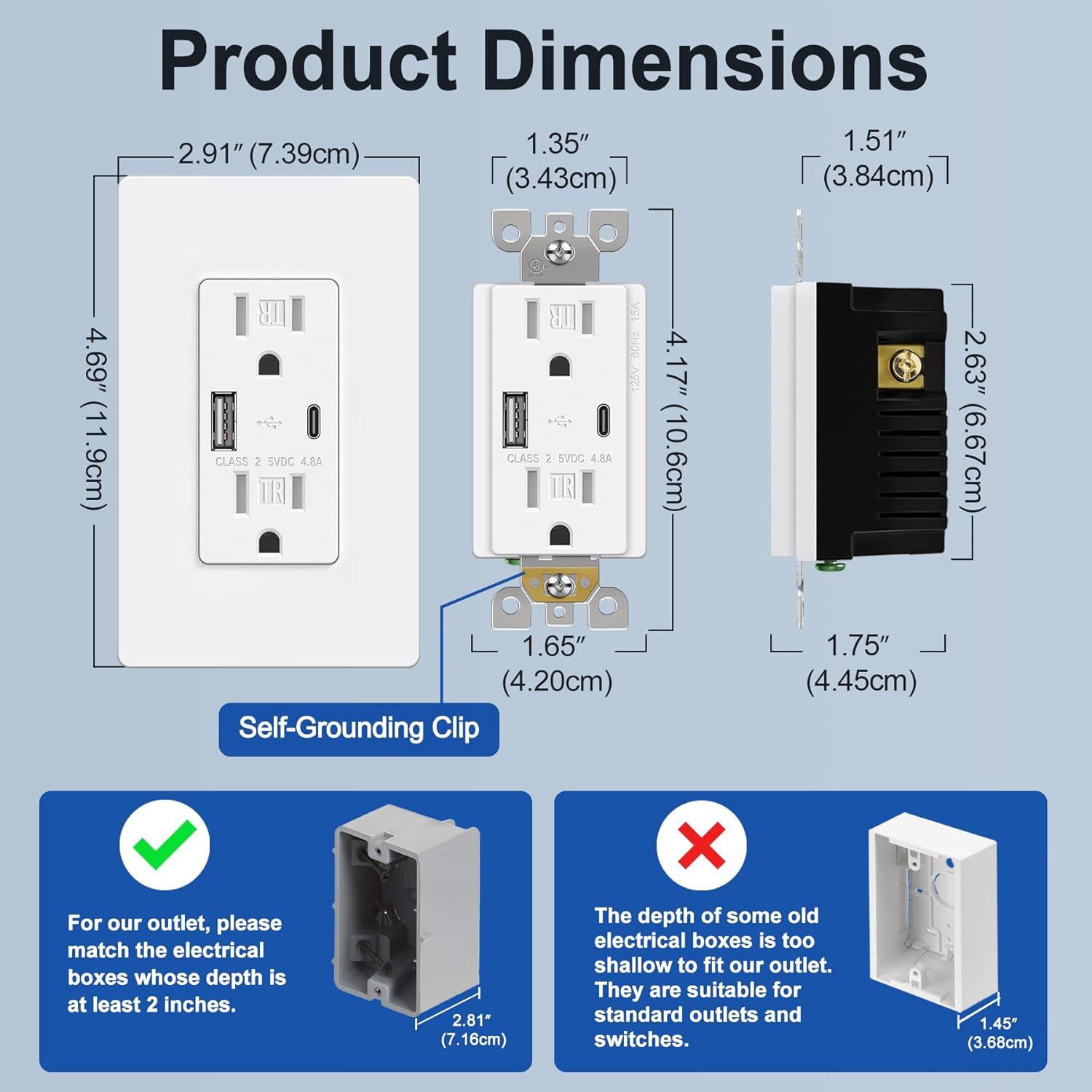
Image 4.1: Product dimensions and electrical box depth requirement.

Image 4.2: Comprehensive product specifications and dimensions.
5. Persediaan (Pemasangan)
Installation should be performed by a qualified electrician or a knowledgeable individual following all local electrical codes and safety guidelines. Always ensure power is OFF at the circuit breaker before starting.
Arahan Pendawaian
The outlet supports both back and side wiring options.

Image 5.1: Wiring diagram and installation steps.

Image 5.2: Back wire vs. Side wire connection methods.
Steps for Back Wiring:
- Gently loosen the screw holding it against the terminal.
- Press the screw, insert the bare wire into the terminal hole.
- Tighten the terminal screw to 12-14 in-lbs.
Steps for Side Wiring:
- Strip approximately 1 inch of insulation from the wire.
- Wrap the wire clockwise around the screw terminal, ensuring 2/3 of the way around.
- Tighten the terminal screw securely.
Awas Penting:
- Ensure the electrical box depth is at least 2 inches for proper fitment.
- Connect the Black/Hot wire to the Brass screw, White/Neutral wire to the Silver screw, and Green/Ground wire to the Green screw.
- After wiring, carefully push the outlet into the electrical box and secure it with mounting screws.
- Attach the screwless wallplate by snapping it into place.
- Pulihkan kuasa pada pemutus litar.
6. Arahan Operasi
Once installed and power is restored, the BESTTEN USB Wall Outlet is ready for use.
- Cawangan AC: Plug standard electrical devices into the two 15 Amp AC receptacles.
- Port Pengecasan USB: Use the Type C or Type A USB ports to charge compatible electronic devices. The total output for both USB ports is 4.8A (5VDC, 24W).
- Pengecasan serentak: You can charge two USB devices simultaneously without needing adapters, while still having access to the two AC outlets.
- Keserasian: Compatible with a wide range of electronic devices including smartphones, tablets, e-readers, digital cameras, and MP3 players. Note: This USB outlet cannot charge laptops.

Image 6.1: High-speed charging with Type C and Type A USB ports.

Image 6.2: Wide compatibility with various electronic devices.
7. Penyelenggaraan
The BESTTEN USB Wall Outlet requires minimal maintenance.
- Pembersihan: To clean the surface, wipe with a soft, damp kain. Jangan gunakan pembersih atau pelarut yang melelas. Pastikan kuasa dimatikan sebelum membersihkan.
- Pemeriksaan: Periodically inspect the outlet and wallplate for any signs of damage, wear, or loose connections. If any issues are found, turn off power at the breaker and consult a qualified electrician.
8. Penyelesaian masalah
If you encounter issues with your USB wall outlet, refer to the following table:
| Masalah | Kemungkinan Punca | Penyelesaian |
|---|---|---|
| No power from AC outlets | Pemutus litar terpelantik; Sambungan pendawaian longgar | Check and reset the circuit breaker. Verify wiring connections are secure (power off first). |
| Port USB tidak dicas | Device incompatibility; Faulty USB cable; USB ports failed; Overload | Ensure device is compatible (not a laptop). Try a different USB cable. Reduce number of devices charging. If USB ports fail after extended use, replacement may be necessary. |
| Peranti mengecas perlahan | High power demand from multiple devices; Faulty USB cable | Ensure total USB current draw does not exceed 4.8A. Try a different, high-quality USB cable. |
| Wallplate does not fit flush | Electrical box too shallow; Obstruction | Ensure electrical box depth is at least 2 inches. Check for any wires or debris obstructing the fit. |
9. Waranti dan Sokongan
This BESTTEN product is backed by a standard return policy, typically 30 days from the date of purchase for refund or replacement, as per retailer terms. For specific warranty details and duration, please refer to the product packaging or contact BESTTEN customer support.
For technical assistance or further inquiries, please visit the official BESTTEN webtapak atau hubungi bahagian perkhidmatan pelanggan mereka. Simpan resit pembelian anda untuk tuntutan waranti.
Maklumat Hubungan:
Please refer to the BESTTEN official webtapak untuk butiran hubungan sokongan pelanggan terkini.