
pengenalan
This manual provides instructions for the proper setup, operation, and maintenance of your SMALLRIG Push-Button Rotating Side Handle with NATO Clamp. This accessory is designed to enhance handheld camera operation by providing a comfortable and versatile grip solution for camera cages and mounting plates equipped with NATO rails.
Apa yang ada dalam Kotak
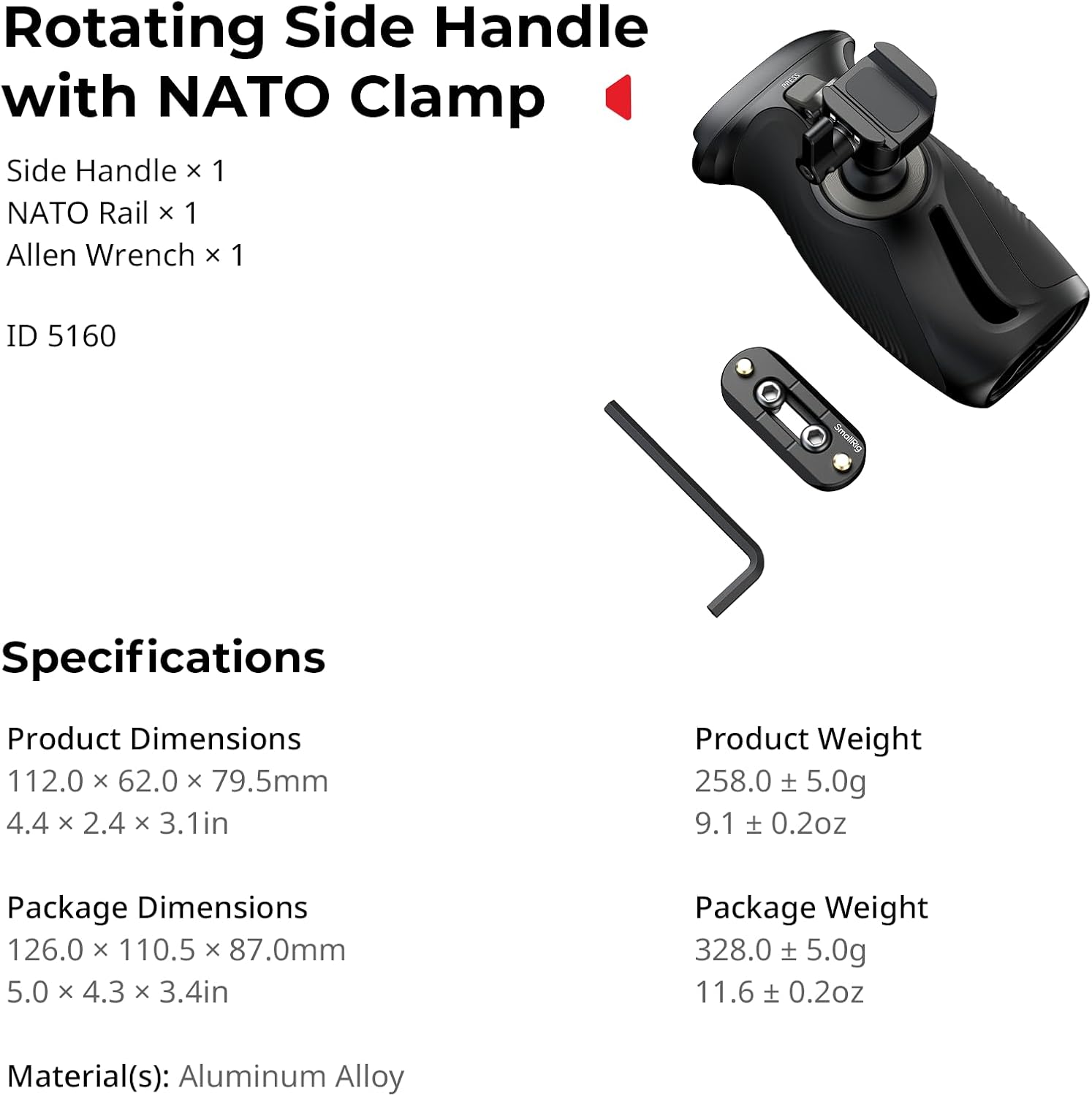
- Pemegang Sisi x 1
- Rel NATO x 1
- Sepana Allen x 1
Ciri-ciri Utama
- Reka Bentuk Boleh Diputar: Features a push-button mechanism for 360° rotation, allowing for quick and smooth angle adjustments.
- Keserasian Universal: Designed for both left and right-hand use, attaching to camera/monitor cages and mounting plates with NATO rails.
- Kapasiti Beban Tinggi: Supports a maximum load of 15kg (33lb), ensuring stability for various camera setups.
- Cengkaman Ergonomik: Constructed with anti-slip silicone for a comfortable and secure hold, even in varying conditions.
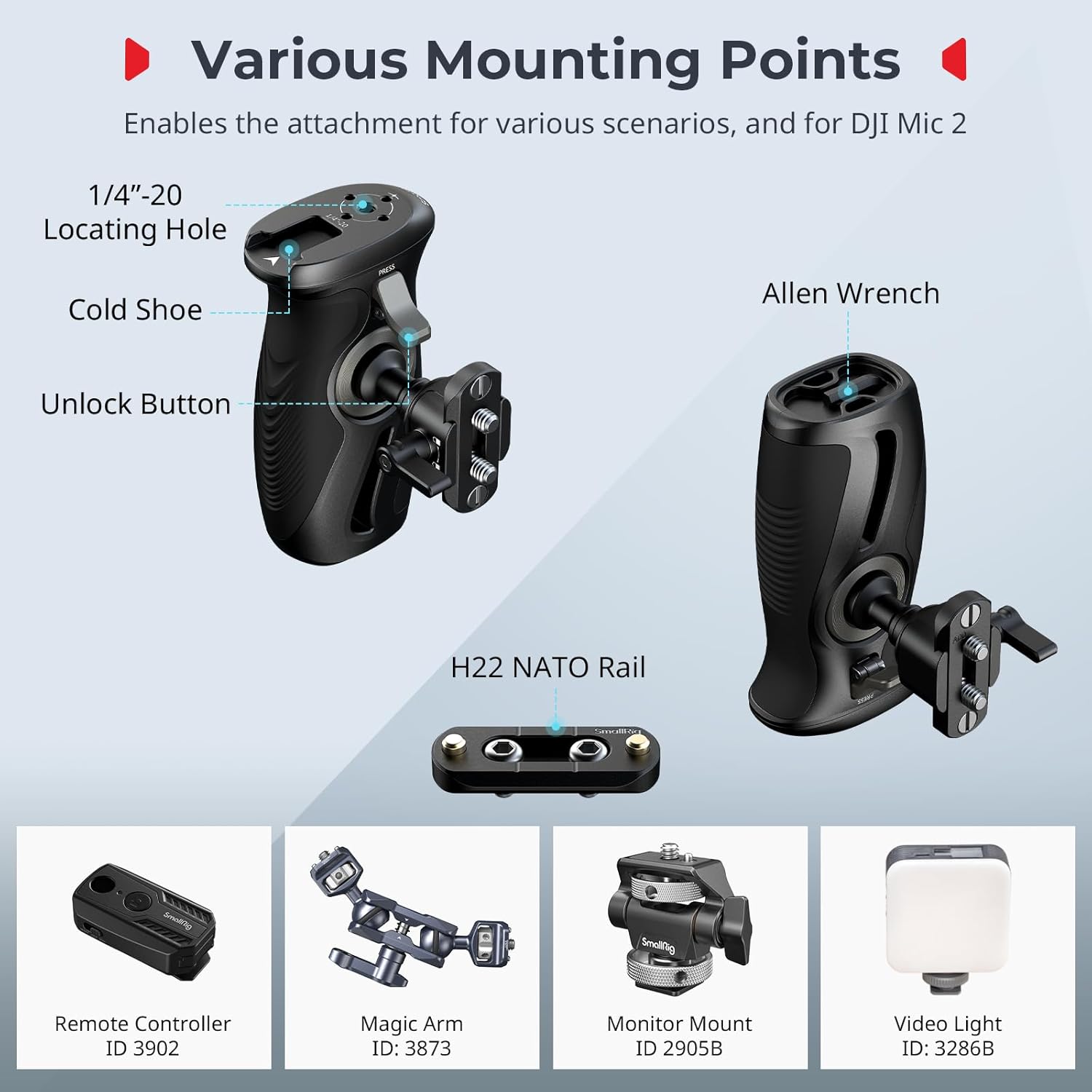
- Pelbagai Titik Pemasangan: Includes 1/4"-20 locating holes and a cold shoe mount for attaching accessories like remote controllers, magic arms, monitors, microphones, and video lights.
Arahan Persediaan
- Attach NATO Rail (if necessary): If your camera cage or mounting plate does not have a built-in NATO rail, use the included NATO rail and Allen wrench to securely attach it to your desired position on the cage. Ensure it is tightened firmly to prevent movement.
- Mount the Side Handle: Selaraskan kelompok NATOamp on the side handle with the NATO rail on your camera setup. Slide the handle onto the rail.
- Selamatkan Pemegang: Tighten the locking knob on the NATO clamp to firmly secure the side handle in place. Verify that the handle is stable and does not wobble.

Arahan Operasi
Putaran 360°
The side handle features a push-button mechanism for quick angle adjustments. To rotate the handle:
- Locate the unlock button on the handle.
- Tekan dan tahan butang buka kunci.
- While holding the button, rotate the handle to your desired angle (up to 360°).
- Release the button to lock the handle in the new position.
Langkah berjaga-jaga keselamatan penting: When adjusting the angle, always hold the camera or rig securely with your other hand to prevent accidental drops or damage.

Memasang Aksesori
The handle provides various mounting points for additional accessories:
- 1/4"-20 Locating Holes: Use these threaded holes to attach remote controllers, magic arms, or other accessories with 1/4"-20 screws.
- Lekapan Kasut Sejuk: The integrated cold shoe mount allows for direct attachment of accessories such as monitor mounts, microphones, or video lights.
Penyelenggaraan
- Regularly inspect all screws and connections to ensure they are tight. Use the included Allen wrench for tightening if necessary.
- Clean the handle and NATO rail with a soft, dry cloth. Avoid using harsh chemicals or abrasive materials that could damage the finish or silicone grip.
- Store the handle in a dry, dust-free environment when not in use.
Menyelesaikan masalah
Handle is loose or wobbly after attachment
Ensure the locking knob on the NATO clamp is fully tightened. If the issue persists, check if the NATO rail itself is securely attached to your camera cage. Re-tighten any loose screws using the Allen wrench.
Rotation mechanism feels stiff or does not lock properly
Ensure the unlock button is fully depressed when attempting to rotate. If the mechanism feels stiff, check for any debris or obstructions around the rotating joint. Avoid forcing the rotation; if resistance is significant, contact customer support.
Spesifikasi
| Ciri | Perincian |
|---|---|
| Nama Model | 12669 |
| Dimensi Produk | 112.0 x 62.0 x 79.5mm (4.41 x 2.44 x 3.15 inci) |
| Berat Produk | 0.26 Kilogram (9.1 oz) |
| bahan | Aloi Aluminium, Silikon |
| Maks. Had muatan | 15 Kilograms (33 lb) |
| Sudut Putaran | 360° |
| Jenis Pemasangan | NATO Clamp (Lekapan Permukaan) |
| Peranti Serasi | Sangkar kamera / monitor, plat pemasangan dengan rel NATO |

Waranti dan Sokongan
Maklumat Waranti
This SMALLRIG product is covered by a Waranti Pengeluar 2 Tahun dari tarikh pembelian. Waranti ini meliputi kecacatan bahan dan mutu kerja di bawah penggunaan biasa. Ia tidak meliputi kerosakan yang disebabkan oleh salah guna, kemalangan, pengubahsuaian tanpa kebenaran atau pemasangan yang tidak betul.
Sokongan Pelanggan
For technical assistance, warranty claims, or product inquiries, please contact SMALLRIG customer support through their official website or the retailer where the product was purchased. Please have your product model number (12669) and proof of purchase ready when contacting support.