
1. Pengenalan
This manual provides detailed instructions for the assembly, operation, and maintenance of your WorkPro Momentum Ergonomic High-Back Active Chair. Please read this manual thoroughly before assembly and use to ensure proper function and safety.
The WorkPro Momentum chair is designed to provide an exceptional seating experience, integrating precision and comfort. Key features include a premium seat cushion with 3D printed lattice mesh, an active high-back for dynamic support, multiple reclining positions, built-in lumbar support, pneumatic 1-touch height adjustment, and 3D adjustable armrests.

Image 1.1: The WorkPro Momentum Ergonomic High-Back Active Chair in a modern office environment, showcasing its design and presence.
2. Maklumat Keselamatan
AMARAN: Kegagalan mematuhi arahan keselamatan ini boleh mengakibatkan kecederaan atau kerosakan pada produk.
- Pneumatic Height Adjustment: The pneumatic height adjustment mechanism may cause injury if not used carefully. Always follow manufacturer's instructions for safe use. Avoid sudden movements when adjusting height.
- Perhimpunan: Ensure all components are securely fastened before use. Periodically check all screws and bolts to ensure they remain tight.
- Kapasiti Berat: This chair supports up to 275 lbs (124.7 kg). Do not exceed this weight limit.
- Penggunaan yang Dimaksudkan: This chair is designed for indoor office and home office use. Do not use for purposes other than its intended design.
- Kanak-kanak: Keep children away from the chair during assembly. Do not allow children to play on or with the chair.
- Kestabilan: Do not stand on the chair. Avoid leaning excessively to one side or backward, which could cause the chair to tip.
3. Kandungan Pakej
Before beginning assembly, verify that all parts are present and undamaged. If any parts are missing or damaged, do not proceed with assembly. Contact customer support immediately.
- Backrest
- Perhimpunan Kusyen Tempat Duduk
- Tempat Letak Tangan (Kiri dan Kanan)
- Chair Base (Star Base)
- Roda (5 keping)
- Silinder Angkat Gas
- Pek Perkakasan (skru, pencuci, sepana Allen)
4. Persediaan dan Pemasangan
Assembly is required for this product. Please follow these steps carefully. It is recommended to assemble the chair on a soft, clean surface to prevent scratching.
- Pasang Kastor ke Pangkalan: Masukkan setiap lima kastor ke dalam lubang di hujung setiap kaki tapak kerusi. Tolak dengan kuat sehingga mereka klik pada tempatnya.
- Masukkan Pengangkat Gas: Letakkan silinder pengangkat gas ke dalam lubang tengah tapak kerusi yang telah dipasang. Pastikan ia diletakkan dengan selamat.
- Pasangkan Tempat Letak Tangan pada Tempat Duduk: Align the armrests with the pre-drilled holes on the underside of the seat cushion assembly. Secure them using the provided screws and Allen wrench. Do not overtighten initially.
- Pasang Sandaran Belakang ke Tempat Duduk: Connect the backrest to the seat cushion assembly using the designated mounting points and hardware. Ensure proper alignment before tightening all screws.
- Sambungkan Pemasangan Tempat Duduk ke Lif Gas: Carefully place the assembled seat and backrest onto the gas lift cylinder, ensuring the center mechanism hole aligns with the top of the gas lift. Press down firmly to secure.
- Semakan Akhir: Once assembled, sit on the chair to ensure all components are properly seated and stable. Test all adjustment functions.
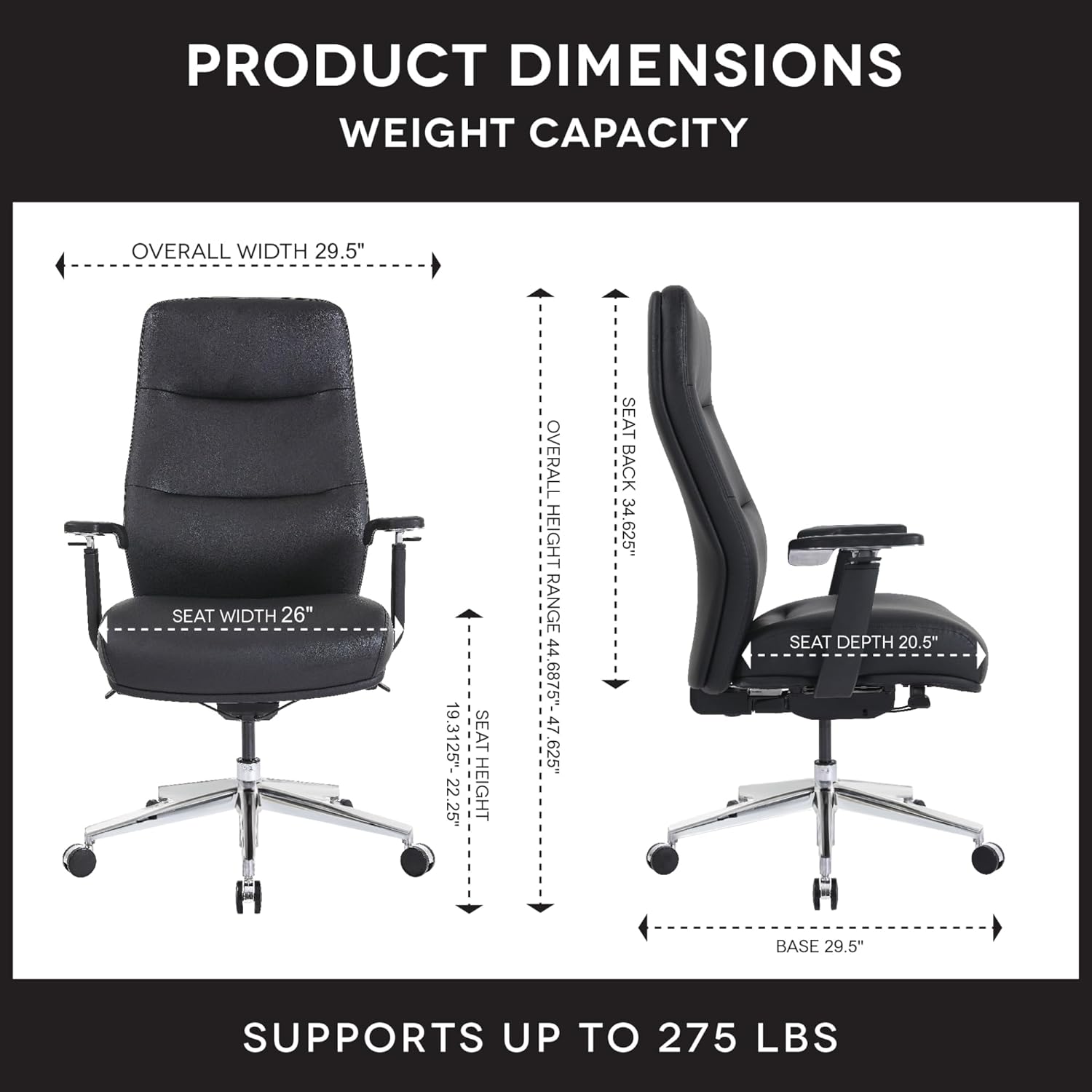
Image 4.1: Detailed product dimensions and weight capacity (275 lbs) of the WorkPro Momentum Ergonomic High-Back Active Chair.
5. Arahan Operasi
Your WorkPro Momentum chair offers several adjustment features to customize your seating experience for optimal comfort and ergonomic support.
5.1. Pelarasan Ketinggian Tempat Duduk
To adjust the seat height, locate the pneumatic 1-touch lever typically found on the right side beneath the seat. While seated, pull the lever up to lower the seat. To raise the seat, stand up slightly and pull the lever up. Release the lever at your desired height.
5.2. Reclining Positions
The chair features multiple reclining positions. Use the recline tension knob (usually located under the front of the seat) to adjust the resistance of the recline. A separate lever (often on the left side) may be used to lock the backrest in a specific reclined position or allow for free-flowing tilt.

Image 5.1: The WorkPro Momentum chair illustrating its capability for multiple reclining positions, allowing users to find their optimal comfort angle.
5.3. Active High-Back Support
The active high-back is designed to move harmoniously with your body, providing continuous support and promoting healthy posture throughout the day. This dynamic movement helps reduce static pressure and encourages micro-movements.

Imej 5.2: Bahagian belakang view of the WorkPro Momentum chair demonstrating the active movement of its high-back, adapting to the user's posture.
5.4. Sokongan Lumbar
The chair features built-in lumbar support that cradles your lower back, ensuring proper spinal alignment and reducing strain. This support is integrated into the backrest design.
5.5. Pelarasan Tempat Letak Tangan 3D
The 3D armrests offer customizable support with three adjustment capabilities:
- Pelarasan Ketinggian: Press the button on the side of the armrest and move it up or down to your desired height.
- Pivot: Rotate the armrest pads inward or outward to support your arms during various tasks.
- Forward & Backward Movement: Slide the armrest pads forward or backward to find the optimal position for your forearms.
5.6. Premium Seat Cushion
The premium seat cushion design incorporates a 3D printed lattice mesh structure combined with foam layers. This construction ensures long-lasting comfort and maintains its shape and performance over time.

Imej 5.3: Satu meletup view illustrating the multi-layered construction of the WorkPro Momentum chair's premium seat cushion, including the 3D printed lattice mesh.
6. Penyelenggaraan
Regular maintenance will help prolong the life and appearance of your WorkPro Momentum chair.
- Cleaning Vegan Leather: For general cleaning, wipe the vegan leather upholstery with a soft, damp kain. Untuk kesan yang lebih degil, gunakan larutan sabun yang lembut dan lap sehingga kering dengan segera. Elakkan bahan kimia yang keras atau pembersih yang kasar.
- Pemeriksaan perkakasan: Periodically inspect all screws, bolts, and connections to ensure they are tight. Retighten as necessary to maintain stability and safety.
- Penyelenggaraan Kastor: Keep casters free of hair, dust, and debris to ensure smooth movement. You may occasionally clean the caster wheels with a damp kain.
- Lif Gas: The gas lift is a sealed unit and requires no user maintenance. If it fails to function, contact customer support.
7. Penyelesaian masalah
Jika anda menghadapi masalah dengan kerusi anda, rujuk masalah dan penyelesaian biasa berikut:
| Masalah | Kemungkinan Punca | Penyelesaian |
|---|---|---|
| Kerusi tidak melaraskan ketinggian | Gas lift malfunction or lever not engaged | Ensure the lever is fully pulled. If still unresponsive, the gas lift may need replacement. Contact support. |
| Chair is wobbly or unstable | Perkakasan longgar | Check and tighten all screws and bolts, especially those connecting the seat, backrest, and armrests to the mechanism. |
| Bunyi-bunyi berdecit | Loose connections or friction between parts | Tighten all hardware. Apply a small amount of silicone lubricant to moving parts if necessary, avoiding contact with upholstery. |
| Roda tidak bergolek dengan lancar | Serpihan dalam roda | Keluarkan sebarang rambut, habuk atau serpihan dari roda kastor. |
8. Spesifikasi
| Ciri | Perincian |
|---|---|
| Jenama | WorkPro |
| Nombor Model | 735854699437 |
| warna | Hitam |
| bahan | Vegan Leather (Faux Leather), Foam, Wood Frame |
| Berat Barang | 64 paun (29 kg) |
| Kapasiti Berat | Sehingga 275 paun (124.7 kg) |
| Dimensi Keseluruhan (L x W x H) | 16.54 x 36.22 x 25.98 inci (anggaran) |
| Julat Ketinggian Tempat Duduk | 19.13" - 22.23" (approximate) |
| Gaya Belakang | High Back, Active Movement |
| Gaya Lengan | 3D Adjustable (Height, Pivot, Forward/Backward) |
| Kedudukan Berbaring | Berbilang |
| Perhimpunan Diperlukan | ya |
| Pematuhan | ANSI/BIFMA Compliant, FSC Certified Wood/Paper |
9. Waranti dan Sokongan
For warranty information, please refer to the documentation provided at the time of purchase or contact your retailer. Warranty terms and conditions may vary.
If you require further assistance, have questions about assembly, operation, or need to report a missing/damaged part, please contact the manufacturer or your point of purchase. The manufacturer of this product is OFFICE DEPOT.
You can often find support resources, FAQs, and contact information on the official WorkPro website or through the retailer where you purchased the chair.
WorkPro Store: Visit the WorkPro Store on Amazon