
pengenalan
Thank you for choosing the GNCC 1080P Indoor Security Camera. This manual provides detailed instructions for setting up, operating, and maintaining your camera to ensure optimal performance and security for your home. This camera offers high-definition video, advanced detection features, and two-way audio communication.
Apa yang ada dalam Kotak
Sila semak kandungan pakej anda. Jika ada item yang hilang atau rosak, hubungi sokongan pelanggan.
- Kamera dalaman
- Penyesuai Kuasa
- Manual Arahan
- Skru Pemasangan
- kord kuasa 2m
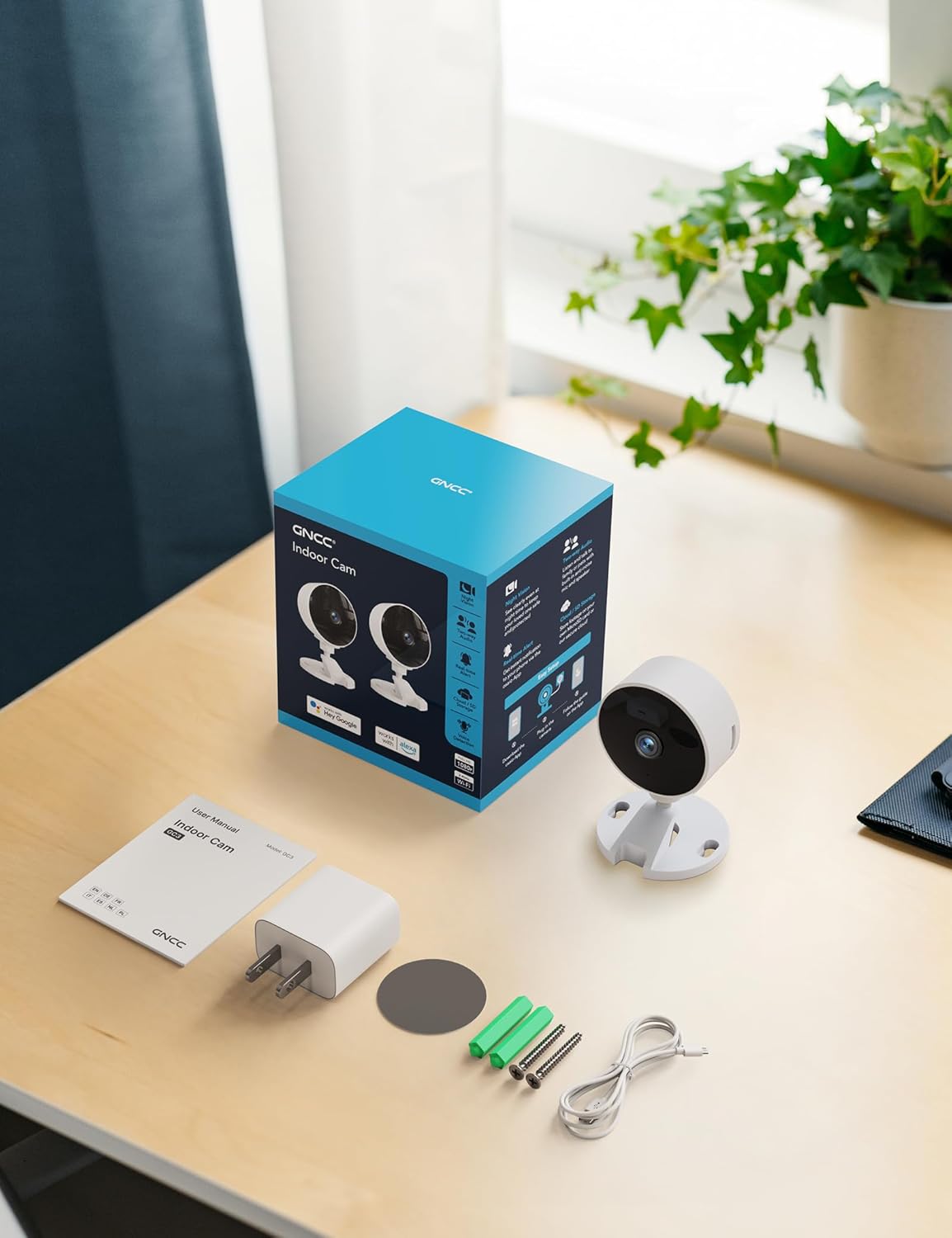
Image: All components included in the GNCC Indoor Camera package, neatly laid out on a wooden surface.
Ciri-ciri Produk
The GNCC Indoor Security Camera is equipped with several features designed to enhance your home security and monitoring experience:
- Resolusi HD Penuh 1080P: Provides clear and detailed video monitoring.
- 15m Night Vision: Built-in infrared LEDs enable clear vision up to 15 meters in low-light conditions.
- Smarter AI Detection: Advanced AI (subscription required) for identifying people, pets, vehicles, and packages, reducing false alerts.
- Pilihan Storan Fleksibel: Supports local recording with a 128GB Micro SD card (not included) and offers a 14-day free cloud storage trial.
- Persediaan Mudah: Can be installed quickly using 3M tape or included screws for wall mounting.
- Mod Privasi: One-tap privacy mode to disable the lens and LED for enhanced privacy.
- Audio Dua hala: Mikrofon dan pembesar suara terbina dalam untuk komunikasi masa nyata.
- Integrasi Pintar: Compatible with Alexa and Google Home for voice control.
- Perkongsian Keluarga: Allows sharing access with up to 3 users.

Image: Visual representation of the camera's core functionalities, including HD resolution, night vision, and two-way audio.
Persediaan
1. Menghidupkan
- Sambungkan penyesuai kuasa yang disediakan ke port input kuasa kamera.
- Palamkan penyesuai kuasa ke soket elektrik standard.
- Kamera akan dihidupkan dan lampu penunjuk akan menunjukkan statusnya.
2. Pemasangan Aplikasi dan Penciptaan Akaun
- Download the official GNCC app from your smartphone's app store (iOS App Store or Google Play Store).
- Buka apl dan ikut arahan pada skrin untuk membuat akaun baharu atau log masuk jika anda sudah mempunyai akaun.
3. Menambahkan Kamera pada Apl
- In the GNCC app, tap the "+" icon to add a new device.
- Select "Security Camera" or the specific model if prompted.
- Follow the app's instructions to connect the camera to your 2.4GHz Wi-Fi network. Note: This camera is not compatible with 5GHz Wi-Fi networks.
- You may be required to scan a QR code displayed on your phone with the camera lens or enter a code manually.
- Once connected, name your camera and assign it to a specific room or location.

Image: The GNCC camera alongside a smartphone showing the camera's live feed and app interface, demonstrating connectivity.
4. Pilihan Pemasangan
Kamera ini menawarkan pilihan pemasangan fleksibel:
- Peletakan Atas Meja: Simply place the camera on a flat surface like a shelf, table, or desk.
- Pemasangan Dinding: Use the included 3M adhesive tape for a drill-free installation, or use the provided screws for a more permanent fixture. Ensure the mounting surface is clean and dry before applying adhesive.
Arahan Operasi
Langsung View dan Pemantauan Jauh
Once connected, you can access the live video feed from your camera anytime, anywhere, through the GNCC app.

Image: A smartphone screen showing the live feed from the GNCC camera, illustrating remote monitoring capabilities.
Audio Dua Hala
The camera features a built-in microphone and speaker, allowing for two-way communication. Tap the microphone icon in the app to speak, and release to listen. This is ideal for communicating with family members or pets.

Image: A visual representation of the two-way audio feature, showing a child and a pet, with text bubbles indicating conversation.
Penglihatan Malam
The camera automatically switches to night vision mode in low-light conditions, providing clear black and white images up to 15 meters. This ensures continuous monitoring even in complete darkness.

Image: A baby sleeping in a crib, demonstrating the camera's clear night vision capabilities in a dark environment.
Pengesanan Pergerakan dan Bunyi
The camera can detect motion and sound, sending instant alerts to your smartphone. With an optional AI subscription, the camera can differentiate between people, pets, vehicles, and packages, reducing false alarms. You can customize motion detection zones within the app.

Image: Children and a dog triggering motion and sound detection, with example alert notifications shown.
Pilihan Storan
Your GNCC camera supports two primary storage methods for recorded footage:
- Kad SD mikro: Insert a Micro SD card (up to 128GB, not included) into the camera's slot for continuous local recording.
- Storan Awan: A 14-day free trial of cloud storage is included. Cloud storage provides secure, off-site backup of your recordings, accessible from anywhere.

Image: The camera with visual cues for both SD card and cloud storage, highlighting flexible recording options.
Mod Privasi
To ensure privacy, the GNCC camera features a one-tap privacy mode within the app. Activating this mode will fully disable the camera lens and LED indicator, preventing any recording or live viewing.
Penyelenggaraan
- Pembersihan: Gunakan kain lembut dan kering untuk membersihkan kanta dan badan kamera. Elakkan menggunakan pembersih cecair atau bahan kasar.
- Kemas kini Firmware: Regularly check the GNCC app for firmware updates. Keeping your camera's firmware up-to-date ensures optimal performance, security, and access to new features.
- penempatan: Pastikan kamera diletakkan di lokasi yang stabil, jauh daripada cahaya matahari langsung, sumber haba dan kelembapan berlebihan.
Menyelesaikan masalah
| Masalah | Kemungkinan Punca / Penyelesaian |
|---|---|
| Kamera tidak bersambung ke Wi-Fi |
|
| No video feed / Offline status |
|
| Kualiti video yang teruk |
|
| Motion/Sound alerts not received |
|
| Audio dua hala tidak berfungsi |
|
Spesifikasi
| Ciri | Perincian |
|---|---|
| Nama Model | GC3B-1P |
| Penggunaan Dalaman/Luar | Dalaman |
| Resolusi Tangkapan Video | 1080p HD Penuh |
| Julat Penglihatan Malam | 15 Meter |
| Teknologi Ketersambungan | Wayarles (Wi-Fi) |
| Kekerapan Wi-Fi | 2.4GHz (Tidak serasi dengan 5GHz) |
| Sumber Kuasa | Elektrik Bertali |
| Jenis Pengawal | Amazon Alexa, Google Home |
| Jenis Pemasangan | Pelekap Atas Meja, Pemasangan Dinding |
| Pilihan Storan | Kad Mikro SD (sehingga 128GB, tidak termasuk), Storan Awan |
| Audio Dua Hala | ya |
| Pengesanan AI | Motion, Sound (AI features require subscription) |
| Dimensi Produk | 2.56 x 2.76 x 3.54 inci |
| Berat Barang | 2.24 auns |
| warna | putih |
| Komponen yang Disertakan | Indoor camera, Power Adapter, Instruction Manual, Mounting Screw, 2m power cord |
Waranti dan Sokongan
GNCC products are designed for reliability and performance. For specific warranty details, please refer to the warranty card included with your product or visit the official GNCC webtapak.
If you encounter any issues or have questions regarding your GNCC 1080P Indoor Security Camera, please contact GNCC Customer Support through the following channels:
- Official GNCC Webtapak: Look for the "Support" or "Contact Us" section.
- Sokongan E-mel: Refer to the contact information provided in the GNCC app or on the product packaging.
- Sokongan Dalam Apl: Some issues can be resolved directly through the help section within the GNCC application.
Please have your product model (GC3B-1P) and purchase information ready when contacting support.