
1. Pengenalan
This manual provides essential instructions for setting up, operating, maintaining, and troubleshooting your HONOR 400 5G smartphone. Please read this guide thoroughly to ensure proper use and to maximize the performance of your device.
The HONOR 400 is a powerful 5G smartphone featuring a 6.55-inch AMOLED display, a Qualcomm Snapdragon 7 Gen 3 processor, 12GB of RAM, and 512GB of internal storage. It operates on Android 15 and is equipped with a 5300mAh battery, a 200MP main camera, and dual-SIM capabilities.
2. Apa yang ada di dalam Kotak
Upon unboxing your HONOR 400 smartphone, verify that all items are present:
- Telefon Pintar HONOR 400 5G
- Kabel USB
- (Other accessories such as a charger, SIM ejector tool, or protective case may vary by region and package contents.)
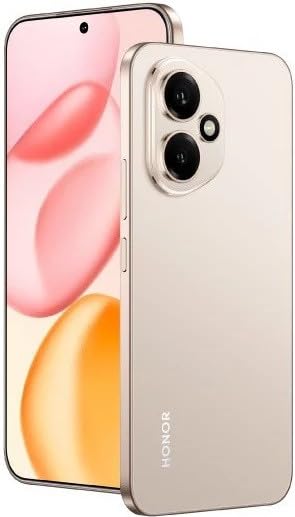
Rajah 2.1: The HONOR 400 5G Smartphone. This image displays the device's sleek design and the main screen.
3. Peranti Lebihview
Familiarize yourself with the physical components of your HONOR 400 smartphone.
3.1 Depan View
- paparan: 6.55-inch AMOLED screen with 1264 x 2736 pixels resolution.
- Kamera Depan: 50 MP, f/2.0 (wide) for selfies and video calls.
- Alat dengar: Terletak di tepi atas paparan.
An illustration of the front view would typically show the display, front camera, and earpiece.
3.2 Belakang View
- Main Camera System:
- 200 MP, f/1.9 (wide), 1/1.4", PDAF, OIS
- 12 MP, f/2.2, 112° (ultrawide), AF
- kilat: Denyar LED untuk fotografi cahaya malap.
- HONOR Logo: Pengenalan jenama.
An illustration of the rear view would typically highlight the camera module and brand logo.
3.3 Bahagian Views dan Pelabuhan
- Butang Kuasa: Biasanya di sebelah kanan, digunakan untuk menghidupkan/mematikan dan membangunkan/menidurkan peranti.
- Butang Kelantangan: Typically on the right side, above the power button, for adjusting volume.
- Port USB Jenis-C: Terletak di bahagian bawah, digunakan untuk pengecasan dan pemindahan data.
- Dulang Kad SIM: Location varies, typically on the side or bottom, for inserting Nano-SIM cards.
- Microphones & Speakers: Strategically placed for calls and audio output.
Illustrations of the device's sides would show the placement of buttons, ports, and the SIM tray.
4. Persediaan
4.1 Memasukkan Kad SIM
- Cari dulang kad SIM pada peranti anda.
- Masukkan alat ejektor SIM (jika disediakan) ke dalam lubang kecil di sebelah dulang dan tolak perlahan-lahan sehingga dulang terkeluar.
- Place your Nano-SIM card(s) into the designated slots on the tray. The HONOR 400 supports Dual-SIM (Nano-SIM + ESIM OR Nano-SIM + Nano-SIM). Ensure the gold contacts face downwards.
- Masukkan semula dulang dengan berhati-hati ke dalam telefon.
An image demonstrating SIM card insertion would be helpful here.
Penting: Sebelum pembelianasing, verify network compatibility with your service provider. This device supports GSM networks (2G, 3G, 4G LTE, and 5G SA/NSA) but does not support CDMA networks.
4.2 Kuasa Awal Hidup dan Wizard Persediaan
- Tekan dan tahan butang Kuasa sehingga logo HONOR muncul.
- Follow the on-screen instructions to complete the initial setup, which includes selecting your language, connecting to Wi-Fi, setting up your Google account, and configuring security features.
5. Mengendalikan Peranti Anda
5.1 Sistem Pengoperasian Android 15
Your HONOR 400 runs on Android 15, offering a user-friendly interface and access to a vast ecosystem of applications via the Google Play Store. Navigate using gestures or on-screen buttons, customize your home screen, and manage notifications.
5.2 Fungsi Asas
- Membuat Panggilan: Ketik ikon Telefon, masukkan nombor dan ketik butang panggilan.
- Menghantar Mesej: Use the Messaging app to send SMS/MMS.
- Pelayaran Internet: Buka a web browser (e.g., Chrome) to access the internet via Wi-Fi or mobile data.
- Pengurusan Apl: Download, install, and uninstall apps from the Google Play Store.
5.3 Penggunaan Kamera
The HONOR 400 features a versatile camera system:
- Kamera Belakang: Utilize the 200 MP main sensor for high-resolution photos and the 12 MP ultrawide lens for expansive shots. Features include PDAF and Optical Image Stabilization (OIS).
- Kamera Depan: The 50 MP wide-angle front camera is ideal for selfies and video conferencing.
- Rakaman Video: Capture videos in up to 4K resolution at various frame rates (30, 60, 120 fps).
A diagram of the camera interface or tips for photography modes could be included here.
5.4 Ketersambungan
Peranti anda menyokong berbilang pilihan sambungan:
- 5G/4G LTE: Kesambungan data mudah alih berkelajuan tinggi.
- Wi-Fi: Sambung ke rangkaian wayarles untuk akses internet.
- Bluetooth: Pasangkan dengan fon kepala wayarles, pembesar suara dan peranti lain.
- USB Jenis-C: For charging and connecting to a computer for data transfer.
6. Penyelenggaraan
6.1 Penjagaan Bateri
- The HONOR 400 is equipped with a 5300mAh non-removable battery.
- Untuk memanjangkan hayat bateri, elakkan suhu yang melampau dan kerap nyahcas bateri sepenuhnya.
- Use the provided USB cable and a compatible charger for optimal charging.
6.2 Kemas Kini Perisian
Regularly check for and install software updates to ensure your device has the latest features, security patches, and performance improvements. You can usually find this option in your phone's Settings menu under "System & updates" or "About phone."
6.3 Membersihkan Peranti Anda
Gunakan kain lembut dan tidak berbulu untuk membersihkan skrin dan badan telefon anda. Elakkan menggunakan bahan kimia yang keras atau bahan yang melelas.
7. Penyelesaian masalah
This section addresses common issues you might encounter with your HONOR 400 smartphone.
7.1 Peranti Tidak Dihidupkan
- Pastikan bateri telah dicas. Sambungkan telefon kepada pengecas selama sekurang-kurangnya 15 minit sebelum cuba menghidupkannya semula.
- Try a forced restart by holding the Power button for an extended period (e.g., 10-15 seconds).
7.2 Isu Ketersambungan Rangkaian
- Periksa sama ada kad SIM anda dimasukkan dengan betul.
- Verify that mobile data is enabled in your phone's settings.
- Mulakan semula peranti anda.
- Confirm with your service provider that your plan is active and there are no network outages di kawasan anda.
- Ensure your device is compatible with your network's frequencies (GSM only, no CDMA).
7.3 Aplikasi Ranap atau Terhenti
- Tutup dan buka semula apl.
- Kosongkan cache dan data apl dalam Tetapan > Apl.
- Pastikan apl dikemas kini kepada versi terkininya.
- Mulakan semula telefon anda.
7.4 Prestasi Perlahan
- Tutup aplikasi latar belakang yang tidak diperlukan.
- Kosongkan cache dan sementara files.
- Ensure you have sufficient free storage space (512GB internal storage).
- Mulakan semula peranti anda dengan kerap.
8. Spesifikasi
| Ciri | Perincian |
|---|---|
| Nama Model | Kehormatan 400 |
| Sistem Operasi | Android 15.0 |
| Pemproses | Qualcomm SM7550-AB Snapdragon 7 Gen 3 (4 nm), Octa-core (1x2.63 GHz Cortex-A715 & 3x2.4 GHz Cortex-A715 & 4x1.8 GHz Cortex-A510) |
| RAM | 12 GB |
| Storan Dalaman | 512 GB (tidak boleh dikembangkan) |
| Paparan | 6.55 Inches AMOLED, 1B colors, 1264 x 2736 pixels |
| Kamera Belakang | 200 MP (wide, OIS) + 12 MP (ultrawide) |
| Kamera Depan | 50 MP (lebar) |
| Resolusi Tangkapan Video | 4K (30, 60, 120 fps) |
| Kapasiti Bateri | 5300 Miliamp Hours (non-removable) |
| Kad SIM | Dual-SIM (Nano-SIM + ESIM OR Nano-SIM + Nano-SIM) |
| Ketersambungan | 5G, GSM, LTE, Wi-Fi, Bluetooth, USB Type-C |
| Dimensi | 156.5 x 74.6 x 7.3 mm (6.16 x 2.94 x 0.29 inci) |
| Berat badan | 202 Gram (6.49 oz) |
| warna | Desert Gold (as per product listing, actual color may vary by variant) |
9. Waranti dan Sokongan
9.1 Waranti Pengilang
The HONOR 400 smartphone comes with a Waranti Pengeluar 1 Tahun. Waranti ini melindungi kecacatan pada bahan dan mutu kerja di bawah penggunaan biasa. Sila simpan bukti pembelian anda untuk tuntutan waranti.
For specific terms and conditions of the warranty, please refer to the warranty card included with your product or visit the official HONOR support webtapak.
9.2 Sokongan Pelanggan
For further assistance, technical support, or service inquiries, please contact HONOR customer support through their official webtapak atau maklumat hubungan yang diberikan dalam pembungkusan produk anda.
You can typically find support resources, FAQs, and contact details on the official HONOR webtapak: www.hihonor.com