
pengenalan
Thank you for choosing the WolfLawS TA3000 Wireless Gaming Headset. This manual provides detailed instructions for setting up, operating, and maintaining your headset to ensure optimal performance and longevity. Please read this manual thoroughly before using the product.

Image: The WolfLawS TA3000 Wireless Gaming Headset, shown with its detachable microphone, USB wireless transmitter, and 3.5mm audio cable.

Image: The WolfLawS TA3000 headset emphasizing its lightweight design for extended comfort during use.
Kandungan Pakej
Selepas membuka pakej, sila sahkan bahawa semua item berikut disertakan:
- Alat dengar Permainan Wayarles WolfLawS TA3000
- Pemancar Wayarles USB
- Kabel Pengecasan USB Jenis-C
- Mikrofon boleh tanggal
- Kabel Audio 3.5mm
- Manual Pengguna (dokumen ini)
Persediaan dan Sambungan
1. Mengecas Alat Dengar
Before initial use, fully charge the headset. Connect the provided USB Type-C charging cable to the headset's Type-C port and the other end to a USB power source (e.g., computer USB port, USB wall adapter). The charging indicator light will show the charging status.

Image: The WolfLawS TA3000 headset highlighting its 48-hour battery life, indicating extended usage between charges.
2. Menyambung Mikrofon
The headset features both a built-in beamforming microphone and a detachable boom microphone. For enhanced voice clarity, attach the detachable microphone to the dedicated microphone port on the headset. Ensure it is plugged into the microphone port, not the 3.5mm audio port, as incorrect insertion may cause the headset to shut down.

Imej: A terperinci view of the headset's dual microphone system, illustrating the detachable boom mic and the internal beamforming mic for clear communication.
3. Mod Sambungan
The TA3000 headset offers multiple connection options for various devices:
- Sambungan Wayarles 2.4GHz: For PC, PS4, PS5, and Laptops.
- Plug the USB wireless transmitter into an available USB port on your device.
- Power on the headset. The headset should automatically connect to the transmitter.
- Ensure the headset is selected as the audio input and output device in your system settings.

Image: The USB wireless transmitter, illustrating its role in providing a low-latency 2.4GHz wireless connection for gaming.
- Mod Bluetooth: For Mac, Nintendo Switch, and mobile devices.
- Power on the headset and switch to Bluetooth mode (refer to the "On-ear Function Control" section for button details).
- On your device, enable Bluetooth and search for "TA3000" in the list of available devices.
- Select "TA3000" to pair.
- Nota: Bluetooth function does not support PS5 or PS4.
- Mod Berwayar 3.5mm: For Xbox One, Xbox Series X|S, and any device with a 3.5mm audio port.
- Connect the provided 3.5mm audio cable to the headset's 3.5mm port and to your device's 3.5mm audio jack.
- This mode is purely analog and does not require headset power.
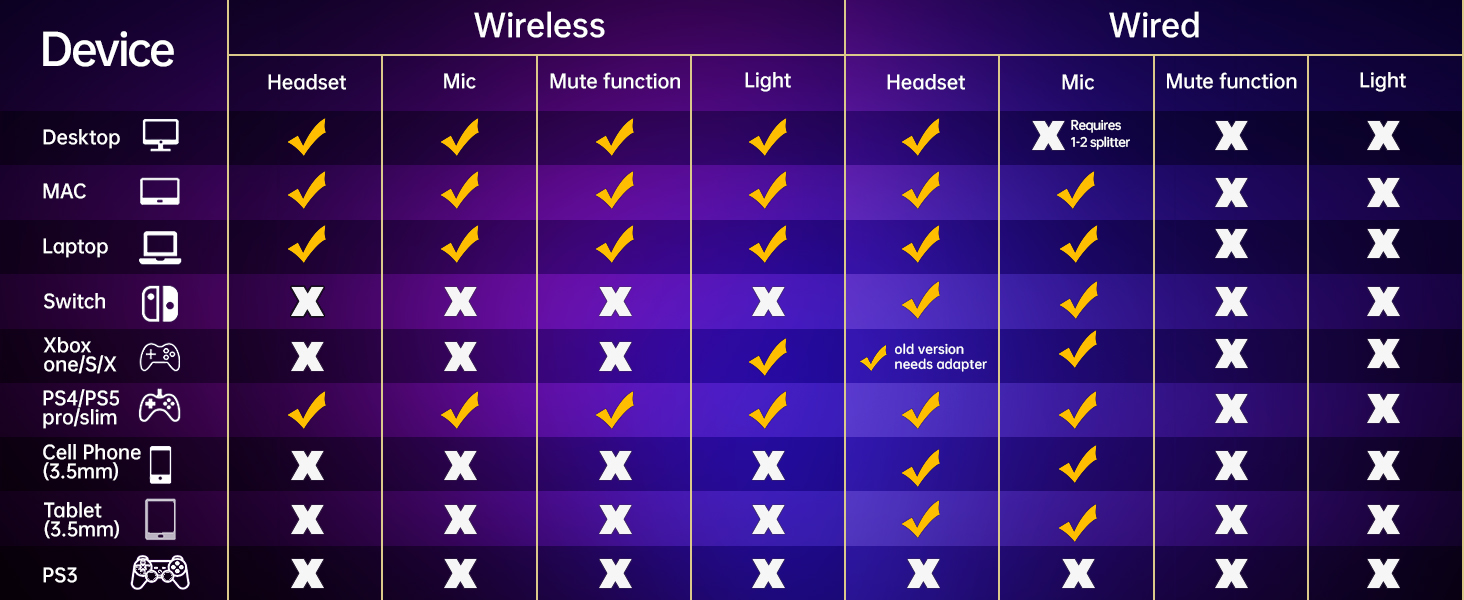
Image: A comprehensive compatibility chart detailing which features (headset, mic, mute, light) work with different devices (PC, Mac, Laptop, Switch, Xbox, PS4/PS5, Mobile, Tablet, PS3) in both wireless and wired modes.
Arahan Operasi
On-ear Function Controls
The headset features intuitive controls located on the earcup for easy access during use:
- Butang Kuasa: Tekan dan tahan untuk menghidupkan/mematikan alat dengar.
- BT/2.4G Switch: Toggles between Bluetooth and 2.4GHz wireless modes.
- Volume + / Next: Increases volume; short press for next track in media playback.
- Volume - / Prev: Decreases volume; short press for previous track in media playback.
- Mic Hidup / Mati: Menogol bisu/nyahbisu mikrofon.
- Port 3.5mm: Untuk sambungan audio berwayar.
- Pelabuhan Jenis-C: Untuk mengecas set kepala.

Image: An annotated diagram of the headset's left earcup, clearly labeling the Power Button, BT/2.4G switch, Volume controls, Mic On/Off button, 3.5mm Port, and Type-C Charging Port.
Ciri Audio
- 50mm Precision Drivers: Equipped with high-precision 50mm magnetic neodymium drivers, the TA3000 enhances acoustic positioning and speaker unit sensitivity, delivering clear and powerful audio.
- 3D Surround Sound: Experience immersive 3D surround sound, allowing you to accurately perceive in-game audio cues and communicate effectively with teammates.

Imej: Gambar rajah ilustrasi menunjukkanasing the internal components of the 50mm precision drivers and the concept of 3D surround sound for an immersive audio experience.
Penyelenggaraan dan Penjagaan
- Pembersihan: Gunakan kain lembut dan kering untuk membersihkan alat dengar. Elakkan menggunakan pembersih atau pelarut yang kasar.
- Storan: Simpan alat dengar di tempat yang sejuk dan kering jauh dari cahaya matahari langsung dan suhu yang melampau.
- Penjagaan Bateri: Untuk memanjangkan hayat bateri, elakkan daripada menyahcas sepenuhnya set kepala dengan kerap. Mengecasnya dengan kerap, walaupun tidak digunakan untuk tempoh yang lama.
- Pengendalian: Handle the headset with care. Avoid dropping it or exposing it to excessive force, which could damage internal components.
Menyelesaikan masalah
If you encounter issues with your WolfLawS TA3000 headset, please refer to the following common solutions:
| Masalah | Kemungkinan Punca / Penyelesaian |
|---|---|
| Alat dengar tidak dihidupkan. |
|
| Tiada audio atau kualiti audio yang lemah. |
|
| Mikrofon tidak berfungsi. |
|
| Tidak boleh menyambung melalui wayarles 2.4GHz. |
|
| Tidak dapat menyambung melalui Bluetooth. |
|
Spesifikasi
| Ciri | Perincian |
|---|---|
| Nama Model | TA3000 |
| Jenama | WolfLawS |
| Teknologi Ketersambungan | Wireless (2.4GHz, Bluetooth), Wired (3.5mm Jack) |
| Jack Fon Kepala | Jack 3.5 mm |
| Teknologi Komunikasi Tanpa Wayar | 2.4GHz wireless, Bluetooth |
| Saiz Pemacu Audio | 50 Milimeter |
| Latensi Audio | 20 milisaat |
| Berat Barang | 12.6 auns (0.36 Kilogram) |
| Penempatan Telinga | Atas Telinga |
| Faktor Bentuk | Atas Telinga |
| Impedans | 160 Ohm |
| bahan | plastik |
| Peranti Serasi | PS5, PS4, PC, Mac, Switch, Xbox One, Xbox Series X|S, and devices with 3.5mm port |
| Hayat Bateri | Up to 48 hours of non-stop use, over 100 hours standby time |
Waranti dan Sokongan
For warranty information, technical support, or customer service inquiries, please refer to the contact information provided with your purchase or visit the official WolfLawS webtapak. Simpan bukti pembelian anda untuk tuntutan waranti.
Polisi Pemulangan: The product typically includes a 30-day return/replacement policy. Please check your purchase details for specific terms.