
1. Produk Lebihview
The DELLA Serena 18000 BTU 22 SEER2 Smart WiFi Mini Split Heat Pump is an advanced climate control system designed for efficient heating and cooling of spaces up to 1000 sq.ft. This inverter-driven unit offers smart connectivity, allowing control via a dedicated app or voice commands through Alexa and Google Home. It features a high 22 SEER2 rating for energy efficiency and operates quietly.

Image 1.1: The DELLA Serena Mini Split Heat Pump system, including the indoor unit, outdoor unit, remote control, and a representation of the mobile app interface.
Ciri-ciri Utama
- Kawalan Pintar: Integrated WiFi for control via the DELLA app, Alexa, or Google Home. Includes a geo-location function for automated temperature adjustments.
- Kecekapan Tenaga: 18000 BTU/h capacity with a 22 SEER2 rating, offering up to 57% power savings through inverter technology.
- Operasi senyap: Operates at an ultra-silent 22 dBa in mute mode.
- Advanced Airflow: Features 4D airflow (up-down, left-right) for even temperature distribution.
- Pelbagai Mod: Includes I Feel mode, 24-hour timer, sleep mode, eco energy-saving mode, multiple fan speeds, turbo function, heating, cooling, auto, and dry (dehumidifying) modes.
- PureClean Technology: Prevents dust buildup and defrosts the indoor unit for cleaner air.
- Winter Performance: Equipped with a bottom heating element in the outdoor unit to prevent ice buildup and ensure reliable operation down to 5°F (-15°C).
- Kit Pemasangan: Comes with a 16.4ft installation kit, including standard 1/4" & 1/2" outer dimension copper pipes.
2. Garis Panduan Keselamatan
Read all safety warnings and instructions carefully before installing, operating, or performing maintenance on this appliance. Failure to follow these instructions may result in electric shock, fire, property damage, or personal injury.
Keselamatan Am
- Perkakas ini tidak dimaksudkan untuk digunakan oleh orang (termasuk kanak-kanak) yang kurang keupayaan fizikal, deria, atau mental, atau kurang pengalaman dan pengetahuan, melainkan mereka telah diberi pengawasan atau arahan mengenai penggunaan perkakas oleh orang yang bertanggungjawab untuk keselamatan mereka .
- Kanak-kanak harus diawasi untuk memastikan bahawa mereka tidak bermain dengan perkakas.
- Jangan masukkan jari atau benda asing ke dalam saluran masuk atau keluar udara.
- Jangan kendalikan unit dengan tangan yang basah.
- Jangan sembur air terus ke unit.
- Pastikan unit dipasang pada permukaan yang stabil dan rata untuk mengelakkan getaran dan bunyi bising.
Keselamatan Elektrik
- The unit requires a 208V-230V, 60Hz power supply with a maximum fuse size of 20A.
- Always ensure the power supply is disconnected before performing any maintenance or repairs.
- Do not use extension cords or multi-outlet adapters with this unit.
- Pastikan pembumian yang betul untuk mengelakkan kejutan elektrik.
- Jika kord kuasa rosak, ia mesti diganti oleh pengilang, ejen servisnya, atau orang yang berkelayakan yang serupa untuk mengelakkan bahaya.
3. Kandungan Pakej
Verify that all components listed below are included in your package before beginning installation.

Imej 3.1: Satu meletup view diagram illustrating the various components included with the DELLA Serena Mini Split Heat Pump.
- 1 x Unit Dalaman
- 1 x Unit Luaran
- 1 x Alat Kawalan Jauh
- 1 x Refrigerant Pipe (16.4ft)
- 1 x Drain Lines
- 1 x Penutup Dinding
- 1 x Plat Pemasangan
- 2 x Bateri AAA (untuk alat kawalan jauh)
- 1 x Plasticine Putty
- Kord Kuasa
- Kabel Komunikasi
- Templat Kurungan
- Manual Pengguna
4. Arahan Pemasangan
Penting: This DELLA Mini Split AC system mandates professional installation. It is not designed for DIY installation. Improper installation can lead to refrigerant leaks, electrical hazards, and void the product warranty. Line-set vacuuming is required during installation. Any alteration of line-set length requires adjusting freon levels by a qualified technician.
Senarai Semak Prapemasangan
- Ensure the installation area is suitable for both indoor and outdoor units, considering space, airflow, and structural integrity.
- Confirm availability of a dedicated 208V-230V, 60Hz power supply with a 20A circuit breaker.
- Verify that the included 16.4ft copper pipes (1/4" & 1/2" outer dimension) are sufficient for your desired unit placement.
- Have all necessary tools and safety equipment ready for professional installation.
Installation Kit Details
The provided 16.4ft installation kit includes pre-charged R32 refrigerant for the specified line-set length. The drain pipe length is 78.7 inches. Ensure these lengths are adequate for your installation plan. Professional technicians will handle the connection of refrigerant lines, electrical wiring, and proper vacuuming of the system.
5. Operating Your Mini Split System
Your DELLA Serena Mini Split Heat Pump can be operated using the included remote control, the DELLA mobile application, or voice commands.
Fungsi Kawalan Jauh

Image 5.1: The remote control for the DELLA Serena Mini Split system, showing various buttons and their functions.
- Hidup/Mati: Menghidupkan atau mematikan unit.
- Tukar Mod: Cycles through Auto, Cool, Heat, Dry, and Fan modes.
- Suhu Naik/Turun: Melaraskan suhu yang dikehendaki.
- Kelajuan Kipas: Selects fan speed (Quiet, Low, Mid, High, Turbo).
- Vertical Swing: Controls vertical louver movement.
- Ayunan Mendatar: Mengawal pergerakan louver mendatar.
- Turbo On/Off: Activates or deactivates rapid cooling/heating.
- Mod ECO: Melibatkan operasi penjimatan tenaga.
- Mod tidur: Adjusts temperature for comfortable sleep and quiet operation.
- Tetapan Pemasa: Sets a timed on/off schedule.
- Cahaya Paparan: Turns the unit's display light on or off.
- PureClean: Activates the self-cleaning function.
- Vicinity Sensor: Activates the 'I Feel' function, sensing temperature around the remote.
Smart Features (Wi-Fi App & Voice Control)
The DELLA Serena system offers advanced control options through its dedicated mobile application and compatibility with smart home assistants.

Image 5.2: Various screens of the DELLA mobile application, demonstrating control over modes, fan speed, timer, and scheduling.
- DELLA App: Download the DELLA app to your smartphone or tablet. Connect your mini split unit to your home WiFi network following the in-app instructions. The app allows for remote control, scheduling, mode selection, and monitoring from anywhere.
- Geo-Location Function: Utilize the app's exclusive geo-location feature to automatically adjust the unit's operation based on your proximity to home, optimizing energy use.
- Kawalan Suara: Integrate your DELLA Serena unit with Amazon Alexa or Google Home for hands-free operation. Use simple voice commands to turn the unit on/off, adjust temperature, or change modes.
Mod Pengendalian
- Mod Sejuk: Menyediakan penyejukan untuk menurunkan suhu bilik.
- Mod Panas: Menyediakan pemanasan untuk meningkatkan suhu bilik.
- Mod Auto: Automatically selects cooling or heating based on the set temperature and current room temperature.
- Mod Kering (Penyahlembapan): Mengurangkan kelembapan di dalam bilik tanpa perubahan suhu yang ketara.
- Mod Peminat Sahaja: Mengedarkan udara tanpa penyejukan atau pemanasan.
- Mod ECO: Optimizes operation for maximum energy savings.
- Mod tidur: Melaraskan suhu dan kelajuan kipas untuk tidur yang tenang dan selesa.
6. Penyelenggaraan dan Penjagaan
Regular maintenance ensures optimal performance and longevity of your DELLA Serena Mini Split Heat Pump.
Pembersihan Penapis
- The unit is equipped with reusable filters.
- Clean the air filters seasonally, or more frequently depending on usage and air quality.
- Untuk membersihkan, buka panel hadapan unit dalaman, keluarkan penapis dan basuh dengan air suam dan detergen lembut.
- Bilas dengan teliti dan biarkan ia kering sepenuhnya sebelum dimasukkan semula.
PureClean Technology

Imej 6.1: Satu dalaman view of the indoor unit highlighting the PureClean technology, which helps prevent dust buildup and defrosts the coil.
The PureClean technology actively prevents dust buildup and defrosts the indoor unit's coil, contributing to cleaner air and healthier living. This feature helps maintain the unit's efficiency and reduces the need for manual deep cleaning of the internal components.
Outdoor Unit Maintenance
- Keep the area around the outdoor unit clear of debris, leaves, and snow to ensure proper airflow.
- The outdoor unit is equipped with a bottom heating element to prevent ice buildup during winter operation, ensuring efficient defrosting and reliable performance.
- Periodically inspect the outdoor unit for any obstructions or damage.
7. Panduan Penyelesaian Masalah
Refer to this guide for common issues and their potential solutions. If the problem persists, contact customer support.
| Masalah | Kemungkinan Punca | Penyelesaian |
|---|---|---|
| Unit tidak dihidupkan | Tiada kuasa; Bateri alat kawalan jauh lemah; Pemutus litar terpelantik. | Check power supply; Replace remote batteries; Reset circuit breaker. |
| Penyejukan/pemanasan tidak mencukupi | Dirty air filters; Obstruction in airflow; Incorrect mode setting; Room size exceeds capacity. | Clean air filters; Remove obstructions; Select appropriate mode; Ensure unit matches room size. |
| Bunyi yang tidak biasa | Bahagian longgar; Unit tidak rata; Halangan pada kipas. | Check for loose parts; Ensure unit is level; Remove fan obstruction. |
| Kebocoran air dari unit dalaman | Paip longkang tersumbat; Pemasangan yang tidak betul. | Clear drain pipe; Contact professional for inspection. |
| WiFi connectivity issues | Weak WiFi signal; Incorrect network settings. | Ensure strong WiFi signal; Reconfigure network settings in app. |
8. Spesifikasi Teknikal
Detailed specifications for the DELLA Serena 18000 BTU Mini Split Heat Pump.
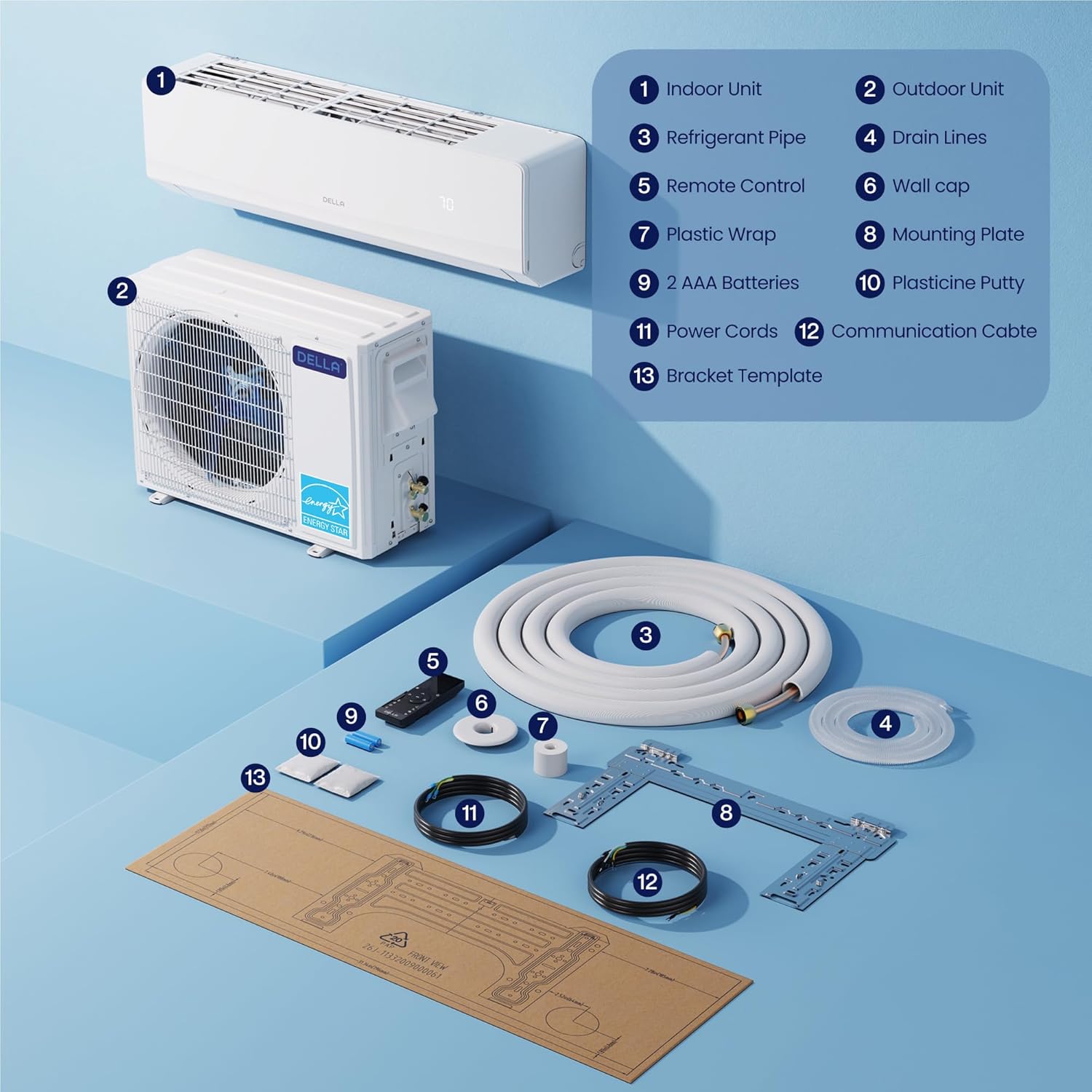
Image 8.1: A visual representation of the indoor and outdoor unit dimensions, along with key performance specifications.
| Spesifikasi | Nilai |
|---|---|
| Nombor Model | 18K2VR-22S-M-I+O |
| Kapasiti Penyejukan | 18000 BTU/j |
| Kapasiti Pemanasan | 18000 BTU/j |
| Penilaian SEER2 | 22 |
| Bekalan Kuasa | 208V-230V/60Hz |
| Kuasa Input Maks | 1450 Watts (Cooling), 1450 Watts (Heating) |
| Saiz Fius Maks | 20A |
| Jenis Penyejuk | R32 |
| Dimensi Unit Dalaman (D x W x H) | 9.02" x 44.88" x 13.15" |
| Dimensi Unit Luar (D x L x T) | 11.81" x 30.91" x 21.85" |
| Berat Barang | 28.7 paun (Unit Dalaman) |
| Kaedah Kawalan | Apl, Kawalan Jauh |
| Ciri Khas | Dehumidifier, WiFi Enabled, PureClean Tech, Inverter System |
9. Waranti dan Sokongan Pelanggan
DELLA is committed to providing reliable products and support.
Maklumat Waranti

Image 9.1: A visual representation of the product's lifetime coverage, emphasizing best-in-class support and no additional costs.
The DELLA Serena Mini Split Heat Pump comes with a lifetime warranty, ensuring unmatched coverage and peace of mind. This warranty covers manufacturing defects and significant operational failures under normal use conditions. Please refer to the warranty card included in your package for full terms and conditions.
Sokongan Pelanggan

Image 9.2: A graphic detailing the available customer support channels, including phone support and 24/7 live chat.
For any questions, technical assistance, or warranty claims, DELLA provides comprehensive customer support:
- Sembang Langsung: Available 24/7 for immediate assistance.
- Sokongan Telefon: Available Monday-Friday, 6 AM - 4 PM PST.
Please have your model number (18K2VR-22S-M-I+O) and purchase information ready when contacting support.