
Zwide NA105H
Zwide NA105H 2-in-1 Laptop User Manual
Model: NA105H
1. Pengenalan
Terima kasih kerana membeliasing the Zwide NA105H 2-in-1 Laptop. This manual provides essential information for setting up, operating, and maintaining your device. Please read it carefully to ensure optimal performance and longevity of your laptop.
2. Produk Lebihview
The Zwide NA105H is a compact and powerful 2-in-1 laptop designed for versatility. Its 360-degree hinge allows it to transform seamlessly between laptop, tablet, tent, and stand modes, adapting to various usage scenarios.
2.1 Kandungan Pakej
- Zwide NA105H Main Unit
- Pengecas
- Manual Arahan

Image: Zwide NA105H Laptop showing package contents and port locations. The image displays the laptop unit, packaging box, charger, and manual. Numbered labels indicate: 1. Power Button, 2. USB-C (Full Function), 3. Cooling Vent, 4. 3.5mm Earphone Jack.
3. Persediaan
3.1 Pengecasan Awal
Before first use, fully charge your Zwide NA105H laptop. Connect the provided charger to the USB-C (Full Function) port on the device and to a power outlet. The charging indicator light will show the charging status.

Image: Zwide NA105H laptop being charged via its USB-C port, illustrating the fast charging capability.
3.2 Menghidupkan
Press and hold the Power Button (labeled 1 in the Product Overview image) for a few seconds until the screen lights up. Follow the on-screen instructions to complete the initial Windows 11 Pro setup.
4. Mengendalikan Peranti Anda
4.1 360° Rotation & 4-Way Convertible Modes
The precise hinge structure allows for 360° rotation, seamlessly switching between four usage modes:
- Mod Komputer Riba: Ideal for productivity and typing.
- Mod Tablet: Terbaik untuk web browsing and e-book reading.
- Mod Khemah: Convenient for media sharing and presentations.
- Mod Berdiri: Enhances visibility for video viewing and e-learning.
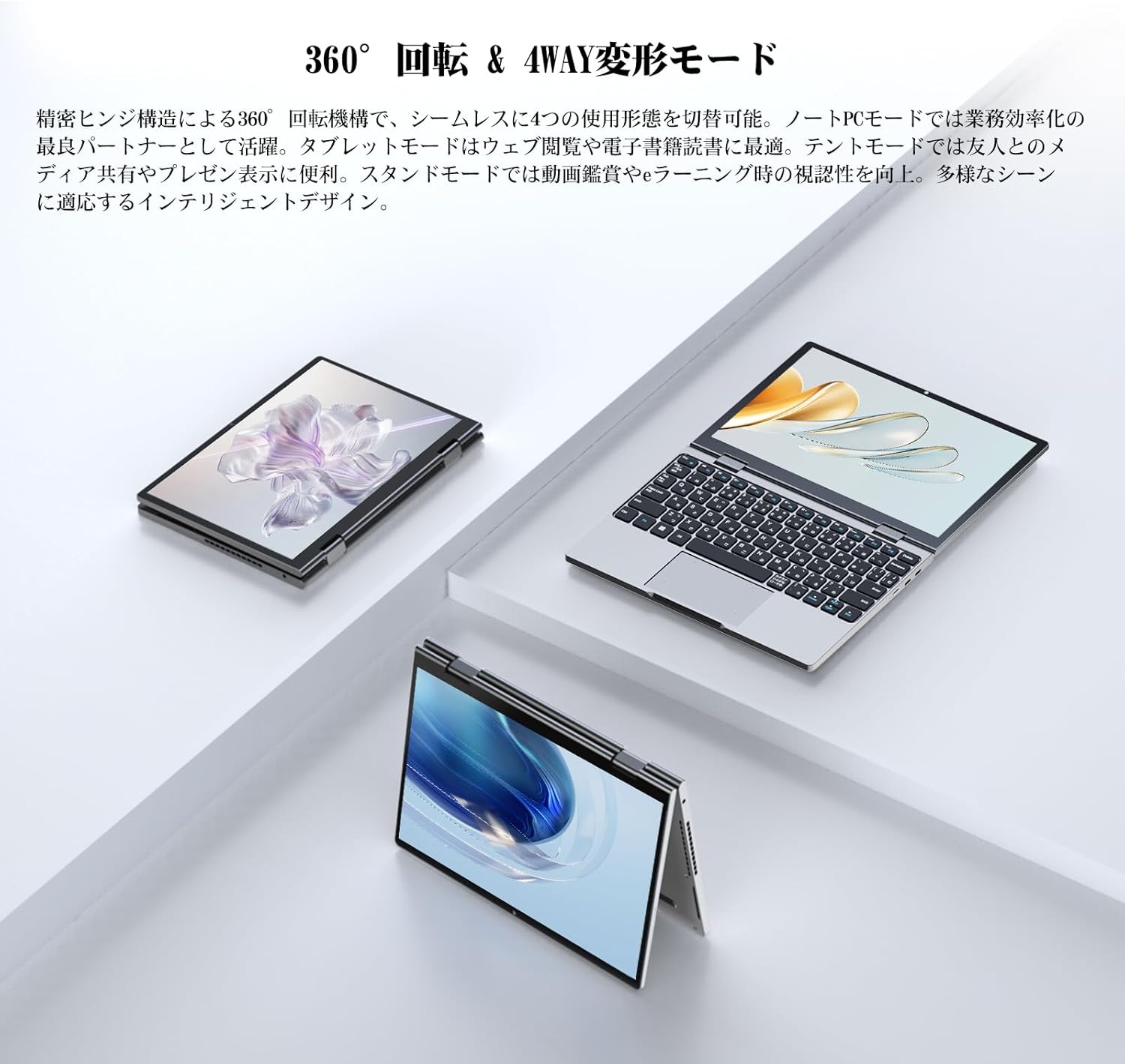
Image: The Zwide NA105H laptop demonstrating its 360-degree hinge, allowing it to rotate and transform into different modes.

Image: The Zwide NA105H laptop shown in its different convertible modes: laptop, tablet, and tent mode, highlighting its versatility.
4.2 Paparan dan Skrin Sentuh
The 10.51-inch Full HD screen (1920x1280 resolution) provides clear images and rich colors. The 10-point multi-touch compatible full lamination panel offers improved response speed and intuitive touch operations.

Image: The Zwide NA105H laptop's display showcasing a vibrant scenic view, emphasizing its exquisite visuals and high-resolution screen.
4.3 Papan Kekunci dan Pad Sentuh
The full-size backlit keyboard features large keys and a comfortable typing feel. The high-sensitivity touchpad supports various gestures, such as two-finger zoom and three-finger application switching, for convenient and efficient operation.

Imej: Jarak dekat view of the Zwide NA105H laptop's full-size keyboard and precise touchpad, highlighting comfortable typing and accurate control.
4.4 Ketersambungan
Equipped with a next-generation Wi-Fi 6 AX101 chip, the laptop provides high-speed transmission and stable signal strength, ensuring fast web page loading, uninterrupted 4K video playback, and stable online conference connections even in crowded network environments.

Image: The Zwide NA105H laptop displaying the Windows 11 interface with a prominent 'WiFi 6' graphic, indicating its advanced wireless connectivity.
4.5 Audio
Built-in dual speakers and advanced audio technology deliver high-quality audio, providing a realistic sound experience for movie viewing, music, and web conferencing, even in noisy environments.

Image: The Zwide NA105H laptop showing its active cooling system (fan and heat pipe) and a user engaged in a video conference, highlighting both quiet operation and immersive audio.
5. Penyelenggaraan
5.1 Pembersihan
Use a soft, lint-free cloth to clean the screen and exterior of the laptop. For stubborn smudges, dampen the cloth slightly with water or a screen cleaner. Avoid using harsh chemicals or abrasive materials.
5.2 Penyimpanan
When not in use for extended periods, store the laptop in a cool, dry place away from direct sunlight and extreme temperatures. Ensure the battery is charged to about 50% before storage to preserve battery health.
5.3 Active Cooling System
The laptop features an active cooling system with a fan and heat pipe to dissipate processor heat. Ensure the cooling vents (labeled 3 in the Product Overview image) are not obstructed to maintain stable performance, especially during high-load operations.
6. Penyelesaian masalah
This section addresses common issues you might encounter with your Zwide NA105H laptop.
6.1 Isu Kuasa
- Peranti tidak dihidupkan: Ensure the laptop is charged. Connect the charger and wait a few minutes before attempting to power on again.
- Bateri tidak dicas: Verify the charger is properly connected to both the laptop and the power outlet. Try a different outlet if available.
6.2 Isu Paparan
- Skrin kosong: Press the power button briefly to wake the screen. If unresponsive, perform a hard reset by holding the power button until the device turns off, then restart.
- Skrin sentuh tidak bertindak balas: Restart the device. Ensure the screen is clean and free of debris.
6.3 Isu Prestasi
- Komputer riba perlahan: Close unnecessary applications. Check for background processes that might be consuming resources. Ensure cooling vents are clear.
- Terlalu panas: Ensure the laptop is on a flat, hard surface to allow proper airflow. Avoid blocking the cooling vents.
6.4 Isu Ketersambungan
- Wi-Fi tidak bersambung: Check if Wi-Fi is enabled in Windows settings. Restart your router.
If you encounter issues not covered here or if troubleshooting steps do not resolve the problem, please contact Zwide customer support.
7. Spesifikasi
| Ciri | Spesifikasi |
|---|---|
| Jenama | Zwide |
| Nama Model | NA105H |
| Saiz Skrin | 10.51 Inci |
| Resolusi | 1920 x 1280 Piksel |
| Jenama CPU | Intel |
| Jenis CPU | Unknown (Intel TwinLake N150) |
| Kelajuan CPU | 3.6 GHz |
| Kiraan Pemproses | 1 |
| Saiz Memori RAM yang Dipasang | 16 GB |
| Jenis Memori | LPDDR5 |
| Kapasiti Cakera Keras | 512 GB |
| Jenis Cakera Keras | SSD |
| Jenis Kad Grafik | Bersepadu |
| VRAM Type | DDR5 SDRAM |
| Jenis Kesambungan | Wi-Fi (802.11ac) |
| Bilangan USB 3.0 Port | 1 (USB-C Full Function) |
| Sistem Operasi | Windows 11 Pro |
| Bateri | 1 bateri Polimer Litium (termasuk) |
| Kandungan Tenaga Bateri Lithium | Jam 28.88 Watt |
| Berat Barang | 1.36 Kilogram |
| Ciri-ciri | Backlit Keyboard, Lightweight |
8. Waranti dan Sokongan
Your Zwide NA105H laptop comes with a standard manufacturer's warranty. Please refer to the warranty card included in your package for specific terms and conditions. For technical support, product inquiries, or warranty claims, please contact Zwide customer service through the official channels provided at the time of purchase or on the Zwide brand webtapak.
Ask a question about this manual
Ask about setup, troubleshooting, compatibility, parts, safety, or missing instructions. Manuals+ will review the question and use this page’s manual context to help answer it.