
Della TL-9K1VB-19S-I+O
DELLA Vario Series 9000 BTU Mini Split Air Conditioner User Manual
Model: TL-9K1VB-19S-I+O
1. Pengenalan
This user manual provides detailed instructions for the installation, operation, and maintenance of your DELLA Vario Series 9000 BTU Mini Split Air Conditioner. Please read this manual thoroughly before installation and use to ensure proper function and safety. Keep this manual for future reference.
2. Maklumat Keselamatan
Always adhere to local and national electrical codes. Professional installation is mandatory for this system. Do not attempt to install or service the unit yourself unless you are a qualified technician. Disconnect power before performing any maintenance or cleaning.
- Pastikan pembumian yang betul untuk mengelakkan kejutan elektrik.
- Jangan sekat saluran masuk atau alur keluar udara.
- Jauhkan kanak-kanak dan haiwan peliharaan dari unit luar.
- If unusual sounds, smells, or smoke occur, immediately turn off the unit and disconnect power. Contact qualified service personnel.
3. Apa yang ada di dalam Kotak
Sahkan bahawa semua komponen hadir sebelum memulakan pemasangan:
- 1 x Mini-Split Air Conditioner (Indoor Unit)
- 1 x Mini-Split Air Conditioner (Outdoor Unit)
- Alat Kawalan Jauh
- Installation Kit (Standard size 1/4" & 3/8" outer dimension copper pipes, drain pipe, wall sleeve, plasticine putty, screws, anchors, bracket template)
- Manual Pengguna (dokumen ini)

Image: All components included in the DELLA Vario Series Mini Split Air Conditioner package, including indoor unit, outdoor unit, remote control, and various installation accessories.
4. Persediaan dan Pemasangan
This DELLA Mini Split AC system requires professional installation. It is not designed for DIY installation. Line-set vacuuming is required during installation. Any alteration of line-set length requires adjusting freon levels. Consult a certified HVAC technician for proper installation to ensure optimal performance and to maintain warranty validity.
4.1 Pemeriksaan Pra-Pemasangan
- Ensure the installation area meets space and electrical requirements.
- Verify power supply (115V) and maximum fuse size (25A).
- Sahkan saliran yang betul untuk unit dalaman.
4.2 Dimensi Unit

Image: Detailed dimensions for both the indoor and outdoor units of the DELLA Vario Series Mini Split Air Conditioner, including length, width, and height measurements.
5. Arahan Operasi
Your DELLA Vario Series Mini Split Air Conditioner offers multiple modes and smart features for optimal comfort and energy efficiency.
5.1 Fungsi Kawalan Jauh
The included remote control allows full command over your unit. Familiarize yourself with its buttons and their functions:
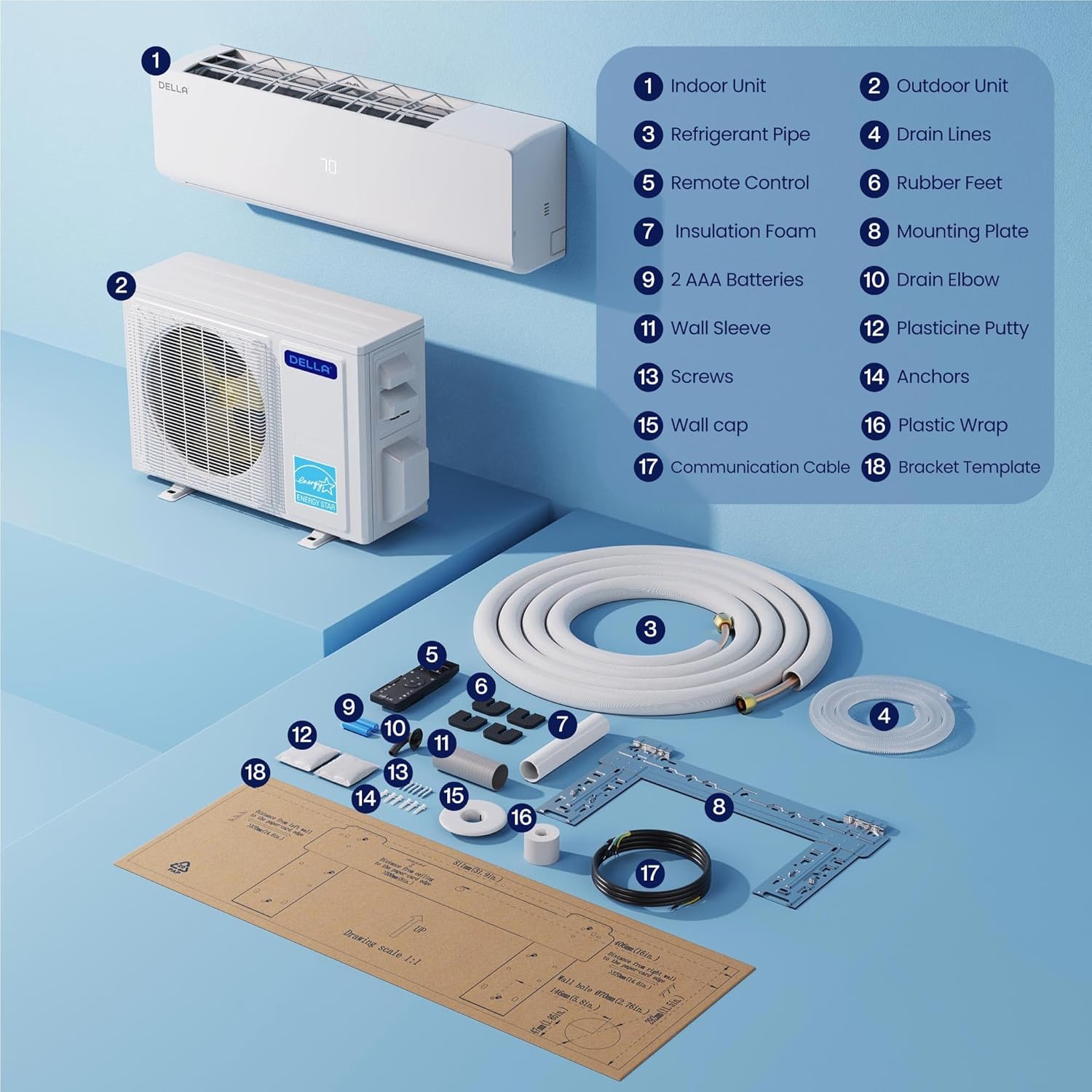
Image: A detailed diagram of the DELLA Mini Split remote control, highlighting various buttons and their corresponding functions such as mode selection, fan speed, temperature adjustment, and special features.
- Hidup/Mati: Menghidupkan atau mematikan unit.
- Mod: Cycles through Cool, Heat, Dry (Dehumidify), Fan Only, and Auto modes.
- Suhu Naik/Turun: Melaraskan suhu yang dikehendaki.
- Kelajuan Kipas: Selects fan speed (Quiet, Low, Mid Low, Mid, Mid High, High, Turbo).
- Airflow (Swing): Controls vertical and horizontal louver movement for optimal air distribution.
- I Feel Mode: Senses room temperature at the remote control for precise comfort.
- Mod tidur: Adjusts temperature and fan speed for comfortable sleep and energy saving.
- Pemasa: Sets a specific time for the unit to turn on or off.
- Mod ECO: Optimizes operation for maximum energy efficiency.
5.2 Smart App Control (Della+ App)
Control your DELLA Mini Split from anywhere using the Della+ app, compatible with Google Assistant and Alexa. The app provides advanced features including scheduling, geo-location, and detailed control over modes and settings.
Video: Demonstration of the Della+ mobile application interface, showcasing features like mode selection, fan speed adjustment, airflow control, scheduling, and timer settings for the mini split air conditioner.
- Kawalan Jauh: Adjust settings from your smartphone.
- Penjadualan: Program daily or weekly operation schedules.
- Geo-Location: Automatically adjust settings based on your proximity to home.
- Kawalan Suara: Integrate with Alexa or Google Assistant for hands-free operation.

Image: Screenshots of the Della+ app showing various control screens, including temperature setting, mode selection, timer functions, and smart home integration options.
6. Penyelenggaraan
Regular maintenance ensures the longevity and efficient operation of your DELLA Mini Split Air Conditioner.
6.1 Pembersihan Penapis
Clean the air filters regularly (every 2-4 weeks, depending on usage) to maintain air quality and efficiency. Refer to the detailed instructions in the full user manual (PDF) for filter removal and cleaning procedures.
6.2 Pembersihan Unit Luar
Keep the outdoor unit clear of debris, leaves, and other obstructions. Periodically clean the coils with a soft brush or vacuum cleaner. Ensure proper drainage from the outdoor unit.
6.3 Fungsi Pembersihan Kendiri
The unit features a PureClean tech self-clean function that stops dust buildup and defrosts the indoor unit, keeping your air fresher with advanced sterilization. Activate this function via the remote control or Della+ app as needed.
7. Penyelesaian masalah
Sebelum menghubungi khidmat pelanggan, silaview isu dan penyelesaian biasa berikut:
| Masalah | Kemungkinan Punca | Penyelesaian |
|---|---|---|
| Unit tidak dihidupkan. | No power, tripped circuit breaker, remote control batteries dead. | Check power supply, reset circuit breaker, replace remote control batteries. |
| Penyejukan/pemanasan yang tidak mencukupi. | Dirty air filters, blocked outdoor unit, incorrect mode/temperature setting, low refrigerant. | Clean filters, clear obstructions, verify settings, contact technician for refrigerant check. |
| Bunyi yang tidak biasa. | Bahagian longgar, kipas tersumbat, bunyi operasi normal (cth., aliran bahan pendingin). | Periksa bahagian yang longgar, bersihkan halangan. Jika berterusan atau bising, hubungi juruteknik. |
For issues not listed here or if solutions do not resolve the problem, please contact DELLA customer support.
8. Spesifikasi
| Ciri | Perincian |
|---|---|
| Nama Jenama | Della |
| Nombor Model | TL-9K1VB-19S-I+O |
| Kapasiti Penyejukan | 9000 BTU/j |
| Kapasiti Pemanasan | 10000 BTU/j |
| Penilaian SEER2 | 19 MELIHAT2 |
| Bekalan Kuasa | 115V / 60Hz / 1PH |
| Kuasa Input Maks | 750 watt |
| Berat Barang | 19.8 paun (Unit Dalaman) |
| Dimensi Produk (Dalam Ruangan) | 31.94 x 8 x 11.5 inci |
| Kawasan Liputan | Sehingga 400 Kaki Persegi |
| Tahap Kebisingan | Ultra silent at only 28 dBa |
| Ciri Khas | Dehumidifier, Fast Cooling, Remote Control, WiFi Enabled, 4D Air Flow, I Feel Mode, 24 Hour Timer, Sleep Mode, ECO Energy Saving Mode, Multiple Fan Speeds, Turbo Function, PureClean Tech |
9. Waranti dan Sokongan
DELLA offers a limited lifetime warranty for this product, ensuring unmatched support and peace of mind. For any inquiries or technical assistance, please contact DELLA customer support.
- Sokongan Pelanggan: Available for technical assistance.
- Pulangan: Polisi pemulangan mudah 30 hari.

Image: Graphic illustrating DELLA's lifetime coverage, highlighting best-in-class support and no additional costs.
For more detailed information, please refer to the official Manual Pengguna (PDF).
Ask a question about this manual
Ask about setup, troubleshooting, compatibility, parts, safety, or missing instructions. Manuals+ will review the question and use this page’s manual context to help answer it.