
pengenalan
This manual provides comprehensive instructions for the proper setup, operation, and maintenance of your Nintens Air Conditioner Remote Control. Please read this manual thoroughly before using the remote control to ensure optimal performance and longevity. This remote is designed to be compatible with various air conditioner models, including A75C3751, A75C3863, A75C4162, A75C3680, A75C4165, A75C2550, and A75C2560.
Persediaan
Pemasangan Bateri
Alat kawalan jauh memerlukan dua bateri AAA (tidak termasuk) untuk operasi. Ikuti langkah ini untuk memasang bateri:
- Cari penutup petak bateri di belakang alat kawalan jauh.
- Tekan ke bawah pada tab dan luncurkan penutup ke bawah untuk membuka petak.
- Masukkan dua bateri AAA baharu, pastikan terminal positif (+) dan negatif (-) sejajar dengan tanda di dalam petak.
- Luncurkan penutup petak bateri kembali ke tempatnya sehingga ia berbunyi dengan selamat.
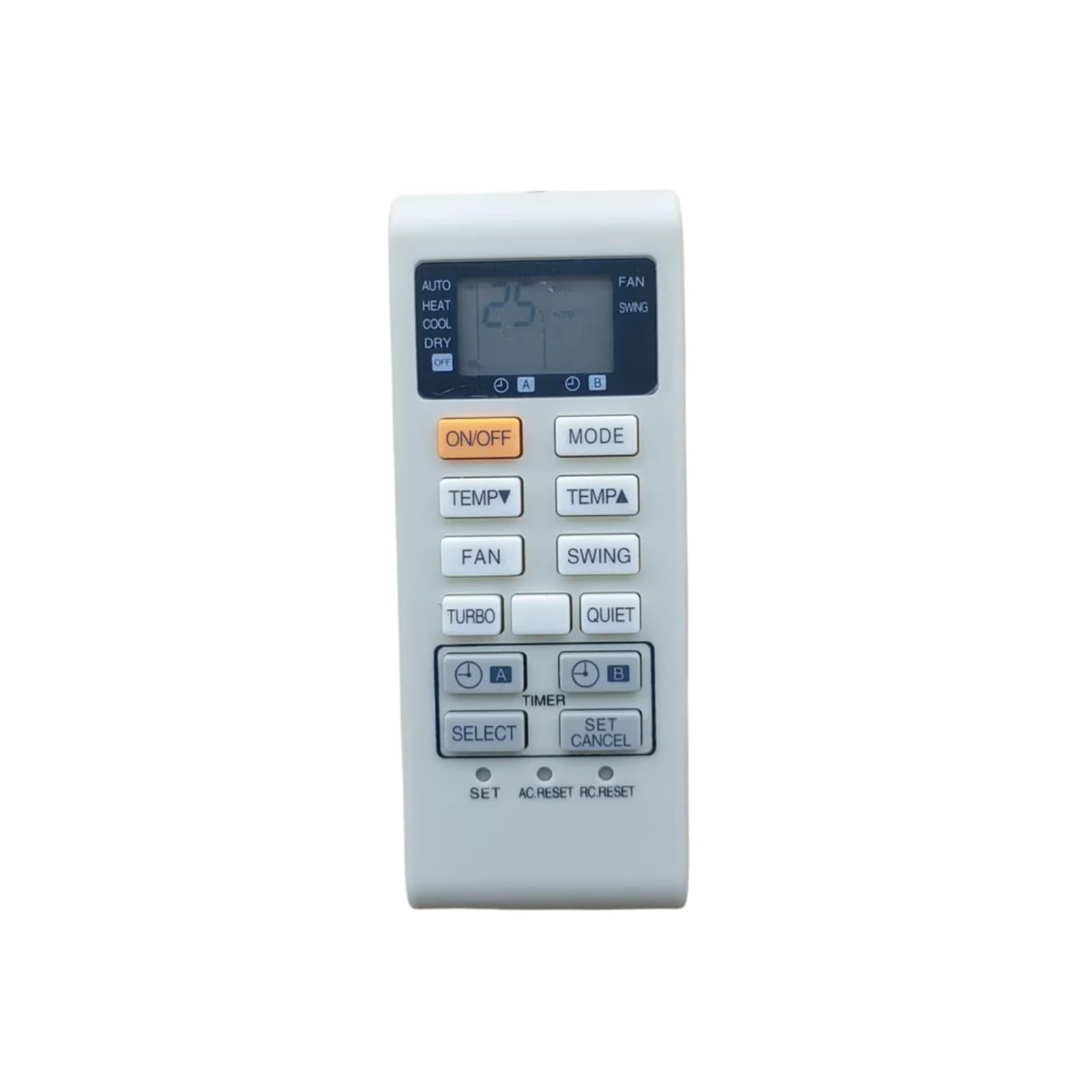
Image: Back of the Nintens Air Conditioner Remote Control, showing the battery compartment cover. To install batteries, slide the cover down to reveal the battery slots.
Nota: Tanggalkan bateri jika alat kawalan jauh tidak akan digunakan untuk tempoh yang lama bagi mengelakkan kebocoran dan kerosakan.
Arahan Operasi
This remote control is pre-programmed for the specified air conditioner models. Point the remote control directly at the air conditioner's receiver when operating.
Fungsi Asas
- Butang Kuasa: Tekan untuk menghidupkan atau mematikan penghawa dingin.
- Kawalan Suhu: Gunakan Up dan Bawah butang anak panah untuk melaraskan suhu yang dikehendaki.
- Butang Mod: Cycle through operating modes such as Cool, Heat, Fan, Dry, and Auto.
- Butang Kelajuan Kipas: Laraskan kelajuan kipas (cth., Rendah, Sederhana, Tinggi, Auto).
- Butang Ayun: Aktifkan atau nyahaktifkan fungsi ayunan louver.
- Butang Pemasa: Set a timer for the air conditioner to turn ON or OFF automatically.
Refer to your air conditioner's specific user manual for detailed explanations of each mode and function.
Penyelenggaraan
Penyelenggaraan yang betul memastikan jangka hayat dan pengendalian alat kawalan jauh anda yang boleh dipercayai.
Pembersihan
- Lap alat kawalan jauh dengan kain lembut dan kering.
- Untuk kotoran degil, ringankan dampen kain dengan air atau pembersih yang lembut dan tidak melelas.
- Do not use harsh chemicals, solvents, or abrasive cleaning pads, as these can damage the remote's surface or internal components.
Penggantian Bateri
Replace batteries when the remote control's range decreases or if the air conditioner does not respond consistently. Always replace both batteries at the same time with new ones of the same type.
Penyimpanan
Simpan alat kawalan jauh di tempat yang sejuk dan kering, jauh daripada cahaya matahari langsung dan suhu yang melampau. Jika menyimpan untuk tempoh yang lama, tanggalkan bateri.
Menyelesaikan masalah
Jika anda menghadapi masalah dengan alat kawalan jauh anda, rujuk langkah penyelesaian masalah biasa berikut:
- Jauh Tidak Menjawab:
- Check if the batteries are correctly installed with the correct polarity.
- Gantikan bateri lama dengan yang baru.
- Pastikan tiada halangan antara alat kawalan jauh dan penerima penghawa dingin.
- Sahkan anda berada dalam julat pengendalian berkesan penghawa dingin.
- Julat Operasi Pendek:
- This often indicates low battery power; replace the batteries.
- Ensure the remote's infrared emitter and the air conditioner's receiver are clean and unobstructed.
- Air Conditioner Not Responding to Specific Functions:
- Verify that the air conditioner model is listed as compatible with this remote control.
- Some advanced functions may require specific settings on the air conditioner unit itself. Consult your air conditioner's manual.
If problems persist after trying these steps, contact customer support.
Spesifikasi
| Jenama | Nintens |
| Model yang Serasi | A75C3751, A75C3863, A75C4162, A75C3680, A75C4165, A75C2550, A75C2560 |
| Kekerapan | 433 MHz |
| Berat Barang | 50 Gram |
| Kiraan Unit | 1.0 Kiraan |
Maklumat Waranti
Specific warranty details for this Nintens remote control are not provided in the product information. Please refer to the seller's return policy or contact the seller directly for warranty inquiries.
Sokongan Pelanggan
For further assistance or technical support, please contact the seller through the platform where the product was purchased. Provide your order number and a detailed description of the issue for prompt service.