
1. Pengenalan
This manual provides essential information for setting up, operating, maintaining, and troubleshooting your OnePlus Nord CE5 smartphone. Please read this guide thoroughly to ensure optimal performance and longevity of your device.
2. Apa yang ada di dalam Kotak
Upon unboxing your OnePlus Nord CE5, verify that all the following items are included:
- OnePlus Nord CE5 Smartphone
- Sarung Telefon
- Penyesuai Kuasa
- Ejector Dulang SIM
- Pelindung Skrin (yang telah dipasang atau di dalam kotak)
- Kabel USB (Jenis-C)

Image: Contents of the OnePlus Nord CE5 retail box.
3. Peranti Lebihview
Familiarize yourself with the physical components of your OnePlus Nord CE5.
3.1 Depan View

Imej: Depan view of the OnePlus Nord CE5, highlighting the display and front camera.
The front of the device features the 6.77-inch AMOLED display and the 16 MP front-facing camera.
3.2 Belakang View

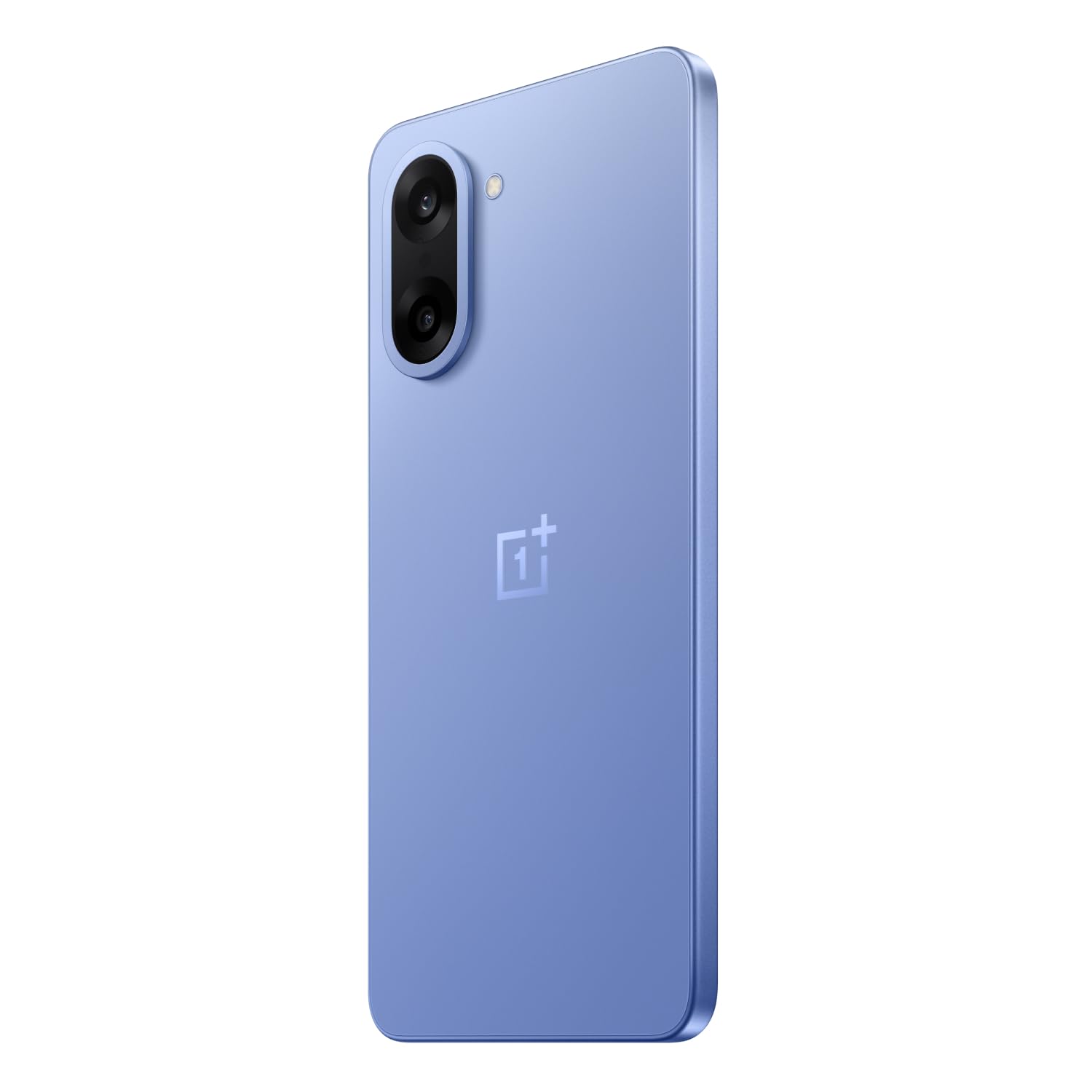
Imej: Belakang view of the OnePlus Nord CE5 in Nexus Blue, featuring the dual camera system and OnePlus branding.
The rear panel houses the 50 MP main camera with OIS and an 8 MP ultra-wide angle lens, along with the LED flash.
3.3 Bahagian View
Imej: Sisi view of the OnePlus Nord CE5, illustrating the placement of the power button and volume controls.
The side of the device includes the power button and volume control buttons. The SIM card tray is also located on one of the sides.
4. Persediaan
4.1 Memasukkan Kad SIM
- Cari dulang kad SIM di sisi peranti anda.
- Masukkan alat ejector dulang SIM ke dalam lubang kecil di sebelah dulang dan tekan dengan kuat sehingga dulang terkeluar.
- Place your Nano SIM cards into the designated slots on the tray. Ensure the gold contacts face downwards.
- Masukkan semula dulang SIM dengan berhati-hati ke dalam peranti sehingga ia berbunyi klik pada tempatnya.
4.2 Kuasa Awal Hidup
Press and hold the power button located on the side of the device until the OnePlus logo appears. Follow the on-screen instructions to complete the initial setup, including language selection, Wi-Fi connection, and Google account setup.
4.3 Mengecas Peranti
Connect the USB Type-C cable to the charging port at the bottom of the phone and the other end to the provided power adapter. Plug the adapter into a power outlet. The device supports 80W SUPERVOOC fast charging.
5. Mengendalikan Peranti Anda
5.1 Paparan dan Navigasi
The OnePlus Nord CE5 features a 6.77-inch 120Hz AMOLED display with Ultra HDR. Navigate the OxygenOS 15 interface using touch gestures. The Aqua Touch feature allows for confident swiping even with wet or oily fingers.
5.2 Pengurusan Bateri
Your device is equipped with a massive 7100mAh battery. To optimize battery life:
- Utilize the 80W SUPERVOOC charger for rapid charging.
- Enable Bypass Charging during extended gaming sessions to reduce battery stress and heat.
- Adjust screen brightness and refresh rate as needed.
- Tutup aplikasi latar belakang yang tidak digunakan.

Image: Illustration of the 7100mAh battery and 80W SUPERVOOC charging capability.

Image: Explanation of Bypass Charging, which directs power to the phone's system instead of the battery during use.
5.3 Penggunaan Kamera
Peranti ini mempunyai sistem kamera serba boleh:
- Kamera Belakang: 50 MP Sony main sensor with Optical Image Stabilization (OIS) and an 8 MP ultra-wide angle lens. Supports 4K video recording at 60 FPS.
- Kamera Depan: 16 MP sensor for selfies and video calls.
Open the Camera app to access various modes, including Photo, Video, Portrait, Night, and more. Tap on the screen to focus and use the zoom controls for magnification.

Imej: Terperinci view of the OnePlus Nord CE5's dual rear camera setup.

Image: The device's capability to record 4K video at 60 frames per second.
5.4 Prestasi dan Permainan
The OnePlus Nord CE5 is powered by the MediaTek Dimensity 8350 Apex processor, offering high performance for demanding applications and gaming. The device supports gaming at up to 120 FPS for a smooth experience.

Image: The MediaTek Dimensity 8350 Apex processor, emphasizing its performance capabilities.

Image: Gaming experience on the OnePlus Nord CE5 at 120 frames per second.
5.5 Ciri AI
The OnePlus Nord CE5 integrates various AI-powered features to enhance user experience:
- Kamera AI: Includes AI Eraser for removing unwanted objects, AI Perfect Shot for optimal photo capture, AI Reflection Remover, and AI Reframe for improved composition.
- AI Productivity: Features AI VoiceScribe for in-app call summaries and real-time translation, AI Translation for global communication, and AI Call Assistant for in-call translation and summaries.
- Google Gemini: A personal AI assistant for writing, planning, learning, and more.

Image: Demonstration of AI Camera features, showing an object removed from a photo.
Image: AI VoiceScribe interface for call summaries and translation.
5.6 Multitasking with Open Canvas
The Open Canvas feature allows for enhanced split-screen multitasking, extending apps beyond the physical display. This includes flexible resizing, screencap for split-screen, drag-and-drop sharing, and refreshed floating windows.

Image: Open Canvas feature showing two applications running side-by-side on the display.
6. Penyelenggaraan
6.1 Kemas Kini Perisian
Semak dan pasang kemas kini perisian secara kerap untuk memastikan peranti anda mempunyai ciri terkini, tampung keselamatan dan peningkatan prestasi. Pergi ke Settings > About device > OxygenOS untuk menyemak kemas kini.
6.2 Membersihkan Peranti Anda
Use a soft, lint-free cloth to clean the screen and body of your phone. Avoid using harsh chemicals or abrasive materials. For the charging port and speaker grilles, use a soft brush to gently remove dust.
6.3 Pengurusan Storan
Semula secara berkalaview storan peranti anda untuk mengosongkan ruang. Padamkan yang tidak perlu files, uninstall unused apps, and clear cache data. You can check storage usage in Tetapan > Storan.
6.4 Sistem Penyejukan
The device features a 7041mm² VC cooling system to manage heat during intensive use. To ensure optimal cooling, avoid blocking the phone's vents (if any) and do not use the device in direct sunlight for extended periods.

Imej: Dalaman view tunjuk casing the 7041mm² VC cooling system for heat dissipation.
7. Penyelesaian masalah
This section addresses common issues you might encounter with your OnePlus Nord CE5.
7.1 Peranti Tidak Dihidupkan
- Pastikan bateri telah dicas. Sambungkan peranti ke pengecas dan tunggu beberapa minit sebelum cuba menghidupkannya semula.
- Tekan dan tahan butang kuasa selama sekurang-kurangnya 10-15 saat untuk memaksa mula semula.
7.2 Aplikasi Ranap atau Terhenti
- Clear the cache and data of the problematic app via Settings > Apps > [App Name] > Storage > Clear cache/Clear data.
- Kemas kini apl kepada versi terkini daripada Gedung Google Play.
- Mulakan semula peranti anda.
7.3 Hayat Bateri Lemah
- Semak penggunaan bateri masuk Tetapan > Bateri untuk mengenal pasti apl yang haus kuasa.
- Kurangkan kecerahan skrin dan tetapkan tamat masa skrin yang lebih pendek.
- Lumpuhkan Wi-Fi, Bluetooth dan GPS apabila tidak digunakan.
- Ensure background app refresh is limited for non-essential apps.
7.4 Isu Ketersambungan Rangkaian
- Hidupkan dan matikan Mod Pesawat.
- Mulakan semula peranti anda.
- Periksa sama ada kad SIM anda dimasukkan dengan betul.
- Tetapkan semula tetapan rangkaian melalui Settings > System settings > Reset phone > Reset Wi-Fi, mobile & Bluetooth.
8. Spesifikasi
Key technical specifications for the OnePlus Nord CE5:
| Ciri | Spesifikasi |
|---|---|
| Jenama | OnePlus |
| Model | Nord CE5 |
| Sistem Operasi | Android 15, OxygenOS 15 |
| Pemproses | MediaTek Dimensity 8350 Apex (3.35 GHz) |
| RAM | 8 GB |
| Storan Dalaman | 128 GB |
| Paparan | 6.77 Inches AMOLED, 2392 x 1080 Pixels, 120Hz Refresh Rate |
| Kamera Belakang | 50 MP (Main) + 8 MP (Ultra-wide), OIS, 4K 60 FPS Video |
| Kamera Depan | 16 MP |
| Kapasiti Bateri | 7100 mAh |
| Mengecas | SUPERVOOC 80W |
| Jenis Kad SIM | Dual Nano SIM |
| Ketersambungan | 5G, Bluetooth, USB Jenis-C, Wi-Fi |
| Keselamatan Biometrik | Pengecaman Cap Jari |
| Dimensi | 16.4 x 7.6 x 0.8 Sentimeter |
| Berat badan | 199 Gram |
| Tahan Air | Tahan Air |
9. Waranti dan Sokongan
9.1 Maklumat Waranti
Your OnePlus Nord CE5 comes with a Waranti Pengeluar 1 Tahun from the date of purchase. This warranty covers manufacturing defects. Additionally, OnePlus offers a Lifetime Display Warranty for industry-wide green line issues. Please retain your proof of purchase for warranty claims.

Image: Lifetime Display Warranty information.
9.2 Sokongan Pelanggan
For technical assistance, service, or warranty inquiries, please contact OnePlus Customer Service:
- Nombor Perhubungan: 1800 102 8411
- WhatsApp: +91-9289606888
- Pengeluar: OPPO Mobiles India Private Limited, PLOT-NO.1, SECTOR ECOTECH-VII, GREATER, NOIDA, UTTAR PRADESH, India-201306