
1. Pengenalan
This manual provides detailed instructions for the installation, operation, and maintenance of your GNCC 2K 3MP Indoor WiFi Surveillance Camera, model P5W. Please read this manual thoroughly before using the product to ensure proper functionality and safety.
2. Produk Lebihview
2.1 Kandungan Pakej
Sahkan bahawa semua item terdapat dalam pakej anda:
- GNCC 2K 3MP Indoor WiFi Surveillance Camera (P5W)
- Penyesuai Kuasa
- 2-meter Power Cable
- Pangkalan Pemasangan
- Skru untuk pemasangan
- Manual Pengguna (dokumen ini)
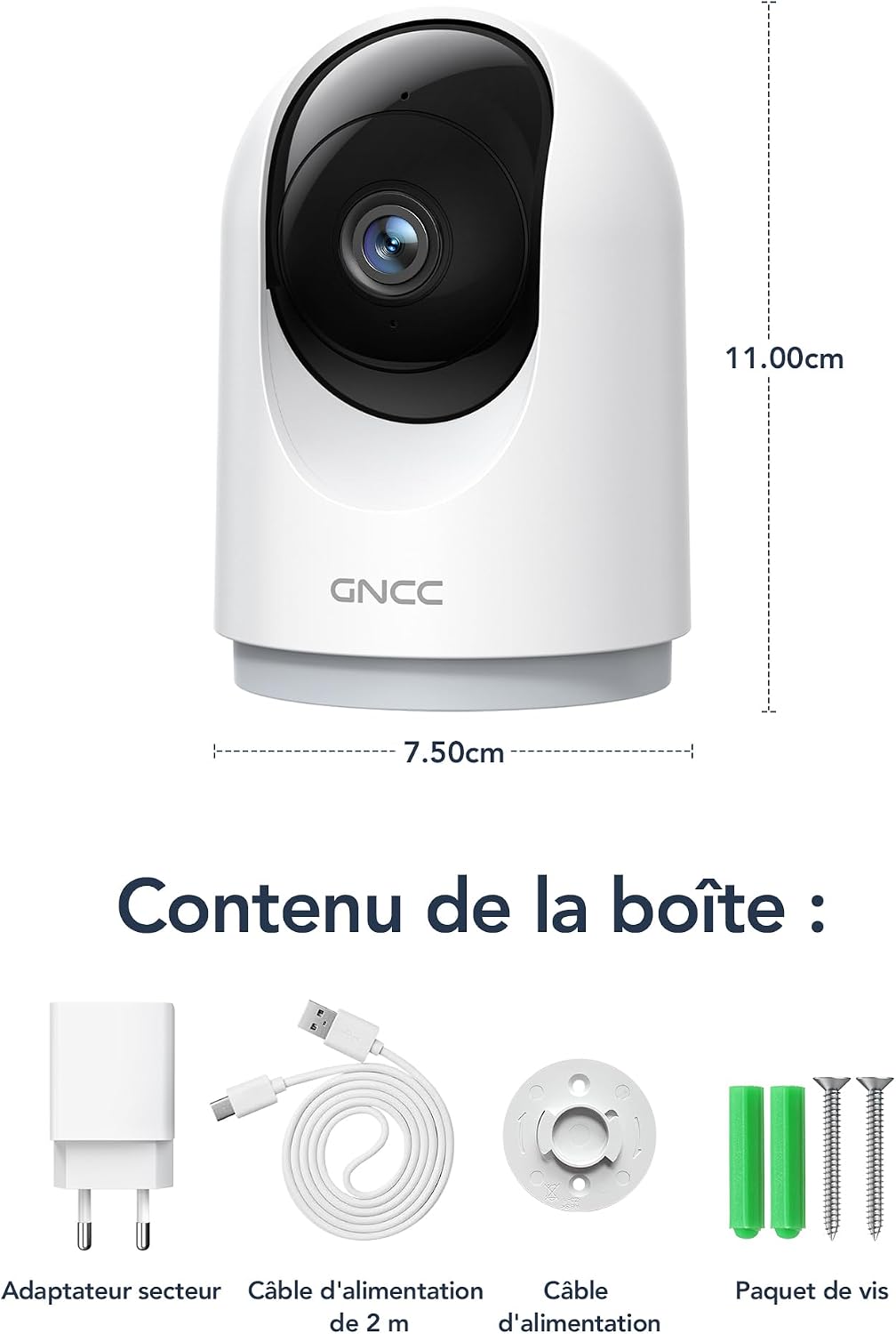
Figure 2.1: Package Contents and Camera Dimensions. The image displays the camera, power adapter, USB cable, mounting base, and screws. Dimensions are indicated as 7.50cm width and 11.00cm height.
2.2 Ciri-ciri Kamera
- Resolusi 2K 3MP: Menyediakan foo video yang jelas dan terperincitage.
- Liputan 360°: Features 355° horizontal pan and 60° vertical tilt for comprehensive monitoring.
- Kesambungan WiFi 2.4GHz: Connects to your home network for remote access.
- Penglihatan Malam Inframerah: Automatically activates in low light, providing clear visibility up to 15 meters.
- Audio Dua hala: Membolehkan komunikasi masa nyata melalui kamera.
- Pengesanan & Penjejakan Gerakan AI: Detects movement, human shapes, pets, and abnormal sounds, sending instant alerts to your phone.
- Pelbagai Peranti View: Monitor up to four cameras simultaneously on your mobile device.
- Integrasi Rumah Pintar: Sesuai dengan Amazon Alexa dan Google Assistant untuk kawalan suara.
- Mod Privasi: Remotely disable recording and live view melalui aplikasi.
- Storan Fleksibel: Supports Cloud storage (subscription required) and local storage via MicroSD card (up to 128GB, not included).

Figure 2.2: Key Features of the GNCC P5W Camera.
3. Arahan Persediaan
3.1 Menghidupkan Kamera
- Connect the 2-meter power cable to the camera's power input port.
- Palamkan penyesuai kuasa ke soket elektrik standard.
- The camera will power on, and its indicator light will begin to flash, indicating it is ready for setup.
3.2 Pemasangan Aplikasi dan Penciptaan Akaun
- Download the official GNCC app from your smartphone's app store (iOS App Store or Google Play Store).
- Buka apl dan ikut arahan pada skrin untuk membuat akaun baharu atau log masuk jika anda sudah mempunyai akaun.
3.3 Menyambungkan Kamera ke Wi-Fi
Pastikan telefon pintar anda disambungkan ke rangkaian Wi-Fi 2.4GHz. Kamera tidak menyokong Wi-Fi 5GHz.
- In the GNCC app, tap the "+" icon to add a new device.
- Select your camera model (P5W) from the list of devices.
- Follow the app's prompts to connect the camera to your 2.4GHz Wi-Fi network. This typically involves scanning a QR code displayed on your phone with the camera lens.
- Once connected, the camera's indicator light will turn solid, and you will hear a confirmation sound.
3.4 Memasang Kamera
The camera can be placed on a flat surface or mounted to a wall/ceiling using the provided mounting base and screws.
- Lekapan Meja: Place the camera on a stable, flat surface. Ensure it has a clear view kawasan yang anda ingin pantau.
- Screw-in Installation:
- Pilih lokasi yang sesuai untuk pemasangan.
- Use the mounting base as a template to mark the screw positions on the wall or ceiling.
- Drill pilot holes and insert the wall anchors if necessary.
- Secure the mounting base with the provided screws.
- Attach the camera to the mounting base by twisting it until it locks securely.
4. Arahan Operasi
4.1 Langsung View dan Kawalan Pan/Tilt
Open the GNCC app and select your camera to access the live view. Use the on-screen controls to pan (355° horizontal) and tilt (60° vertical) the camera lens to adjust the viewsudut ing.

Figure 4.1: 360° Coverage of the GNCC P5W Camera.
4.2 Audio Dua Hala
Dari siaran langsung view screen, tap the microphone icon to enable two-way audio. You can speak into your phone, and your voice will be transmitted through the camera's speaker. Similarly, you can hear audio from the camera's environment.

Figure 4.2: Two-Way Audio Functionality.
4.3 Pengesanan Gerakan dan Makluman
The camera is equipped with AI-powered motion detection, human shape detection, pet detection, and abnormal sound detection. When an event is detected, the camera will automatically record and send an instant notification to your smartphone.
- Enabling/Disabling Alerts: Navigate to the camera settings in the app to customize alert preferences, including sensitivity levels and detection zones.
- Penjejakan Motion: Apabila gerakan dikesan, kamera boleh menjejaki objek bergerak secara automatik dalam medannya view.

Figure 4.3: Motion Detection and Instant Notifications.
4.4 Penglihatan Malam
The camera automatically switches to infrared night vision mode in low-light conditions, providing clear black-and-white video up to 15 meters. No manual intervention is required.

Figure 4.4: Night Vision in operation, showing a baby in a crib.
4.5 Pilihan Storan
- Storan Kad MicroSD: Insert a MicroSD card (up to 128GB, not included) into the camera's designated slot for local recording. The camera will continuously record or record upon motion detection, depending on your settings.
- Storan Awan: Optional cloud storage is available via subscription, offering 24/7 unlimited recording and access to past footage. A 14-day free trial for smart AI detection features may be available.

Figure 4.5: Cloud and Local Storage Options.
4.6 Integrasi Rumah Pintar (Alexa & Google Assistant)
The GNCC P5W camera can be integrated with Amazon Alexa and Google Assistant for convenient voice control. Follow the instructions in your Alexa or Google Home app to link your GNCC account and devices.
- ExampPerintah Suara: "Alexa, show me the living room camera."

Figure 4.6: Smart Home Integration and Advanced Features.
4.7 Mod Privasi
To ensure privacy, you can remotely disable the camera's recording and live view functions through the GNCC app. This feature allows you to turn off surveillance when not needed.
5. Penyelenggaraan
- Pembersihan: Gunakan kain lembut dan kering untuk membersihkan kanta dan badan kamera. Elakkan penggunaan bahan kimia yang keras atau bahan yang melelas.
- Kemas kini Firmware: Regularly check the GNCC app for available firmware updates. Keeping your camera's firmware up-to-date ensures optimal performance and security.
- Kitaran Kuasa: Jika kamera mengalami masalah, cuba cabut plagnya daripada sumber kuasa selama 10 saat dan kemudian pasangkannya semula.
- Pengurusan Kad MicroSD: If using a MicroSD card, periodically check its status in the app and format it if necessary to maintain recording quality and prevent errors.
6. Penyelesaian masalah
| Masalah | Kemungkinan Punca | Penyelesaian |
|---|---|---|
| Kamera gagal menyambung ke Wi-Fi. | Incorrect Wi-Fi password; Camera too far from router; 5GHz Wi-Fi network used; Router firewall settings. |
|
| Tiada langsung view or offline status. | No internet connection; Camera powered off; Weak Wi-Fi signal. |
|
| Makluman pengesanan gerakan tidak diterima. | Alerts disabled in app; Incorrect detection zone/sensitivity; App notifications blocked by phone settings. |
|
| Audio dua hala tidak berfungsi. | Microphone/speaker muted in app; Phone volume too low; Network latency. |
|
7. Spesifikasi
| Ciri | Perincian |
|---|---|
| Nama Model | P5W |
| Resolusi | 2K (1296 Pixels effective capture, 1440p screen capture resolution) |
| Julat Pan/Sendeng | Mendatar 355°, Menegak 60° |
| Ketersambungan | 2.4GHz Wi-Fi (Wireless) |
| Julat Penglihatan Malam | Sehingga 15 meter |
| Audio | Audio Dua Hala |
| Pengesanan Pergerakan | AI Motion, Human, Pet, Abnormal Sound Detection |
| Pilihan Storan | MicroSD Card (up to 128GB), Cloud Storage (subscription) |
| Sumber Kuasa | Wired Electric Cable (5 Volts, 3 Watts) |
| Dimensi (L x W x H) | 7.5 x 7.5 x 14.9 cm |
| Berat badan | 330 gram |
| Persekitaran Operasi | Penggunaan Dalaman Sahaja |
| Peranti Serasi | Smartphone (iOS/Android), Amazon Alexa, Google Assistant |
| GTIN / UPC | 850070296489 |
8. Waranti dan Sokongan
8.1 Maklumat Waranti
GNCC products are designed and manufactured to the highest quality standards. For specific warranty details, please refer to the warranty card included in your product packaging or visit the official GNCC webtapak. Simpan resit pembelian anda sebagai bukti pembelian untuk tuntutan waranti.
The product has a return policy duration of 30 days for refund/replacement, as per Amazon's policy.
8.2 Sokongan Pelanggan
If you encounter any issues or have questions regarding your GNCC P5W camera, please contact GNCC customer support through the following channels:
- rasmi Webtapak: Visit the GNCC official webtapak untuk Soalan Lazim, artikel sokongan dan maklumat hubungan.
- Sokongan Dalam Apl: The GNCC app may offer a support section or direct contact options.
- Sokongan E-mel: Rujuk pembungkusan produk atau arahan rasmi webtapak untuk alamat e-mel sokongan pelanggan.
When contacting support, please have your product model (P5W) and purchase information ready.