
1. Produk Lebihview
The GMKtec M3 Mini PC is a compact and powerful desktop computer designed for various applications, from daily office tasks to multimedia consumption and light gaming. It features an Intel Core i5-12450H processor, 16GB DDR4 RAM, and a 1TB M.2 NVMe SSD, offering efficient performance in a small form factor.

Figure 1: GMKtec M3 Mini PC, showcasing reka bentuk padat dan port USB hadapannya.
Ciri-ciri Utama:
- Pemproses: Intel Core i5-12450H (up to 4.4 GHz, 8 cores, 12 threads, 12MB cache).
- Ingatan: 16GB DDR4 dual-channel RAM (expandable).
- Storan: 1TB M.2 2280 NVMe SSD (PCIe3.0), with an additional M.2 2242 SATA slot for expansion up to 2TB.
- Grafik: Intel Iris Xe Graphics G7 96EU GPU, supporting 4K UHD triple display output.
- Ketersambungan: Dual-band WiFi 6 (2.4G+5G), Bluetooth 5.2, and 2.5Gbps RJ45 Ethernet.
- Pelabuhan: Multiple USB 3.2, USB 2.0, HDMI, and Type-C (DP/DATA) ports.
Video 1: Tamatview of the GMKtec M3 Mini PC, highlighting its compact size, processor, and connectivity options.
2. Panduan Persediaan
2.1 Kandungan Pakej
Sebelum memulakan, pastikan semua item terdapat dalam pakej:
- 1 x GMKtec Nucbox M3 Intel Core i5-12450H Mini PC Computer
- 1 x Penyesuai Kuasa
- 1 x VESA Mount dengan Skru
- 1 x Kabel HDMI
- 1 x Manual Pengguna

Figure 2: All components included in the GMKtec M3 Mini PC package.
2.2 Sambungan Awal
- Paparan Sambungkan: Use the provided HDMI cable to connect the Mini PC to your monitor or TV. The Mini PC supports up to three displays simultaneously via 2x HDMI and 1x Type-C port.
- Sambung Peranti: Pasangkan papan kekunci dan tetikus USB anda ke port USB yang tersedia.
- Sambungkan Kuasa: Sambungkan penyesuai kuasa ke port DC IN pada Mini PC, kemudian pasangkan penyesuai ke soket kuasa.
- Hidupkan kuasa: Tekan butang kuasa yang terletak di hadapan Mini PC.
2.3 Pemasangan Pemasangan VESA
The included VESA mount allows you to attach the Mini PC to the back of a compatible monitor or under a desk for a clutter-free setup. Follow the instructions provided with the VESA mount for secure installation.
3. Arahan Operasi
3.1 Windows 11 Pro Setup
Upon first boot, the Mini PC will guide you through the Windows 11 Pro initial setup process. Follow the on-screen prompts to configure your region, language, network, and user account settings.
3.2 Port Overview
The GMKtec M3 Mini PC offers a variety of ports for versatile connectivity:

Figure 3: Front and rear port layout of the GMKtec M3 Mini PC.
- Pelabuhan hadapan: 2x USB 3.2, Power Button.
- Port Belakang: DC IN (20V 5A), 3.5mm CTIA Audio Jack, 2x HDMI (4K@60Hz), 1x RJ45 (2.5GbE), 1x USB 3.2, 1x USB 2.0, 1x Type-C (DP/DATA).
3.3 Triple Display Support
The Mini PC supports connecting up to three independent 4K displays simultaneously. Use the two HDMI ports and the USB Type-C port (which supports DisplayPort Alt Mode) to extend your desktop across multiple screens.

Gambar 4: Cthample of a triple display setup with the GMKtec M3 Mini PC.
3.4 Kesambungan Rangkaian
- Wi-Fi 6: Sambungkan ke rangkaian tanpa wayar untuk akses internet berkelajuan tinggi.
- 2.5Gbps Ethernet: For stable and fast wired network connections, plug an Ethernet cable into the RJ45 port.
- Bluetooth 5.2: Pair with Bluetooth-enabled devices such as headphones, keyboards, or mice.
3.5 Persediaan BIOS
The BIOS (Basic Input/Output System) allows for advanced configuration of the Mini PC's hardware. To access the BIOS, press the designated key (usually DEL or F2) repeatedly during startup. Within the BIOS, you can adjust power limits, boot order, and other system settings. Exercise caution when changing BIOS settings, as incorrect configurations can affect system stability.
Video 2: A guide to navigating the BIOS setup utility for the GMKtec M3 Mini PC, including power limit adjustments.
4. Penyelenggaraan dan Peningkatan
4.1 Komponen Lebihview and Upgrades
The GMKtec M3 Mini PC is designed for easy maintenance and upgrades. You can expand its memory and storage capacity:
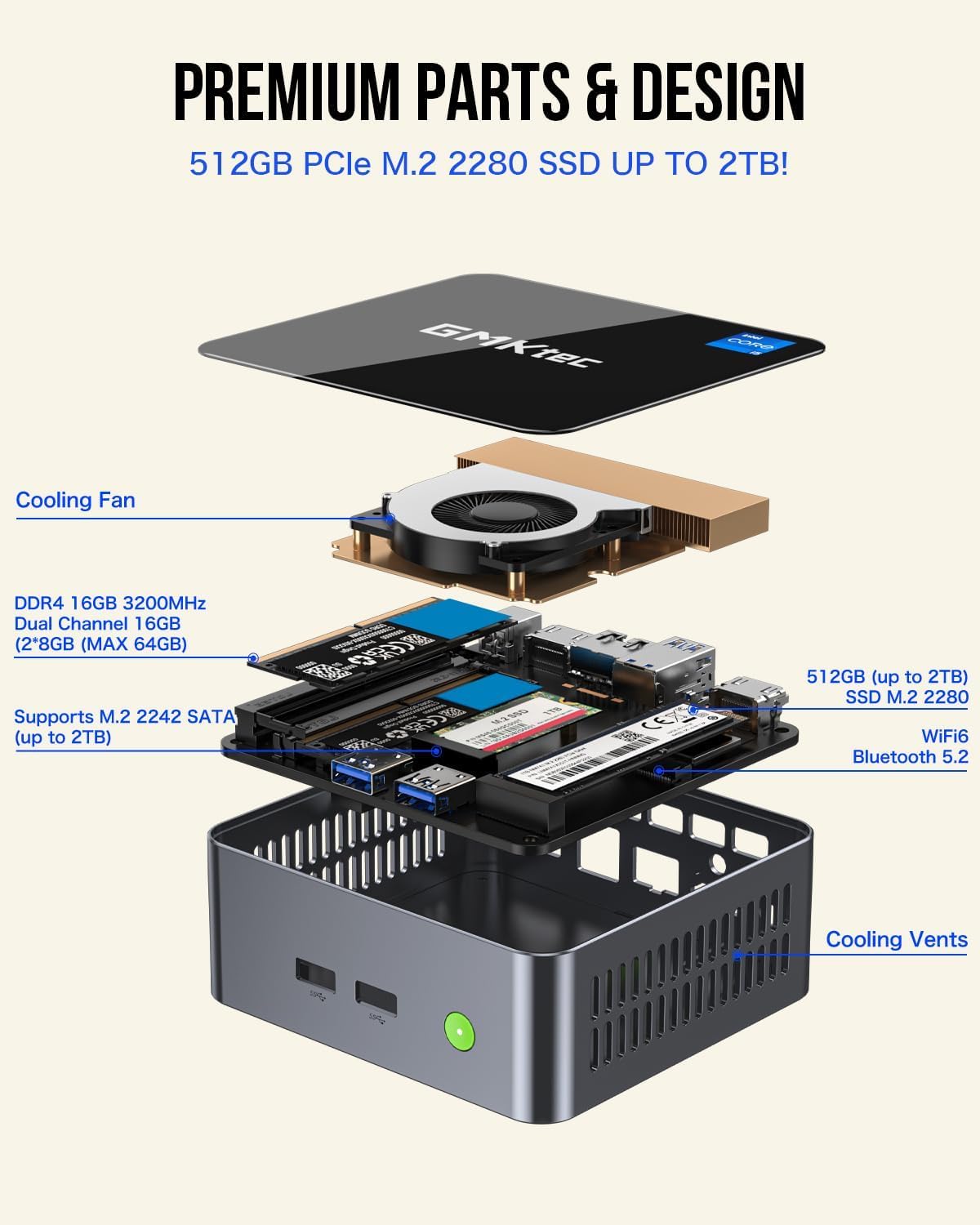
Figure 5: Internal layout of the GMKtec M3 Mini PC, highlighting upgradeable components.
- RAM: The device comes with 16GB dual-channel DDR4 RAM. It supports further upgrades, typically up to 64GB (2x 32GB SO-DIMM).
- SSD: It includes a 1TB M.2 2280 NVMe SSD. An additional M.2 2242 SATA slot is available for expanding storage up to 2TB.
To access internal components for upgrades, carefully remove the bottom cover of the Mini PC. Refer to the detailed instructions in the included user manual for specific steps.
Video 3: A demonstration of the internal components and potential upgrade paths for the GMKtec M3 Mini PC.
4.2 Sistem Penyejukan
The Mini PC features a smart cooling fan with dual copper heat pipes to ensure efficient heat dissipation and stable performance during operation. Keep the air intake and exhaust vents clear of obstructions to maintain optimal airflow.
5. Penyelesaian masalah
If you encounter issues with your GMKtec M3 Mini PC, consider the following basic troubleshooting steps:
- Tiada Kuasa: Ensure the power adapter is securely connected to both the Mini PC and a working power outlet. Check if the power button lights up when pressed.
- Tiada Paparan: Verify that the HDMI or Type-C cable is firmly connected to both the Mini PC and the monitor. Try a different cable or monitor if possible. Ensure the monitor is set to the correct input source.
- Isu persisian: If your keyboard or mouse is not responding, try connecting them to different USB ports. For wireless peripherals, check battery levels and ensure they are properly paired.
- Masalah Ketersambungan Rangkaian: For Wi-Fi, ensure the Wi-Fi adapter is enabled in Windows settings and you are connected to the correct network. For wired Ethernet, check the cable connection and router status.
- Kelembapan Sistem: Close unnecessary applications. Check for background processes consuming high CPU or RAM usage in Task Manager. Ensure adequate ventilation for the Mini PC.
For persistent issues or advanced troubleshooting, please refer to the support section or contact GMKtec customer service.
6. Spesifikasi Teknikal
| Ciri | Spesifikasi |
|---|---|
| Pemproses | Intel Core i5-12450H (4.4 GHz, 8 Cores, 12 Threads) |
| RAM | 16 GB DDR4 SDRAM (3200 MHz) |
| Penyimpanan | 1 TB M.2 NVMe SSD (PCIe 3.0), expandable with M.2 2242 SATA |
| Pemproses bersama Grafik | Intel Iris Xe Graphics G7 96EU GPU |
| Resolusi Skrin Maks | 5120 x 2880 Piksel |
| Sistem Operasi | Windows 11 Pro |
| Jenis Wayarles | WiFi 6 (802.11ax), Bluetooth 5.2 |
| Ethernet | RJ45 2.5 Gbps |
| Port USB | 3x USB 3.0, 1x USB 2.0, 1x USB Type-C (DP/DATA) |
| Berat Barang | 3.3 paun |
| warna | Hitam |
7. Waranti dan Sokongan
7.1 Maklumat Waranti
GMKtec menawarkan a Waranti terhad 1 tahun untuk setiap Mini PC, berkuat kuasa dari tarikh pembelian. Waranti ini melindungi kecacatan akibat reka bentuk dan mutu kerja. Sila simpan bukti pembelian anda untuk tuntutan waranti.
7.2 Sokongan Pelanggan
For any questions, technical assistance, or warranty inquiries, please contact GMKtec's professional after-sales team. Contact details are typically found in the included user manual or on the official GMKtec webtapak.