
SURRYN NPS3010W
Wanptek NPS3010W Bench Power Supply User Manual
Model: NPS3010W (4 Digits 30V 10A)
Brand: SURRYN
1. Pengenalan
This manual provides detailed instructions for the safe and efficient operation of your Wanptek NPS3010W Bench Power Supply. This miniature switching DC power supply offers adjustable output voltage and current, with high-precision four-digit display for voltage, current, and power. It is designed for laboratory, educational, and DIY applications requiring a stable and adjustable power source.
Ciri-ciri utama termasuk:
- Complete operating protection functions: over temperature protection, overload protection, short circuit protection.
- Small size, low ripple, light weight, and high power density.
- Highly efficient design.
- Voltage stabilization and current limiting capabilities.
- Automatic switching between Constant Voltage (CV) and Constant Current (CC) modes.
- High-precision four-digit LED display for voltage, semasa, dan kuasa.

Rajah 1: Depan view of the Wanptek NPS3010W Bench Power Supply.
2. Arahan Keselamatan
Please read and understand all safety instructions before operating the power supply. Failure to follow these instructions may result in electric shock, fire, or damage to the unit.
- Sumber Kuasa: Connect the power supply only to a grounded AC outlet with the correct voltage (115V or 230V, ensure the voltage selector switch on the rear panel is set correctly).
- Pengudaraan: Ensure adequate ventilation around the unit. Do not block the cooling fan or ventilation openings. Maintain at least 10 cm (4 inches) of clear space around the unit.
- Persekitaran: Do not operate the power supply in damp, wet, or explosive environments. Avoid direct sunlight and high temperatures.
- Lebihan beban: Jangan melebihi nilai keluaran voltage or current. Operating the unit beyond its specifications can cause damage.
- Penyelenggaraan: Jangan cuba menservis unit ini sendiri. Rujuk semua servis kepada kakitangan yang berkelayakan.
- Sambungan: Ensure all connections are secure before applying power. Disconnect power before making or changing connections.
3. Komponen dan Susun Atur Produk
3.1 Panel Depan

Figure 2: Labeled front panel of the NPS3010W.
- Voltage Paparan: Menunjukkan volum outputtage dalam Volt (V).
- Paparan Semasa: Menunjukkan arus keluaran dalam Amperes (A).
- Paparan Kuasa: Shows the output power in Watts (W).
- C.V. Indicator: Illuminates when the power supply is operating in Constant Voltagmod e.
- C.C. Indicator: Illuminates when the power supply is operating in Constant Current mode.
- V-COARSE Knob: Coarse adjustment for output voltage.
- V-FINE Knob: Fine adjustment for output voltage.
- A-COARSE Knob: Coarse adjustment for output current limit.
- A-FINE Knob: Fine adjustment for output current limit.
- Suis kuasa: ON/OFF button for the power supply.
- Terminal Keluaran Negatif (-): Black terminal for negative connection.
- Terminal Keluaran Positif (+): Red terminal for positive connection.
3.2 Panel Belakang

Figure 3: Rear panel of the NPS3010W.
- Kipas Penyejuk: Automatically adjusts speed based on internal temperature to ensure optimal cooling.
- Soket Input AC: Untuk menyambungkan kord kuasa.
- Pemegang fius: Mengandungi fius pelindung.
- Input AC Voltage Switch (115V/230V): Memilih input voltage untuk wilayah anda. Ensure this is set correctly before connecting to power.
4. Persediaan
- Membongkar: Carefully remove the power supply and all accessories from the packaging. Verify that all components are present: power supply unit, power cord, and operation manual.
- penempatan: Place the power supply on a stable, level surface. Ensure there is sufficient space around the unit for proper ventilation, especially around the cooling fan on the rear panel.
- Voltage Pemilihan: Before connecting the power cord, check the AC Input Voltage Switch on the rear panel. Set it to match your local mains voltage (115V atau 230V). Tetapan yang salah boleh merosakkan unit.
- Sambungan Kuasa: Connect the provided power cord to the AC Input Socket on the rear panel of the power supply, then plug the other end into a grounded AC outlet.
- Semakan Awal: With no load connected, press the Power Switch to turn on the unit. The LED displays should illuminate, showing default voltage dan bacaan semasa.

Rajah 4: Kandungan pakej biasa.
5. Arahan Operasi
5.1 Adjusting Voltage dan Semasa
- Hidupkan kuasa: Pastikan bekalan kuasa dihidupkan.
- Set Voltage: Use the V-COARSE and V-FINE knobs to set the desired output voltage. Voltage Display will show the set value.
- Tetapkan Had Semasa: Use the A-COARSE and A-FINE knobs to set the desired current limit. This is the maximum current the power supply will deliver. It is recommended to set the current limit slightly above the expected operating current of your load to prevent accidental overcurrent.
- Pemalar VoltagMod e (CV): Apabila keluaran voltage is stable and the current drawn by the load is below the set current limit, the C.V. indicator will be lit. The power supply will maintain the set voltage.
- Mod Arus Malar (CC): If the load resistance is too low or the load attempts to draw more current than the set limit, the power supply will automatically switch to Constant Current mode. The C.C. indicator will be lit, and the output current will be maintained at the set limit, while the output voltage akan jatuh.
5.2 Connecting a Load
- Matikan: Turn off the power supply before connecting any load.
- Sambungkan Petunjuk: Connect the positive (+) lead from your load to the red Positive Output Terminal (+) and the negative (-) lead from your load to the black Negative Output Terminal (-). Ensure connections are secure.
- Hidupkan kuasa: Turn on the power supply. The displays will show the actual voltage, current, and power being delivered to the load.
- Memutuskan sambungan: Always turn off the power supply before disconnecting the load.
6. Penyelenggaraan
Penyelenggaraan yang betul memastikan ketahanan dan operasi bekalan kuasa anda yang boleh dipercayai.
- Pembersihan: Regularly clean the exterior of the unit with a soft, dry cloth. Do not use abrasive cleaners or solvents. Ensure no liquids enter the unit.
- Pengudaraan: Periodically check the cooling fan and ventilation openings for dust accumulation. Use compressed air to gently clear any blockages. A blocked fan can lead to overheating.
- Penggantian fius: If the unit fails to power on, the fuse may need replacement. Ensure the power supply is disconnected from the mains before attempting to replace the fuse. The fuse holder is located on the rear panel. Replace with a fuse of the same type and rating only.
- Storan: Apabila tidak digunakan untuk tempoh yang lama, simpan bekalan kuasa di tempat yang sejuk dan kering, jauh daripada cahaya matahari langsung dan suhu yang melampau.
7. Penyelesaian masalah
Bahagian ini menangani isu biasa yang mungkin anda hadapi. Untuk masalah yang tidak disenaraikan di sini, hubungi sokongan pelanggan.
| Masalah | Kemungkinan Punca | Penyelesaian |
|---|---|---|
| Tiada kuasa/Unit tidak menyala | Power cord not connected; AC outlet faulty; Fuse blown; Incorrect voltage pemilihan. | Check power cord connection; Test AC outlet; Replace fuse (see Maintenance); Verify AC Input Voltage Switch setting. |
| Tiada keluaran voltage/semasa | Terminal output tidak disambungkan; Voltage/current knobs set to zero; Overload protection activated. | Ensure load is properly connected; Adjust voltage/current knobs; Check for short circuit in load, reduce load, or increase current limit. |
| Unit terlalu panas | Blocked ventilation; Excessive load. | Ensure clear space around unit, clean fan/vents; Reduce load or operate within specified limits. |
| C.C. indicator is always on | Rintangan beban terlalu rendah; Had arus ditetapkan terlalu rendah untuk beban. | Increase the current limit using A-COARSE/A-FINE knobs; Check load for short circuit or very low resistance. |
8. Spesifikasi
The following specifications apply to the Wanptek NPS3010W (4 Digits 30V 10A) model:
- model: NPS3010W
- Keluaran Voltage: 0-30V (Boleh Laras)
- Arus Keluaran: 0-10A (Boleh Laras)
- paparan: LED 4 digit untuk Voltantage (0.01V resolution), Current (0.001A resolution), and Power.
- Input Voltage: AC 115V/230V ±10% (Switchable)
- Load Regulation (CV): <0.1% + 2mV
- Load Regulation (CC): <0.1% + 2mA
- Ripple and Noise (CV): <20mVrms
- Ripple and Noise (CC): <20mArms
- Perlindungan: Over Temperature Protection (OTP), Overload Protection (OLP), Short Circuit Protection (SCP).
- Dimensi: Kira-kira 70mm (W) x 130mm (H) x 230mm (D)
- Berat Barang: 6.61 paun (lebih kurang 3 kg)
- Suhu Operasi: 0°C hingga 40°C
- Suhu penyimpanan: -10°C hingga 70°C
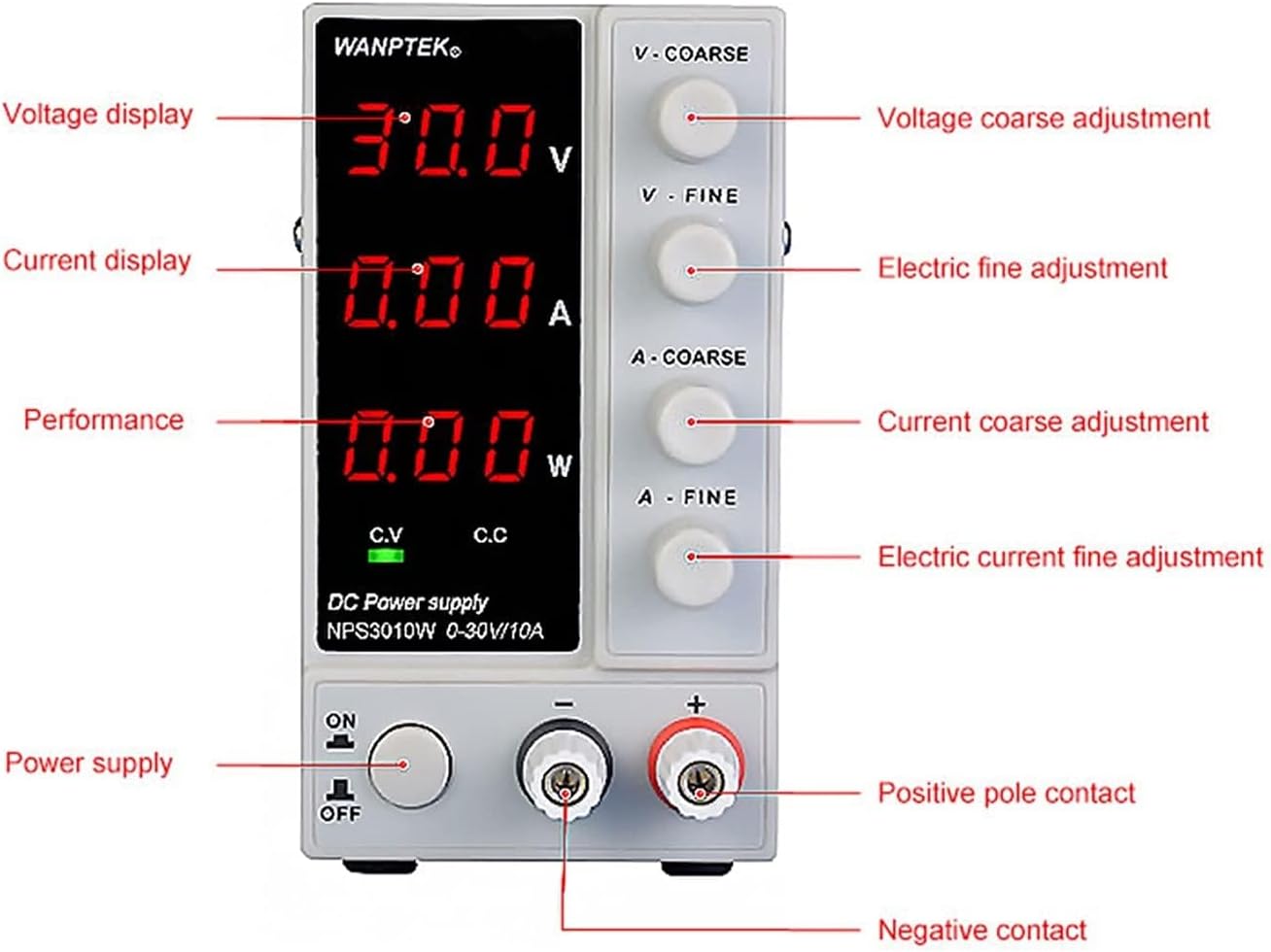
Figure 5: Approximate dimensions of the NPS3010W.
9. Waranti dan Sokongan
This product is manufactured by SURRYN. For specific warranty information and terms, please refer to the documentation included with your purchase or contact the seller directly. Manufacturer warranties typically cover defects in materials and workmanship for a specified period from the date of purchase.
Optional extended protection plans may be available for purchase separately. These plans are not provided by the manufacturer but offer additional coverage beyond the standard warranty period.
For technical support, troubleshooting assistance, or inquiries regarding parts and service, please contact the retailer or the manufacturer's customer service department using the contact information provided at the time of purchase.
Ask a question about this manual
Ask about setup, troubleshooting, compatibility, parts, safety, or missing instructions. Manuals+ will review the question and use this page’s manual context to help answer it.