
1. Pengenalan
This manual provides detailed instructions for the safe and efficient operation, setup, and maintenance of your SURRYN Bench DC Power Supply. Please read this manual thoroughly before using the device to ensure proper functionality and to prevent damage.
The SURRYN Bench DC Power Supply is an adjustable, stabilized switching power source designed for laboratory, electronic repair, DIY projects, communication equipment maintenance, and scientific research. It features automatic power calculation, a 5V/3.6A USB fast charging interface, and multiple safety protections.
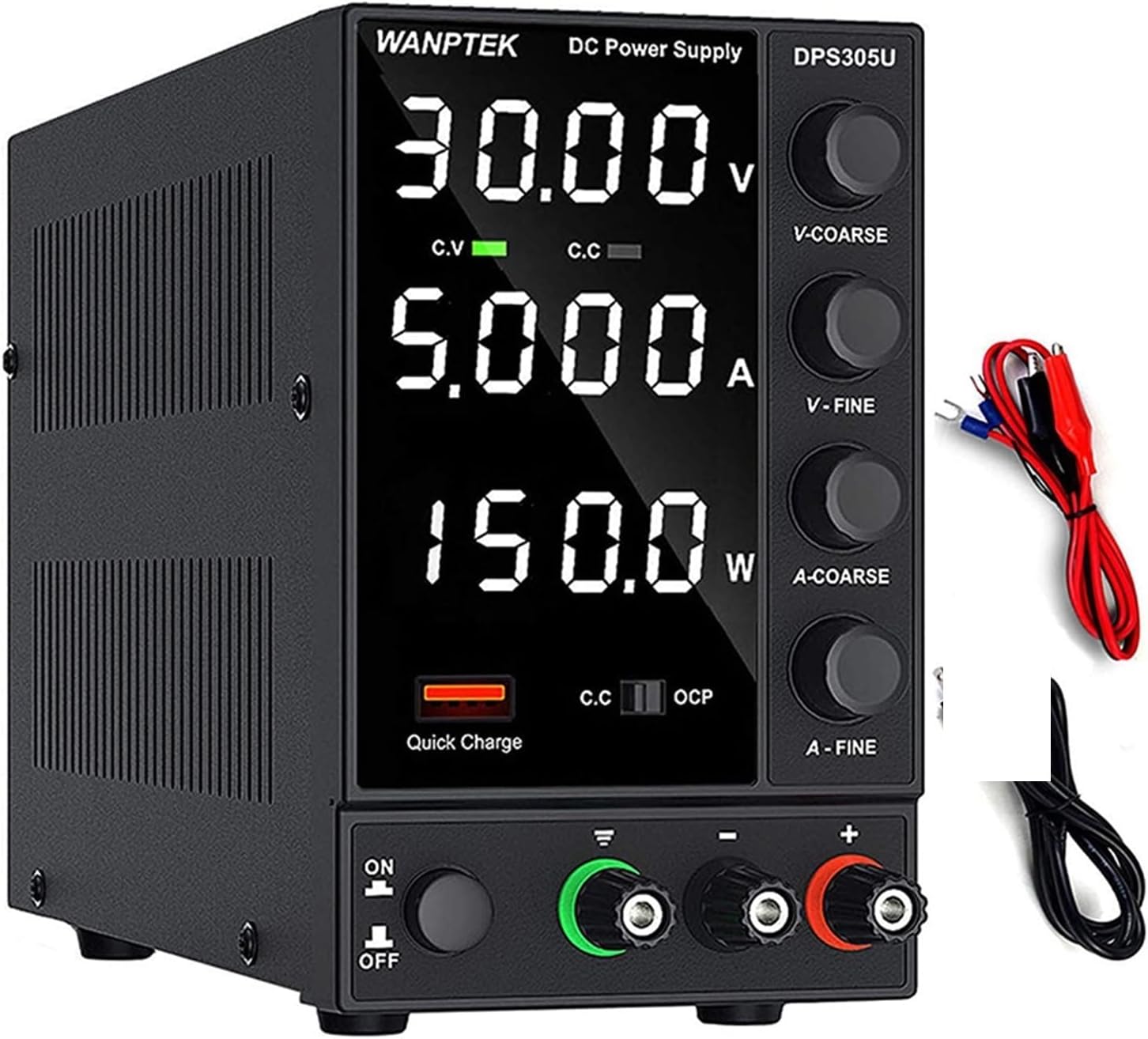
Rajah 1: Depan view of the SURRYN DPS305U Bench DC Power Supply, showing the digital display for voltage, current, and power, along with control knobs and output terminals.
2. Langkah-langkah Keselamatan
- Sentiasa sambungkan bekalan kuasa ke soket yang dibumikan.
- Jangan kendalikan peranti dalam keadaan basah atau damp syarat.
- Pastikan pengudaraan yang betul untuk mengelakkan terlalu panas.
- Jangan buka casing; rujuk servis kepada kakitangan yang berkelayakan.
- Sahkan input voltage switch setting (115V/230V) matches your local power supply before connecting.
- In case of a short circuit, the device will alarm and stop output. Address the short circuit before resuming operation.
3. Ciri-ciri Produk
- Pengiraan Kuasa Automatik: Displays 4-digit voltage, current, and power values simultaneously with high accuracy (0.01V, 0.001A).
- 5V/3.6A USB Interface: Built-in fast charging protocol identification chip for quick charging of mobile devices or powering repair equipment.
- Penggera Litar Pintasan: Automatically stops output and sounds an alarm upon detecting a short circuit, enhancing safety and prolonging device life.
- Perlindungan Keselamatan Komprehensif: Termasuk overvoltage, perlindungan arus lampau, pemanasan melampau dan perlindungan beban lampau.
- Intelligent Temperature-Controlled Fan: Ensures efficient heat dissipation for stable operation.
- Reka bentuk padat dan ringan: Saves workbench space.
4. Persediaan
4.1 Membongkar dan Pemeriksaan
Carefully remove the power supply and all accessories from the packaging. Inspect for any signs of damage during transit. If any damage is found, contact your supplier immediately.
Kandungan Pakej:
- 1 x Power Host (Bench DC Power Supply Unit)
- 1 x Output Power Cord (Test Leads)
- 1 x Input Power Cord (AC Power Cable)
- 1 x Manual Pengguna (Dokumen ini)
4.2 Sambungan Awal
- Voltage Switch Setting: Locate the 230V/115V switch on the rear panel of the power supply. Ensure it is set to match your local AC power voltage (e.g., 115V for North America, 230V for Europe).
- Sambungkan Kuasa AC: Insert the input power cord into the AC power input socket on the rear panel of the power supply, then plug the other end into a grounded wall outlet.
- Connect Output Leads: Connect the output power cords (test leads) to the positive (+) and negative (-) terminals on the front panel. Ensure a secure connection.

Rajah 2: Terperinci view of the power supply's front and rear panels, highlighting the AC power input, 230V/115V switch, fuse box, cooling fan, USB Quick Charging Interface, display screen, control knobs, and output terminals.
5. Arahan Operasi
5.1 Panel Hadapan Atasview

Rajah 3: Front panel of the power supply, emphasizing the Short Circuit Alarm indicator and the USB Quick-Charge Interface.
- Skrin Paparan: Shows 4-digit voltage (V), current (A), and power (W) values.
- V-COARSE / V-FINE Knobs: Laraskan keluaran voltage (coarse and fine adjustments).
- A-COARSE / A-FINE Knobs: Adjust output current limit (coarse and fine adjustments).
- Butang HIDUP/MATI: Menghidupkan atau mematikan unit.
- Output Terminals (+, -, GND): Connect test leads for power output.
- USB Quick Charging Interface: Provides 5V/3.6A output for charging devices.
- C.V. / C.C. Indicators: Pemalar Voltage (C.V.) and Constant Current (C.C.) mode indicators.
- OCP Indicator: Over Current Protection indicator.
- Quick Charge Indicator: Illuminates when the USB quick charge function is active.
5.2 Operasi Asas
- Hidupkan kuasa: Press the ON/OFF button. The display will illuminate.
- Set Voltage: Gunakan V-COARSE knob for large voltage adjustments and the V-FINE knob for precise adjustments. Observe the voltage reading on the display.
- Tetapkan Had Semasa: Gunakan A-COARSE knob for large current limit adjustments and the A-FINE knob for precise adjustments. This sets the maximum current the power supply will deliver.
- Sambungkan Beban: Selepas menetapkan volum yang dikehendakitage and current limit, connect your device or circuit to the output terminals.
- Keluaran Monitor: The display will show the actual voltage, current, and calculated power being delivered to the load. The C.V. or C.C. indicator will light up depending on the operating mode.
- USB Quick Charge: To use the USB charging function, simply plug your device into the USB Quick Charging Interface. The Quick Charge indicator will light up.
Nota: Adalah disyorkan untuk menetapkan voltage and current limit before connecting the load to prevent accidental overvoltage or overcurrent to your device.
5.3 Automatic Power Calculation
The power supply automatically calculates and displays the output power (in Watts) based on the current voltage and current readings. This feature provides real-time power consumption information for your connected load.

Rajah 4: The power supply's display showing precise voltage, current, and power readings, demonstrating its high resolution of 0.01V and 0.001A.
6. Penyelenggaraan
6.1 Pembersihan
Ensure the power supply is turned off and disconnected from the AC power outlet before cleaning. Use a soft, dry cloth to wipe the exterior. Do not use abrasive cleaners or solvents.
6.2 Pengudaraan
Keep the ventilation openings on the sides and rear of the unit clear of obstructions to ensure proper airflow. The intelligent temperature-controlled fan will activate as needed to maintain optimal operating temperature.

Rajah 5: Dalaman view highlighting the cooling fan and heat sink, which contribute to the intelligent temperature control and efficient heat dissipation.
6.3 Penggantian Fius
If the power supply does not turn on, check the fuse located in the fuse box on the rear panel. Disconnect the AC power cord, open the fuse box, and replace the fuse with one of the same type and rating. Refer to the specifications for fuse details.
7. Penyelesaian masalah
- Tiada Kuasa:
- Periksa sama ada kord kuasa AC disambungkan dengan selamat ke kedua-dua bekalan kuasa dan alur keluar dinding.
- Verify the 230V/115V switch on the rear panel is set correctly for your region.
- Check and replace the fuse if necessary (refer to Section 6.3).
- Tiada Keluaran Voltage/Semasa:
- Ensure the ON/OFF button is pressed.
- Check if the output leads are correctly connected to the terminals and the load.
- Sahkan bahawa voltage and current limit knobs are adjusted to desired values.
- Penggera Litar Pintasan:
- If the short circuit alarm sounds and output stops, immediately disconnect the load.
- Identify and resolve the short circuit in your connected circuit or device.
- Once the short circuit is cleared, the power supply can resume normal operation.
- Terlalu panas:
- Pastikan pengudaraan yang mencukupi di sekitar bekalan kuasa.
- Clear any obstructions from the cooling fan and vents.
- Reduce the load if operating continuously at maximum capacity in a high ambient temperature.
8. Spesifikasi
Spesifikasi Umum:
- Jenama: SURRYN
- model: DPS3010U (30V 10A), DPS305U (30V 5A)
- Input Voltage: AC 115V/230V ±10% (Switchable)
- paparan: LED 4 digit untuk Voltantage, Arus, Kuasa
- Voltage Ketepatan: 0.01V
- Ketepatan Semasa: 0.001A
- Output USB: 5V/3.6A (Quick Charge)
- Perlindungan Keselamatan: Overvoltage, Overcurrent, Overheating, Overload, Short Circuit Alarm
- penyejukan: Intelligent Temperature-Controlled Fan
- Dimensi: Kira-kira 8.86 x 3.54 x 5.7 inci (22.5 x 9 x 14.5 cm)
- Berat Barang: Kira-kira 4.41 paun (2 kg)

Rajah 6: Product dimensions of the SURRYN switching power supply, illustrating its compact size compared to a traditional linear power supply.
Spesifikasi Model:
- DPS3010U:
- Keluaran Voltage: 0-30V DC
- Arus Keluaran: 0-10A
- Kuasa Keluaran: 0-300W
- DPS305U:
- Keluaran Voltage: 0-30V DC
- Arus Keluaran: 0-5A
- Kuasa Keluaran: 0-150W
9. Waranti dan Sokongan
SURRYN products are designed for reliability and performance. For warranty information, please refer to the terms and conditions provided at the point of purchase or contact your retailer.
For technical support, troubleshooting assistance, or inquiries regarding your SURRYN Bench DC Power Supply, please contact the seller or manufacturer directly through the platform where the product was purchased. Please have your model number (DPS3010U or DPS305U) and purchase date available when seeking support.