
1. Lebihview
The Bigme HiBreak Pro is a smart Epaper phone designed for an eye-friendly experience with its 6.13-inch HD Eye-Care 300ppi screen. Running on Android 14, it offers robust performance with a Dimensity 1080 processor, 8GB RAM, and 256GB storage. It supports 5G full network and dual SIM functionality, powered by a 4500mAh long-lasting battery. This manual provides essential information for setting up, operating, and maintaining your device.
2. Ciri-ciri Produk
- 6.13-inch Epaper Display: Features an energy-efficient and eye-friendly screen with minimal blue light emission.
- Prestasi Teguh: Equipped with a Dimensity 1080 processor, 8GB RAM, and 256GB storage for smooth and efficient operation.
- Enhanced Daily Functionality: A 4500mAh battery ensures extended use. The dual camera setup includes a 20MP rear camera for document scanning with OCR.
- 5G Dual SIM Capability: Supports 5G dual standby for flexible and seamless connectivity across 5G and 4G networks.
- Full App Compatibility: Operates on Android 14 OS, supporting a wide range of applications.

Figure 2.1: Key features of the Bigme HiBreak Pro, including NFC, fingerprint unlocking, fast charging, BigmeGPT, GPS, voice-to-text, battery life, and storage.
3. Reka Letak Peranti

Figure 3.1: Device layout showing the Fingerprint Power Button, Volume Button, USB-C port, Card Slot, Microphone, Light Sensor, 5MP Front Camera, Speaker, Infrared, 20MP Rear Camera, LED Flash, and Custom Key.

Figure 3.2: HD Dual Camera setup with 5MP front and 20MP rear cameras.
4. Persediaan
- Membuka kotak: Keluarkan semua barang dari pembungkusan dengan berhati-hati. Sahkan bahawa semua komponen yang disenaraikan dalam bahagian 'Apa yang Ada di Dalam Kotak' ada.
- Masukkan Kad SIM: Use the provided SIM ejector tool to open the card slot. Insert your 5G compatible SIM card(s) and/or a microSD card if desired. Ensure the tray is fully reinserted.
- Hidupkan kuasa: Press and hold the Fingerprint Power Button located on the side of the device until the Bigme logo appears.
- Konfigurasi Awal: Follow the on-screen prompts to select your language, connect to a Wi-Fi network, set up your Google account, and configure security settings like fingerprint unlock.
- Kemas Kini Perisian: It is recommended to check for and install any available software updates to ensure optimal performance and security.
5. Arahan Operasi
5.1 Navigasi Asas
- Skrin sentuh: Navigate the interface by tapping, swiping, and pinching on the ePaper display.
- Butang Kuasa: Press briefly to lock/unlock the screen. Press and hold to power off or restart the device.
- Butang Kelantangan: Adjust media volume, call volume, or use as page-turn buttons in reading applications.
5.2 Epaper Display Modes
The Bigme HiBreak Pro features various display modes optimized for different tasks. Access these settings through the quick settings panel or display settings to adjust refresh rates and visual quality for reading, browsing, or video playback.
5.3 Panggilan dan Pemesejan
Utilize the dual SIM functionality for managing two phone numbers. Make and receive calls, send text messages, and manage contacts through the standard Android phone and messaging applications.
5.4 Aplikasi
The device runs on Android 14, allowing access to a wide range of applications from the Google Play Store. Install your preferred reading apps, productivity tools, and communication platforms.

Figure 5.1: Android 14 OS interface on the Bigme HiBreak Pro.
6. Penyelenggaraan
- Penjagaan Bateri: To prolong battery life, avoid extreme temperatures. Charge the device using the provided USB-C cable and a compatible power adapter.
- Pembersihan: Use a soft, lint-free cloth to clean the screen and device body. Avoid harsh chemicals or abrasive materials.
- Kemas Kini Perisian: Semak dan pasang kemas kini sistem secara kerap untuk memastikan prestasi optimum, keselamatan dan akses kepada ciri baharu.
- Pengurusan Storan: Semula secara berkalaview dan padam yang tidak perlu files and applications to free up storage space and maintain device speed.
7. Penyelesaian masalah
7.1 Peranti Tidak Dihidupkan
- Pastikan bateri telah dicas. Sambungkan peranti kepada pengecas selama sekurang-kurangnya 30 minit.
- Try a forced restart by holding the power button for 10-15 seconds.
7.2 Screen Freezing or Unresponsive
- Lakukan tetapan semula lembut dengan menekan butang kuasa sehingga peranti dimulakan semula.
- If the issue persists, consider a factory reset (note: this will erase all data).
7.3 Isu Kesambungan (Wi-Fi/5G)
- Toggle Wi-Fi or mobile data off and on.
- Mulakan semula peranti anda.
- Check your router or contact your mobile service provider.
8. Spesifikasi
| Ciri | Perincian |
|---|---|
| Jenama | Bigme |
| Nama Model | HiBreak Pro |
| Teknologi Paparan | E-Ink |
| Saiz Skrin | 6.13 Inci |
| Resolusi Paparan | 824 x 1648 |
| RAM | 8 GB |
| Kapasiti Storan | 256 GB |
| Teknologi Ketersambungan | USB |
| warna | Hitam |
| Disokong File Format | EPUB, MOBI, PDF |
| Ciri-ciri Produk | HD Eye-Care 300ppi Screen, Document Scanner with OCR |
| Penerangan Bateri | Litium-ion |
| Input Antara Muka Manusia | Skrin sentuh |
9. Apa yang ada di dalam Kotak
- Bigme HiBreak Pro Epaper Phone
- Kabel USB-C
- Alat Ejector SIM
- Panduan Mula Pantas (jika disertakan)
- Kad Waranti (jika disertakan)
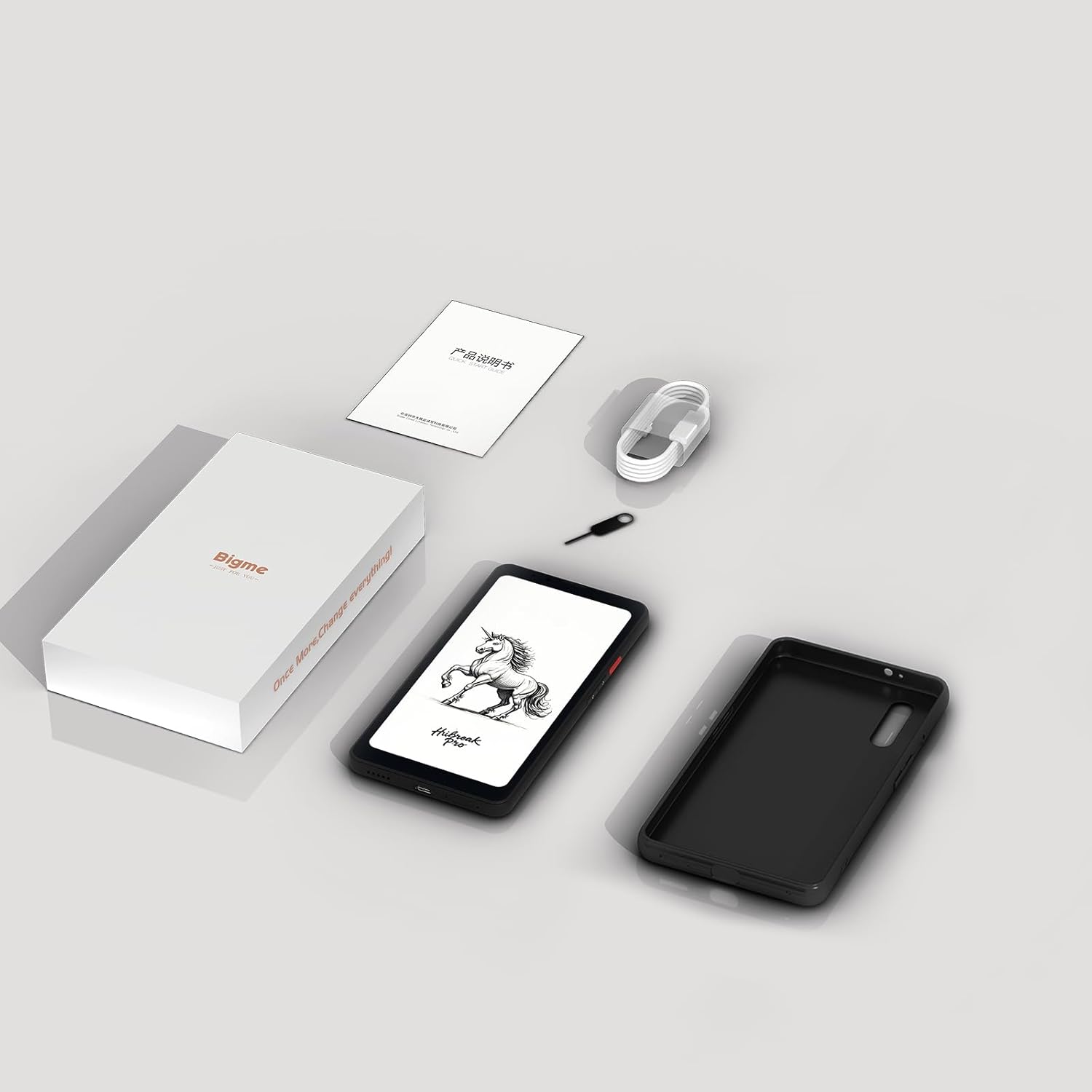
Figure 9.1: Contents of the Bigme HiBreak Pro retail box.
10. Waranti dan Sokongan
Your Bigme HiBreak Pro Epaper Phone is covered by a manufacturer's warranty. Please refer to the warranty card included in your product packaging for specific terms and conditions, including warranty period and coverage details. For technical support, service, or further inquiries, please visit the official Bigme webtapak atau hubungi perkhidmatan pelanggan mereka.