
1. Pengenalan
Thank you for choosing the SHEHDS 192 DMX DJ Controller. This versatile lighting console is designed to provide precise control over various DMX-compatible stage lighting fixtures, including fog machines, spotlights, par lights, strobes, and beam lights. This manual will guide you through the setup, operation, maintenance, and troubleshooting of your new controller to ensure optimal performance and longevity.
2. Produk Lebihview
2.1. Apa yang ada di dalam Kotak
- SHEHDS 192 DMX DJ Controller
- Penyesuai Kuasa
- Kabel DMX
- Manual Pengguna

Rajah 1: Contents of the SHEHDS 192 DMX Controller package, including the controller, power adapter, DMX cable, and user manual.
2.2. Komponen Utama

Rajah 2: SHEHDS 192 DMX Controller with labeled components: charger input, LCD display, wear-resistant buttons, DMX interface, and channel faders.
2.3. Susun Atur Panel Kawalan

Rajah 3: Terperinci view of the SHEHDS 192 DMX Controller's control panel, highlighting the lighting area, channel faders, scene keys, page change area, functional area, time speed fader, power switch, power interface, and DMX signal interface.
3. Persediaan
- Sambungan Kuasa: Connect the provided power adapter to the controller's power interface and then to a suitable power outlet.
- Sambungan DMX: Use a standard 3-pin DMX cable to connect the controller's DMX output to the DMX input of your first lighting fixture. Daisy-chain additional DMX fixtures from the output of the previous fixture.
- Hidupkan kuasa: Flip the power switch to the 'ON' position. The LCD display should illuminate, indicating the controller is ready for operation.
- Tetapan Alamat DMX: Ensure all your DMX lighting fixtures are set to unique DMX addresses. Refer to your lighting fixture's manual for instructions on setting DMX addresses.
4. Arahan Operasi
4.1. Kawalan Saluran Asas
- Gunakan Pemudar Saluran (labeled 'Putter' in Figure 3) to adjust the intensity or parameter values for individual DMX channels.
- The Kawasan Pencahayaan buttons (DMX512 section) allow you to select specific DMX channels or groups of channels for control.
- Gunakan Page Change Area buttons (Page A/Page B) to switch between different pages of DMX channels if your fixture requires more than 8 channels.
4.2. Scene Programming
- Adjust your lighting fixtures to the desired state using the channel faders.
- Tekan ke Program butang untuk memasuki mod pengaturcaraan.
- Select an empty Kunci Adegan (labeled 'Scene' in Figure 3) where you wish to save the current lighting state.
- Tekan ke MIDI/Add button to save the scene.
- Repeat for additional scenes. Press Program again to exit programming mode.
4.3. Chase Programming
Chases are sequences of scenes that play back automatically.
- Masuk ke mod pengaturcaraan dengan menekan butang Program butang.
- Pilih a Kejar button (Chase 1-6) to program a new chase.
- Recall the scenes you wish to include in the chase by pressing their respective Kunci Adegan.
- Tekan ke MIDI/Add button after each scene to add it to the chase sequence.
- Laraskan Kelajuan dan Masa Pudar faders to control the playback speed and transition time between scenes in the chase.
- Tekan Program again to exit programming mode.
4.4. Important Note on DMX Address
After setting the DMX address for your fixtures, the original DMX address is maintained as long as you press the OK button, even if you power off and restart the controller.
5. Penyelenggaraan
- Pembersihan: Regularly wipe the surface of the controller with a soft, dry cloth. Avoid using abrasive cleaners or solvents.
- Storan: Apabila tidak digunakan, simpan alat kawalan jauh di tempat yang sejuk dan kering, jauh daripada cahaya matahari langsung dan suhu yang melampau.
- Pengurusan Kabel: Ensure DMX and power cables are not kinked or strained to prevent damage.
6. Penyelesaian masalah
| Masalah | Kemungkinan Punca | Penyelesaian |
|---|---|---|
| Pengawal tidak dihidupkan. | Tiada bekalan kuasa atau kabel rosak. | Check power adapter connection and power outlet. Ensure power switch is ON. |
| Lights are not responding to the controller. | Incorrect DMX connections or DMX addresses. | Verify DMX cable connections. Ensure DMX addresses on fixtures match controller settings. Check for faulty DMX cables. |
| Intermittent light control. | Loose DMX connection or DMX termination issue. | Secure all DMX connections. Consider using a DMX terminator at the end of the DMX chain. |
| Specific channels not responding. | Incorrect channel selection or fixture profile tidak sepadan. | Ensure the correct DMX channels are selected on the controller. Verify the DMX channel layout for your specific lighting fixture. |
7. Spesifikasi
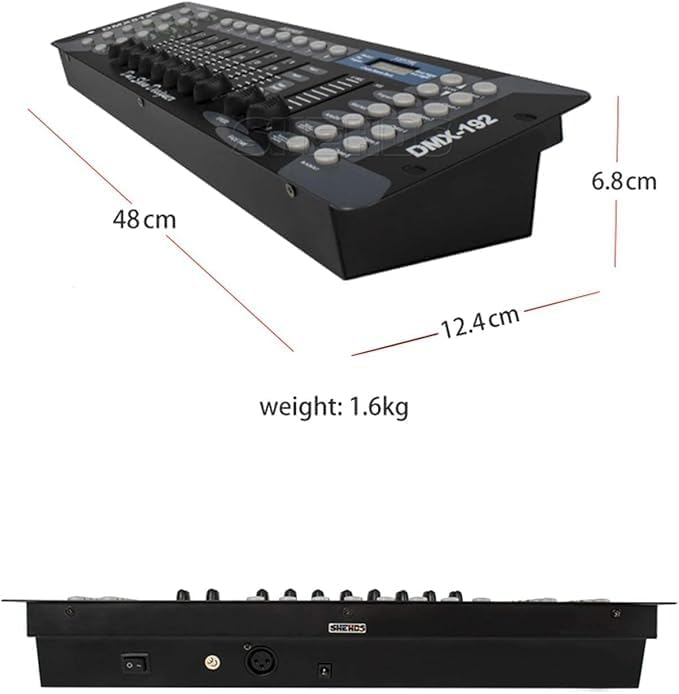
Rajah 4: Dimensions of the SHEHDS 192 DMX Controller: 48 cm length, 12.4 cm width, 6.8 cm height, and 1.6 kg weight.
| Ciri | Perincian |
|---|---|
| Nombor Model | 192 DMX |
| Jenama | SHHDS |
| warna | Hitam |
| bahan | aluminium |
| Jenis Selesai | Digilap |
| Jenis Sumber Cahaya | LED (Diod Pemancar Cahaya) |
| Sumber Kuasa | Elektrik Bertali |
| Berat Barang | 2.04 Kilogram |
| Gaya | moden |
| Jenis Pemasangan | Rak Gunung |
| Ciri-ciri | Dimmable, Color Changing, Multiple Control Channels |
| Bilangan Mentol | 12 (referring to internal LEDs for indicators) |
| Bateri Termasuk | Tidak |
| Negara Asal | China |
| Dimensi Item (L x W x H) | 57.3L x 16.7W x 10H sentimeter |
8. Waranti dan Sokongan
SHEHDS is committed to providing quality products and customer satisfaction.
- 1 Month Replacement: In case of any manufacturing defects or issues within the first month of purchase, the product is eligible for a replacement.
- Waranti 1 Tahun: The SHEHDS 192 DMX DJ Controller is covered by a 1-year warranty from the date of purchase, protecting against defects in materials and workmanship.
- Perkhidmatan Pelanggan: For any inquiries, technical assistance, or warranty claims, please contact SHEHDS customer service. Refer to your purchase documentation or the SHEHDS official weblaman web untuk maklumat hubungan.