1. Pengenalan
Thank you for choosing the Redkey W15 Cordless Wet Dry Vacuum Cleaner. This manual provides essential information for safe and efficient use of your appliance. Please read it thoroughly before first use and keep it for future reference.

Imej 1.1: Redkey W15 Cordless Wet Dry Vacuum Cleaner with included accessories. This image displays the main unit, charging base, power adapter, roller brush, and cleaning brush.
2. Arahan Keselamatan Penting
Sentiasa ikuti langkah berjaga-jaga keselamatan asas apabila menggunakan peralatan elektrik untuk mengurangkan risiko kebakaran, renjatan elektrik atau kecederaan.
- Baca semua arahan sebelum digunakan.
- Jangan rendamkan perkakas dalam air atau cecair lain.
- Jauhkan rambut, pakaian longgar, jari dan semua bahagian badan daripada bukaan dan bahagian yang bergerak.
- Gunakan hanya seperti yang diterangkan dalam manual ini. Gunakan hanya lampiran yang disyorkan pengilang.
- Jangan gunakan dengan kord atau palam yang rosak. Jika perkakas tidak berfungsi sebagaimana mestinya, telah terjatuh, rosak, ditinggalkan di luar rumah, atau terjatuh ke dalam air, kembalikannya ke pusat servis.
- Jangan pegang palam atau perkakas dengan tangan yang basah.
- Jangan ambil cecair mudah terbakar atau mudah terbakar, seperti petrol, atau gunakan di kawasan yang mungkin terdapat.
- Jangan ambil apa-apa yang terbakar atau berasap, seperti rokok, mancis, atau abu panas.
- Berhati-hati semasa membersihkan tangga.
- Jangan gunakan tanpa penapis di tempatnya.
- Simpan perkakas di dalam rumah.
- Perkakas ini tidak dimaksudkan untuk digunakan oleh orang (termasuk kanak-kanak) yang kurang keupayaan fizikal, deria atau mental, atau kurang pengalaman dan pengetahuan, melainkan mereka telah diberi pengawasan atau arahan mengenai penggunaan perkakas oleh orang yang bertanggungjawab untuk keselamatan mereka.
3. Komponen Produk
3.1. Kandungan Pakej
- Redkey W15 Main Unit
- Mengendalikan Pemasangan
- Pangkalan Pengecasan
- Penyesuai Kuasa
- Berus Penggelek
- Penapis HEPA
- Berus Pembersih
3.2. Rajah Unit Utama
Refer to the image below for a visual representation of the main components of your Redkey W15.
Imej 3.1: Berakhirview of the Redkey W15 Cordless Wet Dry Vacuum Cleaner and its accessories. Key components include the clean water tank, dirty water tank, LED display, handle, and brush head.
4. Persediaan dan Pemasangan
4.1. Mengendalikan Pemasangan
- Insert the handle assembly into the main unit until it clicks securely into place.
- Ensure the handle is firmly attached before use.
4.2. Mengecas Perkakas
- Letakkan unit utama pada pangkalan pengecasan.
- Connect the power adapter to the charging base and then to a power outlet.
- Paparan LED akan menunjukkan status pengecasan.

Imej 4.1: The Redkey W15 vacuum cleaner placed on its charging station. The image highlights the long battery life of up to 35 minutes and a cleaning area of 150 square meters.
4.3. Mengisi Tangki Air Bersih
- Keluarkan tangki air bersih dari unit utama.
- Open the tank cap and fill with clean tap water. You may add a small amount of non-foaming floor cleaning solution if desired. Do not exceed the MAX fill line.
- Close the cap securely and reattach the tank to the main unit.
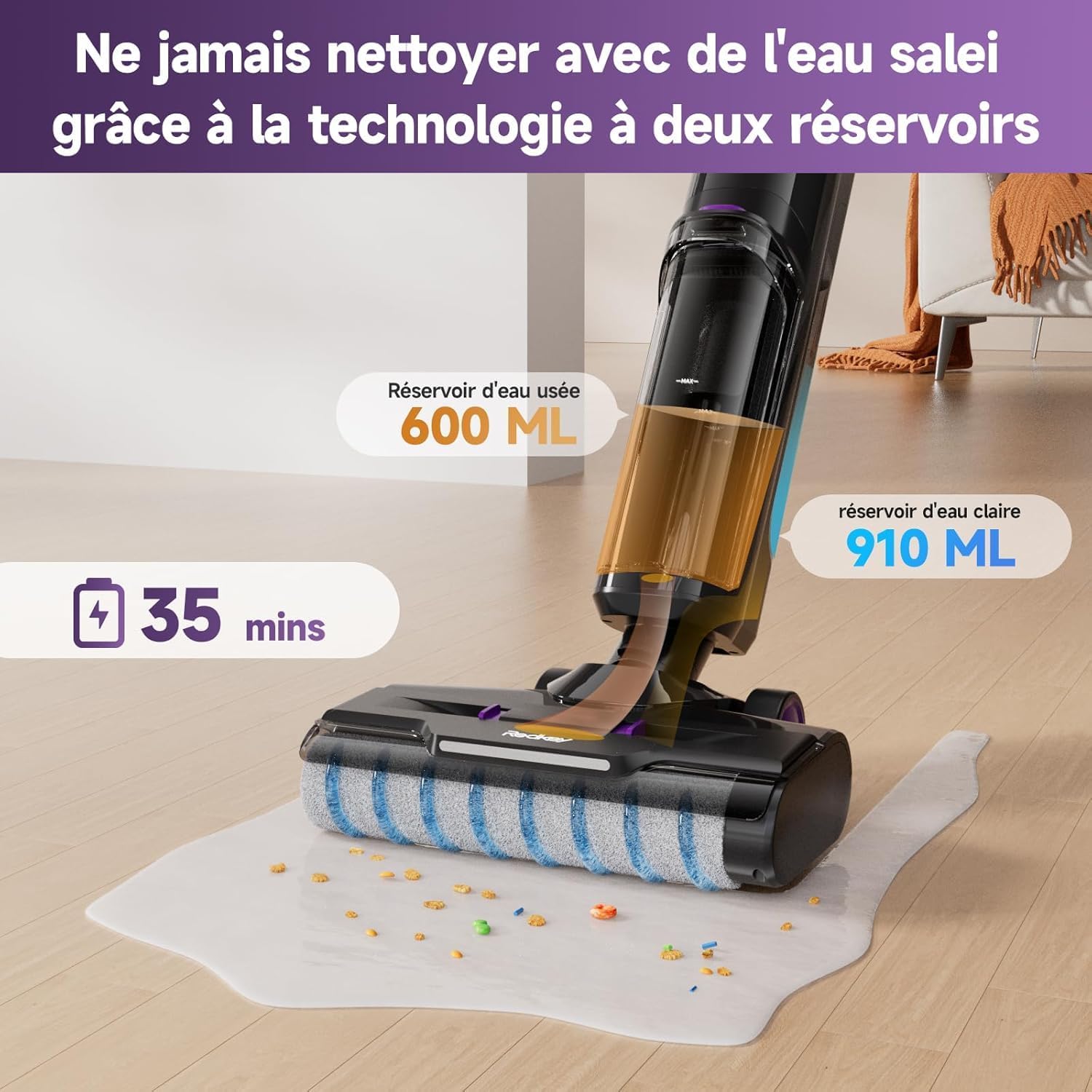
Imej 4.2: Illustration of the Redkey W15's dual-tank system, showing the 910 ml clean water tank and the 600 ml dirty water tank. This design ensures cleaning is always done with fresh water.
5. Arahan Operasi
5.1. Menghidupkan/Mematikan
Press the power button on the handle to turn the appliance on or off.
5.2. Memilih Mod Pembersihan
The Redkey W15 offers three adjustable cleaning modes: Standard, Wash, and Strong Suction. Use the mode selection button on the handle to cycle through these options.
- Mod Standard: For general cleaning of light dirt and dust.
- Mod Basuh: For wet cleaning and mopping hard floors.
- Strong Suction Mode: For stubborn dirt, spills, and heavy debris.

Imej 5.1: The Redkey W15's LED display, illustrating different operational modes. The display shows battery level, current mode (e.g., Smart/Dry in blue, Powerful in red), and other status indicators.
5.3. Membersihkan Lantai Keras
The Redkey W15 is designed for effective cleaning of various hard floor types, including marble, laminate, parquet, and tile.
- Pastikan tangki air bersih diisi dan tangki air kotor kosong.
- Select the appropriate cleaning mode for your task.
- Move the vacuum cleaner slowly and steadily across the floor. The self-propelled system assists in movement.
- For wet cleaning, the appliance will dispense water and scrub the floor simultaneously, then vacuum up the dirty water.
- For dry vacuuming, ensure the wash mode is off.

Imej 5.2: The Redkey W15 demonstrating its wet and dry cleaning capabilities on various hard floor surfaces like parquet, marble, and tile, effectively handling different types of debris and spills.
5.4. Pembersihan Tepi
The Redkey W15 features a specialized design for cleaning close to edges and baseboards, reaching within 5mm of walls.
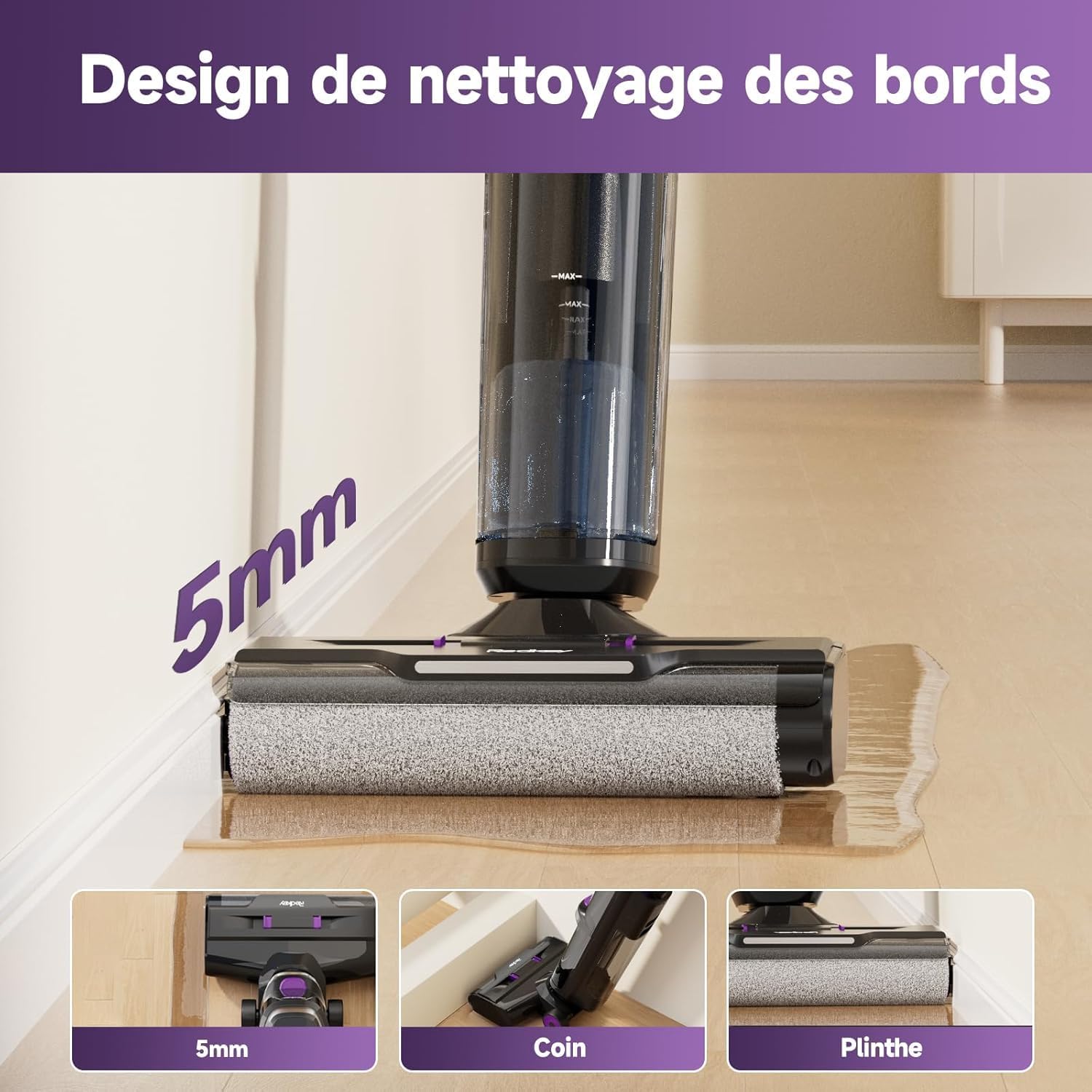
Imej 5.3: The Redkey W15 showcasing its 5mm edge cleaning design, allowing it to clean effectively along walls, corners, and baseboards without leaving uncleaned areas.
6. Penyelenggaraan dan Penjagaan
Regular maintenance ensures optimal performance and extends the lifespan of your Redkey W15.
6.1. Fungsi Pembersihan Diri
- Selepas setiap penggunaan, letakkan pembersih vakum pada tapak pengecasannya.
- Press the dedicated self-cleaning button (usually indicated on the handle or base).
- The appliance will automatically clean the roller brush and internal tubing. Ensure the dirty water tank is empty before starting self-cleaning and the clean water tank has sufficient water.
- Once complete, empty the dirty water tank.
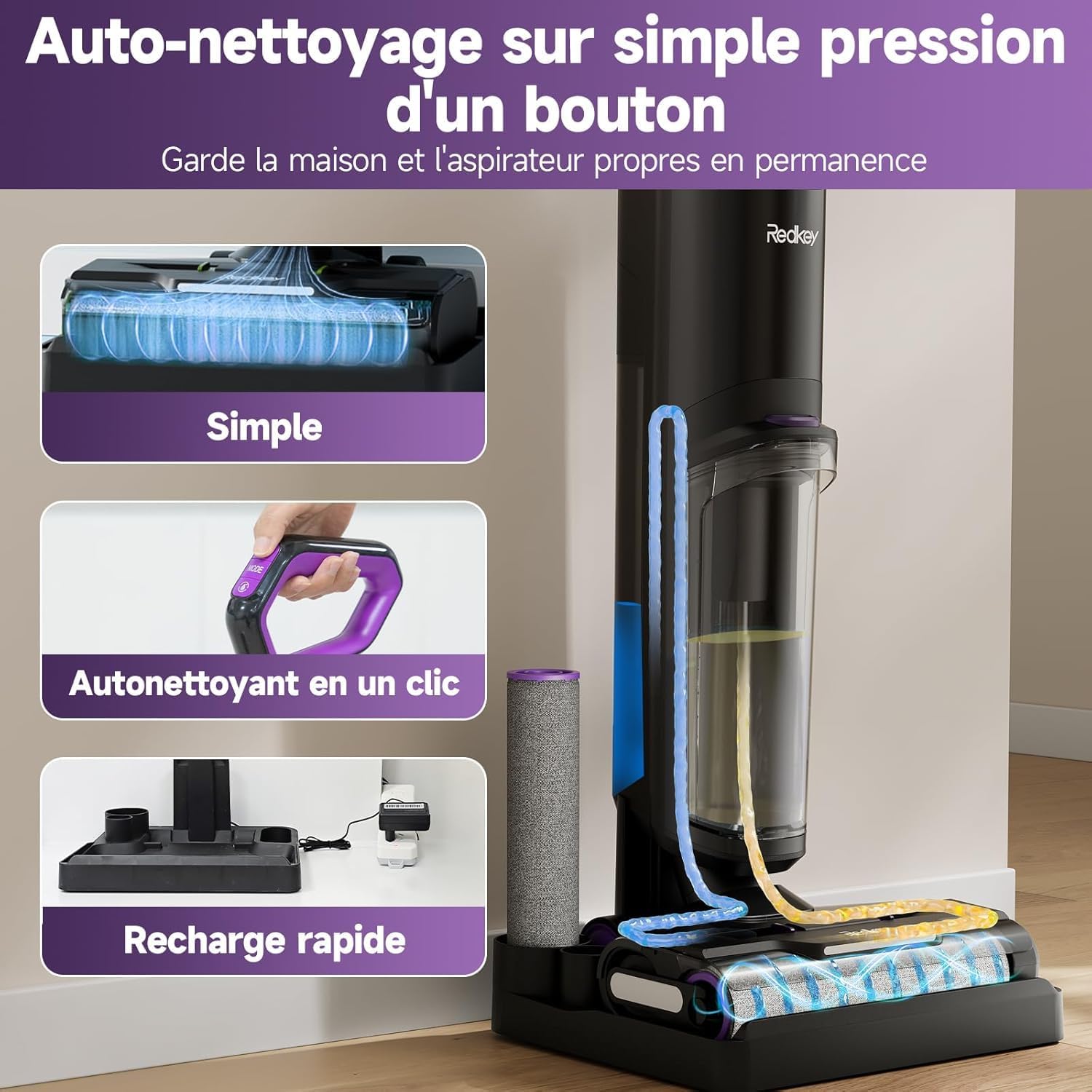
Imej 6.1: The Redkey W15's one-touch self-cleaning feature. This image illustrates the internal cleaning process of the roller brush and tubes, ensuring the device remains hygienic and ready for next use.
6.2. Mengosongkan Tangki Air Kotor
- Keluarkan tangki air kotor dari unit utama.
- Open the tank and dispose of the dirty water.
- Bilas tangki dengan teliti dengan air bersih.
- Reattach the tank securely.
6.3. Membersihkan Berus Penggelek
While the self-cleaning function is effective, occasional manual cleaning of the roller brush may be necessary.
- Matikan dan cabut plag perkakas.
- Remove the roller brush cover and then the roller brush.
- Use the provided cleaning brush to remove any tangled hair or debris.
- Rinse the roller brush under running water. Allow it to air dry completely before reinstallation.
6.4. Cleaning/Replacing the HEPA Filter
The HEPA filter should be cleaned regularly and replaced periodically to maintain suction performance.
- Remove the HEPA filter from its housing (usually located within the dirty water tank assembly).
- Ketik penapis perlahan-lahan untuk mengeluarkan habuk yang longgar.
- Rinse the filter under cool running water. Do not use detergent.
- Allow the filter to air dry completely for at least 24 hours before reinstallation. Do not use a wet filter.
- Replace the HEPA filter every 3-6 months, depending on usage.

Imej 6.2: Instructions for easy maintenance, specifically recommending regular cleaning of the HEPA filter by rinsing it under water.
7. Penyelesaian masalah
Sebelum menghubungi sokongan pelanggan, sila rujuk panduan penyelesaian masalah berikut untuk isu biasa.
| Masalah | Kemungkinan Punca | Penyelesaian |
|---|---|---|
| Perkakas tidak dihidupkan. | Bateri habis. | Cas perkakas sepenuhnya. |
| Tiada sedutan atau sedutan lemah. | Tangki air kotor penuh. Tangki air bersih kosong. Penapis tersumbat. Berus roller disekat. | Kosongkan tangki air kotor. Isi tangki air bersih. Bersihkan atau gantikan penapis HEPA. Bersihkan berus roller. |
| Kebocoran air. | Tangki air tidak dipasang dengan betul. Tank caps not securely closed. | Ensure both clean and dirty water tanks are correctly seated. Check that all tank caps are tightly closed. |
| Error Code E3 (Roller brush issue). | Roller brush is jammed or obstructed. | Turn off the appliance, remove the roller brush, and clear any obstructions. Reinstall the brush and restart. |
| Voice assistant not in desired language. | Language setting needs adjustment. | Refer to the product's quick start guide or contact support for instructions on changing voice assistant language settings. |
8. Spesifikasi Teknikal
| Ciri | Spesifikasi |
|---|---|
| Jenama | Redkey |
| Nombor Model | W15 |
| warna | Violet-01 |
| Kapasiti Tangki Air Bersih | 910 mililiter |
| Kapasiti Tangki Air Kotor | 600 mililiter |
| Bilangan Kelajuan | 3 |
| Masa jalan | Sehingga 35 minit |
| Ciri Khas | Wet/Dry Cleaning, Self-Cleaning, LED Display, Edge Cleaning (5mm) |
| Berat Barang | 6.67 Kilograms (Package Weight) / Approx. 4 kg (Operating Weight) |
| Jenis Penapis | Foam, Fabric (HEPA) |
| Penggunaan yang Disyorkan | Lantai Keras |
| Dimensi Produk (L x W x H) | 64.3 x 66.5 x 113.2 cm |
9. Maklumat Waranti
The Redkey W15 Cordless Wet Dry Vacuum Cleaner comes with a Waranti percuma 2 tahun dari tarikh pembelian. Waranti ini meliputi kecacatan pembuatan dan kerosakan dalam keadaan penggunaan biasa.
Please retain your proof of purchase for warranty claims. The warranty does not cover damage caused by misuse, neglect, unauthorized repairs, or normal wear and tear.
10. Sokongan Pelanggan
For any questions, concerns, or technical assistance regarding your Redkey W15, please contact our customer support team.
- Sokongan dalam talian: 24-hour online service is available.
- Sokongan Pantas: Jangkakan maklum balas dalam masa 12 jam.
- Perlindungan Produk: 2 years of product protection.
To contact support via Amazon:
- Go to your Amazon account.
- Navigasi ke "Pesanan Anda".
- Find your order for the Redkey W15.
- Select "Get product support" or "Ask a question" for the seller (WHSJ-EU).

Imej 10.1: Redkey customer support details, indicating 12-hour quick support and a 2-year product protection plan. Instructions for contacting support via Amazon are also provided.