
Jh-anc930plus
Nexbyte JH-ANC930Plus Wireless Headphones User Manual
Model: JH-ANC930Plus
pengenalan
Thank you for choosing the Nexbyte JH-ANC930Plus Wireless Headphones. These headphones are designed to provide an immersive audio experience with advanced active noise cancellation, an intuitive LED touch screen, and versatile connectivity options. This manual will guide you through the features and functions of your new headphones to ensure optimal performance and enjoyment.
Apa yang ada dalam Kotak

Image: The Nexbyte JH-ANC930Plus headphones, a hard-shell carrying case, a USB-C charging cable, and a 3.5mm audio cable, along with a user manual.
- Nexbyte JH-ANC930Plus Headphones
- LCD Screen (integrated)
- Kabel Pengecasan Jenis-C
- Kabel AUX (3.5mm)
- Storage Pack / Carrying Case
Produk Selesaiview
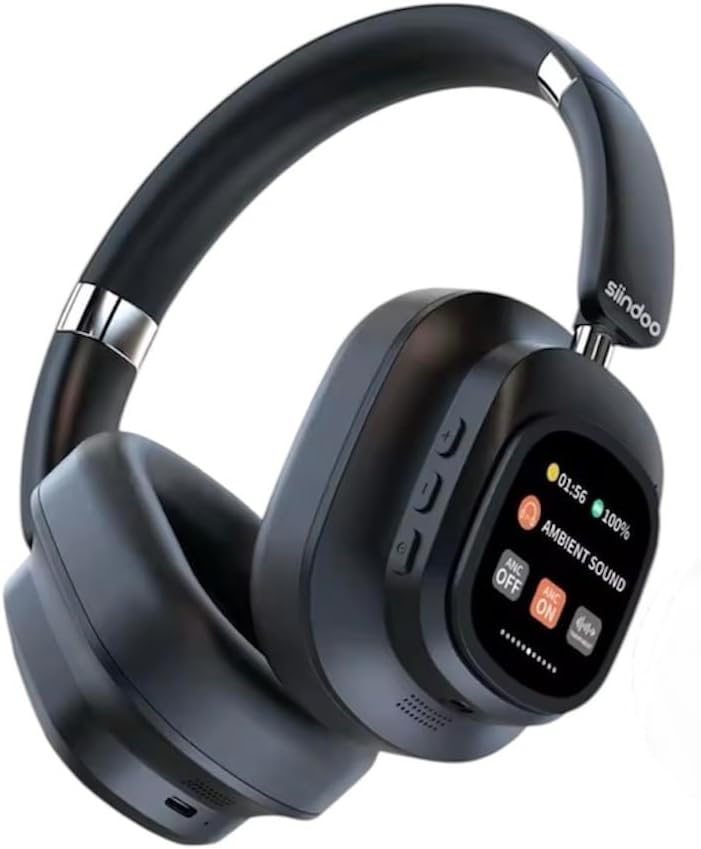
Image: A pair of black Nexbyte JH-ANC930Plus over-ear headphones, showcasing the sleek design and the integrated LED touch screen on the left earcup.
The JH-ANC930Plus headphones feature a robust design with comfortable earcups and an adjustable headband. The left earcup integrates an innovative LED touch screen for easy control of various functions. Physical buttons are also present for essential controls.

Image: A hand holding the magnetic LED touch screen module, detached from the headphone, displaying music playback controls and battery status.
The magnetic touch control LED screen provides a user-friendly interface for managing your audio experience, settings, and more.
Persediaan
1. Mengecas Fon Kepala
Before first use, fully charge your headphones. Connect the supplied Type-C charging cable to the charging port on the headphones and the other end to a USB power adapter (not included) or a computer's USB port.
- Masa Pengecasan: Lebih kurang 2-2.5 jam untuk cas penuh.
- Battery Indicator: The LED screen will display the charging status.
2. Menghidupkan/Mematikan
Press and hold the Power button (usually located on one of the earcups) for a few seconds until the LED screen illuminates. To power off, press and hold the Power button again until the screen turns off.
3. Berpasangan Bluetooth
The JH-ANC930Plus headphones utilize Bluetooth 5.3 for stable wireless connectivity.
- Ensure the headphones are powered on and in pairing mode (indicated by a blinking Bluetooth icon on the LED screen).
- Pada peranti anda (telefon pintar, tablet, komputer), pergi ke tetapan Bluetooth dan dayakan Bluetooth.
- Cari untuk available devices. Select "ANC930" or "JH-ANC930Plus" from the list.
- Once connected, the LED screen will show a stable Bluetooth icon.
4. Sambungan Berwayar (AUX)
For a wired connection, use the supplied 3.5mm AUX cable. Plug one end into the headphone's audio jack and the other end into your audio source's 3.5mm port. The headphones will automatically switch to wired mode.
Arahan Operasi
1. LED Touch Screen Functions

Image: The LED touch screen displaying various icons for functions such as music playback, volume adjustment, ANC mode, equalizer settings, alarm, brightness, language switch, screen lock, date/time, photo capture, and more.
The LED touch screen provides intuitive control over numerous features:
- Main Balik Muzik: Play/Pause, Skip Forward/Backward.
- Pelarasan Kelantangan: Tambah atau kurangkan volum.
- Mod ANC: Toggle between Active Noise Cancellation, Transparency Mode, and ANC Off.
- Pelarasan Penyama (EQ): Pilih daripada pelbagai pro audio pratetapfiles (Normal, Rock, Pop, Classic, Jazz).
- Tukar Bahasa: Choose from 18 language options.
- Tetapan Penggera: Tetapkan penggera terus dari skrin.
- Kecerahan: Laraskan kecerahan skrin.
- Tetapan Tarikh & Masa: Configure current date and time.
- Kunci skrin: Lock the screen to prevent accidental touches.
- Tangkapan Foto: Control photo capture on a connected device (if supported).
- JJoy Audio QR Code: Scan to download the companion app for additional features. Download JJoy Audio App
2. Mod Pembatalan Bunyi Aktif (ANC) & Ketelusan

Image: A visual representation showing how Hybrid Active Noise Cancellation reduces ambient noise, with a waveform comparison of sound before and after ANC activation.
The headphones feature Hybrid Active Noise Cancellation, reducing ambient noise by up to 33dB. Use the ANC mode control on the LED screen to switch between:
- ANC Hidupkan: Menyekat bunyi luaran untuk pengalaman mendengar yang mengasyikkan.
- Mod Ketelusan: Allows you to hear your surroundings while still enjoying your audio, useful for situational awareness.
- ANC Dimatikan: Standard listening mode without noise cancellation.
3. Fungsi Panggilan
When connected via Bluetooth, you can manage calls directly from your headphones:
- Jawab/Tamatkan Panggilan: Tap the designated area on the touch screen or press the multi-function button.
- Tolak Panggilan: Press and hold the designated area or button.
- Pembantu Suara: Triple-tap the multi-function button to activate your device's voice assistant (Siri, Google Assistant, etc.).
4. Customisable EQ Settings / Listening Modes

Image: Icons and descriptions for five distinct audio modes: Normal, Rock, Pop, Classic, and Jazz, each with an illustrative background.
Tailor your audio experience with five professional-level EQ presets:
- Mod Biasa: Bunyi seimbang profile untuk pendengaran umum.
- Rock Mode: Enhanced bass and treble for rock music.
- Mod Pop: Optimized for vocal clarity and energetic pop tracks.
- Mod Klasik: Rich and detailed sound for classical music.
- Mod Jazz: Smooth and mellow tones for jazz.
Select your preferred mode via the EQ adjustment option on the LED touch screen.
5. Ciri-ciri Keselesaan dan Reka Bentuk

Image: Three diagrams illustrating the ergonomic features: earcups that swivel 90 degrees, a foldable design for portability, and an adjustable headband for a custom fit.
The JH-ANC930Plus headphones are designed for extended comfort and portability:
- 90° Swirling Earcups: Earcups can rotate for a comfortable fit and flat storage.
- Reka Bentuk Lipat: Compact folding mechanism for easy storage in the included carrying case.
- Destar boleh laras: Protein leather cushioning on the headband ensures a snug yet comfortable fit for various head sizes.
6. Superior Sound Quality

Image: A man with his eyes closed, wearing the black Nexbyte JH-ANC930Plus headphones, appearing to enjoy the audio, with musical notes overlaid.
Equipped with 40mm drivers, these headphones deliver powerful sound with deep bass and crystal-clear audio across all frequencies, providing a rich and immersive listening experience.
Penyelenggaraan
- Pembersihan: Gunakan kain lembut dan kering untuk membersihkan fon kepala. Jangan gunakan pembersih atau pelarut yang melelas.
- Storan: When not in use, store the headphones in the provided carrying case to protect them from dust and damage.
- Penjagaan Bateri: Untuk memanjangkan hayat bateri, elakkan daripada menyahcas sepenuhnya fon kepala dengan kerap. Mengecasnya dengan kerap, walaupun tidak digunakan untuk tempoh yang lama.
- Elakkan Keadaan Melampau: Jangan dedahkan fon kepala kepada suhu yang melampau, kelembapan atau cahaya matahari langsung.
Menyelesaikan masalah
| Masalah | Kemungkinan Punca | Penyelesaian |
|---|---|---|
| Fon kepala tidak dapat dihidupkan | Bateri lemah | Cas fon kepala sepenuhnya. |
| Tidak boleh berpasangan melalui Bluetooth | Fon kepala tidak dalam mod berpasangan; Bluetooth peranti dimatikan; gangguan | Ensure headphones are in pairing mode. Turn device Bluetooth off/on. Move closer to the device. |
| Tiada bunyi | Volume too low; incorrect source; loose cable (wired) | Increase volume. Check Bluetooth connection or AUX cable. Ensure correct audio output on device. |
| ANC tidak berfungsi dengan berkesan | ANC off; improper fit | Ensure ANC is enabled on the LED screen. Adjust headphones for a snug fit over your ears. |
| LED screen unresponsive | Temporary software glitch; screen lock enabled | Restart the headphones. Check if screen lock is active and disable it. |
Spesifikasi
- Nama Model: JH-ANC930Plus
- Jenama: Generic (Nexbyte)
- Peletakan Telinga: Atas Telinga
- Faktor Bentuk: Atas Telinga
- warna: Hitam
- Kawalan Bunyi: Pembatalan Bunyi Hibrid (sehingga 33dB)
- Saiz Pemandu: 40mm
- Impedans: 32 Ohm
- Respons Kekerapan: 20 Hz - 20 kHz (typical range)
- Sensitiviti: 108 dB
- Versi Bluetooth: 5.3
- Julat Tanpa Wayar: Hingga 10 meter
- Kapasiti Bateri: 600mAh
- Masa Main Semula: Up to 70 hours (standard mode), 45 hours (with ANC at 70% volume)
- Masa Pengecasan: 2-2.5 jam
- Jack fon kepala: 3.5 Millimeter (for wired connection)
- mikrofon: Mikrofon definisi tinggi terbina dalam
- Dimensi Pakej: 21 x 17.5 x 1 cm
- Berat Barang: 300 g
Waranti & Sokongan
Untuk maklumat waranti dan sokongan pelanggan, sila rujuk dokumentasi yang diberikan semasa pembelian atau hubungi peruncit anda. Simpan bukti pembelian anda untuk sebarang tuntutan waranti.
Dokumen Berkaitan - Jh-anc930plus
 |
Siindoo Hybrid ANC Headphones User Manual Comprehensive user manual for Siindoo Hybrid ANC Headphones with Touch Screen, covering setup, pairing, music playback, calls, ANC modes, and technical specifications. |
 |
JH-ANC930PLUS Headphone Screen User Manual and Features Comprehensive guide to the JH-ANC930PLUS Headphone Screen, detailing its functions, pairing, interface controls, charging, technical specifications, and FCC compliance. |
 |
MPWHYL JH-ANC805 ANC Bluetooth Over-Ear Headphones User Manual Comprehensive user manual for the MPWHYL JH-ANC805 ANC Bluetooth Over-Ear Headphones, covering setup, operation, features like Active Noise Cancellation (ANC), Bluetooth connectivity, music playback, calls, charging, and safety guidelines. |
 |
JH-LINK JH-D251 AI Intelligent Translation Bluetooth Earphones User Manual Comprehensive user manual for the JH-LINK JH-D251 AI Intelligent Translation Bluetooth Earphones. Learn about setup, touch controls, charging, and troubleshooting for this open-ear device. |
 |
MCI JH-110 Series Professional Tape Recorders Service Manual Comprehensive service manual for the MCI JH-110 Series professional tape recorders. Details schematic changes, operating procedures, maintenance, and troubleshooting for models including JH-110B, JH-110BC, and JH-110M. |
 |
VEVOR Volleyball and Badminton Set Labeling and Specification Guide Technical specifications for VEVOR volleyball and badminton set product labels, nameplates, and address labeling requirements, including quality control standards and material guidelines. |
Ask a question about this manual
Ask about setup, troubleshooting, compatibility, parts, safety, or missing instructions. Manuals+ will review the question and use this page’s manual context to help answer it.