
1. Pengenalan
This manual provides detailed instructions for the assembly, operation, maintenance, and troubleshooting of your FLEXISPOT EB2 electric height-adjustable desk frame. Please read this manual thoroughly before installation and use to ensure proper function and safety.
The FLEXISPOT EB2 desk frame features dual motors for smooth and quiet height adjustments, a wide height adjustment range, and a smart control panel with memory functions. It is designed to support various desktop sizes, offering flexibility for your workspace.
2. Maklumat Keselamatan
- Sentiasa ikut arahan pemasangan dengan teliti.
- Ensure the desk frame is securely mounted to the tabletop to prevent tipping.
- Do not exceed the maximum weight recommendation of 100 kg (dynamic load) or 125 kg (static load) to maintain stability and safety.
- Jauhkan kanak-kanak dan haiwan peliharaan dari meja semasa operasi.
- Pastikan tiada halangan di laluan meja semasa pelarasan ketinggian.
- Do not open the motor housing or attempt to repair the unit yourself. Contact customer support for assistance.
- Putuskan sambungan kuasa sebelum membersihkan atau melakukan sebarang penyelenggaraan.
3. Kandungan Pakej
Sahkan bahawa semua komponen ada sebelum memulakan pemasangan. Pakej ini biasanya merangkumi:
- Desk Legs (2) with integrated motors
- Crossbar/Frame (adjustable width)
- Control Panel with digital display
- Penyesuai Kuasa dan Kabel
- All necessary screws, bolts, and tools for assembly
- Cable management accessories (e.g., clips, hooks)
4. Persediaan dan Pemasangan
Assembly is required for this product. Please follow the step-by-step instructions provided in the separate assembly guide included with your purchase. Ensure you have adequate space and assistance if needed.
Pertimbangan Perhimpunan Utama:
- Keserasian Desktop: The frame is designed for tabletops with a width of 120 cm to 180 cm and a depth of 60 cm to 80 cm. The frame width is adjustable from 107 cm to 160 cm.
- Pengikat Selamat: Ensure all screws are tightened securely, especially those connecting the desktop to the frame.
- Pengurusan Kabel: Utilize the provided cable management solutions to keep wires tidy and prevent interference with desk movement.
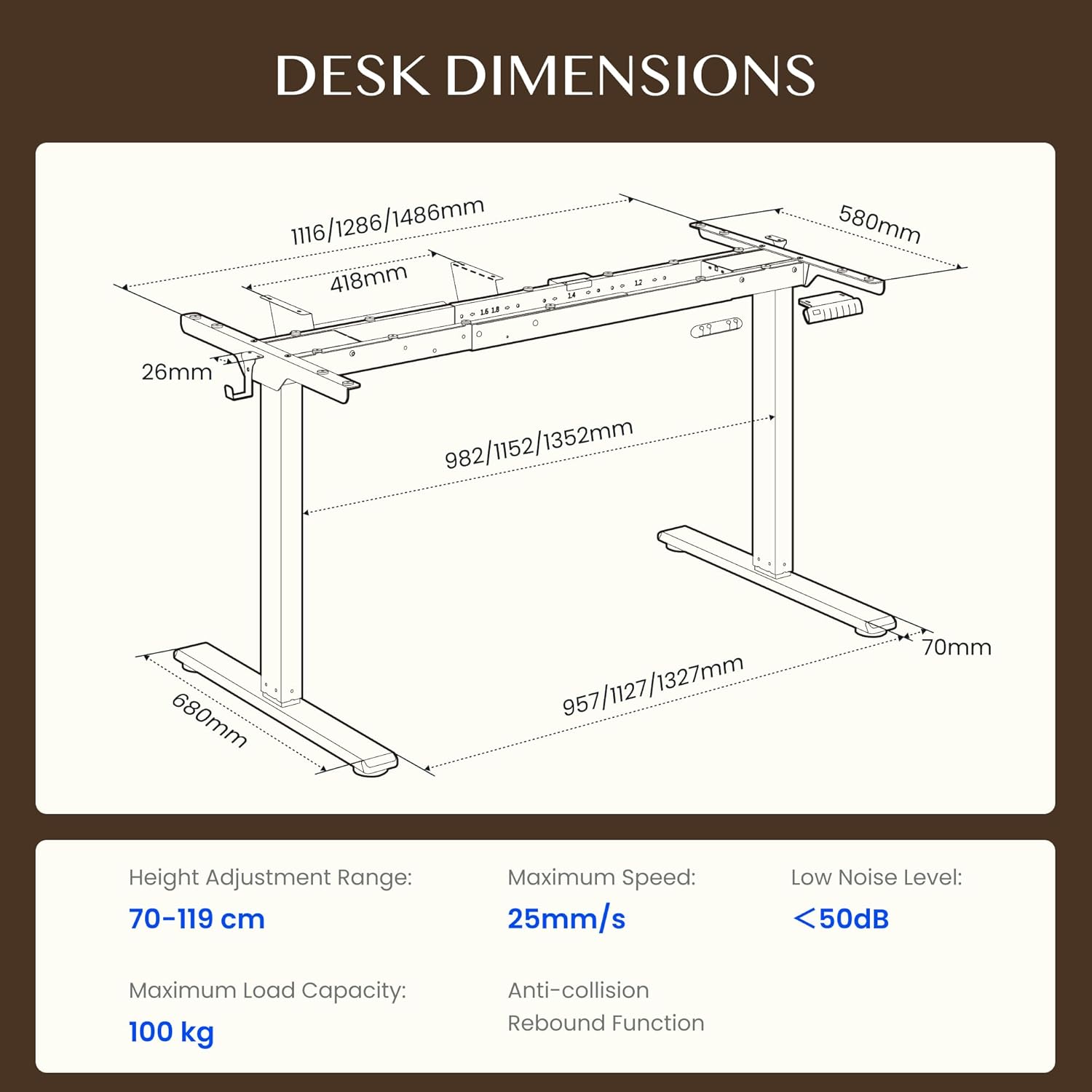
Figure 4.1: Detailed dimensions of the FLEXISPOT EB2 desk frame, showing adjustable width and height ranges, and overall structural measurements.

Figure 4.2: Illustration demonstrating the adaptable desktop size range for the FLEXISPOT EB2 frame, indicating minimum and maximum dimensions for compatible tabletops.
5. Arahan Operasi
5.1 Menghidupkan
Connect the power cable to the desk frame and then to a standard electrical outlet. The digital display on the control panel should illuminate.
5.2 Melaraskan Ketinggian
Gunakan Up dan Bawah arrow buttons on the control panel to manually adjust the desk height. The height range is from 70 cm to 119 cm.

Figure 5.1: Visual representation of the desk's height adjustment range, illustrating the minimum and maximum heights achievable with the FLEXISPOT EB2 frame.
5.3 Pratetap Memori
The control panel features 4 memory preset buttons (1, 2, 3, 4) to save and recall your preferred sitting and standing heights.
- Laraskan meja pada ketinggian yang diingini menggunakan butang Atas/Bawah.
- Press and hold one of the memory buttons (1, 2, 3, or 4) until the display flashes or beeps, indicating the height has been saved.
- To recall a saved height, simply press the corresponding memory button. The desk will automatically move to that position.

Rajah 5.2: Jarak dekat view of the smart control panel, highlighting the Up/Down buttons, 4 memory presets, and LED display for effortless height adjustment.
5.4 Sit/Stand Reminder
The control panel may include a sit/stand reminder button. Consult your specific control panel's instructions for activation and customization of reminder intervals.
5.5 Sistem Anti-Perlanggaran
The desk frame is equipped with an anti-collision system. If the desk encounters an obstruction during height adjustment, it will automatically stop and reverse slightly to prevent damage.

Figure 5.3: Diagram illustrating the powerful dual motor system of the FLEXISPOT EB2, emphasizing stability, quiet operation, and efficiency.

Gambar 5.4: Cthamples of simple desk helpers, including under-desk cable management, side hooks, and adhesive cable clips, designed to keep your workspace organized.
6. Penyelenggaraan
- Pembersihan: Lap rangka meja dengan kain kering. Elakkan menggunakan pembersih yang kasar atau bahan kimia keras yang boleh merosakkan kemasan.
- Pemeriksaan: Periksa semua skru dan sambungan secara berkala untuk memastikan ia kekal ketat. Ketatkan semula jika perlu.
- Pengurusan Kabel: Ensure cables are not pinched or tangled, which could impede desk movement or cause damage.
7. Penyelesaian masalah
If you encounter issues with your FLEXISPOT EB2 desk frame, refer to the following common troubleshooting steps:
- Meja tidak bergerak: Check if the power cable is securely connected to both the desk and the wall outlet. Ensure the outlet is functional.
- Pergerakan tidak sekata atau bunyi-bunyi aneh: Ensure the desk is not overloaded. Check for any obstructions under or around the desk. Verify that all assembly screws are tight.
- Kod ralat pada paparan: Refer to the specific error code in your detailed assembly guide or contact customer support for assistance.
- Menetapkan semula sistem: Some issues can be resolved by performing a system reset. Consult your assembly guide for specific reset procedures, which often involve holding down certain buttons.
If the problem persists after attempting these steps, please contact FLEXISPOT customer support.
8. Spesifikasi
| Ciri | Spesifikasi |
|---|---|
| Jenama | FLEXISPOT |
| Nombor Model | EB2B-EU |
| Julat Pelarasan Tinggi | 70 cm to 119 cm (27.56" to 46.85") |
| Frame Width (Adjustable) | 107 cm to 160 cm (42.13" to 62.99") |
| Recommended Tabletop Width | 120 cm to 180 cm (47.24" to 70.87") |
| Recommended Tabletop Depth | 60 cm to 80 cm (23.62" to 31.50") |
| Kapasiti Beban Maksimum | 100 kg (220 lbs) dynamic, 125 kg (275 lbs) static |
| Jenis Motor | Motor Dwi |
| Kelajuan Pelarasan | 2.5 cm/s (1 inch/s) |
| Tahap Kebisingan | <50 dB |
| Penggunaan Kuasa Siap Sedia | <0.5 W |
| Panel Kawalan | 7-button digital display with 4 memory presets |
| bahan | Keluli Aloi |
| Berat Barang | 28 Kilogram (61.7 lbs) |
| Ciri Khas | Anti-collision system, Sit/Stand reminder |
9. Waranti
The FLEXISPOT EB2 desk frame comes with a limited warranty. Please refer to the warranty card included with your product or visit the official FLEXISPOT webtapak untuk terma dan syarat terperinci mengenai perlindungan dan tempoh.
10. Sokongan Pelanggan
For technical assistance, warranty claims, or any questions regarding your FLEXISPOT EB2 desk frame, please contact FLEXISPOT customer support through their official webtapak atau maklumat hubungan yang diberikan dalam pembungkusan produk anda.
Please have your model number (EB2B) and purchase information ready when contacting support.