
1. Produk Lebihview
The CUBOT GT 3 Smartwatch is a robust and feature-rich device designed for active lifestyles. It integrates advanced GPS positioning, comprehensive health monitoring, and a wide array of sports modes, all housed within a durable, water-resistant design.
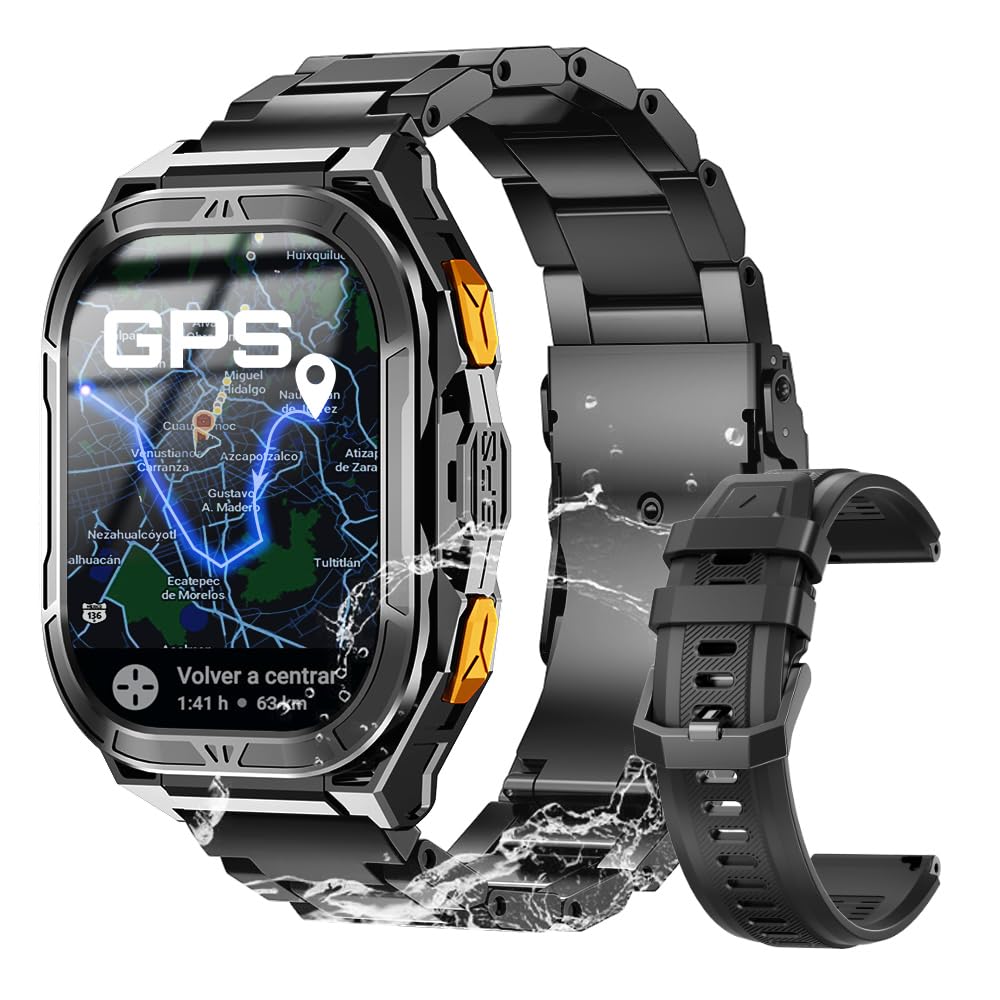
Rajah 1: Utama view of the CUBOT GT 3 Smartwatch.
2. Persediaan dan Penggunaan Awal
2.1 Menyahkotak dan Komponen
Selepas membuka bungkusan, pastikan semua komponen ada:
- CUBOT GT 3 Smartwatch
- Kabel Pengecasan
- Manual Pengguna
- Additional strap (if included)
Video 1: Pembukaan kotak dan permulaanview of a similar smartwatch model.
2.2 Mengecas Jam Pintar
Before first use, fully charge the smartwatch. Connect the magnetic charging cable to the charging points on the back of the watch and plug the USB end into a power adapter (not included) or a computer's USB port. A full charge typically takes approximately 2 hours.

Figure 2: The smartwatch displaying battery information and charging status.
2.3 Pemasangan Apl dan Berpasangan
To unlock the full potential of your CUBOT GT 3, download and install the companion app on your smartphone. Scan the QR code displayed on the watch or in the manual to find the correct app (e.g., GloryFitPro or FitCloudPro, depending on the specific version). Follow the on-screen instructions to create an account and pair your smartwatch via Bluetooth.
Video 2: Tutorial on connecting a smartwatch via Bluetooth on iOS.
Video 3: Demonstrates Bluetooth connection steps for a smartwatch.
2.4 Pelarasan Tali
The smartwatch comes with interchangeable straps. To adjust or change the strap, use the provided tool to remove the pins holding the strap in place. Insert the new strap and secure it with the pins. Ensure the strap is comfortably snug on your wrist for accurate health monitoring.
Video 4: Shows unboxing, strap adjustment, and app connection for a smartwatch.
3. Mengendalikan Jam Pintar
3.1 Navigasi Asas
The CUBOT GT 3 features a 1.96" HD AMOLED touchscreen display. Swipe left/right, up/down to navigate through menus and functions. Use the physical buttons for quick access to specific features or to return to the home screen.

Figure 3: The smartwatch display showing resolution and AMOLED screen type, along with button functions.
3.2 Membuat dan Menerima Panggilan
Once connected to your phone via Bluetooth, you can make and receive calls directly from your smartwatch. Access the call function from the main menu, dial numbers, or select contacts. The watch also supports SOS calls by pressing a designated button in emergencies, provided emergency contacts are set up in the companion app.

Figure 4: The smartwatch demonstrating Bluetooth call functionality and SOS feature.
Video 5: Shows Bluetooth calling features on a smartwatch.
3.3 Pemberitahuan
Receive notifications for calls, messages, and various apps directly on your watch. Ensure notification permissions are enabled in the companion app settings on your smartphone.
3.4 Menyesuaikan Muka Jam
Personalize your smartwatch with a variety of pre-installed watch faces or download more from the companion app. You can also set custom wallpapers using your own photos.

Figure 5: The smartwatch showing various customizable watch faces and themes.
3.5 Alatan Pintar
The CUBOT GT 3 includes several smart tools for daily convenience:
- penggera: Set alarms directly from the watch.
- Kawalan Muzik: Kawal main balik muzik pada telefon pintar anda.
- Kawalan Kamera: Cetuskan kamera telefon anda dari jauh.
- Ramalan cuaca: Dapatkan kemas kini cuaca masa nyata.
- Lampu suluh: Use the watch screen as a flashlight.
- Kalkulator: Lakukan pengiraan asas.
- Cari Telefon: Cari telefon pintar berpasangan anda.
- Pembantu Suara: Berinteraksi dengan pembantu suara telefon anda.

Gambar 6: Lebihview of various smart tools available on the smartwatch.
4. Pemantauan Kesihatan
The CUBOT GT 3 provides 24-hour health monitoring using bio-optical sensors.

Figure 7: The smartwatch displaying various health metrics including heart rate, blood oxygen, and stress levels.
4.1 Pemantauan Kadar Jantung
Sentiasa pantau kadar denyutan jantung anda sepanjang hari. View real-time data and historical trends in the companion app.
4.2 Pemantauan Oksigen Darah (SpO2)
Measures your blood oxygen saturation levels. This feature helps you understand your body's oxygen absorption capacity.
4.3 Pemantauan Tidur
Automatically tracks your sleep patterns, including deep sleep, light sleep, and REM cycles. Provides insights into your sleep quality and helps set sleep goals.

Figure 8: The smartwatch illustrating automatic sleep monitoring and sleep staganalisis e.
4.4 Stress Test and Breathing Training
The watch offers stress level assessments and guided breathing exercises to help manage stress and promote relaxation.
Video 6: Demonstrates health monitoring features including heart rate, SpO2, and blood pressure on a smartwatch.
5. Mod Sukan dan GPS
The CUBOT GT 3 supports over 100 sports modes and features advanced GPS capabilities.

Figure 9: The smartwatch displaying various sports modes and activity tracking.
5.1 GPS Positioning
Equipped with dual-band L1 and L5 GPS for precise and rapid positioning. Features include real-time route tracking, return planning, and automatic return reminders, ideal for outdoor sports.

Figure 10: The smartwatch showcasing its dual-band GPS positioning system for accurate outdoor tracking.
Video 7: Highlights GPS tracking and route monitoring for outdoor activities.
5.2 Pemantauan Alam Sekitar
Features a built-in compass for real-time navigation, and measures altitude and atmospheric pressure. This provides crucial environmental data for outdoor enthusiasts.

Figure 11: The smartwatch displaying environmental data such as compass, altitude, and barometer readings.
5.3 Tahan Air
With IP68 and 5ATM water resistance, the watch can be used for swimming and diving up to 50 meters. It includes a drainage function to remove water from the microphone and speaker after water exposure.

Figure 12: The smartwatch highlighting its 5ATM water resistance and swimming features.
6. Hayat Bateri
The CUBOT GT 3 is equipped with a 480 mAh battery, offering up to 30 days of standby time and 15 days of daily use, depending on usage patterns and feature activation.

Figure 13: The smartwatch emphasizing its 480 mAh battery capacity and extended usage times.
7. Spesifikasi
| Ciri | Spesifikasi |
|---|---|
| Jenama | CUBOT |
| Nama Model | GT 3 |
| Saiz Skrin | 1.96 Inci |
| Jenis Paparan | AMOLED |
| GPS | Integrated GPS (Dual-band L1+L5) |
| Tahan Air | IP68, 5ATM (up to 50 meters) |
| Kapasiti Bateri | 480 mAh |
| Purata Hayat Bateri | 15 days (daily use), 30 days (standby) |
| Ketersambungan | Bluetooth |
| Ciri Khas | SOS Button, GPS, Weather Forecast, Compass, Altimeter, Barometer, Health Monitoring (HR, SpO2, Sleep, Stress), 100+ Sports Modes |
| Kapasiti Penyimpanan Memori | 256 MB |
8. Penyelenggaraan
To ensure the longevity and optimal performance of your CUBOT GT 3 Smartwatch, follow these maintenance guidelines:
- Pembersihan: Kerap lap jam tangan dan tali dengan lembut, damp cloth. For water-resistant models, ensure the drainage function is used after exposure to water.
- mengecas: Gunakan hanya kabel pengecas yang disediakan. Elakkan daripada mendedahkan kenalan pengecas kepada air atau cecair menghakis.
- Storan: Simpan jam tangan di tempat yang sejuk dan kering jauh dari cahaya matahari langsung dan suhu yang melampau.
- Elakkan Bahan Kimia: Do not expose the watch to strong chemicals, detergents, or solvents, as these can damage the materials.
- Kesan: While durable, avoid unnecessary drops or impacts to prevent damage to the screen or internal components.
9. Penyelesaian masalah
If you encounter issues with your CUBOT GT 3 Smartwatch, try the following steps:
- Tonton tidak dihidupkan: Pastikan jam tangan dicas sepenuhnya. Sambungkannya ke pengecas selama sekurang-kurangnya 30 minit.
- Tidak boleh berpasangan dengan telefon: Make sure Bluetooth is enabled on your phone and the watch. Ensure the watch is within range and not paired with another device. Restart both the watch and phone.
- Data kesihatan tidak tepat: Pastikan jam tangan dipakai dengan kemas pada pergelangan tangan anda, tidak terlalu ketat atau terlalu longgar. Bersihkan penderia di belakang jam tangan.
- Pemberitahuan tidak diterima: Check app permissions on your phone to ensure the companion app has access to notifications. Verify that notifications are enabled within the companion app settings.
- GPS tidak bersambung: Pastikan anda berada di kawasan luar yang terbuka dengan jernih view of the sky. Wait a few minutes for the watch to acquire a GPS signal.
If the issue persists, consult the detailed troubleshooting section in the full user manual or contact customer support.
10. Waranti dan Sokongan
Your CUBOT GT 3 Smartwatch comes with a standard manufacturer's warranty. Please refer to the warranty card included in your product packaging for specific terms and conditions. For technical support, product inquiries, or warranty claims, please visit the official CUBOT website or contact their authorized customer service channels.