
Bagotte A21
Bagotte Robot Vacuum and Mop Model A21 User Manual
Panduan anda untuk persediaan, pengendalian dan penyelenggaraan
1. Arahan Keselamatan Penting
Please read this user manual carefully before using the Bagotte Robot Vacuum and Mop Model A21. Keep this manual for future reference.
- Perkakas ini boleh digunakan oleh kanak-kanak berumur 8 tahun ke atas dan orang yang kurang keupayaan fizikal, deria atau mental atau kurang pengalaman dan pengetahuan jika mereka telah diberi penyeliaan atau arahan mengenai penggunaan perkakas dengan cara yang selamat dan memahami bahaya yang terlibat .
- Kanak-kanak tidak boleh bermain dengan perkakas. Pembersihan dan penyelenggaraan pengguna tidak boleh dibuat oleh kanak-kanak tanpa pengawasan.
- Hanya gunakan penyesuai kuasa asal yang disediakan oleh pengilang.
- Do not use the robot in environments with open flames or fragile objects.
- Ensure the charging station is placed on a level surface against a wall, with no obstacles within 1 meter on either side and 2 meters in front.
- Before cleaning, remove power cords, small objects, and any items that could entangle the robot.
- Do not immerse the robot or its electronic components in water.
- Turn off the robot and unplug the charging station before performing any maintenance or cleaning.
2. Kandungan Pakej
Sahkan bahawa semua komponen ada dan dalam keadaan baik semasa membongkar.

Image: All items included in the Bagotte Robot Vacuum A21 package.
- A21 Robot Vacuum Cleaner * 1
- Charging Station * 1
- Remote Control (2 AAA batteries included) * 1
- Penyesuai Kuasa * 1
- 2-in-1 Water Tank * 1
- Berus Sisi * 2
- Mop Holder * 1
- Mop Cloth * 2
- Hepa Filters * 1
- Berus Pembersih * 1
- Manual Pengguna * 1
3. Produk Lebihview
The Bagotte A21 is a 3-in-1 robot vacuum designed for vacuuming, sweeping, and mopping. It features a slim design, powerful suction, and multiple control options.

Image: Bagotte Robot Vacuum A21 main unit and accessories.
Komponen Unit Utama
- Penutup atas: Power button, Wi-Fi indicator.
- Bampar Hadapan: Collision sensors.
- Berus Sisi: For sweeping edges and corners.
- Roda Memandu: For movement.
- Dustbin/Water Tank: Integrated unit for dry and wet cleaning.
- Mengecas Kenalan: For automatic recharging.
- Bottom Sensors: Cliff sensors to prevent falls.
4. Persediaan
4.1 Penempatan Stesen Pengecasan
Place the charging station against a wall on a hard, level surface. Ensure there are no obstacles within 1 meter (3.3 feet) to the left and right, and 2 meters (6.6 feet) in front of the charging station. This allows the robot to return for charging without obstruction.

Image: Robot vacuum returning to its charging station.
4.2 Pengecasan Awal
Connect the power adapter to the charging station and plug it into a wall outlet. Place the robot onto the charging station, ensuring the charging contacts align. For first-time use, charge the robot for at least 6 hours to ensure the battery is fully conditioned.
4.3 Memasang Berus Sisi
Attach the side brushes to the corresponding posts on the bottom of the robot until they click into place. Ensure the brushes are securely fastened.
4.4 Installing the 2-in-1 Water Tank/Dustbin
To use the mopping function, fill the water tank with clean water. Attach the mop cloth to the mop holder, then slide the mop holder onto the water tank. Insert the combined 2-in-1 water tank/dustbin unit into the back of the robot until it clicks securely.

Image: Components for 3-in-1 cleaning functionality.
5. Arahan Operasi
5.1 Hidupkan/Mati Kuasa
- Hidupkan kuasa: Press and hold the power button on the robot for a few seconds until the indicator light turns on.
- Matikan: Press and hold the power button for a few seconds until the indicator light turns off.
5.2 Mod Pembersihan
The robot offers four cleaning modes to suit different needs:

Image: Illustration of different cleaning modes.
- Pembersihan Auto: Robot secara automatik membersihkan dalam corak yang sistematik.
- Pembersihan Tempat: Robot itu membersihkan kawasan tertentu dalam corak lingkaran untuk pembersihan tertumpu.
- Pembersihan Tepi: Robot membersihkan sepanjang dinding dan tepi perabot.
- Pembersihan Manual: Control the robot's direction using the remote control or app.
5.3 Kawalan Apl (Apl Pintar Tuya)
Download the Tuya Smart app from your smartphone's app store. Follow the in-app instructions to connect your robot to your home's 2.4GHz Wi-Fi network. The app allows for advanced control and scheduling.
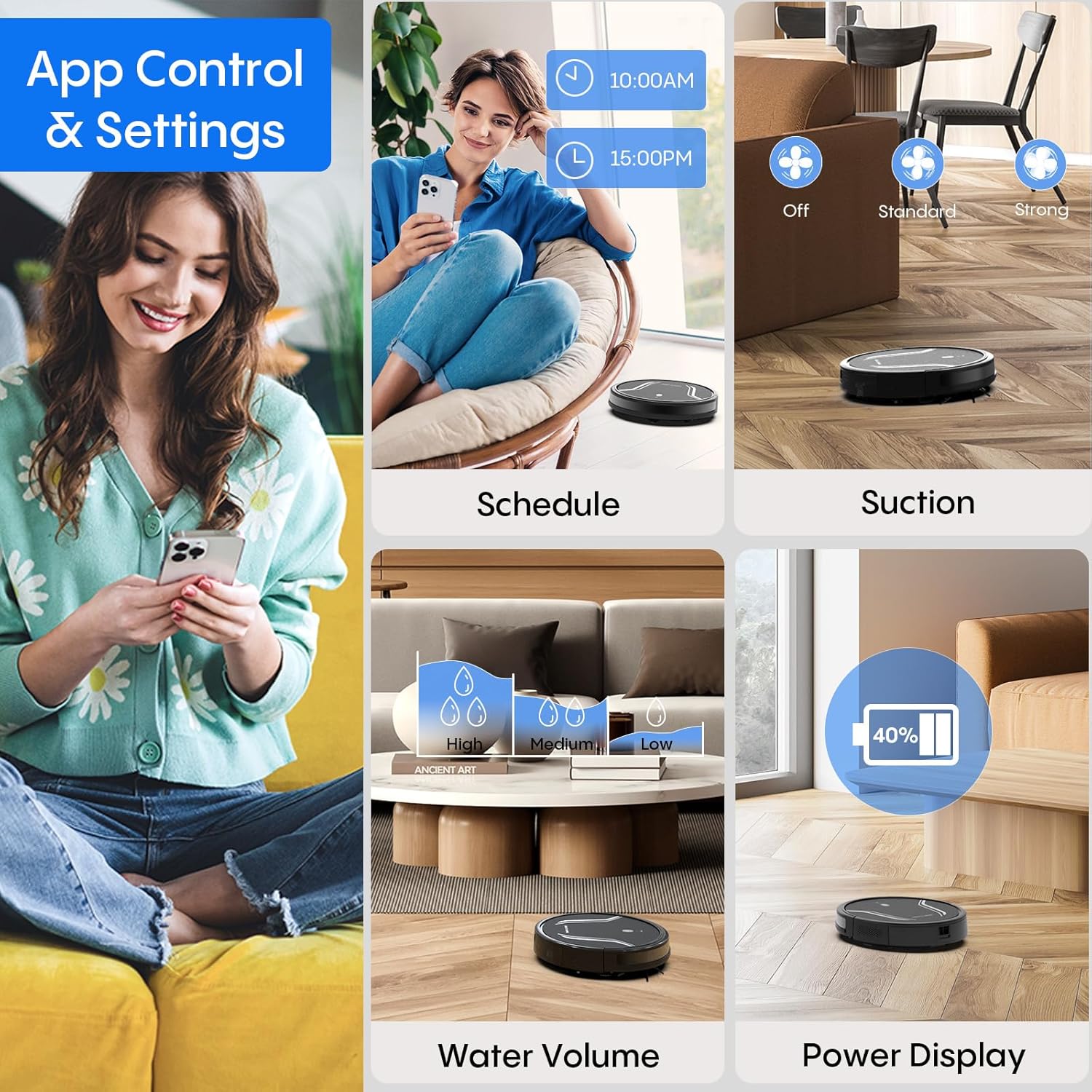
Image: App control interface for the robot vacuum.
- Penjadualan: Tetapkan masa tertentu untuk robot membersihkan secara automatik.
- Kaedah Pembersihan: Select desired cleaning modes.
- Kuasa sedutan: Adjust suction levels (e.g., Standard, Strong).
- Isipadu air: Control water flow for mopping (e.g., Low, Medium, High).
- Status Bateri: Monitor the robot's battery level.
- Find My Robot: Locate the robot if it gets stuck or lost.
5.4 Alat Kawalan Jauh
Use the included remote control to manually direct the robot, start/pause cleaning, select cleaning modes, and send it back to the charging station.
5.5 Kawalan Suara (Alexa/Google Assistant)
Once connected to the Tuya Smart app, you can link your robot to Amazon Alexa or Google Assistant for voice commands. For example, say "Alexa, turn on the robot."

Image: Robot vacuum controlled via voice command.
5.6 Pengecasan Semula Automatik
When the battery level is low, the robot will automatically return to its charging station to recharge. You can also manually send it back using the app or remote control.
6. Penyelenggaraan
Penyelenggaraan tetap memastikan prestasi optimum dan memanjangkan jangka hayat vakum robot anda.
6.1 Mengosongkan Tong Sampah
Press the release button to remove the 2-in-1 water tank/dustbin unit. Open the dustbin cover and empty its contents into a trash bin. It is recommended to empty the dustbin after each cleaning cycle.
6.2 Membersihkan Penapis
Remove the HEPA filter and sponge filter from the dustbin. Tap them gently to remove dust. The filters are not washable and should be replaced every 3-6 months, depending on usage.
6.3 Membersihkan Berus Sisi
Periodically check the side brushes for tangled hair or debris. Carefully remove any obstructions. If brushes are worn or damaged, replace them with new ones.
6.4 Penderia Pembersihan
Wipe the cliff sensors (located on the bottom of the robot) and the charging contacts (on both the robot and charging station) with a clean, dry cloth. This ensures proper navigation and charging.
6.5 Cleaning Mop Cloth and Water Tank
After each mopping session, remove the mop cloth and wash it thoroughly. Allow it to air dry completely before reattaching. Empty any remaining water from the water tank and rinse it out. Ensure the water tank is dry before storage.
7. Penyelesaian masalah
Jika anda menghadapi masalah dengan vakum robot anda, rujuk masalah dan penyelesaian biasa berikut:
| Masalah | Kemungkinan Punca | Penyelesaian |
|---|---|---|
| Robot tidak dihidupkan | Bateri lemah; Butang kuasa tidak ditekan dengan betul | Charge the robot; Press and hold the power button until the indicator lights up. |
| Robot tidak mengecas | Charging contacts are dirty; Charging station not powered | Clean charging contacts on both robot and station; Ensure power adapter is plugged in. |
| Robot kerap tersangkut | Too many obstacles; Cliff sensors are dirty | Clear the cleaning area of loose cables and small objects; Clean cliff sensors. |
| Prestasi pembersihan yang lemah | Dustbin full; Filters clogged; Side brushes worn | Empty dustbin; Clean or replace filters; Clean or replace side brushes. |
| Fungsi mengemop tidak berfungsi | Water tank empty; Mop cloth not attached; Water flow setting too low | Fill water tank; Attach mop cloth correctly; Adjust water flow setting in the app. |
| Tidak dapat menyambung ke Wi-Fi | Incorrect Wi-Fi password; Not 2.4GHz network; Robot too far from router | Verify password; Ensure router is 2.4GHz; Move robot closer to router during setup. |
8. Spesifikasi
| Ciri | Perincian |
|---|---|
| Nombor Model | A21 |
| Dimensi Produk | 15 x 12.5 x 4 inci |
| Berat Barang | 7.24 paun |
| Kuasa Sedutan | Sehingga 5000Pa |
| Kapasiti Kotak Debu | 250mL (integrated with water tank) |
| Kapasiti Tangki Air | 200mL (integrated with dust box) |
| Kaedah Kawalan | App, Remote Control, Voice Control (Alexa/Google Assistant) |
| Keserasian Wi-Fi | 2.4GHz sahaja |
| Ciri-ciri Automatik | Auto-recharge, Obstacle avoidance, Fall prevention |
9. Waranti dan Sokongan
Bagotte provides a 12-month service warranty for the Robot Vacuum and Mop Model A21. For technical support, warranty claims, or any questions regarding your product, please contact Bagotte customer service through the official webtapak atau platform pembelian anda.
Please have your model number (A21) and purchase information ready when contacting support.
Ask a question about this manual
Ask about setup, troubleshooting, compatibility, parts, safety, or missing instructions. Manuals+ will review the question and use this page’s manual context to help answer it.