
pengenalan
This manual provides detailed instructions for the VINABTY Voice Remote Control, designed as a direct replacement for various OK. QLED TV models. This remote control features voice search capabilities, an ergonomic design, and durable construction for reliable performance. Please read this manual carefully to ensure proper setup and operation.
Persediaan
1. Pemasangan Bateri
Alat kawalan jauh memerlukan dua bateri AAA (tidak disertakan). Ikuti langkah berikut untuk memasangnya:
- Buka penutup petak bateri yang terletak di belakang alat kawalan jauh.
- Masukkan dua bateri AAA, pastikan terminal positif (+) dan negatif (-) sepadan dengan gambar rajah di dalam petak.
- Tutup penutup petak bateri dengan selamat.

Imej: Belakang view of the remote control with the battery cover removed, illustrating the correct placement for two AAA batteries.
2. Berpasangan dengan TV Anda
This remote control is designed for easy use and typically requires no programming. However, for voice search functionality, it must be paired with your TV. Refer to your TV's user manual for specific pairing instructions for a new remote control. Generally, this involves:
- Pastikan TV anda dihidupkan.
- Navigate to the TV's settings menu, usually under 'Remotes & Accessories' or 'Bluetooth Settings'.
- Select 'Add new device' or 'Pair remote control'.
- Follow the on-screen prompts to complete the pairing process. This may involve holding down specific buttons on the remote.

Image: The VINABTY remote control positioned beside a television, highlighting its ready-to-use nature and material quality.
Arahan Operasi
The VINABTY Voice Remote Control offers intuitive control over your OK. QLED TV. Below are the primary functions:
- Butang kuasa (⏻): Menghidupkan atau mematikan TV.
- Butang Nombor (0-9): Directly select TV channels.
- Pad Navigasi (Atas, Bawah, Kiri, Kanan, OK): Navigasi melalui menu dan sahkan pilihan.
- Kelantangan Naik/Turun (+/-): Laraskan kelantangan TV.
- Saluran Atas/Bawah (P^/P˅): Tukar saluran TV.
- Butang Redam (🔇): Mute or unmute the TV audio.
- Butang Belakang (←): Kembali ke skrin atau menu sebelumnya.
- Butang rumah (🏠): Access the TV's home screen or smart hub.
- Butang Kawalan Suara (🎤): Press and hold to activate voice search or commands (requires successful pairing).
- Butang Akses Pantas: Dedicated buttons for popular streaming services like Netflix, YouTube, Prime Video, and Google Play for direct access. A USB button is also included for media playback.
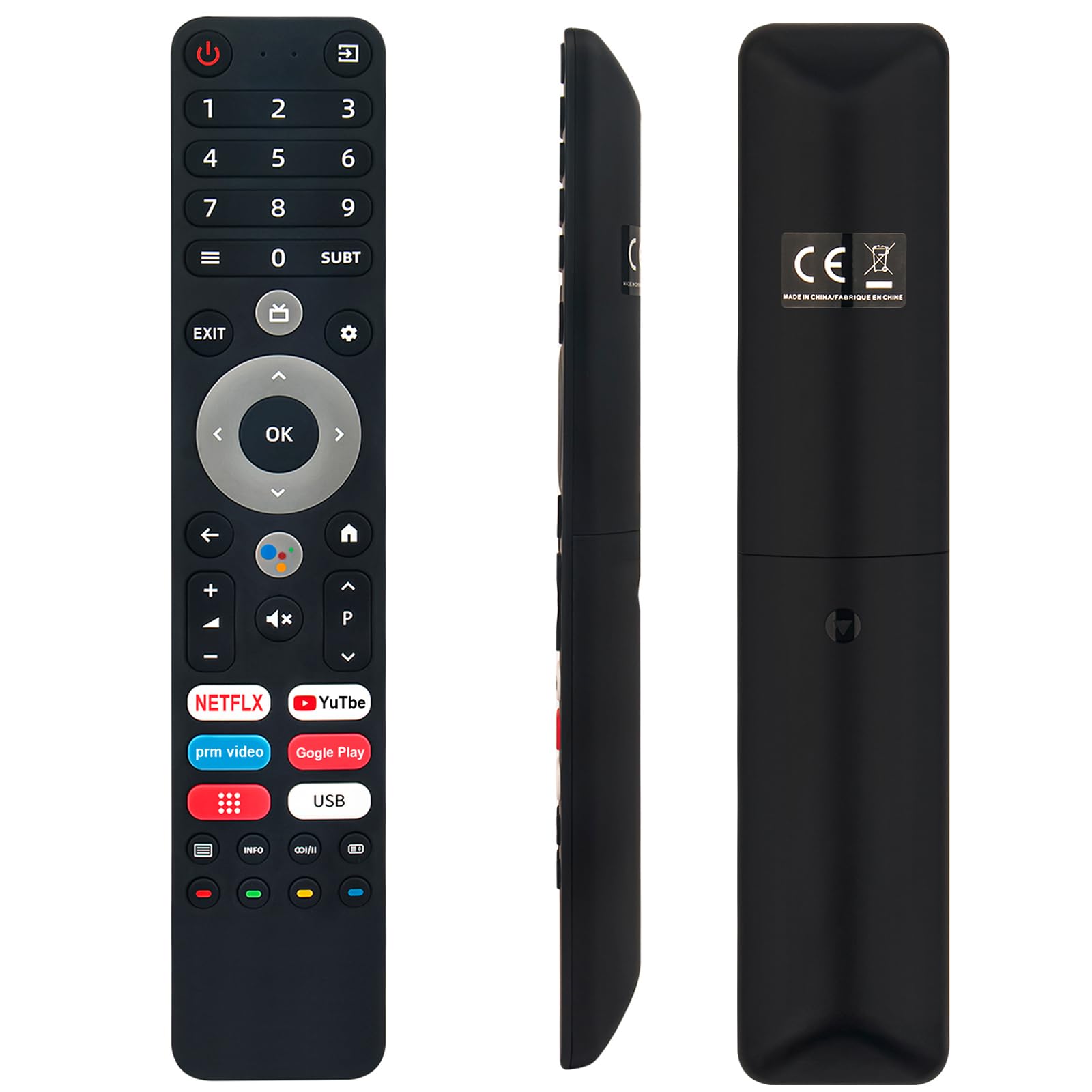
Image: The remote control with a visual emphasis on the voice command button, indicating its functionality.
Penyelenggaraan
To ensure the longevity and optimal performance of your VINABTY Voice Remote Control, follow these maintenance guidelines:
- Pembersihan: Use a soft, dry cloth to clean the remote control. Avoid using liquid cleaners, aerosols, or harsh chemicals, as these can damage the surface or internal components.
- Penggantian Bateri: Replace batteries when the remote's response becomes sluggish or it stops functioning. Always replace both batteries at the same time with new ones of the same type (AAA).
- Storan: Store the remote control in a cool, dry place away from direct sunlight, extreme temperatures, and high humidity. If the remote will not be used for an extended period, remove the batteries to prevent leakage.
- Pengendalian: Avoid dropping the remote control or subjecting it to strong impacts, as this can damage internal circuitry.
Menyelesaikan masalah
If you encounter issues with your VINABTY Voice Remote Control, try the following solutions:
- Jauh Tidak Menjawab:
- Periksa sama ada bateri dipasang dengan betul dan tidak kehabisan kuasa. Gantikannya jika perlu.
- Pastikan tiada halangan antara alat kawalan jauh dan penerima inframerah TV.
- Sahkan alat kawalan jauh dihalakan terus ke TV.
- Kawalan Suara Tidak Berfungsi:
- Verify that the remote control is successfully paired with your TV. Refer to the 'Pairing with Your TV' section or your TV's manual.
- Ensure your TV's internet connection is stable, as voice commands often rely on online services.
- Butang Tidak Berfungsi:
- Clean the remote control, especially around the buttons, to remove any dirt or debris that might be causing sticking.
Jika langkah ini tidak menyelesaikan isu ini, sila hubungi sokongan pelanggan untuk mendapatkan bantuan lanjut.
Spesifikasi
| Ciri | Perincian |
|---|---|
| Jenama | VINABTY |
| Model yang Serasi | OK. QLED TV OTV 55AU-5023C, OTV43AU-5023C, OTV50AU-5023C, OTV 43AU-5023C, OTV 50AU-5023C |
| Teknologi Ketersambungan | Inframerah |
| Julat Maksimum | 10 Meter |
| Jenis Bateri | 2 x AAA (tidak termasuk) |
| bahan | ABS (body), Soft Rubber (buttons) |
| warna | Hitam |
| Dimensi (L x W x H) | 18 cm x 3 cm x 1.5 cm (lebih kurang 7.09 x 1.18 x 0.59 inci) |
| Berat badan | 60 Gram |
| Ciri Khas | Voice Control, No Programming Required, Ergonomic Design |

Image: The remote control displayed with its precise length and width measurements.
Sokongan
For any questions regarding the VINABTY Voice Remote Control, or if you are unsure about its compatibility with your specific TV model, please contact our customer support team. We are committed to providing assistance and ensuring your satisfaction.
If you received a remote control that does not function as expected, or if you require further technical support, please reach out to us via email. We will respond promptly to address your concerns.