
1. Pengenalan
This manual provides detailed instructions for the installation, operation, and maintenance of your JOYING Android 13 Car Stereo Head Unit (Model JY-HT145N8). This unit is designed to integrate seamlessly with Honda Civic models from 2016 to 2021, offering advanced features such as CarPlay, Android Auto, GPS navigation, and enhanced audio capabilities.
Please read this manual thoroughly before installation and use to ensure proper functionality and to prevent damage to the unit or your vehicle.

Imej: Selesaiview of the JOYING Android 13 Car Stereo Head Unit highlighting key features.
2. Maklumat Keselamatan
- Always ensure the vehicle's ignition is off before performing any installation or wiring.
- Putuskan sambungan bateri kenderaan untuk mengelakkan seluar pendek elektrik atau kerosakan.
- Rujuk pemasang profesional jika anda tidak pasti tentang sebarang langkah.
- Jangan kendalikan unit dengan cara yang mengalihkan perhatian anda daripada memandu.
- Ensure all connections are secure to prevent intermittent issues or hazards.
3. Kandungan Pakej
Sahkan bahawa semua item yang disenaraikan di bawah disertakan dalam pakej anda:
- 9" radio x1
- Single Din Cage x1
- Left & Right Bracket x1
- Antena WiFi x1
- Antena GPS x1
- Antena 4G x2
- Mikrofon Luaran x1
- Kabel USB x2
- AR Cable x1
- Screen Ribbon Cable x1
- Kabel Kuasa x1
- Manual Pengguna x1

Image: All components included in the JOYING Android 13 Car Stereo package.
4. Persediaan dan Pemasangan
The JOYING head unit is designed for a plug-and-play installation, supporting factory reverse camera, steering wheel controls, USB, and lanewatch camera. Follow these general steps for installation:
- Remove Original Dashboard Components: Carefully remove the side panel trims and the original radio unit from your vehicle's dashboard.
- Sambungkan Abah-abah Pendawaian: Connect the provided wiring harnesses to the new head unit and your vehicle's existing connectors. Ensure all compatible plugs are securely connected. Some plugs may not be used depending on your vehicle's configuration.
- Sambungkan Antena: Attach the WiFi, GPS, and 4G antennas to their respective ports on the head unit.
- Sambungkan Kabel USB: Plug in the USB cables for data transfer and charging.
- Connect Camera Inputs: Connect your reverse camera to the "CAM IN" port.
- CAN Bus Setting: If your vehicle is equipped with a CAN bus, ensure the communication protocol (white button) on the head unit is set to the right side (CAN).
- Radio Antenna Adapter: For sedan 4-door Honda Civic models, you may need to remove the rear passenger seat panel trim to access and bypass the HD radio box using the included green and gray cables.
- Kefungsian Ujian: Before fully reassembling the dashboard, loosely fit the head unit and test all functions (power, audio, navigation, camera, steering wheel controls) to ensure everything is working correctly.
- Pasang semula Papan Pemuka: Once all functions are verified, carefully reassemble the dashboard components.

Image: JOYING head unit seamlessly integrated into a Honda Civic dashboard.

Image: Purchase guide illustrating different wiring harnesses (A, B, C) based on OEM radio type.

Image: Important note on setting the CAN bus communication protocol.
Video Pemasangan:
Video: Detailed installation guide for an Android 13 car stereo in a Honda Civic (from Dasaita Offical Store). This video provides comprehensive steps for removing the old unit and connecting the new one.
Video: Installation steps for a new radio in a Honda Civic (from Dasaita Offical Store). This video focuses on the initial removal and wiring process.
Video: Wiring installation guide (from Jingelsye-US). This video demonstrates the connection of various cables to the head unit.
5. Arahan Operasi
5.1 Fungsi Asas
- Hidupkan/Mati Kuasa: The unit will typically power on with the vehicle's ignition. A fast boot feature allows it to start in 2 seconds after the initial 30-40 second boot.
- Kawalan Kelantangan: Gunakan tombol kelantangan fizikal atau kawalan pada skrin untuk melaraskan tahap audio.
- Android OS Navigation: Navigate through the Android 13 interface using the touchscreen.
5.2 Ciri Ketersambungan
- CarPlay & Android Auto: Connect your mobile phone via USB cable or Bluetooth to mirror apps, access navigation, make calls, and listen to music on the larger screen.
- Bluetooth 5.0: For hands-free calls and audio streaming.
- Built-in 4G Module: Insert a SIM card for internet access (does not support phone calls or SMS). Supports FDD-LTE: B2/B4/B5/B7/B12/B13/B14/B17/B25/B26/B38/B66/B71 and TDD-LTE: B41.
- Isyarat WiFi: Independent WiFi antenna ensures stable 2.4GHz/5GHz internet access.
- Port USB: Three USB ports are available for various connections.
- Slot Kad Mikro SD: For additional storage.

Image: Demonstration of Built-in CarPlay and Android Auto connectivity.

Image: Illustration of the upgraded WiFi signal with an independent antenna.
5.3 Navigation and Multimedia
- Navigasi GPS: Precise GPS engines with included GPS antennas for accurate positioning and faster real-time navigation. Supports offline maps.
- Radio FM/AM: Built-in FM RDS tuner radio for selecting your favorite radio stations.
- DSP Sound: TDA7851 chip, 48-band graphic equalizer, and 4x50W max output power for high-quality sound. Supports aftermarket amplifiers via optical fiber and coaxial digital output.
- Pelbagai Tugas Skrin Terpisah: Jalankan dua aplikasi serentak pada skrin.
- Output HDMI: Full digital image and sound-sending interface for projection screen display or on-screen display (1080P clear picture, zero delays). HDMI cable not included.

Image: High-quality sound enjoyment features including DSP chip and graphic equalizer.
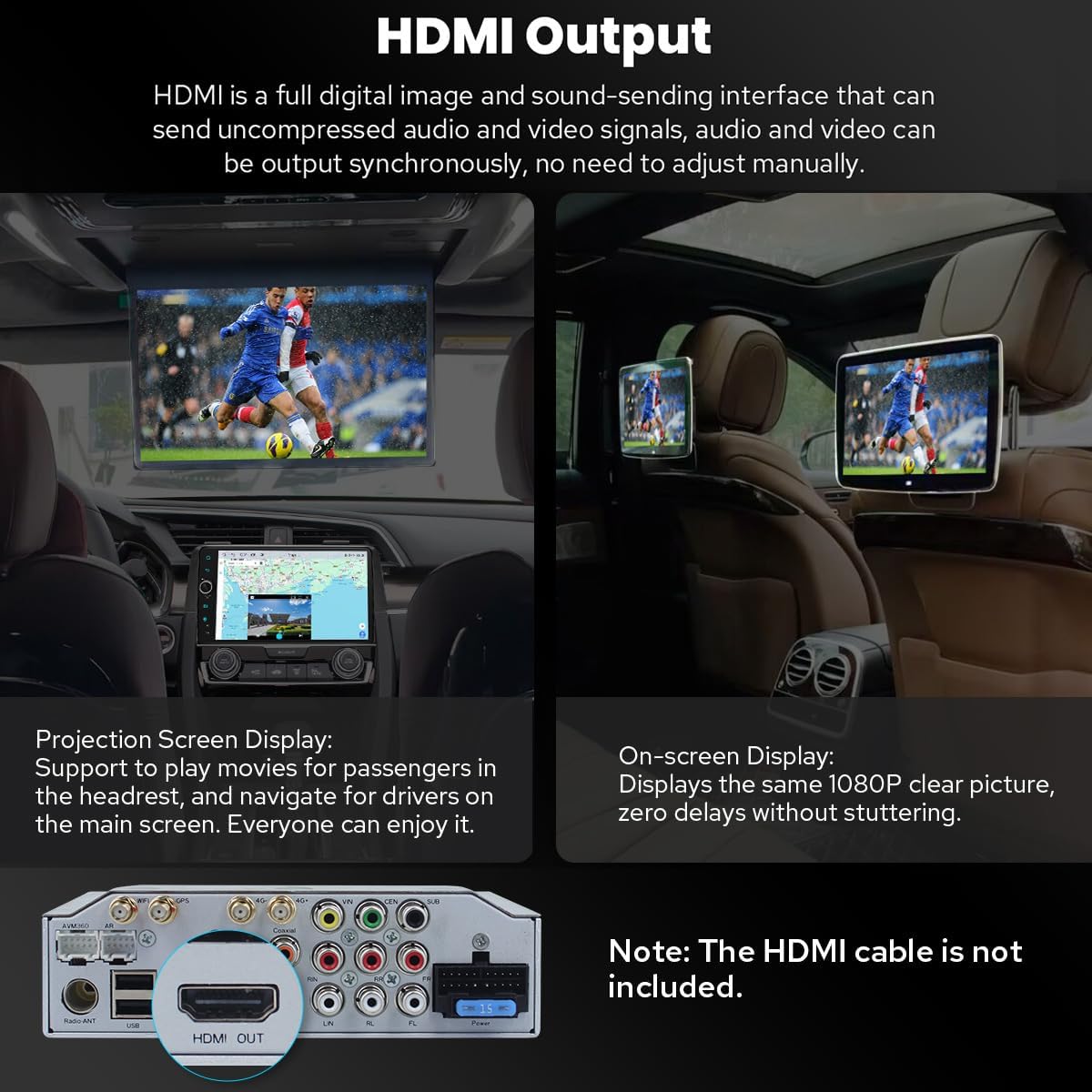
Image: HDMI output for connecting external displays.

Image: Demonstration of split-screen multitasking on the head unit.
5.4 Personalization and Other Features
- Tetapan Diperibadikan: Customize car boot logo, wallpapers, and changeable button colors. Adjustable screen brightness.
- Sistem Penyejukan: Dual heat sink design for superior heat dissipation and temperature control. Fan automatically turns on if CPU temperature or radio volume exceeds a warning value.
- Aksesori Pilihan: Supports external OBD2 (for real-time data and trouble codes), AR Front Camera (records front road), and AR Rear Camera (switches automatically when reversing).

Image: Personalized settings for the head unit interface.

Image: Illustration of the upgraded dual heat sink cooling system.

Image: Optional accessories that can be integrated with the head unit.
6. Penyelenggaraan
- Pembersihan: Gunakan kain lembut dan kering untuk membersihkan skrin dan unit. Elakkan pembersih atau pelarut yang melelas.
- Kemas Kini Perisian: Periodically check for software updates via the system settings. Updates can improve performance and add new features.
- Kawalan Suhu: The dual heat sink design helps manage temperature. Ensure proper ventilation around the unit.
7. Penyelesaian masalah
Jika anda menghadapi masalah, rujuk petua penyelesaian masalah biasa berikut:
- Tiada Kuasa: Periksa semua sambungan kabel kuasa. Pastikan penyalaan kenderaan dihidupkan.
- Tiada Bunyi: Verify audio cable connections (RR, RL for touring amp). Check volume levels and DSP settings.
- Reverse Camera Not Working: Ensure the "CAM IN" cable is properly connected. Check factory settings for reversing camera (Setting > Factory settings > Others > Prohibit reverse and set "Enable").
- Kawalan Roda Stereng Tidak Berfungsi: Check factory settings (Setting > Car > Factory settings > Canbus > Canbus Select and choose NO.21).
- Isu Isyarat GPS: Ensure the GPS antenna is securely connected and has a clear view dari langit.
- Wi-Fi/4G Connectivity Problems: Check antenna connections and ensure correct SIM card insertion (for 4G). Verify network settings.
- Prestasi Perlahan: Ensure the unit's cooling system is functioning. Close unnecessary background applications.
8. Spesifikasi
| Berat Barang | 6 paun |
| Dimensi Pakej | 12.6 x 9.06 x 7.68 inci |
| Nombor Model Item | JY-HT145N8 |
| Saiz Paparan | 9 Inci |
| Perintah Suara | Skrin sentuh |
| Jenis Perkhidmatan Kenderaan | kereta |
| Ciri Khas | Bluetooth, Touchscreen |
| Teknologi Ketersambungan | Bluetooth, Ethernet, USB, Wi-Fi |
| Jenis Peta | Amerika Utara |
| Mod Keluaran Audio | Stereo |
| Jenis Pemasangan | Pemasangan Papan Pemuka |
| Sistem Operasi | Android |
9. Waranti dan Sokongan
9.1 Maklumat Waranti
The JOYING Android 13 Car Stereo Head Unit comes with a Waranti 2 Tahun. Sila simpan bukti pembelian anda untuk tuntutan waranti.
9.2 Sokongan Produk
For technical assistance, troubleshooting, or warranty inquiries, please contact JOYING customer support through the Amazon platform or visit the official JOYING website. Refer to the included warranty card for specific contact details.
Polisi Pemulangan: This product is eligible for a 30-day refund/replacement policy from the date of purchase, subject to Amazon's return guidelines.