
1. Maklumat Keselamatan
Please read all instructions carefully before installation and use. Improper installation or operation may cause damage to the device or vehicle, and may void the warranty. Always prioritize safe driving practices. Do not operate the device in a way that distracts you from the road.
- Pemasangan Profesional Disyorkan: Disebabkan kerumitan sistem elektrik kereta, pemasangan profesional sangat disyorkan.
- Bekalan Kuasa: Pastikan peranti disambungkan kepada bekalan kuasa 12V DC dengan pembumian negatif.
- Pendawaian: Double-check all wiring connections before powering on the unit to prevent short circuits or damage.
- Suhu Operasi: Elakkan daripada mendedahkan peranti kepada suhu yang melampau atau cahaya matahari langsung untuk tempoh yang lama.
2. Produk Lebihview
The JOYING JY-TT158N4 is a 9-inch Android car stereo designed for Toyota Land Cruiser Prado 120 and Lexus GX470 models from 2004-2009. It features a high-resolution touchscreen, integrated CarPlay and Android Auto, a physical volume knob, and robust hardware for an enhanced in-car experience.

Rajah 2.1: Depan view of the JOYING JY-TT158N4 car stereo.
Ciri-ciri Utama:
- Keserasian Kenderaan: Specifically designed for Toyota Land Cruiser Prado 120 & Lexus GX470 (2004-2009), compatible with JBL amplifier and factory steering wheel controls.
- But Cepat: Quick startup, entering the user interface in approximately 2 seconds after the initial boot.
- Output Audio: Optical Fiber and Coaxial Digital Output for high-quality sound with external amppenyelamat.
- Built-in 4G Module: Supports SIM card for internet access (data only, no calls/SMS).
- Navigasi GPS: Precise GPS with included antenna, supporting offline maps and synchronization with phone map data via CarPlay/Android Auto.
- CarPlay & Android Auto: Built-in support for seamless smartphone integration via USB or Bluetooth.
- Tetapan Diperibadikan: Customizable car boot logos, wallpapers, and button colors.
- Sistem Penyejukan: Dual heat sink design with automatic fan control to prevent overheating.
3. Apa yang ada di dalam Kotak
Pakej termasuk komponen berikut:
- 9" radio unit (x1)
- Single Din Cage (x1)
- Left & Right Bracket (x1)
- Antena WiFi (x1)
- Antena GPS (x1)
- Antena 4G (x2)
- External Mic (x1)
- Kabel USB (x2)
- Kabel AR (x1)
- Kabel Reben Skrin (x1)
- Kabel Kuasa (x1)
- Manual Pengguna (x1)

Rajah 3.1: Perwakilan visual komponen yang disertakan.
4. Pemasangan
The JOYING JY-TT158N4 is designed for plug-and-play installation in compatible Toyota Land Cruiser Prado 120 and Lexus GX470 models (2004-2009). No cutting of factory cables is required. Ensure the vehicle's power is disconnected before beginning installation.
4.1. Semakan Keserasian Kenderaan
Verify that your vehicle's dashboard matches the compatible models to ensure proper fitment.
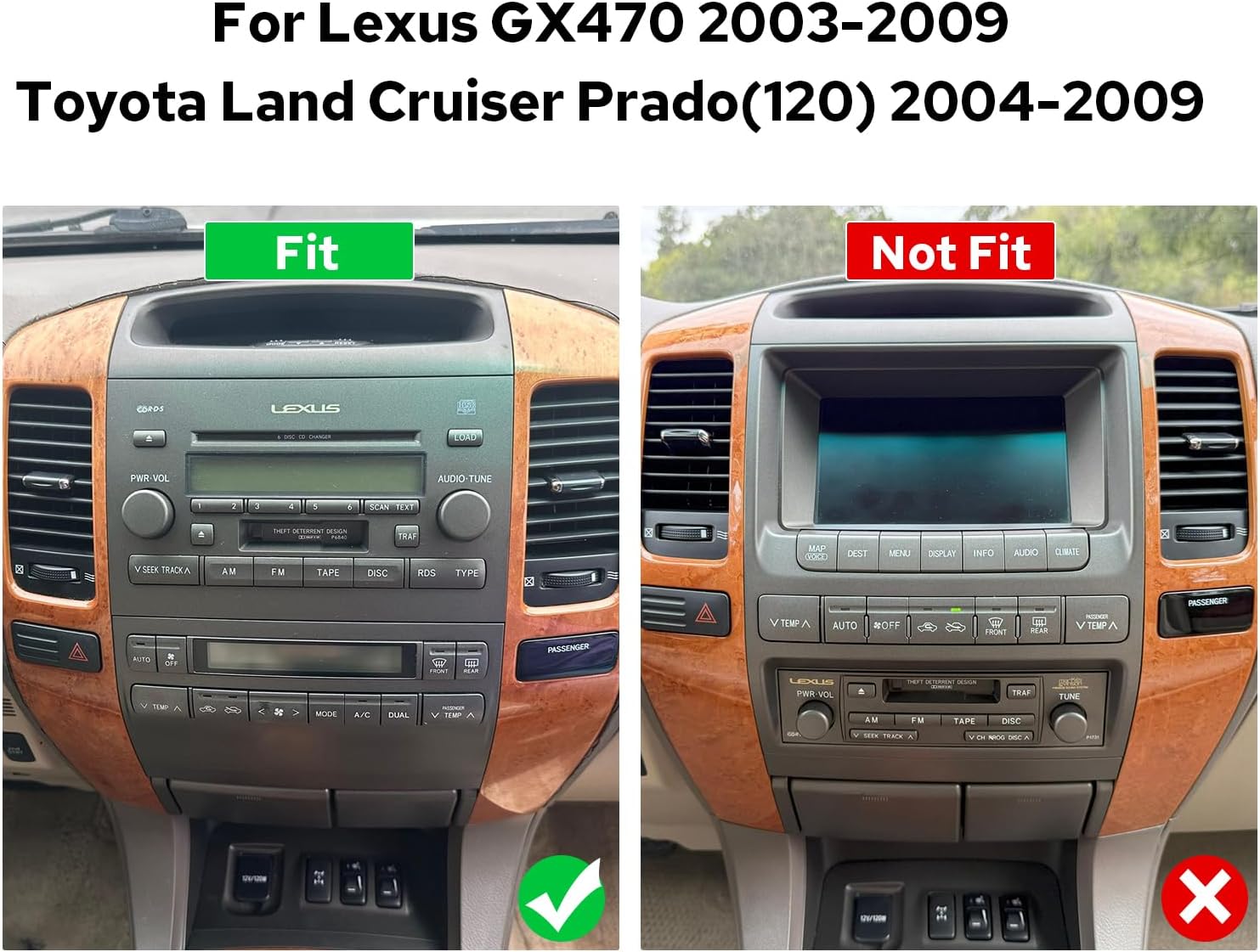
Figure 4.1: Comparison of compatible and incompatible dashboards.
4.2. Sambungan Pendawaian
Sambungkan kabel yang disediakan ke port yang sepadan pada stereo kereta dan abah-abah pendawaian kenderaan anda. Pastikan semua sambungan kukuh.

Rajah 4.2: Belakang view of the car stereo with various ports and connections.
4.3. AR Camera Connection
For connecting AR (Augmented Reality) front and reverse cameras, follow the specific wiring instructions. This typically involves connecting the camera's power cable and video input to the head unit.
Video 4.1: Detailed guide on connecting AR (Front and Reverse) cameras to the head unit.
5. Persediaan Awal
5.1. But Pertama
The first boot-up may take 30-40 seconds. Subsequent startups will be faster, typically within 2 seconds.
5.2. Berpasangan Bluetooth
To enable hands-free calling and audio streaming, pair your smartphone via Bluetooth. Navigate to the Bluetooth settings on the car stereo and your phone, then select 'Car BTo' or a similar device name to connect.
Video 5.1: Demonstration of Bluetooth pairing and CarPlay/Android Auto connection.
5.3. CarPlay & Android Auto Connection
Connect your mobile phone to the car radio via USB cable or Bluetooth to use CarPlay or Android Auto. This allows access to navigation, phone calls, and music on the larger screen.

Figure 5.1: Display showing CarPlay and Android Auto interfaces.
6. Arahan Operasi
6.1. Navigasi Antara Muka Pengguna
The system features an intuitive Android interface. Swipe left or right to access different home screens and applications. Tap icons to launch apps like Radio, Music, Video, Navigation, and Settings.

Figure 6.1: Car stereo displaying the main user interface with various application icons.
6.2. Audio and Equalizer Settings
Adjust audio settings and utilize the 48-band graphic equalizer (TDA7851 DSP chip) for optimal sound quality. Preset EQ modes are available, or you can customize your own.

Figure 6.2: Illustration of high-quality sound features and equalizer interface.
6.3. Kawalan Suara
Utilize voice commands to control various functions, enhancing driving intelligence and security. This allows for hands-free operation of features like radio, navigation, and calls.
Video 6.1: Demonstration of voice control features, including opening FM radio and hands-free calling.
6.4. Dual Screen Functionality
The system supports dual-screen operation, allowing two applications to run simultaneously. For example, you can have navigation on one side and music playback on the other.
Video 6.2: Shows dual screen functionality with FM radio and phone dialer running concurrently.
6.5. Output HDMI
The unit features an HDMI output, allowing you to send uncompressed audio and video signals to external displays, such as headrest monitors, for passenger entertainment.
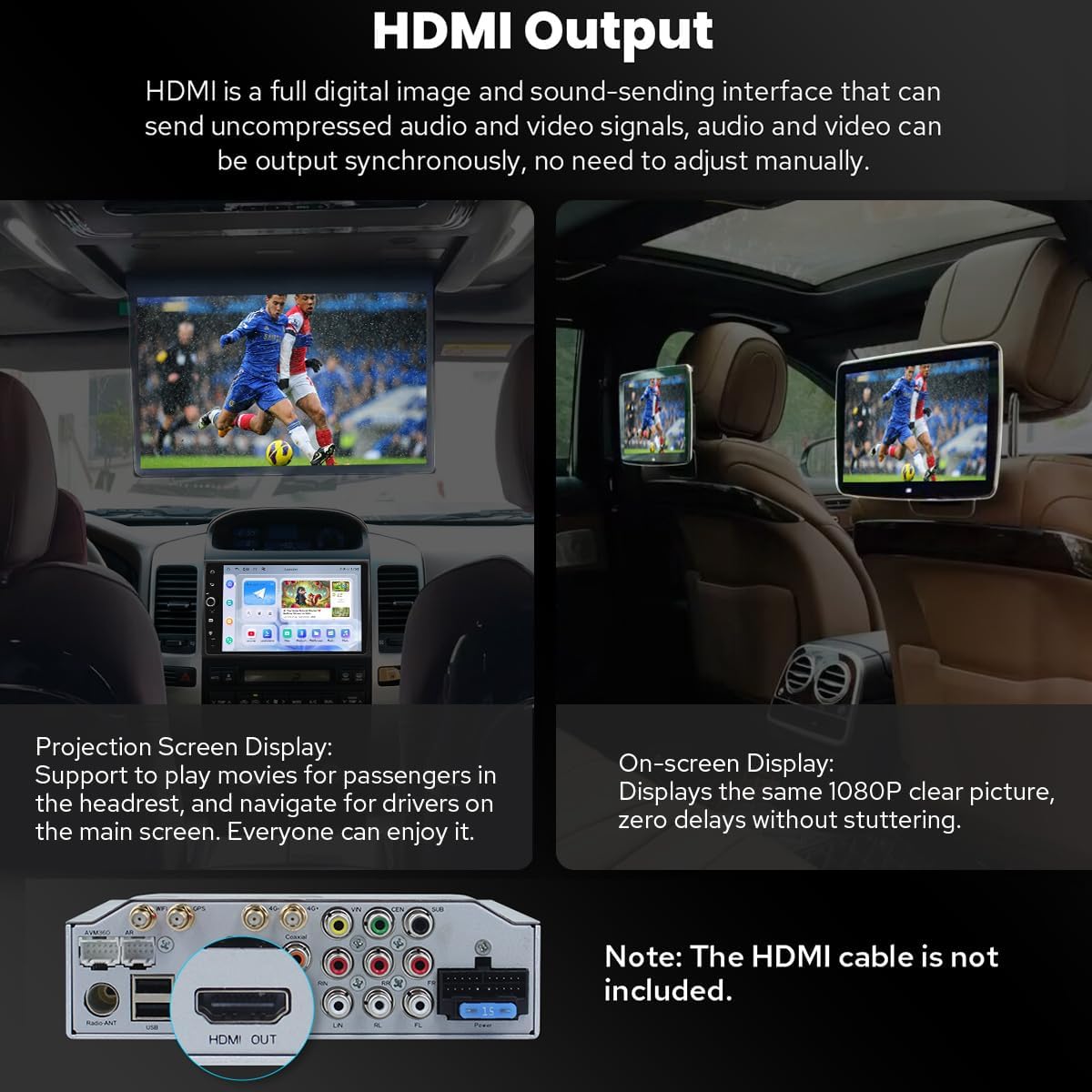
Figure 6.3: Diagram illustrating HDMI output connection to external screens.
7. Ciri-ciri Tambahan
7.1. Personalized Settings
Customize your car stereo experience with changeable button colors, car boot logos, and a variety of wallpapers.
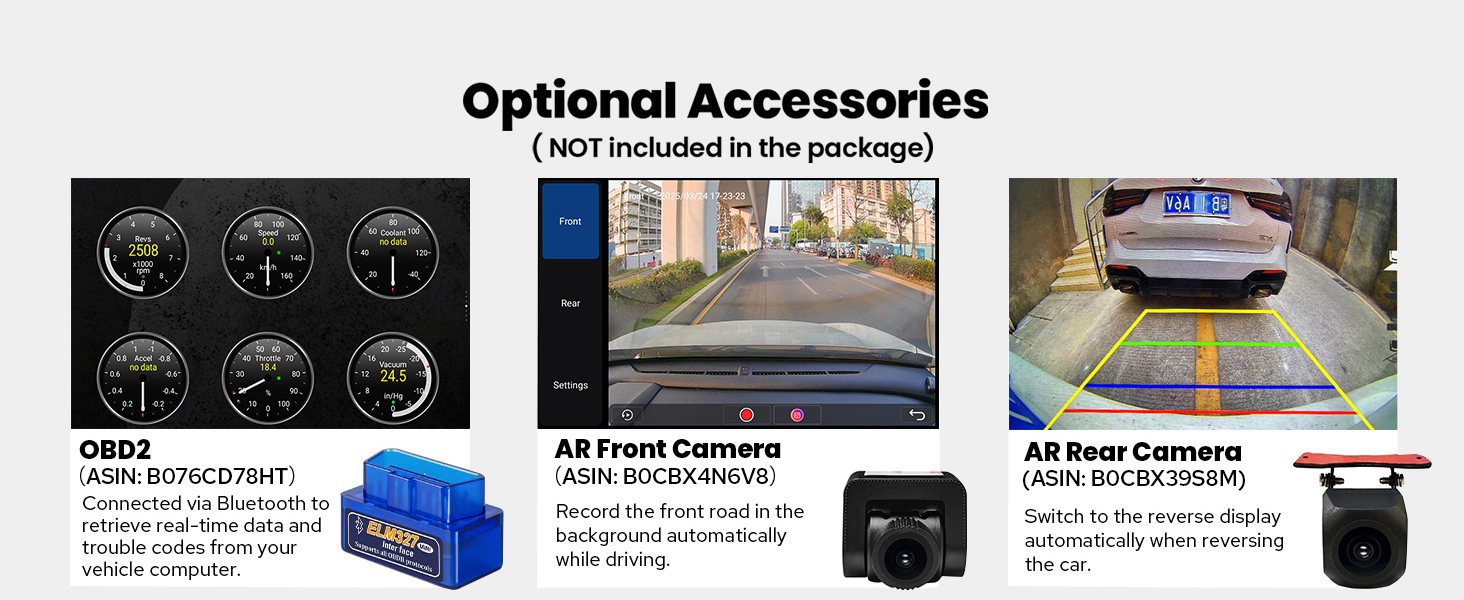
Figure 7.1: Options for customizing UI elements like button colors and wallpapers.
7.2. Ketersambungan
The unit offers enhanced connectivity with upgraded WiFi signal via an independent antenna for stable and fast internet access, and a built-in 4G module for SIM card data.

Figure 7.2: Illustration of the independent WiFi antenna for improved signal.
7.3. Sistem Penyejukan
A dual heat sink design ensures superior heat dissipation and improved temperature control, enhancing performance stability. The fan automatically activates if the CPU temperature or radio volume exceeds a set warning value.

Figure 7.3: Diagram showing the dual heat sink design and fan control interface.
7.4. Aksesori Pilihan
Enhance your experience with optional accessories such as OBD2 scanners, AR front cameras, and AR rear cameras (sold separately).

Gambar 7.4: Lebihview of optional accessories for the car stereo.
8. Spesifikasi
| Ciri | Perincian |
|---|---|
| Nombor Model Item | JY-TT158N4 |
| Saiz Paparan | 9 Inci |
| Sistem Operasi | Android |
| Ciri Khas | Bluetooth, Touchscreen, Built-in 4G Module, Optical Fiber and Coaxial Digital Output, Fast Boot, GPS Navigation, CarPlay, Android Auto |
| Teknologi Ketersambungan | Bluetooth, Ethernet, USB, Wi-Fi |
| Mod Keluaran Audio | Stereo |
| Jenis Peta | North America (Offline maps supported) |
| Berat Barang | 6 paun |
| Dimensi Pakej | 13 x 9 x 8 inci |
9. Penyelenggaraan
- Pembersihan: Gunakan kain lembut dan kering untuk membersihkan skrin dan bahagian luar. Elakkan pembersih atau pelarut yang melelas.
- Kemas Kini Perisian: Semak kemas kini perisian secara berkala untuk memastikan prestasi optimum dan akses kepada ciri baharu.
- Suhu: Jangan dedahkan unit kepada suhu yang melampau.
10. Penyelesaian masalah
- Tiada Kuasa: Check all power connections and ensure the vehicle's ignition is on. Verify fuses.
- Tiada Bunyi: Check speaker connections, volume levels, and audio settings (e.g., equalizer, balance). Ensure external amplifiers are powered on if used.
- Isu Sambungan Bluetooth: Pastikan Bluetooth didayakan pada kedua-dua stereo dan telefon anda. Cuba nyahgandingkan dan pasangkan semula peranti.
- CarPlay/Android Auto Tidak Bersambung: Ensure your phone's operating system is up to date. Try a different USB cable. Verify USB debugging settings for Android Auto if connecting via USB.
- Kehilangan Isyarat GPS: Pastikan antena GPS dipasang dengan betul dan mempunyai jelas view dari langit.
11. Waranti dan Sokongan
Produk ini disertakan dengan a Waranti 2 Tahun. For technical support, troubleshooting assistance, or warranty claims, please contact JOYING customer service through your purchase platform or the official JOYING webtapak.