
1. Pengenalan
This manual provides detailed instructions for the setup, operation, maintenance, and troubleshooting of your CORBOBO LINGBAO K98 PRO Mechanical Keyboard. Please read this manual thoroughly to ensure proper use and to maximize your keyboard's functionality.

Image 1.1: LINGBAO K98 PRO Mechanical Keyboard in Gradient Black Pink.
2. Kandungan Pakej
Sahkan bahawa semua item terdapat dalam pakej:
- LINGBAO K98 PRO Mechanical Keyboard
- Manual Pengguna (dokumen ini)
- Kabel USB-C
- Penarik Kekunci

Imej 2.1: Selesaiview of the LINGBAO K98 PRO keyboard and included accessories.
3. Persediaan
3.1 Pengecasan Awal
Before first use, it is recommended to fully charge the keyboard. Connect the supplied USB-C cable to the keyboard's USB-C port and the other end to a powered USB port on your computer or a USB wall adapter. The keyboard features a 10,000mAh battery.
3.2 Menyambung Papan Kekunci
The LINGBAO K98 PRO supports three connection modes: 2.4GHz Wireless, Bluetooth 5.0, and USB-C Wired.
3.2.1 Sambungan Berwayar USB-C
- Sambungkan kabel USB-C ke papan kekunci dan komputer anda.
- Ensure the keyboard's mode switch (usually on the back or side) is set to USB-C (often indicated by a cable icon or "Wired").
- Papan kekunci akan dikenali secara automatik oleh sistem pengendalian anda.
3.2.2 Sambungan Wayarles 2.4GHz
- Locate the 2.4GHz USB receiver (dongle), typically stored in a compartment on the keyboard.
- Palamkan penerima USB ke dalam port USB yang tersedia pada komputer anda.
- Set the keyboard's mode switch to 2.4GHz (often indicated by a wireless icon or "2.4G").
- Papan kekunci sepatutnya bersambung secara automatik.
3.2.3 Bluetooth 5.0 Sambungan
The keyboard can pair with up to 3 Bluetooth devices.
- Set the keyboard's mode switch to Bluetooth (often indicated by a Bluetooth icon or "BT").
- Pada komputer atau peranti anda, dayakan Bluetooth dan cari peranti baharu.
- Pada papan kekunci, tekan fn+1, fn+2, atau fn+3 to select a Bluetooth channel. The indicator light for the selected channel will flash, indicating pairing mode.
- Select "LINGBAO K98 PRO" from the list of available devices on your computer/device to complete pairing.
- Untuk bertukar antara peranti Bluetooth yang dipasangkan, tekan Fn + 1/2/3.

Image 3.1: Illustration of the keyboard's tri-mode connectivity options (USB-C, 2.4GHz, Bluetooth).
3.3 Suis Keserasian Sistem
The keyboard supports various operating systems. Use the following key combinations to switch modes:
- Fn + Q: For Android System
- Fn + E: For macOS System
- Fn + W: For Windows System
4. Arahan Operasi
4.1 Smart LCD Display and Multi-Functional Knob
The keyboard features a smart LCD display and a multi-functional knob for quick adjustments.
- The LCD display shows real-time information such as time, date, battery level, and current keyboard settings.
- Nota: Time and date must be set via the driver software.
- The multi-functional knob controls various settings:
- Pelarasan Kelantangan: Rotate the knob to adjust volume. Press down to mute/unmute.
- Kawalan Pencahayaan RGB: Rotate the knob to cycle through RGB effects. Press down to confirm.
- Tetapan Paparan LCD: Long press the Fn+ knob to enter display settings. Turn the knob to select options (e.g., brightness, speed, effect, color, language) and press to confirm. Long press Fn+ knob again to return to default settings.

Image 4.1: Close-up of the smart digital display and intuitive knob for customization.
4.2 Penyesuaian Pencahayaan RGB
The keyboard features multi-zone RGB lighting with 16 backlighting effects, 6 side-lighting modes, and a dedicated RGB strip.
- Kesan Lampu Latar: When the screen is on, rotate the knob to "Effect" to browse 16 vibrant backlight effects.
- Fn + Shift Kanan: Switch side lighting modes (Flowing Light / Aurora / Constant Brightness / Breathing Mode) and toggle the light effects on/off.
- Fn + Left Shift: Switch RGB light strip modes (Flowing Light / Aurora / Constant Brightness / Breathing Mode / Turn Off).
- For deeper customization with over 16 million colors, music-responsive lighting, and personalized animations, use the dedicated software.

Imej 4.2: Cthamples of 16 RGB backlight effects and 6 side-lighting modes.
4.3 Suis dan Cap Kekunci Boleh Tukar Panas
The K98 PRO features a gasket mount, fully hot-swappable PCB, supporting both 3-pin and 5-pin mechanical switches. This allows for switch replacement without soldering.
- Penggantian Suis: Use the included keycap puller to gently remove the keycap. Then, use a switch puller (not included, but often comes with replacement switches) to carefully remove the switch. Align the pins of the new switch with the holes on the PCB and press firmly until it clicks into place.
- Penggantian Keycap: Use the included keycap puller to gently remove keycaps. Press new keycaps onto the switch stems until secure.

Image 4.3: Illustration of the hot-swappable switch feature, showing switches being removed and inserted.
4.4 Personalization Software
The included customization software allows for fine-tuning of lighting, macros, and key mapping. This software is essential for setting the time and date on the LCD display.
- Muat turun perisian: The software can typically be found on the CORBOBO official website or via the link provided in the product documentation. Ensure you download software only from official and trusted sources.
- ciri-ciri:
- Customize RGB lighting with over 16 million colors.
- Create music-responsive lighting effects.
- Design personalized animated lighting profiles.
- Set up macros for gaming or productivity.
- Remap keys to suit typing habits.
- Simpan berbilang profesionalfiles for different uses.
- Calibrate time and date for the LCD display.

Image 4.4: Screenshot of the personalization software interface for key mapping and RGB customization.
5. Penyelenggaraan
5.1 Membersihkan Papan Kekunci
- Putuskan sambungan papan kekunci daripada semua sumber kuasa sebelum membersihkannya.
- Gunakan kain lembut dan tidak berbulu sedikit dampdibasahkan dengan air atau larutan pembersih lembut untuk mengelap penutup kekunci dan permukaan papan kekunci.
- Untuk habuk dan serpihan di antara penutup kekunci, gunakan udara termampat atau berus kecil.
- Elakkan menggunakan bahan kimia yang keras, bahan yang melelas atau kelembapan berlebihan.
5.2 Penjagaan Bateri
- Untuk memanjangkan hayat bateri, elakkan daripada kerap mencas sepenuhnya papan kekunci.
- Simpan papan kekunci di tempat yang sejuk dan kering apabila tidak digunakan untuk tempoh yang lama.
- The keyboard features a smart sleep mode to extend battery life when idle.
6. Penyelesaian masalah
If you encounter issues with your LINGBAO K98 PRO keyboard, refer to the following common problems and solutions:
| Masalah | Kemungkinan Punca | Penyelesaian |
|---|---|---|
| Papan kekunci tidak bertindak balas (Berwayar) | Loose USB-C cable connection; incorrect mode switch setting. | Ensure USB-C cable is securely connected. Verify mode switch is set to USB-C. Try a different USB port or cable. |
| Keyboard not responding (2.4GHz Wireless) | USB receiver not plugged in; incorrect mode switch setting; low battery. | Plug in the USB receiver. Verify mode switch is set to 2.4GHz. Charge the keyboard. |
| Papan kekunci tidak bertindak balas (Bluetooth) | Bluetooth not enabled on device; not paired; incorrect channel selected; low battery. | Enable Bluetooth on your device. Ensure keyboard is in pairing mode (Fn + 1/2/3 flashing). Re-pair if necessary. Select the correct Bluetooth channel. Charge the keyboard. |
| LCD Display shows incorrect time/date | Time/date not calibrated via software. | Download and install the personalization software. Use the software to set the correct time and date. |
| Pencahayaan RGB tidak berfungsi atau tidak betul | Lighting effects turned off; incorrect settings. | Check lighting settings using the knob or personalization software. Ensure lighting is enabled. |
| Kunci tidak mendaftar atau menaip dua kali | Faulty switch; debris under keycap/switch. | Remove keycap and switch, clean the area. Replace the switch if it is faulty (due to hot-swappable design). |
If the problem persists after trying these solutions, please contact CORBOBO customer support for further assistance.
7. Spesifikasi
| Ciri | Perincian |
|---|---|
| Model | K98 Pro |
| Susun atur | 96% Reka Letak, 97 Kekunci |
| Ketersambungan | Tri-Mode: 2.4GHz Wireless, Bluetooth 5.0, USB-C Wired |
| Kadar Mengundi | 1000Hz (in wired mode, typically) |
| Kapasiti Bateri | 10,000mAh |
| Hayat Bateri | Up to 55 hours (RGB on), Up to 666 hours (power-saving mode) |
| Suis | Lubricated Linear Switches (Hot-Swappable, supports 3-pin and 5-pin) |
| Kekunci Kekunci | High-quality PBT Keycaps |
| Gaya Pemasangan | Pemasangan Gasket |
| Paparan | Smart LCD Display (shows time, date, battery, settings) |
| Kefungsian Tombol | Multi-functional (volume, RGB, display settings) |
| Pencahayaan RGB | 16 Backlighting Effects, 6 Side-lighting Modes, Dedicated RGB Strip, 16 Million Colors (via software) |
| Keserasian | Windows, macOS, Linux, Android |
| Dimensi Produk | 16 x 5.63 x 1.61 inci (40.64 x 14.30 x 4.09 cm) |
| Berat Barang | 3.65 paun (1.66 kg) |
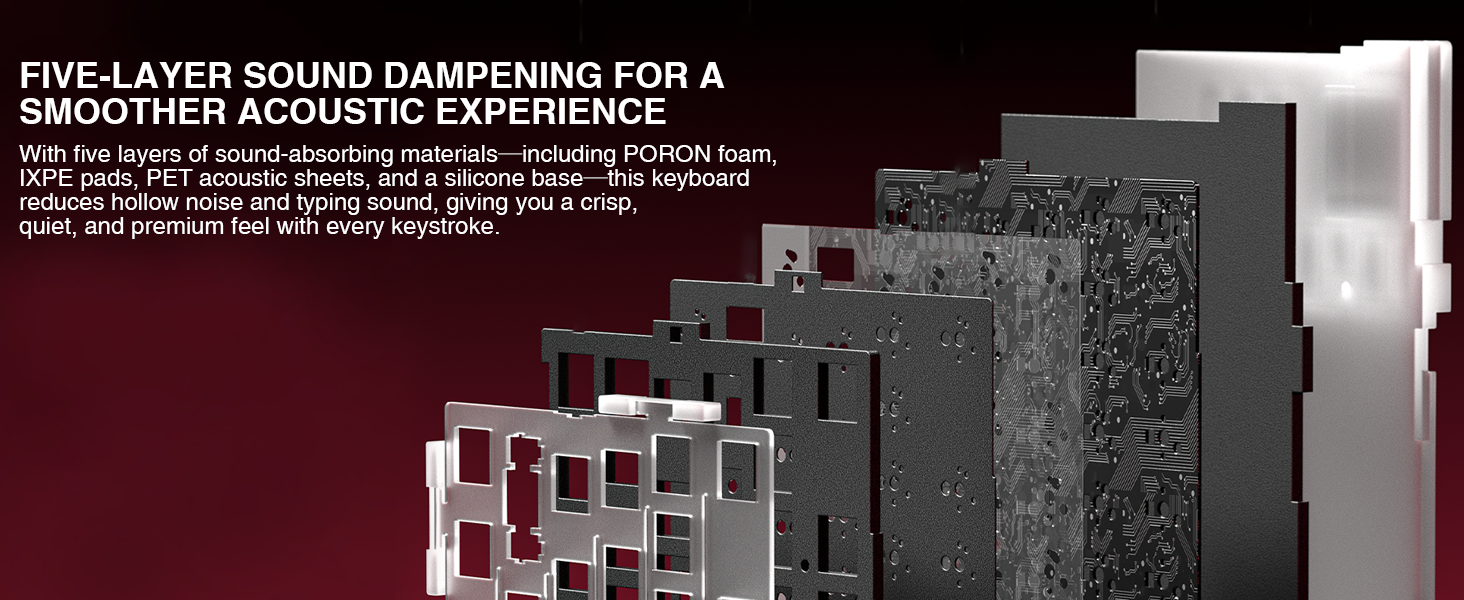
Image 7.1: Diagram illustrating the five-layer sound dampening structure of the keyboard.
8. Waranti dan Sokongan
For warranty information, please refer to the documentation included with your purchase or visit the official CORBOBO webtapak. Terma dan syarat waranti mungkin berbeza mengikut wilayah dan peruncit.
For technical support, troubleshooting assistance beyond this manual, or inquiries about replacement parts, please contact CORBOBO customer service through their official webtapak atau peruncit tempat produk itu dibeli.
Pengeluar: CORBOBO
Kedai Jenama: CORBOBO Store on Amazon