
CORBOBO K98 Pro
LINGBAO K98 PRO Mechanical Keyboard User Manual
Model: K98 Pro | Brand: CORBOBO
1. Pengenalan
Thank you for choosing the LINGBAO K98 PRO 96% Mechanical Keyboard. This advanced keyboard is designed to enhance your typing and gaming experience with its versatile features, including tri-mode connectivity, a smart LCD display, a multi-function knob, and extensive customization options. This manual will guide you through the setup, operation, maintenance, and troubleshooting of your new keyboard.

Image 1.1: The LINGBAO K98 PRO Mechanical Keyboard, showcasing its 96% layout with a smart display and knob.

Imej 1.2: Tamatview of the LINGBAO K98 PRO's key features, including Gasket-Mount, 10000mAh battery, Full Key Hot-Swappable, N-Key Rollover, Fine-Tuned Satellite Stabilizers, LCD Smart Screen, Tri-Mode Connectivity, 16 RGB Backlit Effects, 16.8 Million RGB Color Options, 101-Key Layout, Macro Programmable, and Knob Design.
2. Panduan Persediaan
2.1 Kandungan Pakej
Sebelum anda memulakan, sila pastikan semua item terdapat dalam pakej:
- LINGBAO K98 PRO Mechanical Keyboard
- Kabel USB-C
- Penarik Kekunci
- Manual Pengguna (dokumen ini)
2.2 Pengecasan Awal
The keyboard comes with a built-in 10,000mAh battery. For optimal performance, it is recommended to fully charge the keyboard before first use. Connect the provided USB-C cable to the keyboard's USB-C port and the other end to a powered USB port on your computer or a wall adapter. The LCD display will indicate charging status.
2.3 Mod Kesambungan
The LINGBAO K98 PRO supports three connectivity modes:
- Wayarles 2.4GHz: For a stable and fast wireless connection. Insert the 2.4GHz USB receiver into your device's USB port. The keyboard will automatically connect.
- Bluetooth 5.0: For connecting to multiple devices. The keyboard can pair with up to 3 Bluetooth devices.
- Berwayar USB-C: For a direct, low-latency connection and charging. Connect the USB-C cable directly to your device.
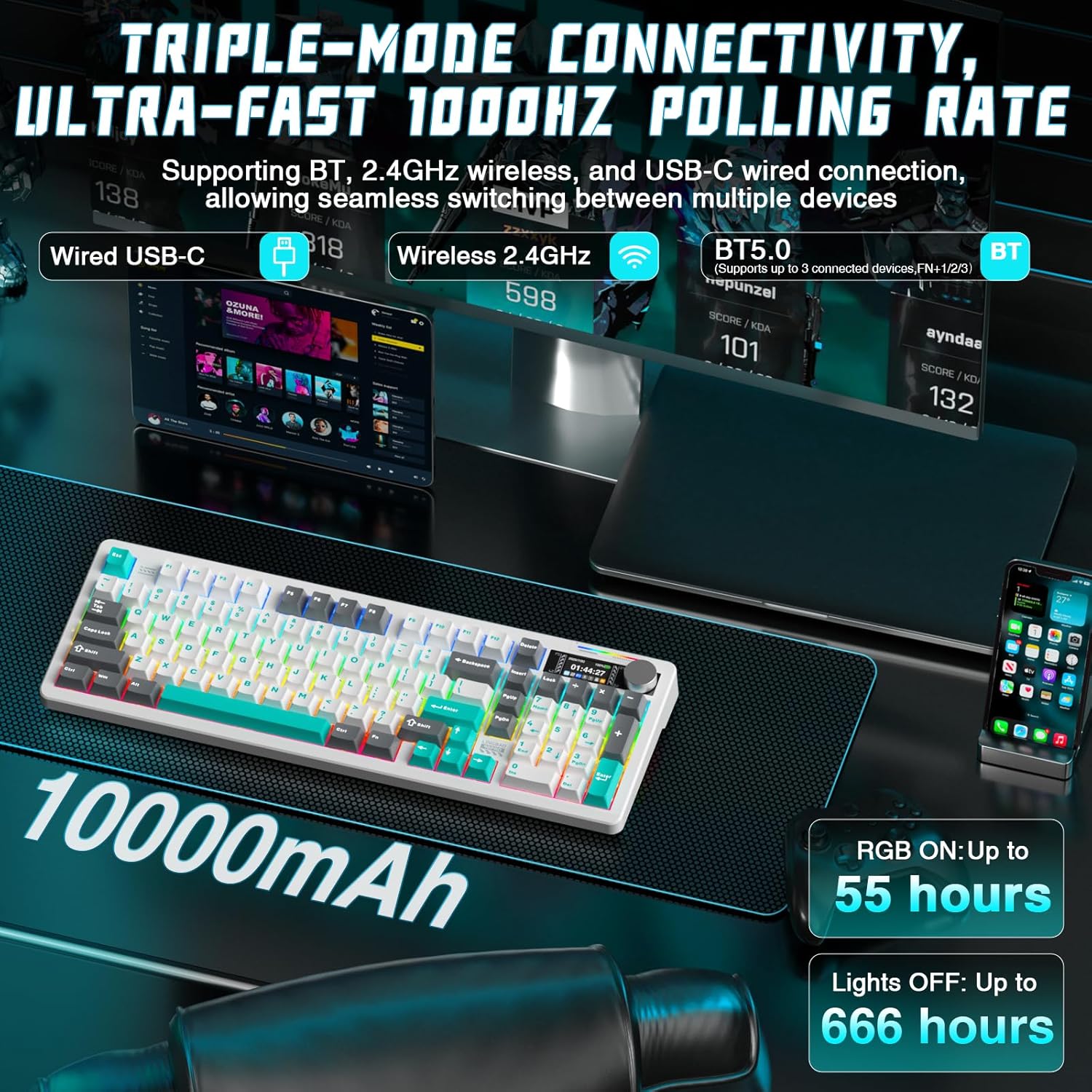
Image 2.1: Illustration of the keyboard's triple-mode connectivity options: Wired USB-C, Wireless 2.4GHz, and Bluetooth 5.0, along with battery life indicators.
2.4 Keserasian Sistem
The keyboard is fully compatible with:
- Sistem pengendalian Windows
- macOS
- Linux
- peranti Android
3. Arahan Operasi
3.1 Smart LCD Display and Multi-Functional Knob
The high-resolution LCD display provides real-time information such as time, date, battery level, and current keyboard settings. The multi-functional knob allows for quick and precise control over various functions.
- Fungsi Tombol: Rotate the knob to adjust volume, brightness, or switch between RGB effects. Press the knob to confirm selections or mute/unmute audio.
- Navigasi Paparan: Use the knob to navigate through display menus for settings like connectivity, lighting, and system information.
Note: Time and date must be set via the driver software.
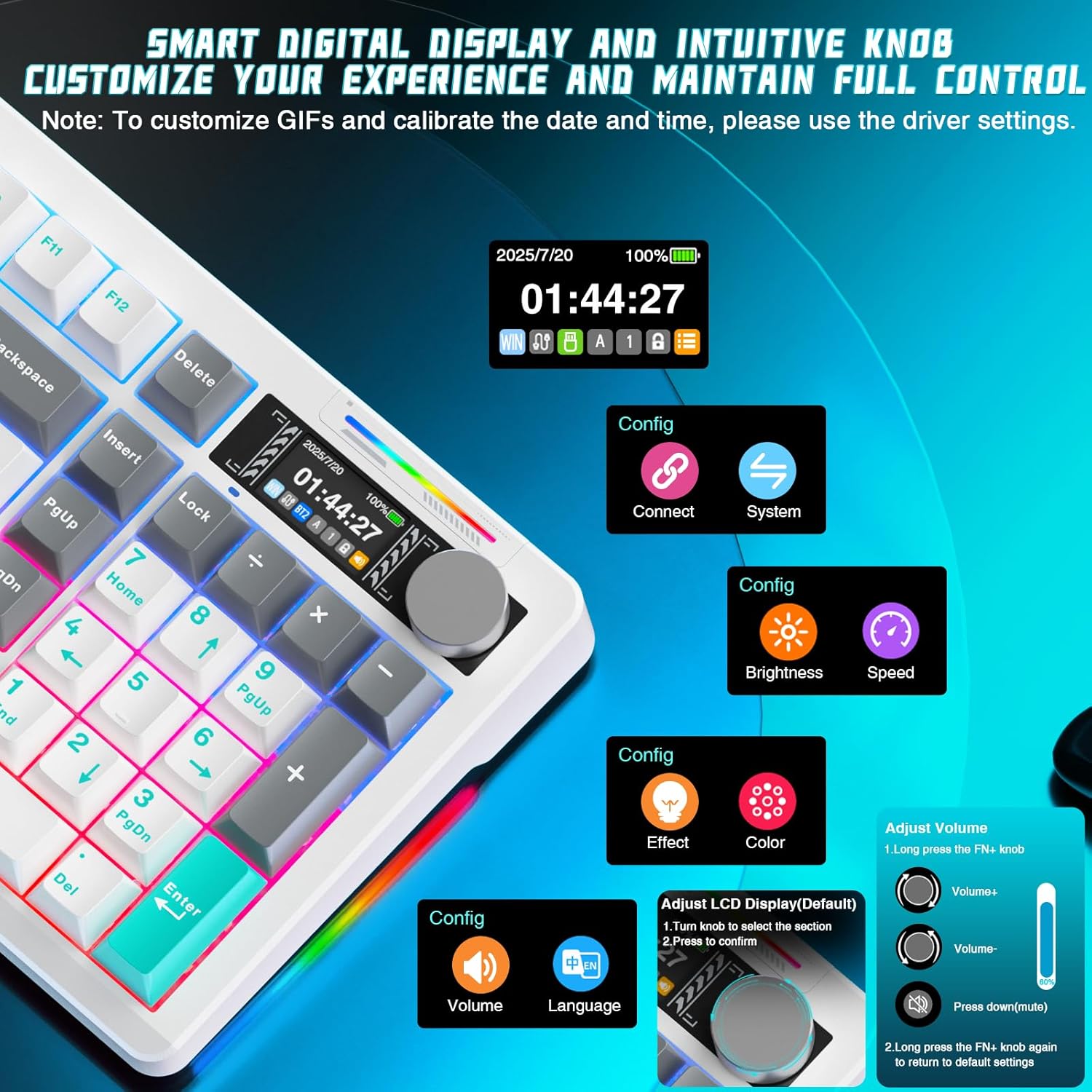
Imej 3.1: Terperinci view of the smart digital display and intuitive knob, showing options for connection, system, brightness, speed, effect, color, volume, and language adjustments.
3.2 Penyesuaian Pencahayaan RGB
The keyboard features multi-zone RGB lighting with 16 dynamic backlighting effects and 6 side-lighting modes. You can adjust these directly from the keyboard using the smart screen and knob, or through the dedicated software for deeper customization.
- FN + Anjakan Kanan: Switch side lighting modes (e.g., Flowing Light, Aurora, Constant Brightness, Breathing Mode).
- FN + Left Shift: Switch RGB light strip modes (e.g., Flowing Light, Aurora, Constant Brightness, Breathing Mode, Turn Off).

Image 3.2: The keyboard displaying various RGB lighting effects, highlighting 16 RGB backlight effects and 6 RGB light effects.
3.3 Suis Boleh Tukar Panas
The K98 PRO features a gasket-mount, fully hot-swappable PCB, supporting both 3-pin and 5-pin mechanical switches. This allows you to easily change switches without soldering, customizing your typing feel.

Imej 3.3: Jarak dekat view of the hot-swappable switch sockets and included LEOBOG Custom Switches, emphasizing easy switch and keycap replacement.
3.4 Fungsi Utama dan Susun Atur
The 96% layout with 97 keys provides a compact design while retaining essential functions, including a full arrow key cluster, function row (F1-F12), dedicated media controls, and a built-in number pad.

Image 3.4: The 96% layout of the LINGBAO K98 PRO, highlighting its compact design and full numeric keypad for both work and gaming.
3.5 Personalization Software Customization
For advanced customization, download the official software. This allows you to:
- Create personalized lighting profiles with over 16 million colors.
- Set up music-responsive lighting effects.
- Design animated lighting sequences.
- Configure macros for gaming or productivity.
- Remap keys to suit your typing habits.
- Simpan berbilang profesionalfiles for different uses.

Image 3.5: Screenshots of the customization software interface, showing options for key assignment, lighting effects, macro programming, and music-synced RGB lighting.
4. Penyelenggaraan
4.1 Pembersihan
Untuk mengekalkan penampilan dan kefungsian papan kekunci anda:
- Gunakan kain lembut dan tidak berbulu sedikit dampdicairkan dengan air atau larutan pembersih lembut untuk mengelap penutup kekunci dan bingkai.
- Untuk habuk dan serpihan di antara kunci, gunakan udara termampat.
- Elakkan menggunakan bahan kimia yang keras atau bahan yang melelas.
4.2 Penjagaan Bateri
The keyboard is equipped with a 10,000mAh Lithium Ion battery. To prolong battery life:
- Elakkan menyahcas sepenuhnya bateri dengan kerap.
- Simpan papan kekunci di tempat yang sejuk dan kering apabila tidak digunakan untuk tempoh yang lama.
- Jika menyimpan untuk masa yang lama, cas bateri kepada kira-kira 50% sebelum penyimpanan.
4.3 Penggantian Kekunci dan Suis
The hot-swappable design allows for easy replacement of keycaps and switches. Use the provided keycap puller to gently remove keycaps. For switches, use a switch puller (not included unless specified) to carefully extract them from the PCB. Ensure proper alignment when inserting new switches to avoid bending pins.
5. Penyelesaian masalah
5.1 Isu Ketersambungan
- 2.4GHz: Ensure the USB receiver is securely plugged in and within range. Try a different USB port.
- Bluetooth: Ensure Bluetooth is enabled on your device. Unpair and re-pair the keyboard. Check if the keyboard is in pairing mode.
- Berwayar: Try a different USB-C cable or USB port on your device.
5.2 Lighting Not Working
- Check battery level; low battery can affect RGB performance.
- Ensure RGB lighting is enabled via the knob or software.
- Perform a factory reset if necessary (refer to software instructions).
5.3 Isu Paparan LCD
- Pastikan papan kekunci dihidupkan.
- If the display is frozen or unresponsive, try restarting the keyboard.
- Update the keyboard firmware via the official software if available.
6. Spesifikasi
| Ciri | Perincian |
|---|---|
| Nama Model | LINGBAO K98 Pro |
| Susun atur | 96% (97 kunci) |
| Ketersambungan | Tanpa Wayar 2.4GHz, Bluetooth 5.0, Berwayar USB-C |
| Kapasiti Bateri | 10,000mAh Litium Ion |
| Hayat Bateri (RGB Dihidupkan) | Sehingga 55 jam |
| Hayat Bateri (Lampu Dimatikan) | Up to 666 hours (power-saving mode) |
| Suis | Hot-swappable (3-pin & 5-pin compatible) |
| Kekunci Kekunci | Bahan PBT |
| Pencahayaan latar | RGB (16 backlight effects, 6 side-lighting modes) |
| Ciri Khas | Smart LCD Display, Multi-functional Knob, Gasket Mount |
| Peranti Serasi | PC, Laptop, Gaming Console, Tablet (Windows, macOS, Linux, Android) |
| Dimensi Produk | 40.64 x 14.3 x 4.09 cm |
| Berat Barang | 1.65 kg |
7. Waranti dan Sokongan
Your LINGBAO K98 PRO Mechanical Keyboard is covered by a standard manufacturer's warranty. Please refer to the warranty card included in your package for specific terms and conditions, including warranty duration and coverage details. Keep your proof of purchase for warranty claims.
7.1 Sokongan Pelanggan
For technical assistance, troubleshooting not covered in this manual, or warranty inquiries, please contact CORBOBO customer support through the retailer's platform or the official brand weblaman web. Berikan model produk dan butiran pembelian anda untuk perkhidmatan yang lebih pantas.
Ask a question about this manual
Ask about setup, troubleshooting, compatibility, parts, safety, or missing instructions. Manuals+ will review the question and use this page’s manual context to help answer it.