
1. Pengenalan
This manual provides detailed instructions for the installation, operation, and maintenance of your Surakey Android 14 Car Stereo. This unit is designed for seamless integration into Jeep Grand Cherokee models manufactured between 2004 and 2007. It features a 10-inch touch screen, 4GB RAM, 64GB ROM, and supports advanced functionalities such as wireless CarPlay, Android Auto, GPS navigation, Bluetooth, and WiFi connectivity.
Please read this manual thoroughly before installation and use to ensure proper functionality and to prevent damage to the unit or your vehicle.

Image 1.1: Surakey Android 14 Car Stereo main unit.
2. Keserasian Kenderaan
Stereo kereta ini direka khas untuk:
- Jeep Grand Cherokee: 2004, 2005, 2006, 2007 models.
Please ensure your vehicle's dashboard configuration matches the installation requirements. Note: Model A will fit. Model B will not fit.
3. Kandungan Pakej
Pakej termasuk item berikut:
- 1 x Car Stereo Radio Unit
- Necessary wiring harnesses
- modul GPS
- kabel USB
- Aksesori pemasangan
4. Spesifikasi Teknikal
| Ciri | Spesifikasi |
|---|---|
| Sistem Operasi | Android 14 |
| Saiz Skrin | 10 Inci |
| Resolusi Skrin | 1280x720 (HD IPS) |
| Memori (RAM) | 4GB |
| Storan (ROM) | 64GB |
| Output Kuasa | 4x45W |
| Suhu Kerja | -20 ℃ hingga 75 ℃ |
| Ketersambungan | Bluetooth, USB (Double interface), Wi-Fi |
| Navigasi | Built-in offline maps (requires internet to download data), supports online navigation apps |
| Jalur Radio | Frequency Modulation (FM) / RDS |
| Output Video | Disokong |
| Membalikkan Input | CVBS (for backup camera) |
| Mikrofon Luaran | Disokong |
| Skrin Pisah | Disokong |
| Kawalan Roda Stereng | Disokong |
| Format Audio | APE/FLAC/WAV/MP3/WMA and more |
| Format Video | MKV/RMVB/AVI/MP4/MDV and more |
| Format Gambar | PNG/JPEG/JPG/GIF/WBMP/BNP and more |
| Bahasa | Cina, Inggeris, Perancis, Itali, Korea, Jepun, Arab, Sepanyol, Portugis, Rusia, Turki, Vietnam, Ibrani, Poland, Jerman |

Image 4.1: High-definition 10.1-inch IPS screen with 1280x720 resolution.
5. Panduan Pemasangan
Pemasangan profesional disyorkan. Pastikan kuasa kenderaan diputuskan sebelum memulakan pemasangan.
5.1. Semakan Pra-Pemasangan
- Sahkan semua kandungan pakej ada.
- Confirm compatibility with your Jeep Grand Cherokee (2004-2007).
- Familiarize yourself with your vehicle's dashboard layout and existing stereo removal process.
5.2. Removing the Old Stereo
Carefully remove the trim panels and screws securing the factory radio. Disconnect all wiring harnesses and the antenna cable from the old unit.
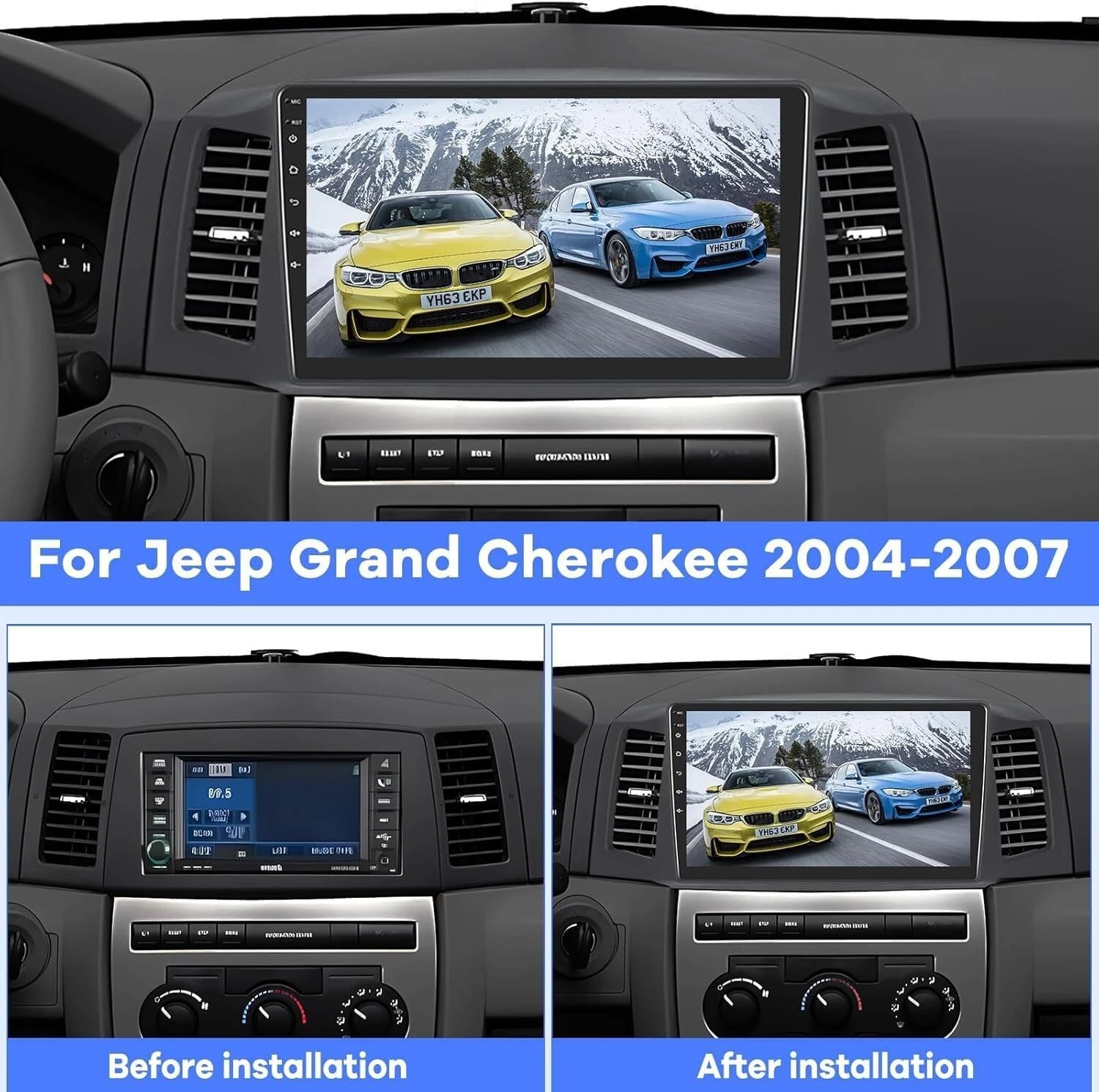
Image 5.1: Comparison of dashboard before and after installing the new car stereo.
5.3. Sambungan Pendawaian
- Connect the provided wiring harness to the new car stereo and then to the vehicle's factory harness.
- Connect the GPS module to the designated port on the stereo and position the antenna for optimal signal reception.
- If installing a backup camera, connect its video input (CVBS) to the stereo's reversing input.
- Connect any external USB devices or microphones as needed.
5.4. Memasang Stereo Baharu
Secure the new car stereo into the dashboard opening using the appropriate mounting brackets and screws. Reattach all trim panels.

Image 5.2: The car stereo unit seamlessly integrated into the vehicle's dashboard.
5.5. Initial Power-Up and Testing
Reconnect the vehicle's power. Turn on the stereo and perform initial tests:
- Check display functionality and touch response.
- Test audio output from all speakers.
- Verify radio reception.
- Test GPS signal acquisition.
- Test Bluetooth connectivity with a mobile device.
- If installed, test the backup camera functionality by engaging reverse gear.
6. Arahan Operasi
6.1. Navigasi Asas
- Skrin Sentuh: The 10-inch touch screen allows for intuitive control of all functions.
- Skrin Utama: Access various applications and settings from the customizable home screen.
- Kawalan Kelantangan: Adjust volume using the on-screen controls or steering wheel buttons (if configured).
6.2. CarPlay dan Android Auto
The unit supports both wireless and wired CarPlay and Android Auto. This allows integration with your iOS or Android smartphone for navigation, music, calls, and messaging.
- Sambungan Wayarles: Enable Bluetooth and Wi-Fi on your smartphone and connect to the car stereo. Follow the on-screen prompts to initiate CarPlay or Android Auto.
- Sambungan Berwayar: Connect your smartphone to the stereo using a USB cable. The system will automatically detect and launch CarPlay or Android Auto.

Image 6.1: Display showing Wireless Apple CarPlay, Android Auto, and Mirror Link options.
6.3. Navigasi GPS
The stereo comes with built-in offline maps. For online navigation, connect to Wi-Fi and download your preferred navigation applications.
- Peta Luar Talian: Use the pre-installed maps for navigation without an internet connection. Initial data download may require internet.
- Peta Dalam Talian: Connect to Wi-Fi and download apps like Waze, Google Maps, Sygic, or HereWeGo from the app store.

Image 6.2: The unit's built-in GPS and WiFi capabilities, demonstrating online map usage and music streaming.
6.4. Kesambungan Bluetooth
Gandingkan telefon pintar anda melalui Bluetooth untuk panggilan bebas tangan dan penstriman audio.
- Pergi ke tetapan Bluetooth pada stereo dan dayakan Bluetooth.
- Cari untuk the stereo on your smartphone and pair the devices.
- Sebaik sahaja disambungkan, anda boleh membuat/menerima panggilan dan memainkan muzik secara wayarles.
6.5. Kefungsian Skrin Pisah
Ciri skrin belah membolehkan anda menjalankan dua aplikasi secara serentak, seperti navigasi dan main balik muzik.
- To activate, open an application, then long-press the recent apps button or follow the specific gesture/button combination for split-screen mode on Android 14.
- Select a second application to display alongside the first.
6.6. Pautan Cermin
Mirror Link allows you to display your smartphone's screen directly onto the car stereo's display via Wi-Fi.
- Access the Mirror Link application on the stereo.
- Follow the instructions to connect your iOS or Android smartphone.
6.7. Kawalan Roda Stereng (SWC)
The unit supports steering wheel control, allowing you to manage audio and calls without taking your hands off the wheel.
- Access the Steering Wheel Control settings in the stereo's menu.
- Follow the on-screen instructions to program each button on your steering wheel to the desired function (e.g., volume up/down, track skip, answer call).
6.8. Backup Camera Support
Jika kamera sandaran yang serasi disambungkan, paparan akan bertukar kepada kamera secara automatik view apabila kenderaan dimasukkan ke dalam gear undur.

Image 6.3: Visual representation of backup camera, Bluetooth, GPS navigation, and steering wheel control functionalities.
6.9. Feature Demonstration Video
Video 6.1: A detailed demonstration of various features of the 4GB+64GB car stereo, including split-screen settings, speed unit switch, and memory clearing. This video is provided by the seller, Hodozzy Direct.
7. Penyelenggaraan
- Membersihkan Skrin: Gunakan kain lembut yang tidak berbulu untuk mengelap skrin sentuh dengan lembut. Elakkan pembersih atau pelarut yang melelas.
- Kemas Kini Perisian: Periodically check for software updates to ensure optimal performance and access to new features. Updates can typically be performed via Wi-Fi.
- Suhu: Operate the unit within the specified working temperature range (-20℃ to 75℃) to prevent damage.
8. Penyelesaian masalah
8.1. Tiada Kuasa
- Periksa semua sambungan kuasa dan fius.
- Pastikan penyalaan kenderaan dihidupkan.
8.2. Tiada Bunyi
- Sahkan kelantangan tidak diredamkan atau ditetapkan terlalu rendah.
- Semak sambungan pembesar suara.
- Pastikan sumber audio yang betul dipilih.
8.3. Isu Isyarat GPS
- Pastikan antena GPS disambungkan dengan betul dan mempunyai jernih view dari langit.
- Alihkan kenderaan ke kawasan terbuka yang jauh dari bangunan tinggi atau dedaun yang lebat.
8.4. Masalah Kesambungan Bluetooth
- Pastikan Bluetooth didayakan pada kedua-dua stereo dan telefon pintar anda.
- Padamkan gandingan sebelumnya dan cuba pasangkan semula peranti.
- Mulakan semula kedua-dua stereo dan telefon pintar anda.
8.5. Skrin Sentuh Tidak Responsif
- Perform a soft reset of the unit (refer to the device settings for reset options).
- Pastikan skrin bersih dan bebas daripada serpihan.
9. Maklumat Keselamatan
- Jangan kendalikan unit dengan cara yang mengalihkan perhatian anda daripada memandu. Sentiasa mengutamakan keselamatan jalan raya.
- Elakkan daripada mendedahkan unit kepada suhu yang melampau, cahaya matahari langsung untuk tempoh yang lama, atau kelembapan yang berlebihan.
- Jangan cuba membuka atau mengubah suai unit. Ini boleh membatalkan jaminan dan menyebabkan kerosakan.
- Ensure all wiring is properly insulated and secured to prevent short circuits or electrical hazards.