
pengenalan
The CYCLAMI M6 Out Front Bike Mount is designed to securely hold your bike computer, action camera, and bicycle light in an optimal viewing position. This mount offers universal compatibility with various devices, enhancing your cycling experience by keeping essential information and recording capabilities easily accessible. Its robust yet lightweight design ensures stability on diverse terrains.
Kandungan Pakej
- Gunung Basikal Depan
- Handlebar shims (for 25.4mm and 31.8mm handlebars)
- Penyesuai GoPro
- Light mount adapter
- Memasang perkakasan dan alatan
Persediaan
Follow these steps to install the CYCLAMI M6 Out Front Bike Mount and attach your devices.
1. Attaching the Mount to the Handlebar
- Identify your handlebar diameter (25.4mm or 31.8mm). Select the appropriate shim if your handlebar is 25.4mm. For 31.8mm handlebars, no shim is typically required.
- Open the split clamp of the mount. Position the mount on your handlebar, ensuring it is centered and oriented correctly for optimal viewing.
- Insert the shim (if applicable) between the mount and the handlebar. Secure the clamp using the provided screws and tools. Tighten firmly but do not overtighten to avoid damage.

Image: The CYCLAMI M6 Out Front Bike Mount securely attached to a bicycle handlebar, ready for device installation.
2. Attaching a Bike Computer
- Align your Garmin-compatible bike computer with the quarter-turn mount on the top of the CYCLAMI M6.
- Gently press down and twist the computer clockwise until it locks into place.

Image: A bike computer mounted on the CYCLAMI M6, providing an easy-to-view display directly in front of the handlebars.
3. Attaching a GoPro Camera or Light
- For a GoPro camera, attach the provided GoPro adapter to the lower accessory mount using the supplied screws. Then, secure your GoPro camera to the adapter.
- For a bike light, attach the provided light mount adapter to the lower accessory mount. Then, secure your bike light to the adapter.
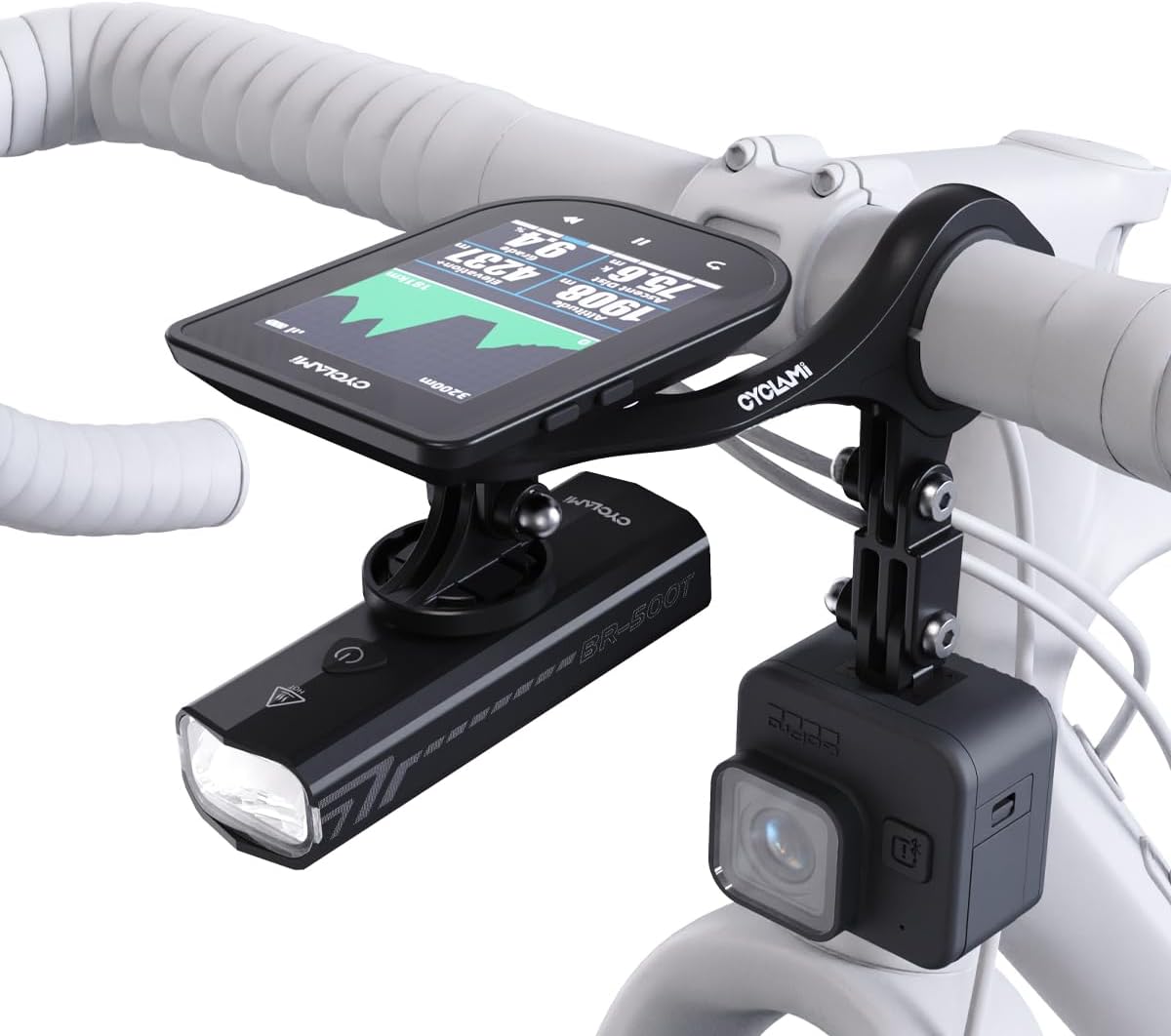
Image: The CYCLAMI M6 mount configured with a bike computer, a bike light, and a GoPro camera, demonstrating its multi-device capability.
Beroperasi
Once installed, the CYCLAMI M6 mount positions your devices for optimal use.
- Viewdalam Jawatan: The mount extends devices approximately 3.5 inches forward, reducing the need to look down significantly and minimizing neck strain.
- Device Access: All attached devices remain easily accessible for operation, such as starting/stopping recordings, adjusting light modes, or interacting with your bike computer.
- Siaran Pantas: To remove your bike computer, twist it counter-clockwise until it detaches from the mount.
Penyelenggaraan
Proper maintenance ensures the longevity and performance of your CYCLAMI M6 mount.
- Pembersihan: Lap pelekap dengan iklanamp cloth to remove dirt and grime. Avoid harsh chemicals that may damage the material.
- Pemeriksaan: Periksa semua skru dan sambungan secara berkala untuk memastikan ia kukuh. Ketatkan semula jika perlu.
- Rintangan kakisan: The mount is constructed from corrosion-resistant materials, suitable for all-weather use. However, regular cleaning after exposure to rain or mud is recommended.
Menyelesaikan masalah
If you encounter issues with your CYCLAMI M6 mount, refer to the following common solutions:
- Mount feels loose on handlebar: Ensure the correct shim is used for your handlebar diameter (25.4mm or 31.8mm) and that the clamp skru diketatkan dengan selamat.
- Device not fitting correctly: Verify that your device is compatible with Garmin-style quarter-turn mounts for bike computers, or standard GoPro/light mounts for accessories. Ensure adapters are correctly installed.
- Vibration during ride: Check all mounting points for tightness. Ensure the mount is firmly secured to the handlebar and that devices are properly locked into their respective adapters.
Spesifikasi
| Dimensi Produk | 0.79 x 3.15 x 6.69 inci |
| Berat Barang | 3.21 auns (72g) |
| Nombor Model | M6-US |
| warna | HITAM |
| Peranti Serasi | Garmin, iGPSPORT, XOSS, CooSpo, Magene, CYCPLUS computers, GoPro cameras, Bicycle Lights |
| Jenis Pemasangan | Handlebar (25.4mm / 31.8mm) |
| bahan | High-quality Vinyl-Composite |
Maklumat Waranti
For information regarding product warranty, please refer to the purchase documentation or contact the retailer where the product was acquired. Specific warranty terms may vary.
Sokongan
Should you require further assistance or have questions not covered in this manual, please contact CYCLAMI customer support through the official brand weblaman web atau saluran sokongan peruncit.